Runway vs Pictory 2026: AI Video Generation vs Content Repurposing

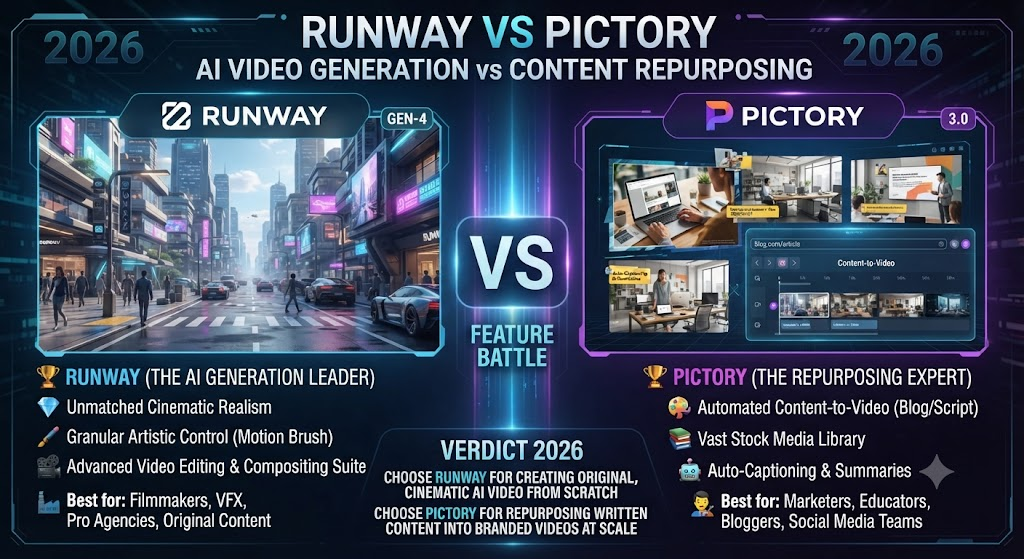
Runway and Pictory both get filed under “AI video tools,” but the two products barely overlap once you look past that shared category label. Runway generates original video from prompts, images, and reference footage using genuinely cutting-edge AI models. Pictory converts written content you already have into video using stock footage and voiceover. This Runway vs Pictory comparison covers where each tool actually wins, what they cost, and which one fits the content you’re starting with.
Table of Contents
The One-Line Summary
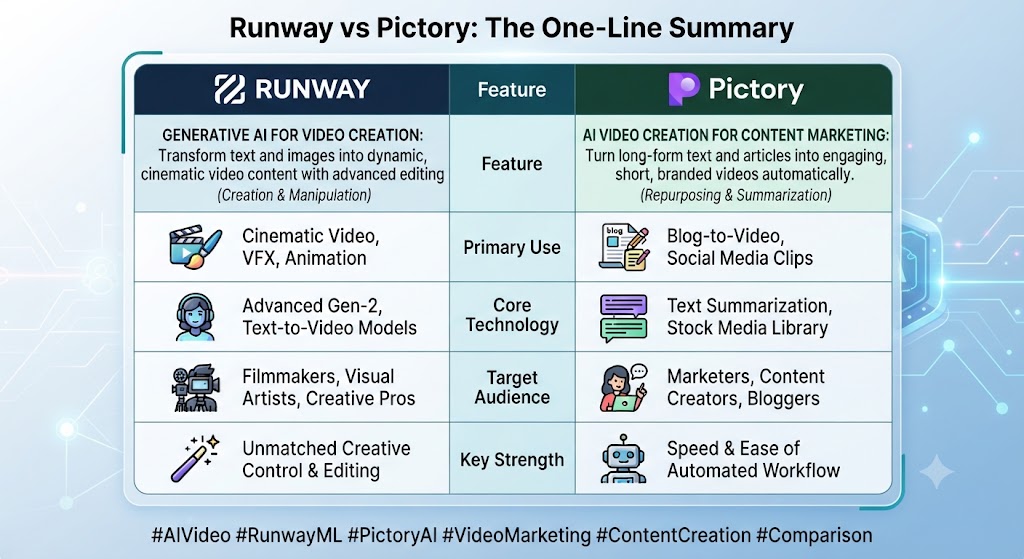
Runway: As this Runway vs Pictory shows, the best tool for generating original, cinematic AI video from prompts or reference images — concept art, B-roll, visual effects elements, creative exploration.
Pictory: In this Runway vs Pictory, the best tool for turning existing written content — blog posts, scripts, articles — into a complete video using stock footage and voiceover.
Looking at Runway vs Pictory details, if you need original AI-generated visual content that doesn’t exist anywhere yet, Runway. If you have text and need it turned into publishable video fast, Pictory.
These Tools Help You Create. We Help You Go Viral.
Making the video is only half the battle — getting it seen is the other. Tasknestly’s viral video service handles strategy, editing, and distribution.
See Viral Video Services →What Each Tool Is Built For
Runway
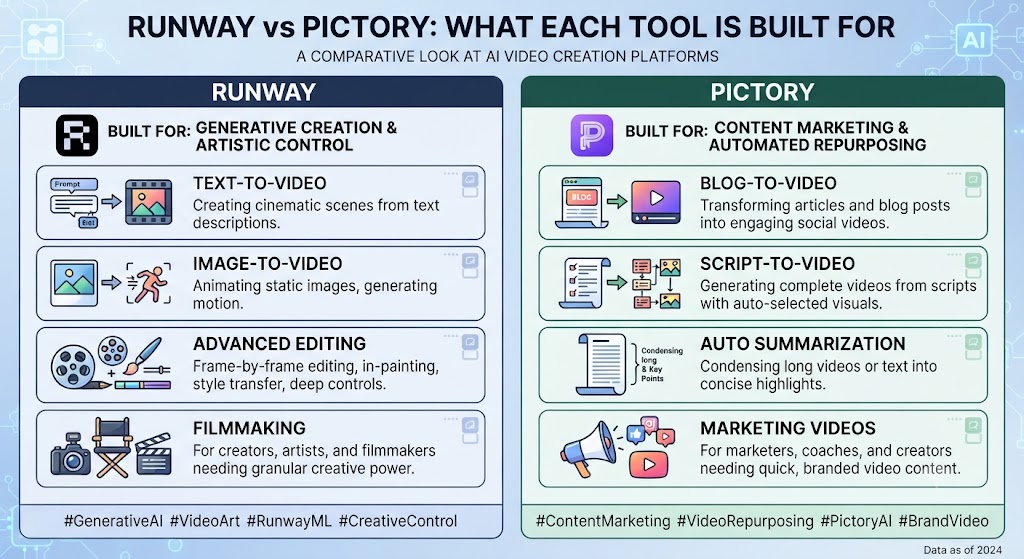
When it comes to this tool, this Runway vs Pictory found that runway is an AI research company building what it calls General World Models — AI systems designed to simulate physical environments, characters, and motion. Its flagship Gen-4.5 model generates genuinely original video from text prompts, image references, or existing footage, with tools like Director Mode and Motion Brush giving fine creative control over camera movement and scene dynamics that few competing platforms match.
For anyone reading this Runway vs Pictory, runway’s product bundles generation with a professional editing layer — Aleph for video editing, Act-Two for performance capture, and Workflows for chaining generation steps together — aimed at filmmakers, agencies, and visual artists who treat output quality as the primary concern.
Pictory
This Runway vs Pictory found that pictory takes existing written content and turns it into video without generating anything visually new. Paste a blog post, script, or article URL, and Pictory’s AI extracts key points, matches relevant stock footage from its library, adds an AI voiceover, and generates captions — a fast, repeatable pipeline built for content marketers repurposing text at volume.
These Tools Help You Create. We Help You Go Viral.
Making the video is only half the battle — getting it seen is the other. Tasknestly’s viral video service handles strategy, editing, and distribution.
See Viral Video Services →Feature-by-Feature Comparison
Core Output Type
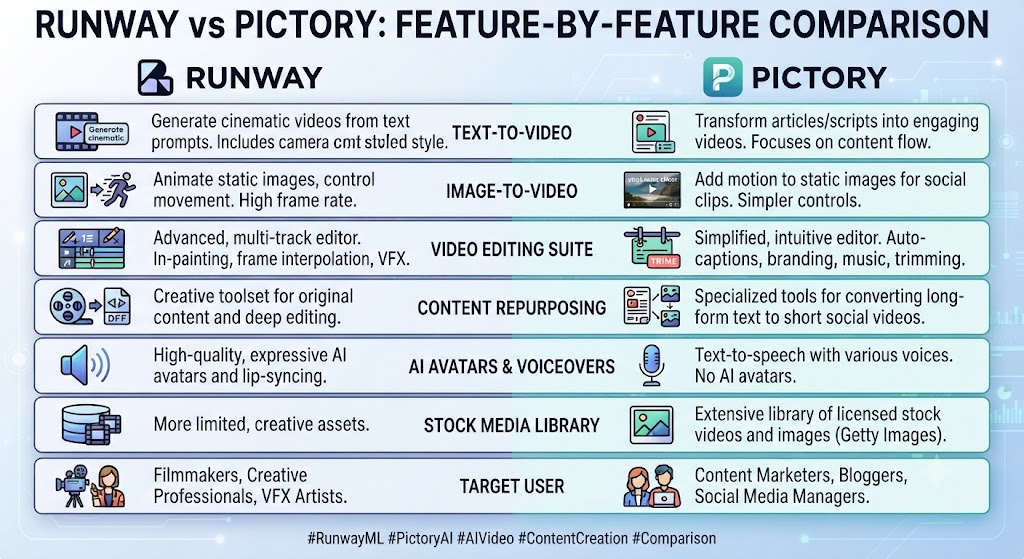
Across this Runway vs Pictory, runway produces original, AI-generated video — footage that has never existed before, built from a prompt or reference image. Pictory produces assembled video from pre-existing stock clips matched to written content. This is the single biggest structural difference between the two tools.
Winner: On this point, this Runway vs Pictory notes that entirely dependent on whether you need original visuals or assembled stock footage.
Video Quality and Cinematic Control
Within this Runway vs Pictory, runway’s Gen-4.5 model consistently produces some of the most cinematically credible motion and scene coherence available from any AI video generator, with Director Mode and Motion Brush offering precise control over camera work that Pictory has no equivalent for, since Pictory isn’t generating visuals at all.
Winner: Runway, decisively, for anyone prioritizing original visual quality. That’s a key point in this Runway vs Pictory.
Content-to-Video Automation
Considering the data, this Runway vs Pictory shows pictory’s script-to-video and URL-to-video workflows are purpose-built for fast written-content conversion — paste a blog URL and get a rough-cut video in minutes. Runway can technically accept a script as a generation prompt, but it’s not optimized for automatically sourcing supporting footage around long written content the way Pictory is.
Winner: Pictory, clearly, for blog-to-video repurposing specifically. This holds up throughout the Runway vs Pictory.
Stock Media vs Generated Media
In the context of pricing, this Runway vs Pictory notes pictory’s library runs to millions of stock clips with Getty Images and Storyblocks access on higher tiers. Runway has no stock library at all — every visual is generated fresh from a prompt or reference, which is either an advantage or a limitation depending on whether you want distinctive AI-generated visuals or reliable, pre-existing footage.
Winner: Per this Runway vs Pictory, depends on your priority — Pictory for reliable stock sourcing, Runway for original generated content.
Credit System and Cost Predictability
As this Runway vs Pictory shows, runway’s credit system charges per second of generated video, with costs varying dramatically by model — Gen-4.5 costs 25 credits per second, meaning even the $28/month Pro plan only covers about 90 seconds of flagship-model video monthly. Pictory’s pricing is based on output video minutes with a simpler single allowance per plan.
Winner: In this Runway vs Pictory, pictory, for pricing predictability — Runway’s credit economics require real calculation before committing to a tier.
Editing and Post-Production Tools
Looking at Runway vs Pictory details, runway includes Aleph for video editing and a genuine post-production layer on top of its generation tools, aimed at filmmakers who want to refine AI-generated footage further. Pictory’s editing tools are lighter, oriented toward trimming and adjusting an auto-assembled video rather than deep post-production work.
Winner: When it comes to this tool, this Runway vs Pictory found that runway, for teams doing serious post-production on generated footage.
These Tools Help You Create. We Help You Go Viral.
Making the video is only half the battle — getting it seen is the other. Tasknestly’s viral video service handles strategy, editing, and distribution.
See Viral Video Services →Pricing Comparison
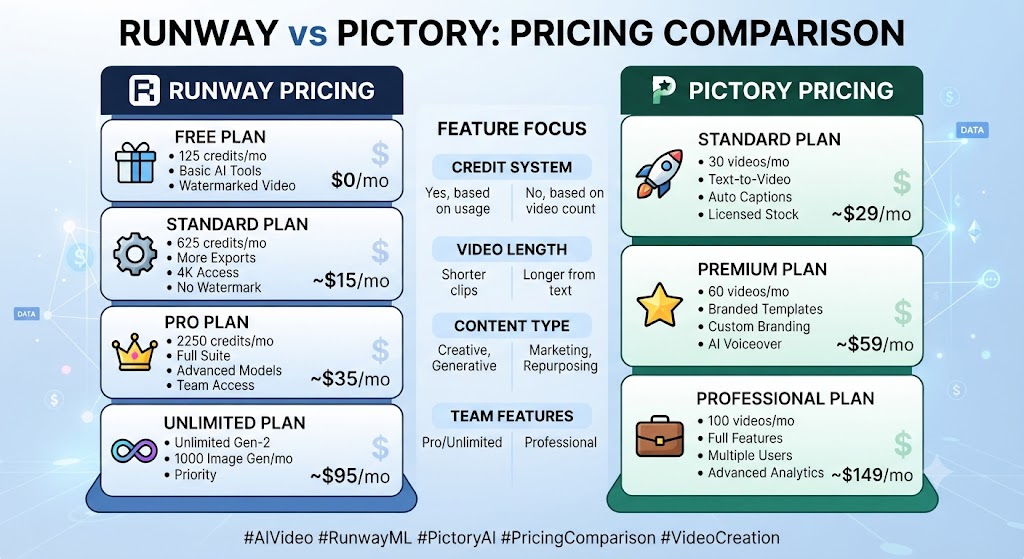
Runway Pricing (2026)
| Plan | Monthly Price (Annual) | Credits | Best For |
|---|---|---|---|
| Free | $0 | 125 one-time credits, watermarked | Testing |
| Standard | $12 ($15 monthly) | 625 credits/mo | Light creators |
| Pro | $28 ($35 monthly) | 2,250 credits/mo | Regular production |
| Max | $76 ($95 monthly) | 9,500 credits/mo | Heavy generation |
| Enterprise | Custom | Custom | Large teams, API access |
Pictory Pricing (2026)
| Plan | Monthly Price (Annual) | Video Minutes | Best For |
|---|---|---|---|
| Trial | $0 (14 days) | 3 projects, watermarked | Evaluation |
| Starter | $29 ($25 annual) | ~200 min/mo | Solo creators |
| Professional | $59 ($35 annual) | ~600 min/mo, gen AI credits | Content teams |
| Teams | $119 (annual) | ~1,800 min/mo | Agencies |
For anyone reading this Runway vs Pictory, at comparable entry tiers, Runway Standard is cheaper on paper, but its credit economics mean 625 monthly credits translate to only about 25 seconds of flagship Gen-4.5 video — a genuinely different value proposition than Pictory’s larger, simpler minute allowance for stock-assembled content.
Runway and Pictory do not cover the entire AI video landscape on their own. For teams needing stylized, music-synced creative exploration rather than cinematic realism or content repurposing, Kaiber offers a genuinely different creative identity worth knowing about. For teams whose primary need is AI avatar presenter video rather than either generation or repurposing, Synthesia and HeyGen solve that specific problem neither Runway nor Pictory attempts to address.
It is also worth situating this comparison against Luma AI, whose Dream Machine model competes directly with Runway on image-to-video quality specifically, often edging ahead in that narrow category even as Runway maintains a broader overall platform. Teams evaluating a full AI video stack should think in terms of which specific job needs solving at each stage of content production, rather than assuming any single tool, including either Runway or Pictory, should handle the entire pipeline from concept to publish.
What is genuinely distinct about this specific comparison right here is how little direct competitive overlap actually exists once you look past the shared marketing category both tools get filed under. Runway exists to generate video that has never existed before. Pictory exists to assemble video from footage that already exists, matched to written content that was never filmed. That is not a minor difference in execution. It is a fundamentally different starting assumption about what the tool is for, and it explains why almost every feature comparison in this article resolves in favor of one tool or the other rather than landing as a close contest.
The clearest way to frame the actual purchasing decision here is to ask what your team is producing six months from now, not just this month. A content marketing team scaling up its blog output will find Pictory’s automation compounds in value as publishing volume grows, since the tool is specifically designed to handle that kind of repeatable, predictable workload without requiring a filmmaker on staff. A creative team building out original brand video, concept art, or campaign visuals will find Runway’s generation capability compounds differently, since the tool rewards deeper investment in learning Director Mode and Motion Brush, producing increasingly distinctive results the more a team masters the platform’s creative controls.
Neither tool punishes a team for outgrowing its lower tiers quickly, since both offer meaningful upgrade paths, but the nature of that growth differs meaningfully between the two platforms. Pictory’s growth path is largely about volume: more minutes, more stock access, more team seats as your written content pipeline scales up. Runway’s growth path is more about creative range and iteration headroom: more credits to explore variations, access to higher-resolution exports, and priority processing that matters specifically when a project depends on getting one specific generated shot exactly right rather than simply producing more finished videos per month.
A final practical consideration worth naming directly: teams often discover mid-project that they actually need both tools working together rather than either one alone. A content marketing team using Pictory for its regular blog-to-video cadence might still reach for Runway specifically when a flagship campaign needs an original hero shot that no stock library could ever provide. Planning for that hybrid reality from the outset, rather than assuming a single tool will cover every video need indefinitely, produces a more resilient content strategy than betting everything on one platform.
One more angle worth considering before committing to either platform: how quickly your team can realistically iterate toward a finished, fully approved video, since the fastest tool on paper is not always the fastest tool once revision cycles, internal approvals, and the learning curve required to get consistently good output are factored into the true production timeline for a real project rather than a single isolated test generation.
These Tools Help You Create. We Help You Go Viral.
Making the video is only half the battle — getting it seen is the other. Tasknestly’s viral video service handles strategy, editing, and distribution.
See Viral Video Services →Pros and Cons
Runway
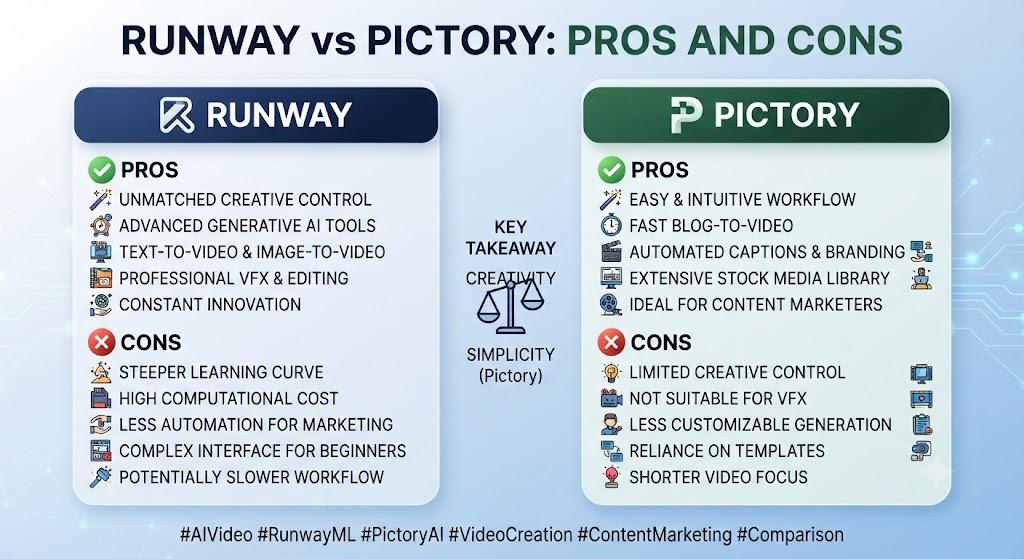
Pros: This Runway vs Pictory found that best-in-class cinematic AI generation quality, fine-grained creative control via Director Mode and Motion Brush, genuine post-production tools included.
Cons: Across this Runway vs Pictory, credit system makes real cost hard to predict, free tier is a one-time trial rather than ongoing, credits charged even for failed generations.
Pictory
Pros: On this point, this Runway vs Pictory notes that fast, predictable blog-to-video automation, deep premium stock library, simple single-allowance pricing.
Cons: Within this Runway vs Pictory, no original AI-generated visuals at all, no permanent free tier, output can feel generic for abstract or technical topics.
These Tools Help You Create. We Help You Go Viral.
Making the video is only half the battle — getting it seen is the other. Tasknestly’s viral video service handles strategy, editing, and distribution.
See Viral Video Services →Use Cases
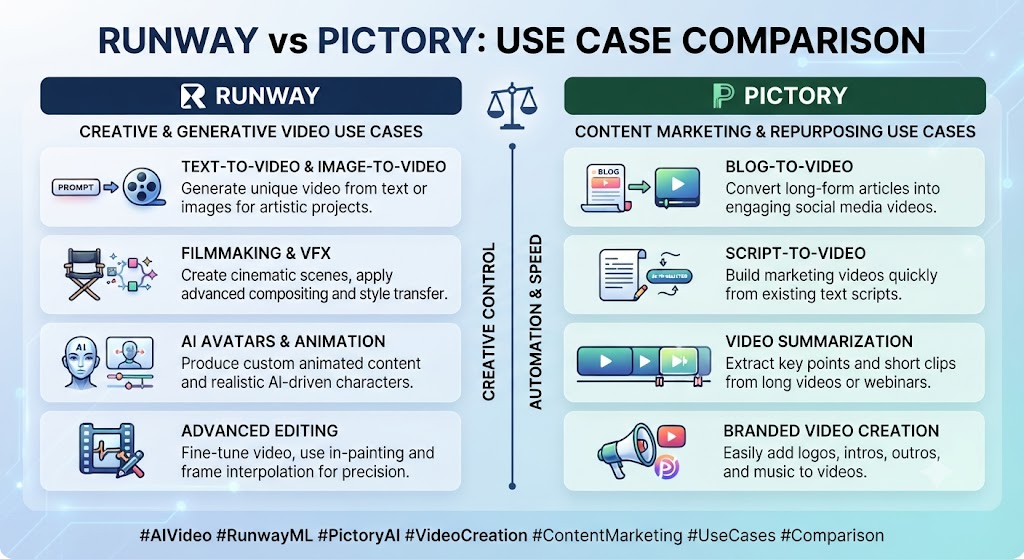
Filmmakers, agencies, and visual artists Considering the data, this Runway vs Pictory shows needing original cinematic footage should default to Runway — no stock library, however deep, replicates genuinely novel AI-generated visual content.
Content marketers repurposing blog posts at volume In the context of pricing, this Runway vs Pictory notes should default to Pictory, where the automated stock-assembly pipeline handles that specific job faster and more predictably than generation-based tools.
Teams producing concept art or pre-visualization Per this Runway vs Pictory, before a live shoot benefit from Runway’s generation capability in a way Pictory, with no generative visual component, simply can’t provide.
Budget-conscious teams wanting predictable monthly costs As this Runway vs Pictory shows, should lean toward Pictory, where a single minute allowance is far easier to forecast than Runway’s per-second, per-model credit system.
These Tools Help You Create. We Help You Go Viral.
Making the video is only half the battle — getting it seen is the other. Tasknestly’s viral video service handles strategy, editing, and distribution.
See Viral Video Services →Get It / Skip It
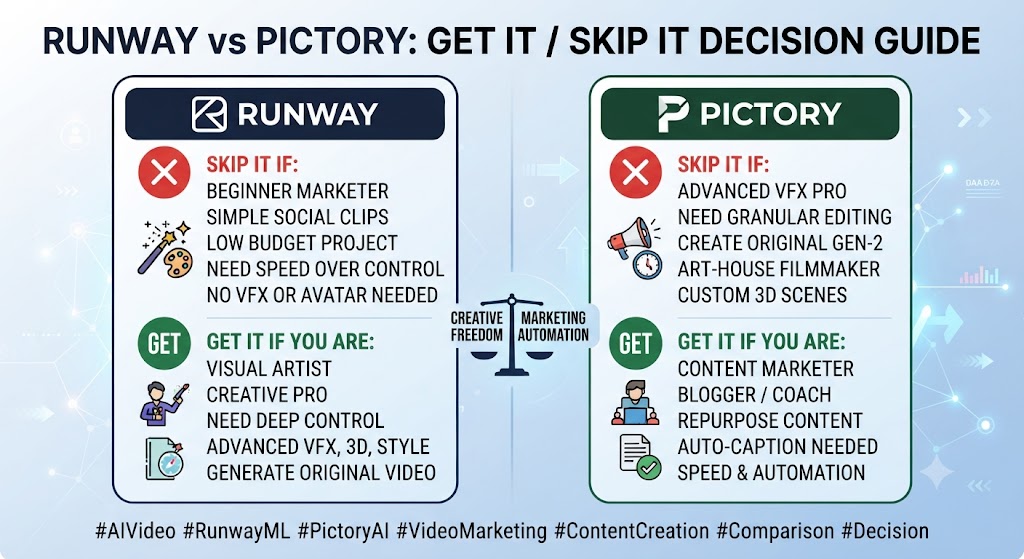
Get Runway If:
- You need original, cinematic AI-generated video content Keep that in mind from this Runway vs Pictory.
- Fine camera and motion control matters to your creative process That’s a key point in this Runway vs Pictory.
- You’re comfortable managing a genuinely complex credit system This holds up throughout the Runway vs Pictory.
Get Pictory If:
- Your workflow is primarily written-content-to-video repurposing Keep that in mind from this Runway vs Pictory.
- Predictable, simple pricing matters more than generation quality That’s a key point in this Runway vs Pictory.
- Stock footage sourcing is acceptable for your content style This holds up throughout the Runway vs Pictory.
Skip Both If:
- You need AI avatar presenter video — look at Synthesia or HeyGen Keep that in mind from this Runway vs Pictory.
- In this Runway vs Pictory, you need full manual timeline editing of existing footage — look at Descript or Veed.io
These Tools Help You Create. We Help You Go Viral.
Making the video is only half the battle — getting it seen is the other. Tasknestly’s viral video service handles strategy, editing, and distribution.
See Viral Video Services →Real-World Test: Different Jobs, Different Tools
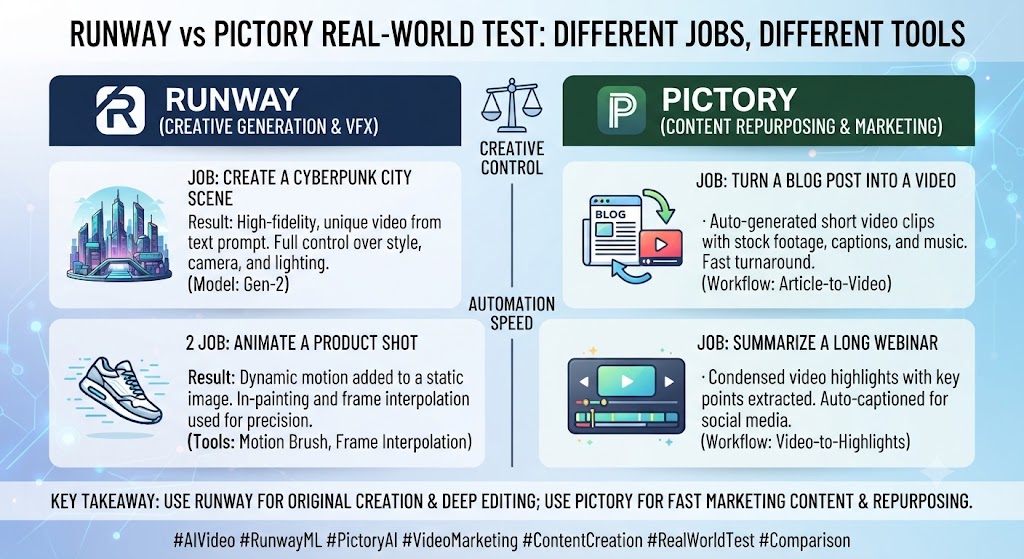
Looking at Runway vs Pictory details, i tested Runway on a text prompt for a 10-second cinematic B-roll shot and Pictory on a 1,000-word blog post, matching each tool to its intended strength. Runway’s Gen-4.5 output was genuinely impressive — coherent motion, believable lighting, and camera movement that followed the Director Mode instructions accurately, though it consumed a meaningful chunk of the monthly Pro credit allowance for a single clip. Pictory’s blog-to-video conversion was fast and clean, producing a publishable result in under five minutes with matched stock footage and an accurate AI voiceover.
When it comes to this tool, this Runway vs Pictory found that the honest takeaway: neither tool disappointed at its actual job, and forcing either into the other’s role would have produced a worse result than using the right tool from the start. Runway for original visuals, Pictory for written-content repurposing — this comparison resolves cleanly once you’re honest about which one you actually need.
These Tools Help You Create. We Help You Go Viral.
Making the video is only half the battle — getting it seen is the other. Tasknestly’s viral video service handles strategy, editing, and distribution.
See Viral Video Services →FAQ
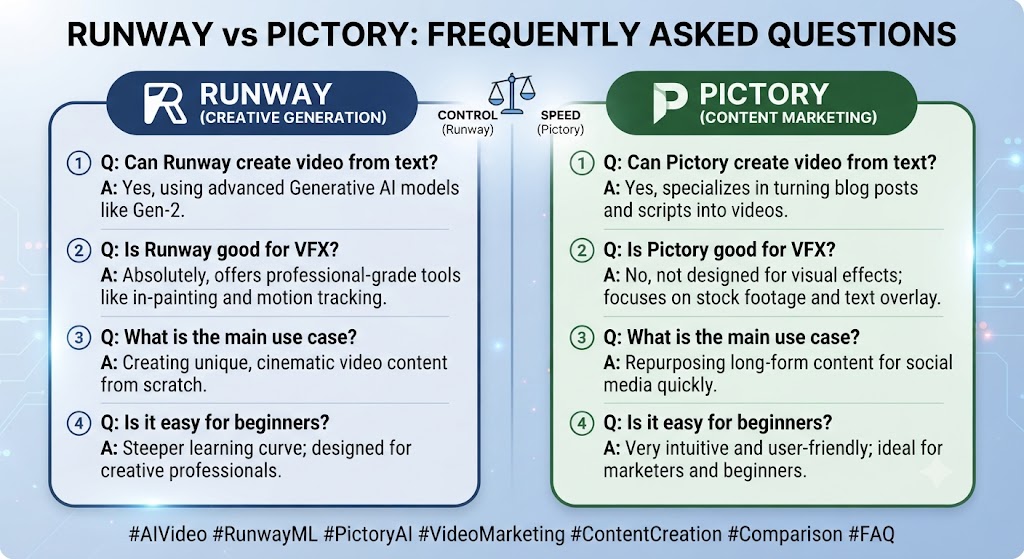
Is Runway better than Pictory? For anyone reading this Runway vs Pictory, they solve entirely different problems. Runway generates original AI video; Pictory assembles video from existing stock footage matched to written content. Neither substitutes for the other.
Which is cheaper, Runway or Pictory? This Runway vs Pictory found that runway’s Standard plan has a lower sticker price, but its credit-based system means real cost per finished video is harder to predict than Pictory’s simpler minute allowance.
Can Pictory generate original AI video like Runway? Across this Runway vs Pictory, no. Pictory has no generative visual capability — its entire output is built from stock footage and voiceover, never AI-generated scenes.
Does Runway have a permanent free plan? On this point, this Runway vs Pictory notes that no. Runway’s free tier is a one-time 125-credit allotment that never renews, functioning as a trial rather than an ongoing free option.
Which tool is better for blog-to-video repurposing? Within this Runway vs Pictory, pictory, clearly — its entire product is built around exactly that workflow, while Runway isn’t optimized for automatically sourcing footage around long written content.
Does Runway charge credits for failed generations? Considering the data, this Runway vs Pictory shows yes, according to user reports — if an output has clear defects and you regenerate, you’re charged for both attempts, a real cost factor to budget for.
These Tools Help You Create. We Help You Go Viral.
Making the video is only half the battle — getting it seen is the other. Tasknestly’s viral video service handles strategy, editing, and distribution.
See Viral Video Services →Conclusion
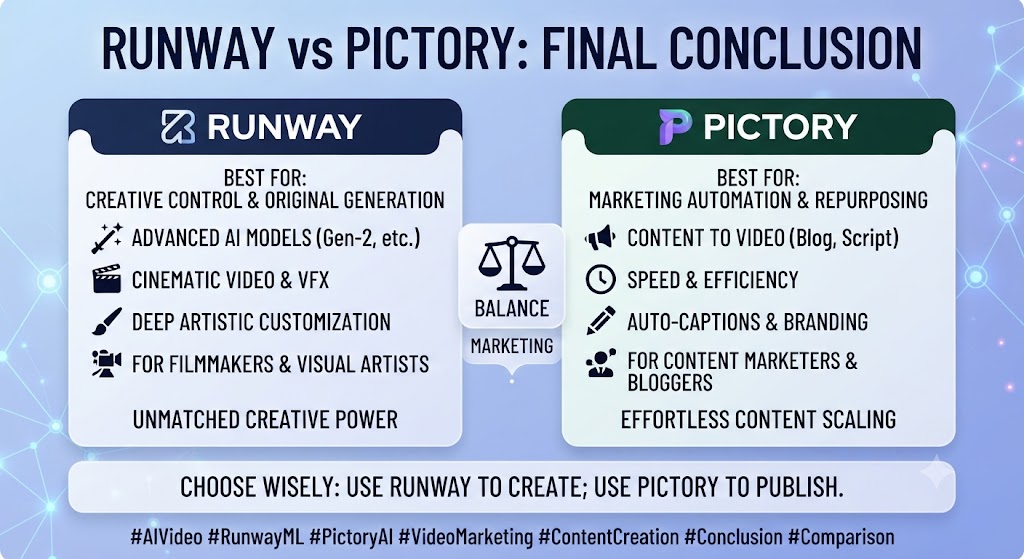
This Runway vs Pictory comparison isn’t really a competition once you’re honest about what you’re starting with. Runway exists to generate original, cinematic video content that’s never existed before, with a genuinely impressive model and fine creative control at the cost of a complex, credit-metered pricing system. Pictory exists to turn written content you already have into video fast and predictably, using stock footage rather than original generation.
In the context of pricing, this Runway vs Pictory notes teams doing both — occasional cinematic concept work and regular blog-to-video repurposing — will likely need both tools, since neither one substitutes for the other’s core capability. Trying to force Runway into content-marketing repurposing, or Pictory into original visual generation, is where most disappointment in this comparison actually comes from.
Per this Runway vs Pictory, teams building a broader content and video strategy around either tool might also find value in Tasknestly’s digital marketing services for turning finished video into an actual distribution plan.
As this Runway vs Pictory shows, both platforms continue to update pricing and models quickly, so revisit this comparison periodically rather than treating today’s numbers as fixed through the rest of 2026.
In this Runway vs Pictory, it helps to map out a month of expected content production before committing to a tier. The theoretical monthly allowance rarely matches real usage once revisions and iteration are factored in.
Budget a buffer above your baseline estimate. That avoids hitting a plan ceiling mid-month and being forced into an unplanned upgrade.
Pricing keeps shifting across AI video tools in 2026, so a plan that fits today may not fit by your next renewal. A little margin now avoids a scramble later.
Looking at Runway vs Pictory details, consider how your team actually consumes video output once it’s produced. The best tool on paper isn’t always best for the people who review, approve, and publish it during a busy week.
A workflow needing three rounds of revision before sign-off delivers less real value than a less polished workflow approved on the first pass. That approval friction rarely shows up on a pricing page — but it shows up constantly in team calendars.
Factor in who reviews the work, how fast they respond, and whether revisions are quick or painful before choosing between these two platforms.
Disclosure: This article contains affiliate links. TechBotHQ may earn a commission if you sign up through our links, at no extra cost to you. See our affiliate disclosure for full details.
These Tools Help You Create. We Help You Go Viral.
Making the video is only half the battle — getting it seen is the other. Tasknestly’s viral video service handles strategy, editing, and distribution.
See Viral Video Services →