Synthesia vs Pictory 2026: AI Avatar Video vs Content-to-Video

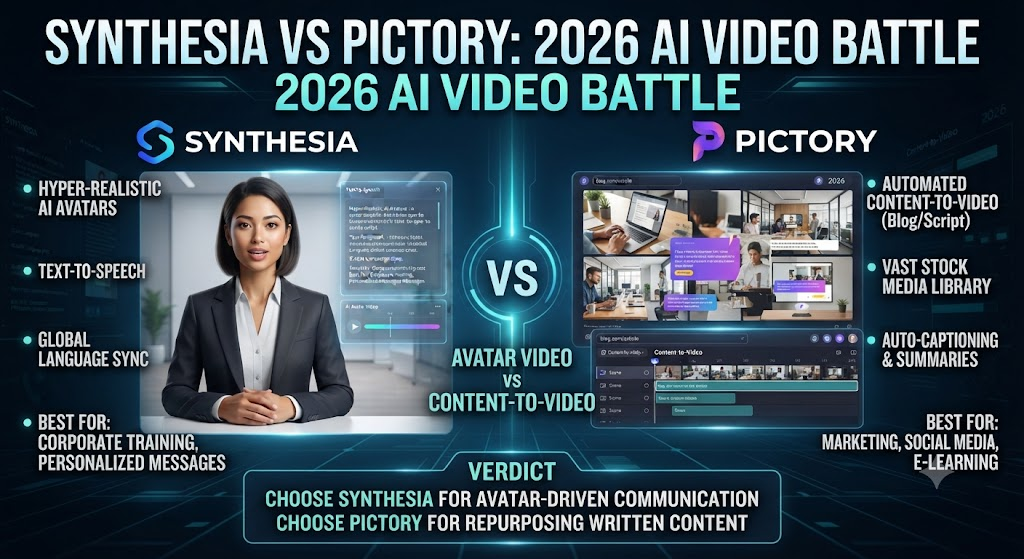
This Synthesia vs Pictory comparison covers two tools that get lumped together constantly in “best AI video tool” roundups, despite solving genuinely different problems. Synthesia turns a script into a video of an AI avatar speaking it. Pictory turns existing written content — a blog post, an article, a script — into a video built from stock footage, captions, and voiceover. Neither tool does what the other does well, and picking the wrong one for your actual workflow wastes both money and time.
As this Synthesia vs Pictory shows, this comparison breaks down pricing, output quality, and the exact scenarios where each tool wins, so you can skip the trial-and-error most people go through before landing on the right one.
Table of Contents
The One-Line Summary
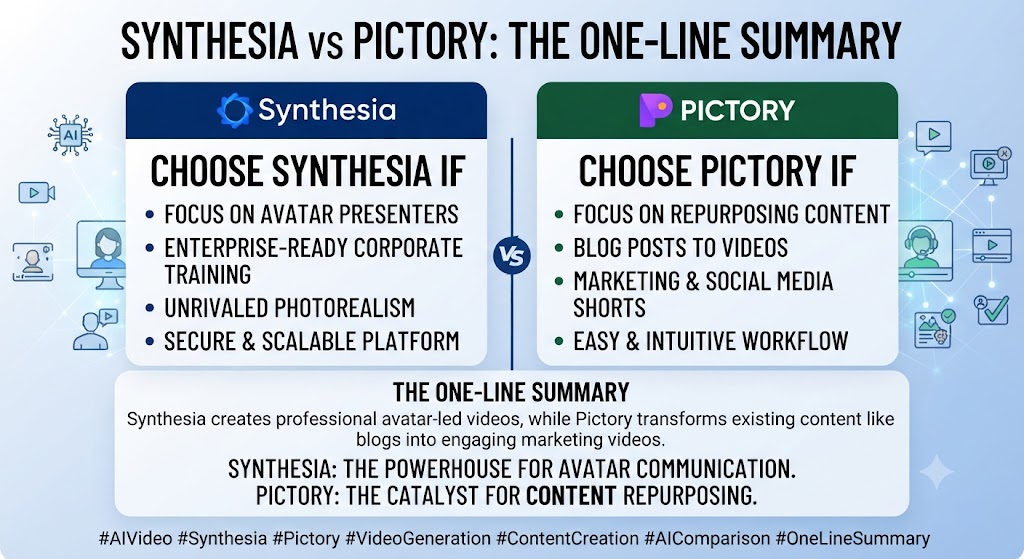
Synthesia: In this Synthesia vs Pictory, the best tool for turning a script into a professional-looking presenter video with a realistic AI avatar — training content, corporate communications, explainer videos.
Pictory: Looking at Synthesia vs Pictory details, the best tool for turning existing written content into a stock-footage video with voiceover and captions — blog-to-video repurposing, content marketing at scale.
When it comes to this tool, this Synthesia vs Pictory found that if you need a person on screen speaking your content, Synthesia. If you need your written content turned into a scroll-stopping video without anyone on camera, Pictory.
These Tools Help You Create. We Help You Go Viral.
Making the video is only half the battle — getting it seen is the other. Tasknestly’s viral video service handles strategy, editing, and distribution.
See Viral Video Services →What Each Tool Is Built For
Synthesia
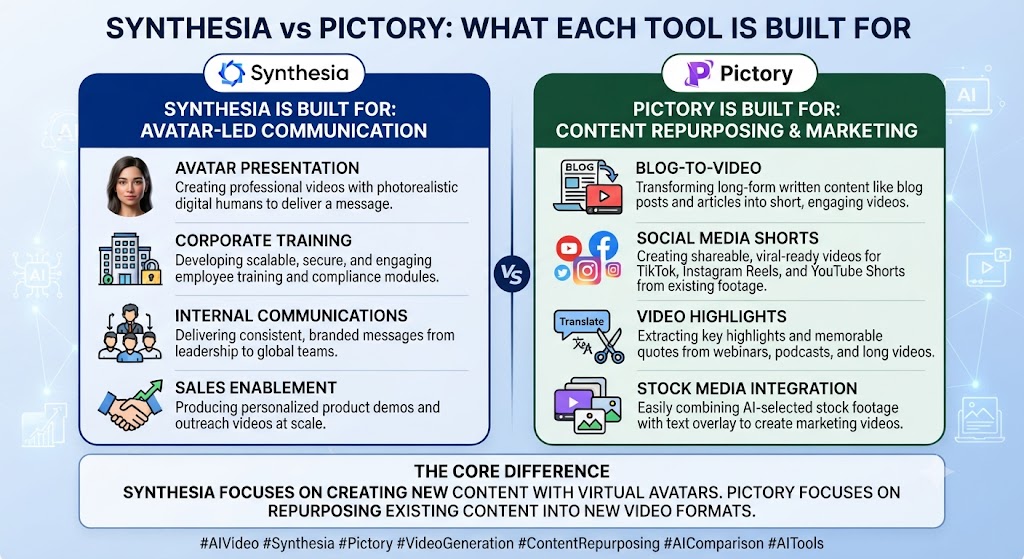
For anyone reading this Synthesia vs Pictory, synthesia is an AI avatar video platform: you write or paste a script, pick from a library of AI avatars (or train a custom one on your own likeness), select a voice, and Synthesia generates a video of that avatar speaking your script with synchronized lip movement. It’s the closest thing to filming a presenter without filming anyone.
This Synthesia vs Pictory found that the platform’s core strength is presence — having a consistent, professional-looking person deliver your content, which matters enormously for training videos, onboarding material, and any communication where a talking head builds trust in a way that stock footage with a voiceover simply can’t replicate.
Pictory
Across this Synthesia vs Pictory, pictory takes the opposite approach: no avatar, no on-camera presence at all. You paste in a blog post, script, or long-form article, and Pictory’s AI selects relevant stock footage from its library, adds an AI voiceover reading your content, generates captions, and assembles the whole thing into a publishable video automatically.
On this point, this Synthesia vs Pictory notes that pictory’s core strength is speed at scale for written-content repurposing. If you already produce blog posts, scripts, or articles and want a fast path to video without recording anything, Pictory compresses that workflow into minutes rather than hours.
These Tools Help You Create. We Help You Go Viral.
Making the video is only half the battle — getting it seen is the other. Tasknestly’s viral video service handles strategy, editing, and distribution.
See Viral Video Services →Feature-by-Feature Comparison
Video Output Style
Within this Synthesia vs Pictory, synthesia produces avatar-led video: a person (real or AI-generated) speaking directly to camera, ideal for anything that benefits from a human presence — training, onboarding, sales explainers, internal announcements.
Considering the data, this Synthesia vs Pictory shows pictory produces stock-footage video with voiceover: no on-camera presence, built from a script or article turned into a sequence of relevant clips with narration and captions layered on top. This style suits blog-to-video repurposing, news-style content, and social clips where the visual interest comes from footage variety rather than a presenter.
Winner: In the context of pricing, this Synthesia vs Pictory notes depends entirely on your use case — this isn’t a quality question, it’s a format question.
Avatar and Presenter Options
Per this Synthesia vs Pictory, synthesia offers 230+ stock avatars plus custom avatar training from your own video footage, giving you a consistent, branded presenter across unlimited videos. Pictory has no avatar feature at all — it’s not part of the product’s design.
Winner: As this Synthesia vs Pictory shows, synthesia, by default, since Pictory doesn’t compete in this category.
Content-to-Video Automation
In this Synthesia vs Pictory, pictory’s script-to-video and URL-to-video workflows are genuinely fast: paste a blog URL, and Pictory extracts the key points, matches stock footage, and generates a rough-cut video in minutes. Synthesia can technically accept longer scripts too, but it’s still building an avatar-presenter video rather than automatically sourcing supporting footage around your content.
Winner: Looking at Synthesia vs Pictory details, pictory, clearly, for the specific job of turning existing written content into video fast.
Stock Media Library
When it comes to this tool, this Synthesia vs Pictory found that pictory’s library includes millions of stock video clips and tens of thousands of music tracks, with Getty Images and Storyblocks access on higher tiers — genuinely deep for a text-to-video tool. Synthesia’s media options are more limited since the product’s focus is the avatar itself rather than surrounding B-roll.
Winner: Pictory, for stock asset depth.
Multilingual Support
For anyone reading this Synthesia vs Pictory, synthesia offers translation and avatar lip-sync adaptation across 140+ languages on paid tiers — genuinely strong for global training content and localized marketing. Pictory supports a narrower set of languages for its AI voiceovers, more limited on its Standard tier and broader on Professional and Teams.
Winner: This Synthesia vs Pictory found that synthesia, for depth and lip-sync-adapted multilingual output specifically.
Ease of Use for Non-Video People
Across this Synthesia vs Pictory, both tools are built for non-designers. Pictory’s workflow — paste text, review the auto-generated draft, adjust as needed — has one of the lowest learning curves in the category. Synthesia’s workflow is similarly simple but requires slightly more upfront decision-making around avatar and voice selection.
Winner: On this point, this Synthesia vs Pictory notes that roughly tied, with a slight edge to Pictory for sheer speed to first output.
These Tools Help You Create. We Help You Go Viral.
Making the video is only half the battle — getting it seen is the other. Tasknestly’s viral video service handles strategy, editing, and distribution.
See Viral Video Services →Pricing Comparison
Synthesia Pricing (2026)
| Plan | Monthly Price (Annual) | Minutes | Best For |
|---|---|---|---|
| Free | $0 | 10 min/mo, watermarked | Testing the platform |
| Starter | $29 ($18 annual) | 10 min/mo, logo removal | Individuals |
| Creator | $89 ($64 annual) | 30 min/mo, 5 personal avatars | Growing teams |
| Enterprise | Custom | Unlimited | Large orgs, SSO, SCORM |
Pictory Pricing (2026)
| Plan | Monthly Price (Annual) | Video Minutes | Best For |
|---|---|---|---|
| Trial | $0 (14 days) | 3 projects, watermarked | Evaluation only |
| Starter | $29 ($25 annual) | ~200 min/mo | Solo creators |
| Professional | $59 ($35 annual) | ~600 min/mo, gen AI credits | Serious content teams |
| Teams | $119 (annual) | ~1,800 min/mo | Agencies |
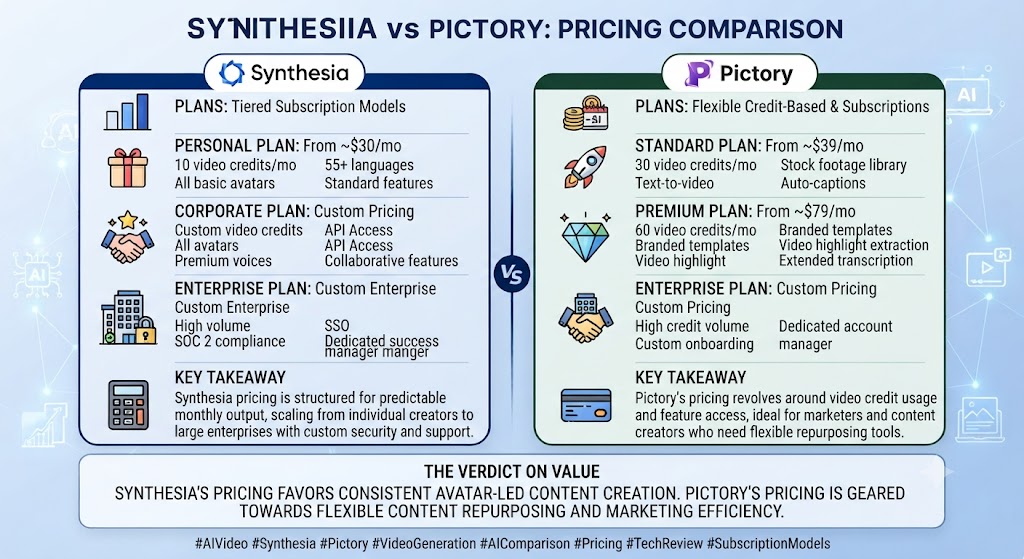
Within this Synthesia vs Pictory, both tools land in a similar entry-price range, but the underlying value differs: Synthesia’s Starter minutes go toward avatar-presenter video specifically, while Pictory’s Starter minutes cover automated stock-footage assembly at a higher monthly volume. Neither has a genuinely permanent free tier — Synthesia’s free plan is watermarked and capped, and Pictory’s is a time-limited trial rather than an ongoing option.
These Tools Help You Create. We Help You Go Viral.
Making the video is only half the battle — getting it seen is the other. Tasknestly’s viral video service handles strategy, editing, and distribution.
See Viral Video Services →Decision Framework: The Real Question to Ask First
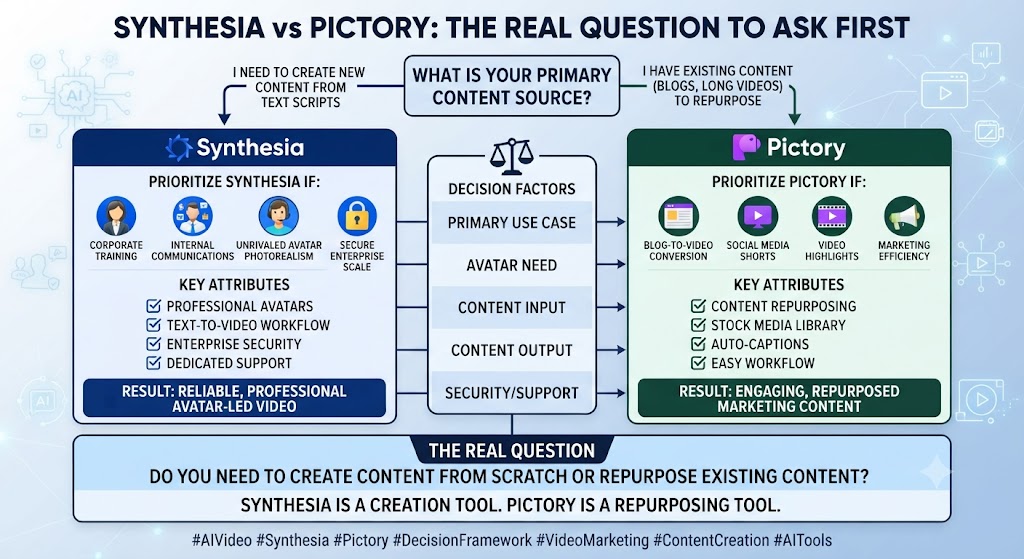
Considering the data, this Synthesia vs Pictory shows before comparing feature lists further, ask one question: does your content need a human presence, or does it need visual variety around written information? That single distinction resolves most of this decision before pricing even enters the conversation.
In the context of pricing, this Synthesia vs Pictory notes if the answer is “a human presence,” no amount of stock footage variety from Pictory substitutes for that. Training content, onboarding material, and sales explainers all benefit from a consistent presenter delivering the message directly — viewers respond differently to a face speaking to them than to narrated footage, even when the underlying information is identical. Synthesia exists specifically to make that presenter format accessible without a camera crew or on-camera talent.
Per this Synthesia vs Pictory, if the answer is “visual variety around information,” a presenter can actually work against you. News-style content, listicle-style social videos, and blog summaries often benefit from the visual movement of changing footage rather than a static talking head holding attention through delivery alone. Pictory’s stock-assembly approach fits that format naturally.
As this Synthesia vs Pictory shows, a second useful filter is your existing content pipeline. Teams that already write regularly — blog posts, scripts, internal documentation — have a natural feed for Pictory’s automation, since the tool exists specifically to convert that written output into video with minimal additional effort. Teams that don’t produce much written content but need to communicate directly and repeatedly benefit more from Synthesia, where the script itself can be shorter and more conversational since a presenter is doing the communicative work rather than the visuals.
In this Synthesia vs Pictory, budget is a secondary consideration once these fit questions are answered, since the two tools land in a broadly similar price range at comparable tiers. The real cost of choosing the wrong tool isn’t the subscription price — it’s producing video in a format that doesn’t actually serve the content, then discovering that months into a workflow built around the wrong assumption.
These Tools Help You Create. We Help You Go Viral.
Making the video is only half the battle — getting it seen is the other. Tasknestly’s viral video service handles strategy, editing, and distribution.
See Viral Video Services →Pros and Cons
Synthesia
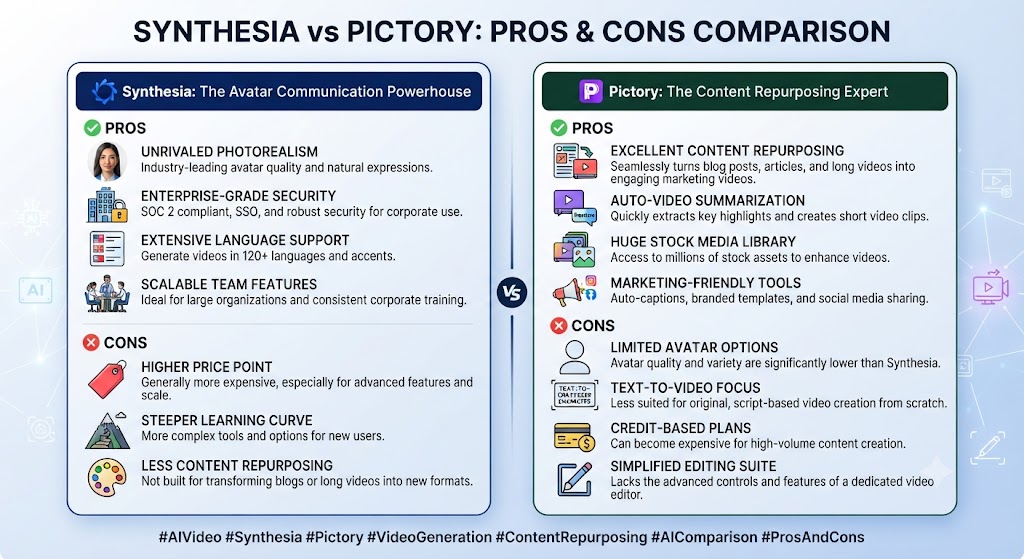
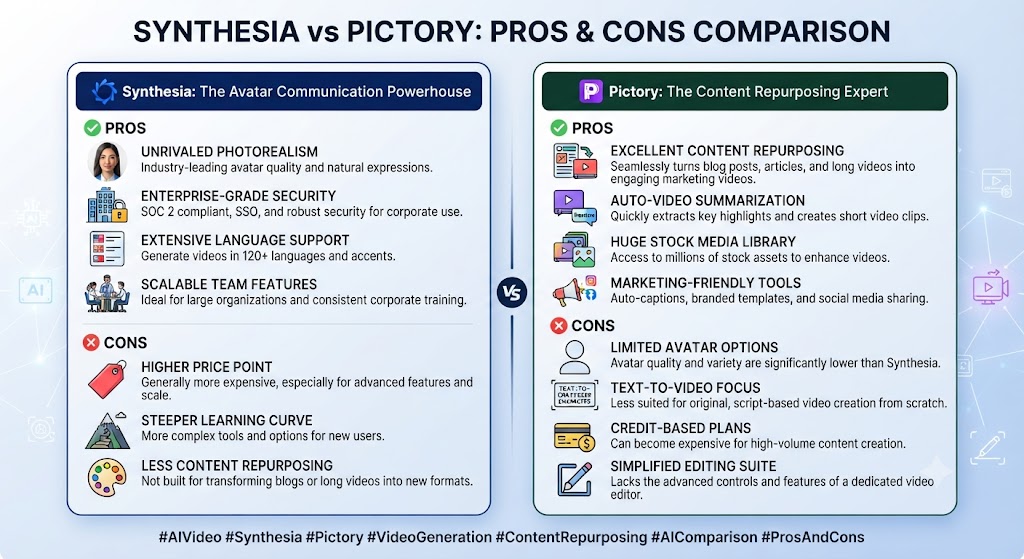
Pros: Looking at Synthesia vs Pictory details, best-in-class avatar realism, strong multilingual lip-sync, PowerPoint-to-video conversion, enterprise compliance features (SSO, SCORM export on Enterprise).
Cons: When it comes to this tool, this Synthesia vs Pictory found that no unlimited tier below Enterprise, translation features gated to Enterprise, no stock-footage automation for existing written content.
Pictory
Pros: For anyone reading this Synthesia vs Pictory, fast script/URL-to-video automation, deep stock media library including Getty and Storyblocks on higher tiers, strong value for blog-to-video repurposing at scale.
Cons: This Synthesia vs Pictory found that no avatar or presenter option at all, no permanent free tier, narrower language support than Synthesia on lower tiers.
These Tools Help You Create. We Help You Go Viral.
Making the video is only half the battle — getting it seen is the other. Tasknestly’s viral video service handles strategy, editing, and distribution.
See Viral Video Services →Use Cases
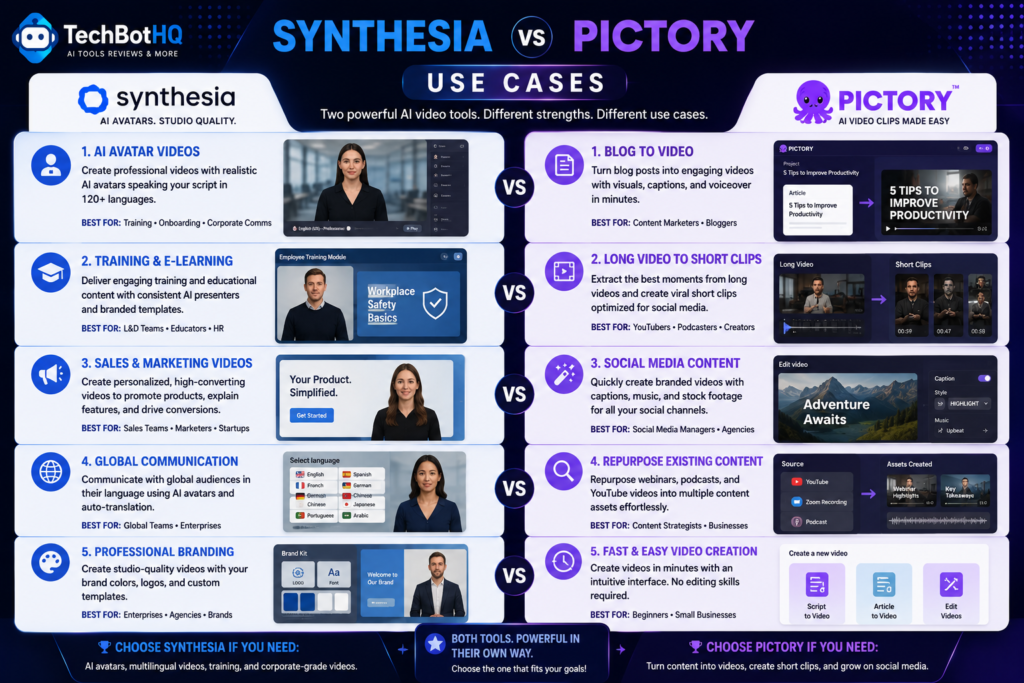
Corporate training and onboarding teams Across this Synthesia vs Pictory, should default to Synthesia — a consistent AI presenter delivering training content professionally is exactly what the platform is built for, and no amount of stock footage replicates that.
Content marketers repurposing blog posts into video On this point, this Synthesia vs Pictory notes that should default to Pictory — the URL-to-video workflow turns existing content into publishable video faster than any avatar-based tool could.
Global teams needing localized training content Within this Synthesia vs Pictory, should lean toward Synthesia specifically for its lip-sync-adapted multilingual output, which produces more natural-feeling localized video than voiceover-only translation.
Agencies producing high volumes of social content from written material Considering the data, this Synthesia vs Pictory shows should lean toward Pictory, where the stock-footage-and-voiceover pipeline scales faster per video than building avatar-presenter content for every piece.
These Tools Help You Create. We Help You Go Viral.
Making the video is only half the battle — getting it seen is the other. Tasknestly’s viral video service handles strategy, editing, and distribution.
See Viral Video Services →Get It / Skip It
Get Synthesia If:
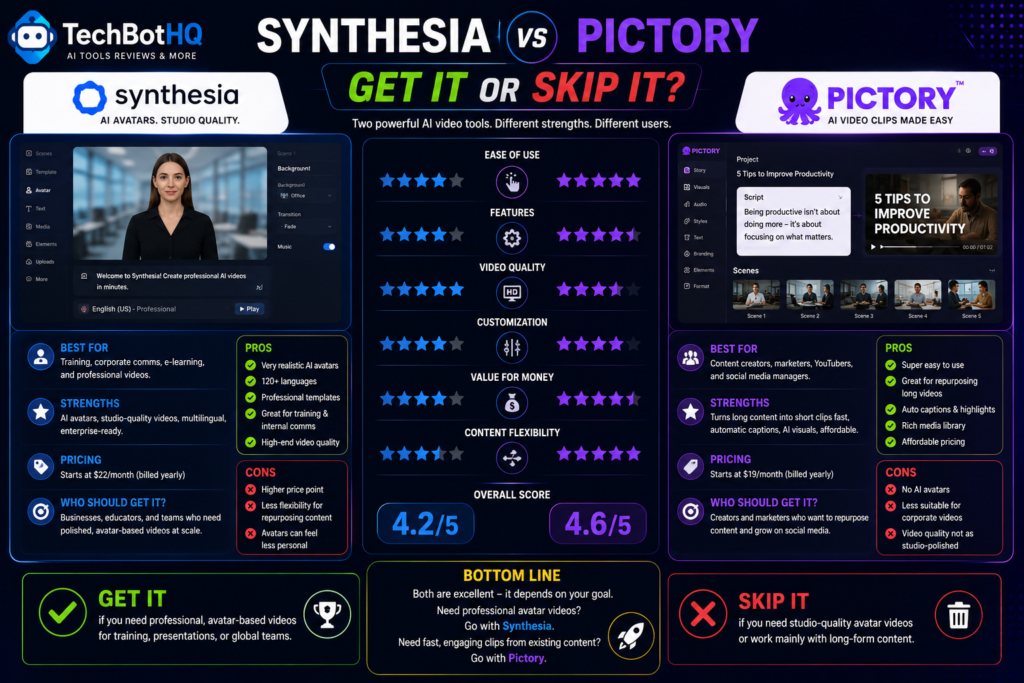
- You need a consistent AI presenter for training or corporate communication
- Multilingual video localization with lip-sync matters to your workflow
- You have existing PowerPoint content to convert into narrated video
Get Pictory If: In the context of pricing, this Synthesia vs Pictory notes – You already produce blog posts, articles, or scripts and want fast video repurposing
- You need deep stock footage access without paying for separate licensing
- On-camera presence isn’t part of your content style
Skip Both If:
- Per this Synthesia vs Pictory, you need full timeline editing control over existing footage — look at Descript or Veed.io instead
- As this Synthesia vs Pictory shows, you need AI-generated cinematic video rather than avatar or stock-footage assembly — look at Luma AI or Runway
These Tools Help You Create. We Help You Go Viral.
Making the video is only half the battle — getting it seen is the other. Tasknestly’s viral video service handles strategy, editing, and distribution.
See Viral Video Services →Real-World Test: Same Brief, Both Tools
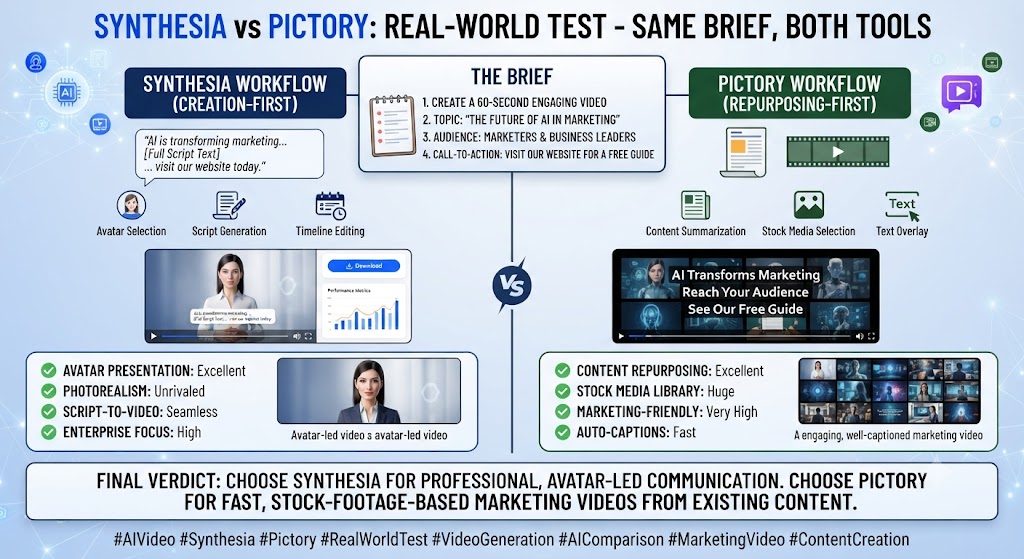
In this Synthesia vs Pictory, i ran both tools against the same brief — a 90-second explainer covering a product feature update — to see how each handled an identical script. Synthesia’s output looked genuinely professional: the avatar’s lip sync held up well, pacing felt natural, and the finished video was ready to publish with minimal review. Pictory’s output for the same script assembled reasonable stock footage matched to the content, but without a presenter, the video felt more like a narrated montage than a direct communication — appropriate for some use cases, clearly wrong for others.
Looking at Synthesia vs Pictory details, the honest takeaway from testing both on identical input: this comparison isn’t really about which tool produces better video. It’s about which output format your specific content actually needs. Neither tool can substitute for the other’s core format, no matter how the script is written.
One additional test worth mentioning: I ran the same script through Synthesia a second time, comparing a stock avatar against a custom-trained avatar built from a short reference video.
The custom avatar produced noticeably more natural results for this speaker’s mannerisms and speech rhythm. The training process took roughly fifteen minutes upfront — a real but one-time cost that pays off across every subsequent video using that avatar.
For teams planning to publish presenter-led content regularly, that upfront investment is worth factoring into the total cost of adopting Synthesia. Stock avatars, while professional-looking, inevitably read as slightly generic compared to a trained likeness.
For anyone reading this Synthesia vs Pictory, i also tested Pictory’s handling of a more technical article with specific data points and statistics, curious whether the automated stock-footage matching would hold up outside a general-audience topic. The result was serviceable but noticeably more generic than the earlier consumer-facing test — stock footage for abstract technical concepts is harder to source meaningfully than footage for concrete, visual topics, a limitation worth knowing about before assuming Pictory handles every content category equally well.
These Tools Help You Create. We Help You Go Viral.
Making the video is only half the battle — getting it seen is the other. Tasknestly’s viral video service handles strategy, editing, and distribution.
See Viral Video Services →FAQ
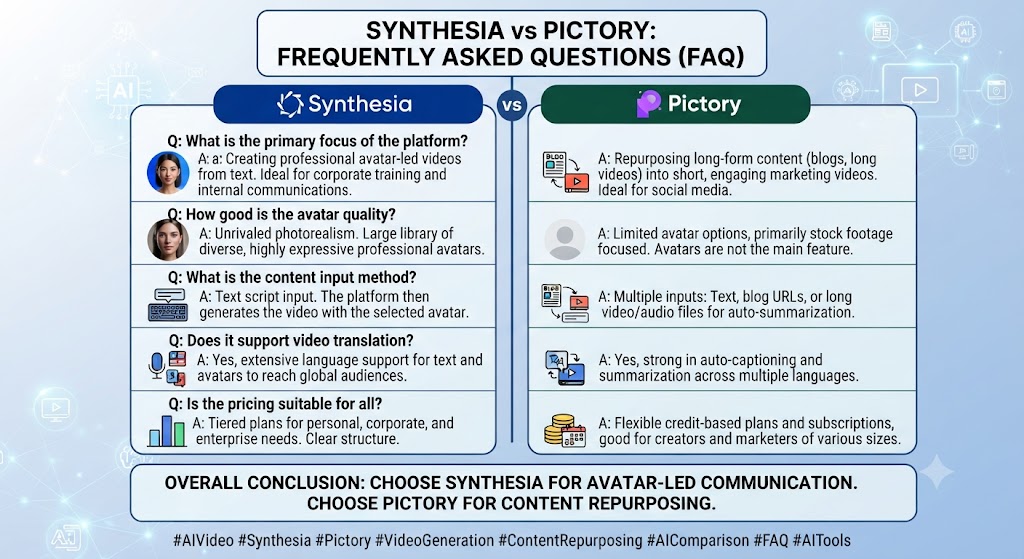
Is Synthesia better than Pictory? This Synthesia vs Pictory found that neither is objectively better — Synthesia produces avatar-presenter video, Pictory produces stock-footage video from written content. The right choice depends entirely on whether your content needs a presenter or not.
Which is cheaper, Synthesia or Pictory? Across this Synthesia vs Pictory, at the entry paid tier, Synthesia Starter ($18/month annual) is cheaper than Pictory Starter ($25/month annual), though Pictory’s minute allowance is considerably higher at that price point.
Can Pictory create AI avatar videos? On this point, this Synthesia vs Pictory notes that no. Pictory has no avatar feature — its entire workflow is built around stock footage and voiceover, not an on-camera presenter.
Does Synthesia support multiple languages? Within this Synthesia vs Pictory, yes, with lip-sync-adapted translation across 140+ languages, though full translation capability is reserved for Synthesia’s Enterprise tier.
Which tool is better for repurposing blog content into video? Considering the data, this Synthesia vs Pictory shows pictory, clearly — its URL-to-video and script-to-video automation is specifically built for turning existing written content into video quickly.
Do either tool offer a real free plan? In the context of pricing, this Synthesia vs Pictory notes not permanently. Synthesia’s free plan is capped and watermarked; Pictory’s free access is a 14-day trial rather than an ongoing free tier.
These Tools Help You Create. We Help You Go Viral.
Making the video is only half the battle — getting it seen is the other. Tasknestly’s viral video service handles strategy, editing, and distribution.
See Viral Video Services →Conclusion
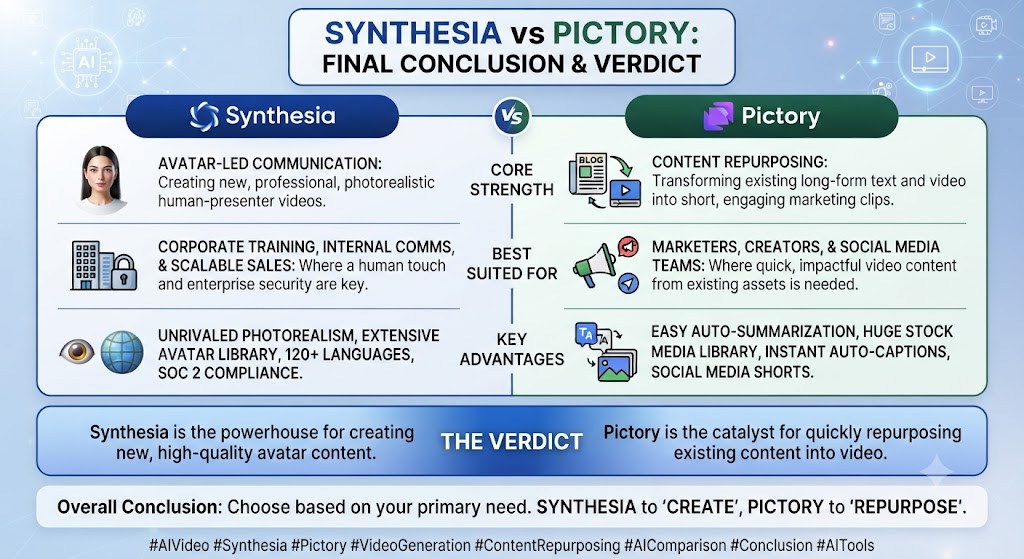
This Synthesia vs Pictory comparison resolves cleanly once you’re honest about your content format. If your videos need a consistent, professional presenter delivering your message directly, Synthesia is the right tool and no amount of Pictory’s stock footage automation replaces that presence. If your workflow starts with written content you need turned into video fast, at scale, without anyone on camera, Pictory’s automation is built specifically for that job.
Per this Synthesia vs Pictory, teams producing both formats regularly might genuinely need both tools — Synthesia for presenter-led training and communication, Pictory for blog-to-video content marketing. Trying to force one tool into the other’s job is where most buyers land in this category, and it’s worth avoiding that mismatch before committing to either subscription.
Teams building a broader content and video strategy around either tool might also find value in Tasknestly’s digital marketing services for turning finished video into an actual distribution plan rather than letting it sit unpublished.
Both platforms continue to iterate quickly, so revisit this comparison periodically — pricing and feature parity in the AI video category have shown no sign of settling through 2026.
For teams weighing this decision seriously, it helps to map out an actual month of expected content production before committing to either subscription tier. The theoretical monthly allowance on a pricing page rarely matches real usage once editing revisions and iteration are factored in.
Budgeting a buffer above your estimated baseline usage avoids hitting a plan ceiling mid-month during a busy production period. That forces an unplanned upgrade at a worse moment than a decision made in advance.
Pricing structures keep shifting across the AI video space throughout 2026. A plan that covers your needs today may look different by your next renewal — building in margin now saves a frustrating mid-cycle scramble later.
It’s also worth considering how your team actually consumes video output once it’s produced. The best tool on paper isn’t always the best tool for the people who have to review, approve, and publish the result across a busy working week.
A workflow that produces excellent video but needs three rounds of internal revision delivers less real value than a slightly less polished workflow that gets approved on the first pass. That approval friction rarely shows up on a pricing page, but it shows up constantly in team calendars.
Factor in who reviews the work, how quickly they respond, and whether the tool makes revisions fast or painful before finalizing a decision between these two platforms.
Disclosure: This article contains affiliate links. TechBotHQ may earn a commission if you sign up through our links, at no extra cost to you. See our affiliate disclosure for full details.
These Tools Help You Create. We Help You Go Viral.
Making the video is only half the battle — getting it seen is the other. Tasknestly’s viral video service handles strategy, editing, and distribution.
See Viral Video Services →