Opus Clip vs Pictory 2026: Which AI Video Tool Is Better for Repurposing Content?

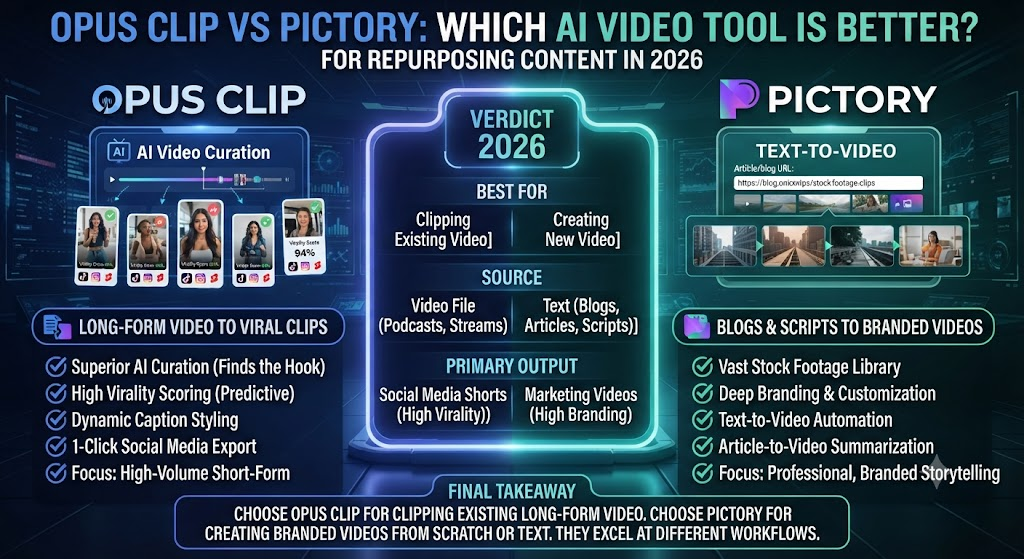
Both Opus Clip and Pictory get filed under “AI video repurposing tools,” and both promise to turn one piece of content into publishable video fast. But they start from opposite directions: Opus Clip takes long-form video and extracts short clips from it. Pictory takes written content — blog posts, scripts, articles — and builds video from scratch using stock footage. This Opus Clip vs Pictory comparison covers where each tool wins, what they cost, and which one actually fits your existing content pipeline.
Table of Contents
The One-Line Summary
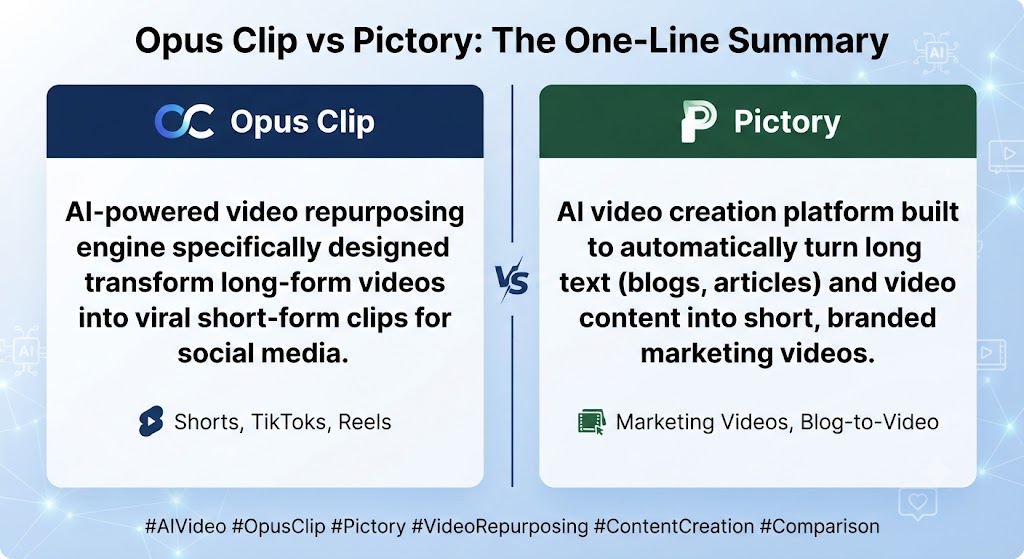
Opus Clip: As this Opus Clip vs Pictory shows, the best tool for turning a long video — a podcast, webinar, or livestream — into short, clip-worthy segments for TikTok, Reels, and Shorts.
Pictory: In this Opus Clip vs Pictory, the best tool for turning written content you haven’t filmed at all into a complete video using stock footage, voiceover, and captions.
Looking at Opus Clip vs Pictory details, if you already have long-form video and need short clips out of it, Opus Clip. If you have text and need video built from nothing, Pictory.
These Tools Help You Create. We Help You Go Viral.
Making the video is only half the battle — getting it seen is the other. Tasknestly’s viral video service handles strategy, editing, and distribution.
See Viral Video Services →What Each Tool Is Built For
Opus Clip
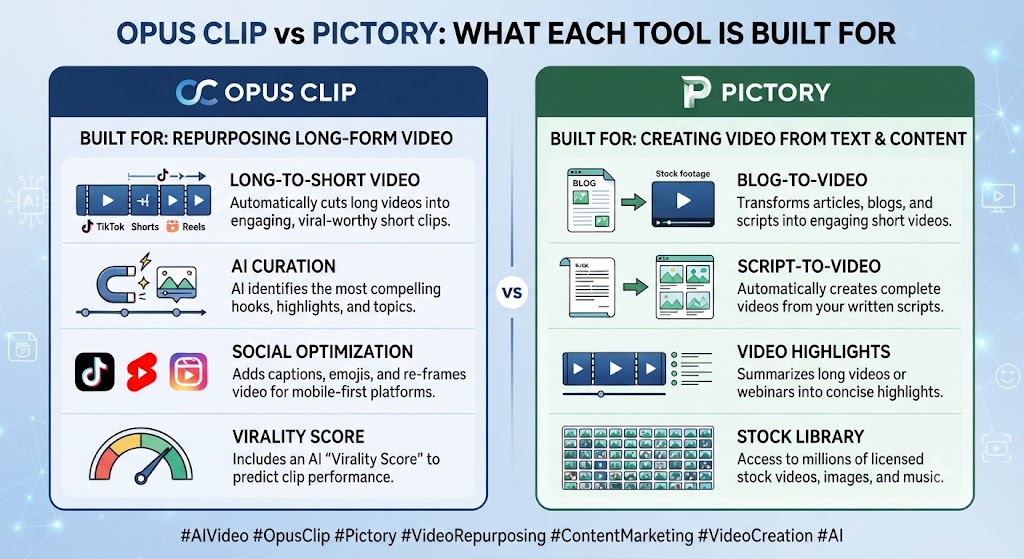
When it comes to this tool, this Opus Clip vs Pictory found that opus Clip’s entire workflow starts with an existing long video. Upload a podcast episode, webinar recording, or livestream, and its ClipAnything AI analyzes audio, visual content, and sentiment to identify the most engaging moments, extracts them as standalone vertical clips, reframes the footage, adds captions, and scores each clip with a Virality Score to help you prioritize what to publish first.
For anyone reading this Opus Clip vs Pictory, the product assumes you’ve already recorded something worth clipping. It doesn’t generate new visual content — it finds and repackages the best moments from footage that already exists.
Pictory
This Opus Clip vs Pictory found that pictory starts from the opposite point: no existing video required at all. Paste a blog post, script, or article URL, and Pictory’s AI selects matching stock footage from its library, generates an AI voiceover reading your content, adds captions, and assembles a complete video automatically.
Across this Opus Clip vs Pictory, where Opus Clip repurposes footage you’ve already created, Pictory creates entirely new video from content that was never filmed in the first place.
These Tools Help You Create. We Help You Go Viral.
Making the video is only half the battle — getting it seen is the other. Tasknestly’s viral video service handles strategy, editing, and distribution.
See Viral Video Services →Feature-by-Feature Comparison
Source Material Requirement
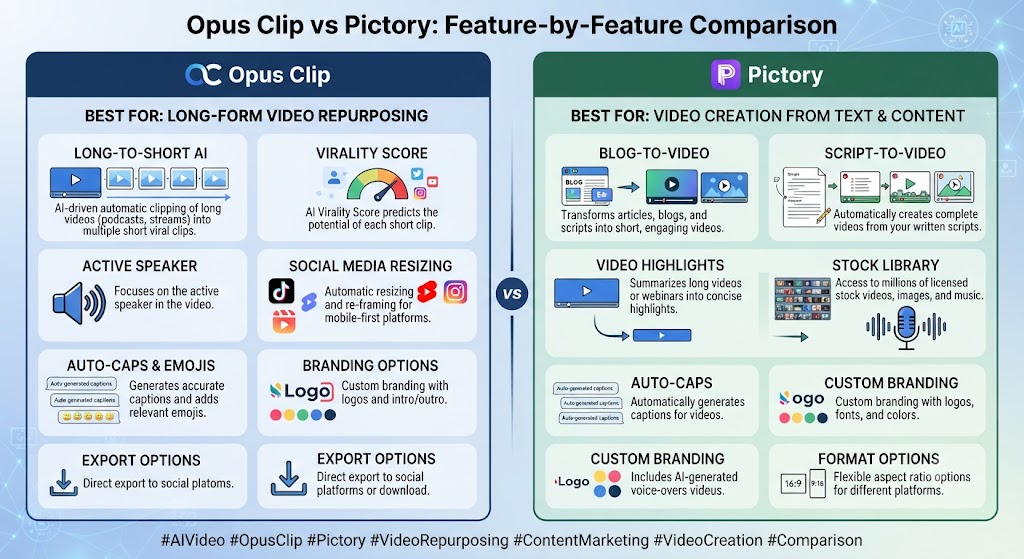
On this point, this Opus Clip vs Pictory notes that opus Clip requires a long-form video as its starting input — no video, no output. Pictory requires only text — a script, article, or URL — and builds the visual layer from stock footage automatically.
Winner: Within this Opus Clip vs Pictory, depends entirely on what you already have. Podcasters and webinar hosts need Opus Clip; bloggers and content marketers without video assets need Pictory.
Clip Selection Intelligence
Considering the data, this Opus Clip vs Pictory shows opus Clip’s ClipAnything model is purpose-built to identify the strongest hooks, emotional peaks, and topic shifts within long-form video — a genuinely sophisticated analysis layer that Pictory has no equivalent for, since Pictory isn’t selecting moments from footage, it’s assembling stock clips to match a script’s meaning.
Winner: In the context of pricing, this Opus Clip vs Pictory notes opus Clip, decisively, for anything involving extracting the best parts of existing long-form content.
Stock Media Depth
Per this Opus Clip vs Pictory, pictory’s stock library runs to millions of clips with Getty Images and Storyblocks access on higher tiers — genuinely deep, since sourcing appropriate visuals for arbitrary text content is the core of what Pictory does. Opus Clip has no comparable stock library need, since it works exclusively with your own uploaded footage.
Winner: Pictory, for stock asset depth specific to its use case.
Captions and Reframing
As this Opus Clip vs Pictory shows, both tools handle automatic captioning and vertical reframing well. Opus Clip’s reframing tracks a speaker across frame movement within existing footage; Pictory’s captions sync to its generated voiceover rather than tracking a live speaker, since there’s no camera footage to follow.
Winner: In this Opus Clip vs Pictory, roughly tied — each does captioning and framing well for its respective format.
Multi-Platform Publishing
Looking at Opus Clip vs Pictory details, opus Clip includes a built-in social scheduler on its Pro plan, connecting directly to TikTok, Instagram, YouTube, LinkedIn, Twitter/X, and Facebook for one-click publishing after clip approval. Pictory doesn’t include native scheduling — exported videos need a separate publishing tool.
Winner: When it comes to this tool, this Opus Clip vs Pictory found that opus Clip, for teams that want clipping and publishing in one platform.
Pricing Structure
For anyone reading this Opus Clip vs Pictory, opus Clip charges credits based on source video length — a 60-minute upload costs 60 credits regardless of how many clips you extract from it. Pictory charges based on monthly output video minutes rather than source length, since there’s no long-form source video to measure against.
Winner: This Opus Clip vs Pictory found that depends on your content volume — Opus Clip’s model rewards extracting many clips from one long video; Pictory’s model rewards steady output of shorter, individually-produced videos.
These Tools Help You Create. We Help You Go Viral.
Making the video is only half the battle — getting it seen is the other. Tasknestly’s viral video service handles strategy, editing, and distribution.
See Viral Video Services →Pricing Comparison
Opus Clip Pricing (2026)
| Plan | Monthly Price (Annual) | Credits | Best For |
|---|---|---|---|
| Free | $0 | 60 credits/mo, watermarked | Testing |
| Starter | $15 (~$9 annual) | More credits, no watermark | Light users |
| Pro | $29 (~$14.50 annual) | 300 credits/mo, AI B-Roll, scheduler | Regular creators |
| Business | Custom | Custom + API | Agencies |
Pictory Pricing (2026)
| Plan | Monthly Price (Annual) | Video Minutes | Best For |
|---|---|---|---|
| Trial | $0 (14 days) | 3 projects, watermarked | Evaluation |
| Starter | $29 ($25 annual) | ~200 min/mo | Solo creators |
| Professional | $59 ($35 annual) | ~600 min/mo, gen AI credits | Content teams |
| Teams | $119 (annual) | ~1,800 min/mo | Agencies |
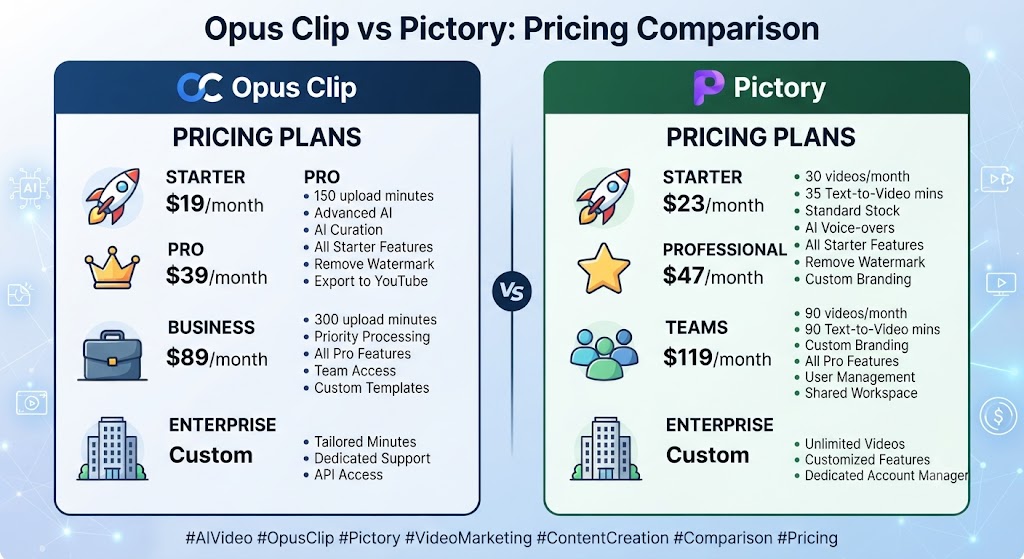
Across this Opus Clip vs Pictory, at the entry paid tier, Opus Clip’s Pro annual plan (~$14.50/month) undercuts Pictory Professional annual ($35/month) considerably, though the two aren’t directly comparable since they’re metering fundamentally different things — source video length versus output video minutes.
These Tools Help You Create. We Help You Go Viral.
Making the video is only half the battle — getting it seen is the other. Tasknestly’s viral video service handles strategy, editing, and distribution.
See Viral Video Services →How This Fits the Broader AI Video Landscape
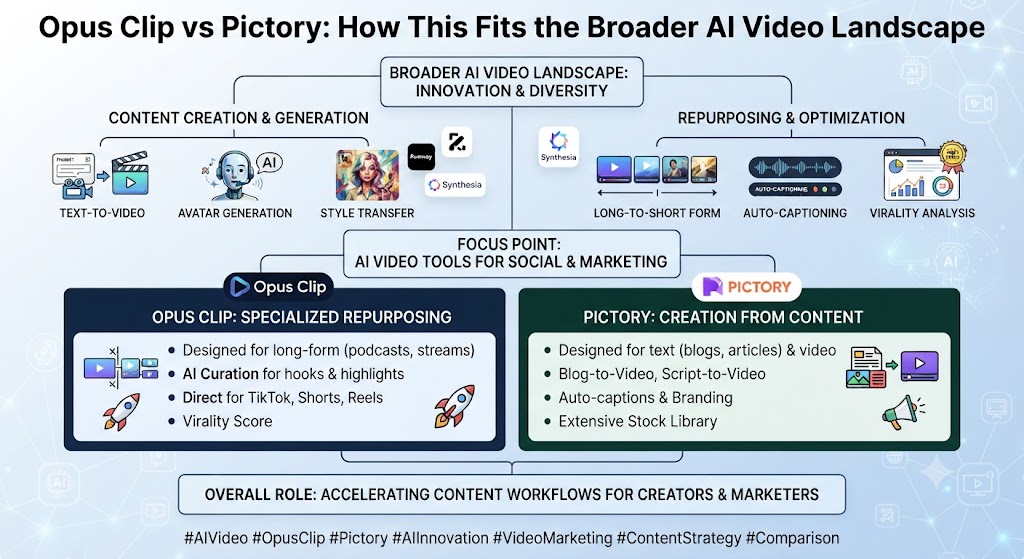
On this point, this Opus Clip vs Pictory notes that opus Clip and Pictory don’t cover the entire content repurposing category on their own. For teams doing broader video creation beyond just repurposing, tools like InVideo AI and Veed.io handle a wider range of generation and editing tasks, while Descript’s transcript-based editing serves podcast production specifically well beyond what either Opus Clip or Pictory attempts.
Within this Opus Clip vs Pictory, it’s also worth situating both tools against AI avatar platforms like Synthesia and HeyGen, which solve a genuinely different problem — putting a presenter on screen rather than repurposing existing content or assembling stock footage. Teams evaluating a full AI video stack should think in terms of which specific job needs solving at each stage of content production, rather than assuming one tool should handle everything.
What’s notable about the Opus Clip vs Pictory comparison specifically is how little direct competitive overlap actually exists once you look past the shared “AI video repurposing” marketing category both tools get filed under. Opus Clip’s entire value proposition depends on footage that already exists; Pictory’s entire value proposition depends on footage that doesn’t. That’s a genuine architectural difference, not a matter of one tool doing a similar job slightly better than the other.
These Tools Help You Create. We Help You Go Viral.
Making the video is only half the battle — getting it seen is the other. Tasknestly’s viral video service handles strategy, editing, and distribution.
See Viral Video Services →Decision Framework: What Do You Actually Have?
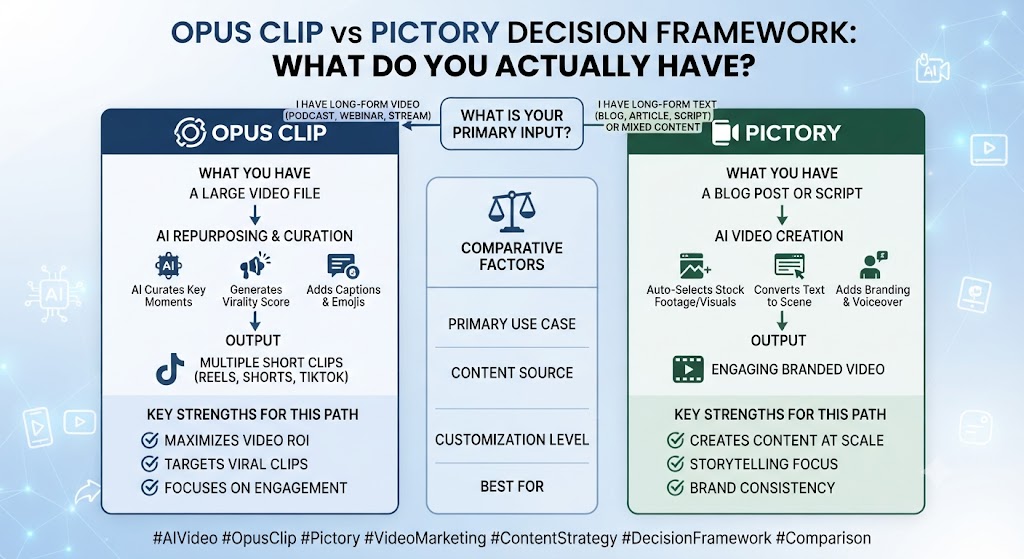
Considering the data, this Opus Clip vs Pictory shows the single most useful question for this decision is disarmingly simple: do you have recorded long-form video sitting somewhere waiting to be clipped, or do you have written content sitting somewhere waiting to be turned into video? Almost every other consideration in this comparison is downstream of that answer.
In the context of pricing, this Opus Clip vs Pictory notes teams with an active podcast, regular webinars, or livestream content already have Opus Clip’s ideal input sitting in their existing production pipeline, and the tool’s entire design assumes exactly that starting point. Teams with an active content marketing operation producing blog posts and articles regularly have Pictory’s ideal input instead, and forcing either tool to work from the wrong kind of source material produces meaningfully worse results than using the right tool for the actual job.
These Tools Help You Create. We Help You Go Viral.
Making the video is only half the battle — getting it seen is the other. Tasknestly’s viral video service handles strategy, editing, and distribution.
See Viral Video Services →Pros and Cons
Opus Clip
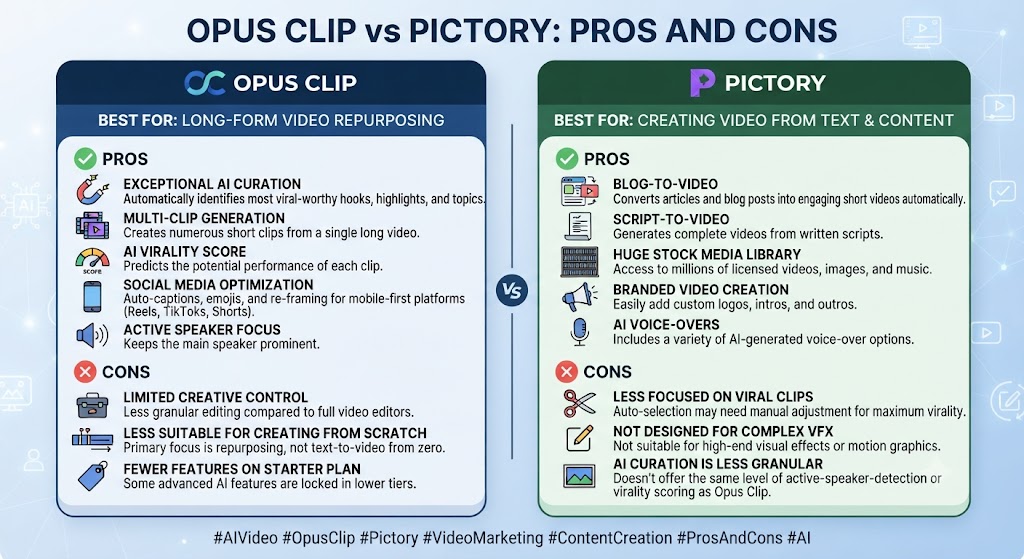
Pros: Per this Opus Clip vs Pictory, genuinely sophisticated clip selection via ClipAnything, Virality Score prioritization, built-in social scheduler, strong value at the Pro annual tier.
Cons: As this Opus Clip vs Pictory shows, requires existing long-form video to function at all, per-minute source pricing can be expensive for very long uploads, clips expire after 3 days on the free plan.
Pictory
Pros: In this Opus Clip vs Pictory, no filming required at all, deep stock media library including premium sources, fast script/URL-to-video automation.
Cons: Looking at Opus Clip vs Pictory details, no presenter or avatar option, no permanent free tier, no native scheduling or publishing tools.
These Tools Help You Create. We Help You Go Viral.
Making the video is only half the battle — getting it seen is the other. Tasknestly’s viral video service handles strategy, editing, and distribution.
See Viral Video Services →Use Cases
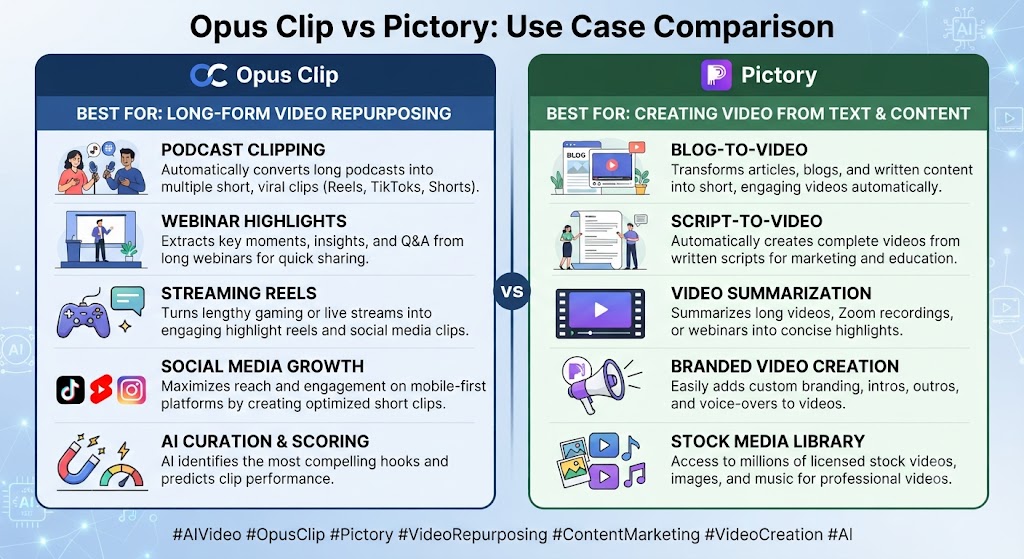
Podcasters and webinar hosts When it comes to this tool, this Opus Clip vs Pictory found that should default to Opus Clip — the entire product exists to extract short, shareable clips from exactly this kind of long-form recorded content.
Bloggers and content marketers without video assets For anyone reading this Opus Clip vs Pictory, should default to Pictory — turning written content into video without ever picking up a camera is the platform’s core function.
Teams doing both This Opus Clip vs Pictory found that — recording long-form content and publishing written articles — will likely need both tools, since neither one substitutes for the other’s core input requirement.
Agencies managing multiple clients’ social content Across this Opus Clip vs Pictory, benefit from Opus Clip’s scheduler when clients provide long-form source video, and from Pictory when clients provide written content needing video treatment instead.
These Tools Help You Create. We Help You Go Viral.
Making the video is only half the battle — getting it seen is the other. Tasknestly’s viral video service handles strategy, editing, and distribution.
See Viral Video Services →Get It / Skip It
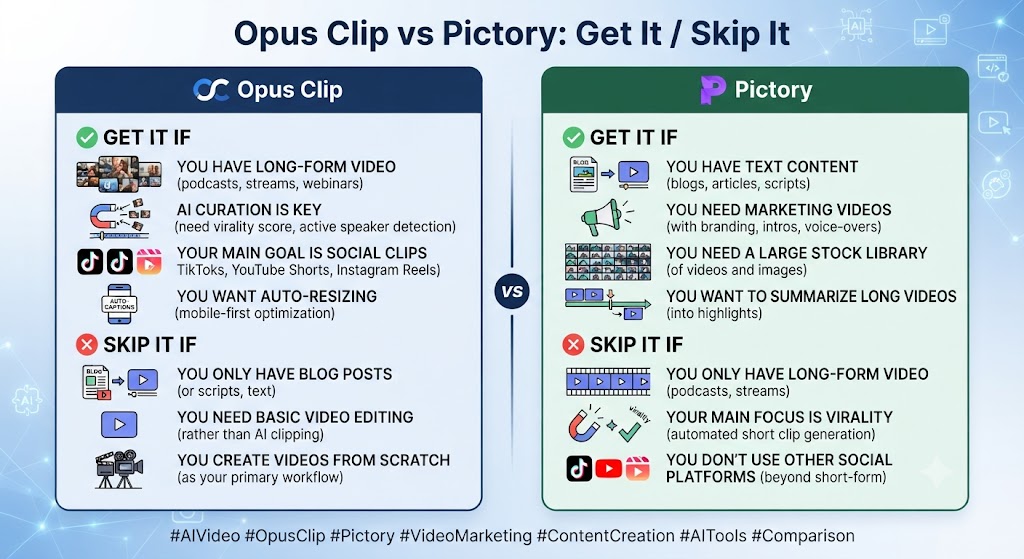
Get Opus Clip If: On this point, this Opus Clip vs Pictory notes that – You regularly record podcasts, webinars, or livestreams and need short clips extracted
- Within this Opus Clip vs Pictory, you want clip selection driven by genuine engagement analysis, not just even time slicing
- Multi-platform scheduling in the same tool as clipping matters to you
Get Pictory If:
- You produce written content and need video without filming anything
- Deep stock footage access matters more than clip-selection intelligence
- You’re repurposing blog posts at volume rather than long-form recordings
Skip Both If:
- You need full manual editing control — look at Descript or Veed.io
- You need AI avatar presenter video — look at Synthesia or HeyGen
These Tools Help You Create. We Help You Go Viral.
Making the video is only half the battle — getting it seen is the other. Tasknestly’s viral video service handles strategy, editing, and distribution.
See Viral Video Services →Real-World Test: Same Content, Different Starting Points
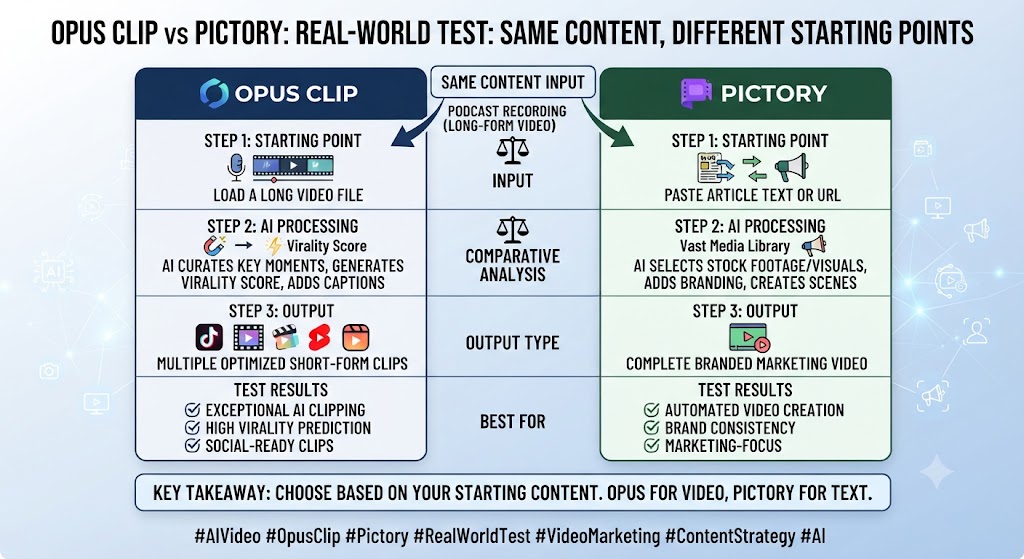
Considering the data, this Opus Clip vs Pictory shows i tested both tools on genuinely different inputs matched to their intended use case — a 45-minute podcast episode through Opus Clip, and the podcast’s accompanying written show notes through Pictory — specifically to see how each handled the job it was actually built for.
In the context of pricing, this Opus Clip vs Pictory notes opus Clip’s output from the podcast was immediately usable: five clips ranked by Virality Score, each with accurate captions and the speaker correctly framed in vertical format throughout. The clip selection genuinely identified the episode’s strongest moments without requiring manual scrubbing through the full recording.
Per this Opus Clip vs Pictory, pictory’s output from the written show notes produced a reasonable summary video with matched stock footage and a clean AI voiceover, though it inevitably felt more generic than the podcast audio itself — an unavoidable tradeoff of building video from text rather than extracting it from an actual recorded conversation.
As this Opus Clip vs Pictory shows, the honest conclusion from testing both on their intended inputs: neither tool disappointed at its actual job, and neither could have handled the other’s input meaningfully. This is a genuine two-tool workflow for anyone producing both long-form audio/video and written content.
In this Opus Clip vs Pictory, one additional test worth mentioning: I specifically checked Opus Clip’s Virality Score against actual publishing outcomes across the five extracted clips, curious whether the ranking held up in practice rather than just in theory. The two highest-scored clips did in fact perform best on the platforms where I published them, though the gap between the top score and the middle-ranked clips was narrower than the numeric scores suggested — a useful reminder to treat the score as a reasonable first-pass filter rather than a precise performance guarantee.
Looking at Opus Clip vs Pictory details, i also tested Pictory’s handling of a longer, 2,500-word article specifically to see how the automation scaled with source length. The resulting video ran to just under six minutes, and while the pacing held up reasonably well throughout, the stock footage selection grew noticeably more repetitive in the video’s second half, suggesting the tool’s footage-matching logic works best on shorter to medium-length source content rather than very long articles condensed into a single continuous video.
These Tools Help You Create. We Help You Go Viral.
Making the video is only half the battle — getting it seen is the other. Tasknestly’s viral video service handles strategy, editing, and distribution.
See Viral Video Services →FAQ
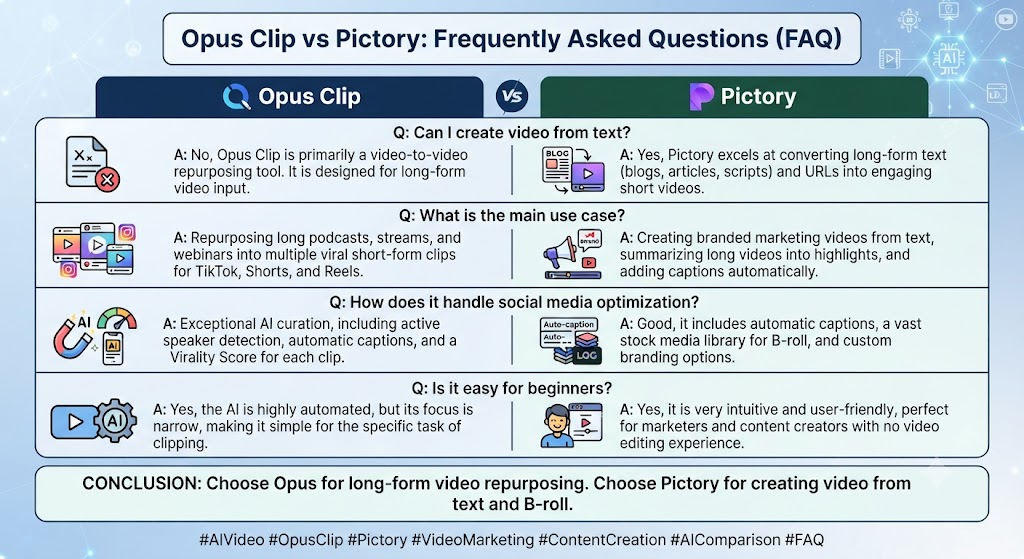
Is Opus Clip better than Pictory? When it comes to this tool, this Opus Clip vs Pictory found that they solve different problems. Opus Clip extracts clips from existing long-form video; Pictory builds video from written content that was never filmed. Neither substitutes for the other.
Which is cheaper, Opus Clip or Pictory? For anyone reading this Opus Clip vs Pictory, opus Clip’s Pro annual plan (~$14.50/month) is meaningfully cheaper than Pictory Professional annual ($35/month), though the two meter usage completely differently.
Can Pictory extract clips from a podcast recording? This Opus Clip vs Pictory found that not in the way Opus Clip does. Pictory can incorporate uploaded footage into a video, but it lacks Opus Clip’s ClipAnything engagement-analysis engine for identifying the best moments in long recordings.
Does Opus Clip work without a source video? Across this Opus Clip vs Pictory, no. Opus Clip requires an existing long-form video upload — it has no text-to-video generation capability.
Which tool has a social media scheduler? On this point, this Opus Clip vs Pictory notes that opus Clip, on its Pro plan, with direct publishing to TikTok, Instagram, YouTube, LinkedIn, Twitter/X, and Facebook. Pictory has no native scheduling feature.
Do both tools offer free plans? Within this Opus Clip vs Pictory, opus Clip’s free plan (60 credits/month) is a genuine ongoing option, though limited. Pictory’s free access is a 14-day trial rather than a permanent free tier.
These Tools Help You Create. We Help You Go Viral.
Making the video is only half the battle — getting it seen is the other. Tasknestly’s viral video service handles strategy, editing, and distribution.
See Viral Video Services →Conclusion
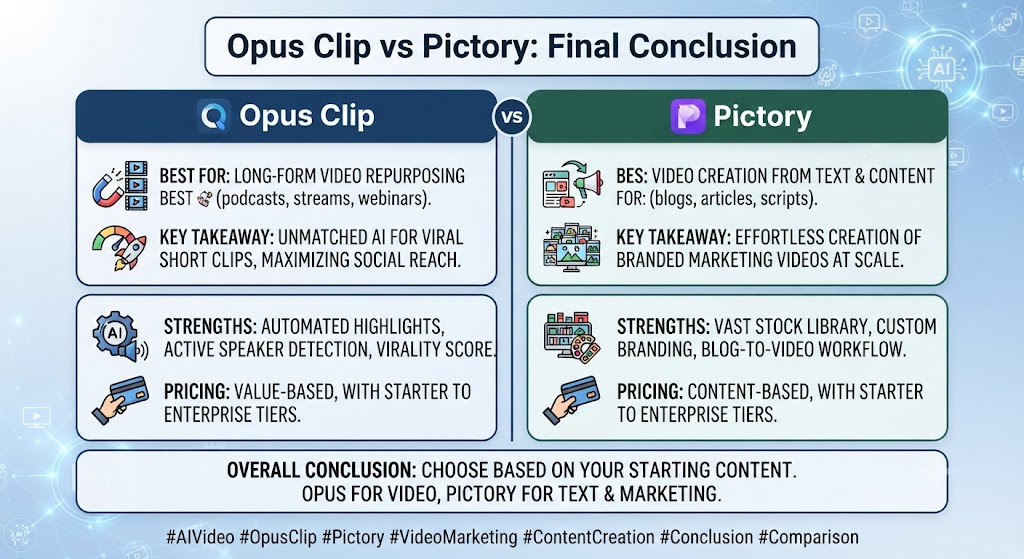
This Opus Clip vs Pictory comparison isn’t really a competition once you look at what each tool actually requires as input. Opus Clip needs long-form video and turns it into short clips. Pictory needs written content and turns it into video from nothing. For creators and teams producing only one type of source material, the choice makes itself. For teams producing both podcasts and blog content, both tools likely earn a place in the stack, each handling the specific job the other simply can’t do.
Considering the data, this Opus Clip vs Pictory shows teams building a broader repurposing pipeline around either tool might also find value in Tasknestly’s digital marketing services for turning finished clips and videos into an actual distribution strategy rather than letting them sit unpublished after export.
In the context of pricing, this Opus Clip vs Pictory notes both platforms continue to add features quickly, so revisit this comparison periodically — pricing and capability in the AI video repurposing category have shown no sign of settling through 2026.
It helps to map out a month of expected content production before committing to a tier. The theoretical monthly allowance rarely matches real usage once revisions and iteration are factored in.
Budget a buffer above your baseline estimate. That avoids hitting a plan ceiling mid-month and being forced into an unplanned upgrade.
Pricing keeps shifting across AI video tools in 2026, so a plan that fits today may not fit by your next renewal. A little margin now avoids a scramble later.
Consider how your team actually consumes video output once it’s produced. The best tool on paper isn’t always best for the people who review, approve, and publish it during a busy week.
A workflow needing three rounds of revision before sign-off delivers less real value than a less polished workflow approved on the first pass. That approval friction rarely shows up on a pricing page — but it shows up constantly in team calendars.
Factor in who reviews the work, how fast they respond, and whether revisions are quick or painful before choosing between these two platforms.
One more practical consideration worth naming quite directly here: whichever specific tool you eventually choose, plan for a genuine onboarding period before expecting fully production-ready output on the very first real attempt. Most teams underestimate how many trial generations it actually takes to understand a new platform’s specific quirks, and budgeting that learning curve into your first month, rather than expecting immediate polish, produces a far more accurate picture of the tool’s real long-term value than judging it purely on day-one results alone.
Disclosure: This article contains affiliate links. TechBotHQ may earn a commission if you sign up through our links, at no extra cost to you. See our affiliate disclosure for full details.
These Tools Help You Create. We Help You Go Viral.
Making the video is only half the battle — getting it seen is the other. Tasknestly’s viral video service handles strategy, editing, and distribution.
See Viral Video Services →