Runway AI Review 2026: Is It the Best AI Video Generator?


| ⚡ TechBotHQ Verdict This Runway AI review gives the platform a strong 4.5 out of 5 for serious video creators and creative teams. Gen-4 and Gen-4.5 produce genuinely cinematic AI video — smooth motion, consistent characters, and realistic physics that no competitor matched eighteen months ago. The credit system takes planning, and the pricing gets expensive at volume, but for filmmakers, agencies, and content creators who need professional-grade AI video generation, Runway is the benchmark tool in 2026. Rating: 4.5/5 | Best For: Filmmakers, content creators, agencies, and marketing teams needing high-quality AI video generation |
Table of Contents
Runway AI Review 2026: What You Need to Know First
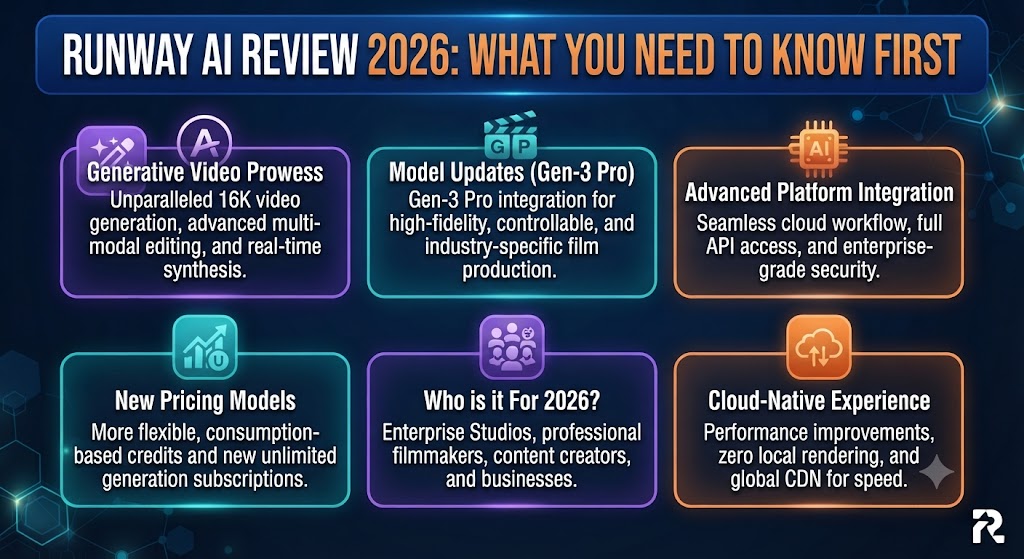
This Runway AI review is going to be direct about something most tool reviews gloss over: Runway ML is not a beginner’s toy. It is a professional creative platform that produces genuinely cinematic AI video — and it has a pricing model, a credit system, and a learning curve that reflects that positioning. If you go in expecting simple, cheap video generation, you will be disappointed. If you go in as a filmmaker, agency creative, or serious content creator, this Runway AI review will show you why it keeps coming up as the benchmark tool in its category.
Runway was founded in New York and has built what it calls General World Models — AI systems designed to simulate physical environments, characters, and motion. The flagship output of this research is Gen-4 and Gen-4.5, which produce AI video with temporal consistency, realistic physics, and cinematic quality that genuinely competes with expensive stock footage and motion graphics.
Our Runway AI review tested the platform across text-to-video, image-to-video, and video editing workflows. We looked at generation quality across models, how far credits actually stretch on each plan, the editing tools, and whether the pricing delivers genuine value for different types of users. Here is the complete picture.
Whether you are a filmmaker looking to add AI video to your production toolkit, a content creator building a YouTube channel, a marketing team producing ad creatives, or an agency exploring AI video for client work — this Runway AI review is written for you.
These Tools Help You Create. We Help You Go Viral.
Making the video is only half the battle — getting it seen is the other. Tasknestly’s viral video service handles strategy, editing, and distribution.
See Viral Video Services →1. What Is Runway AI? A Plain-English Overview ( Runway AI Review )
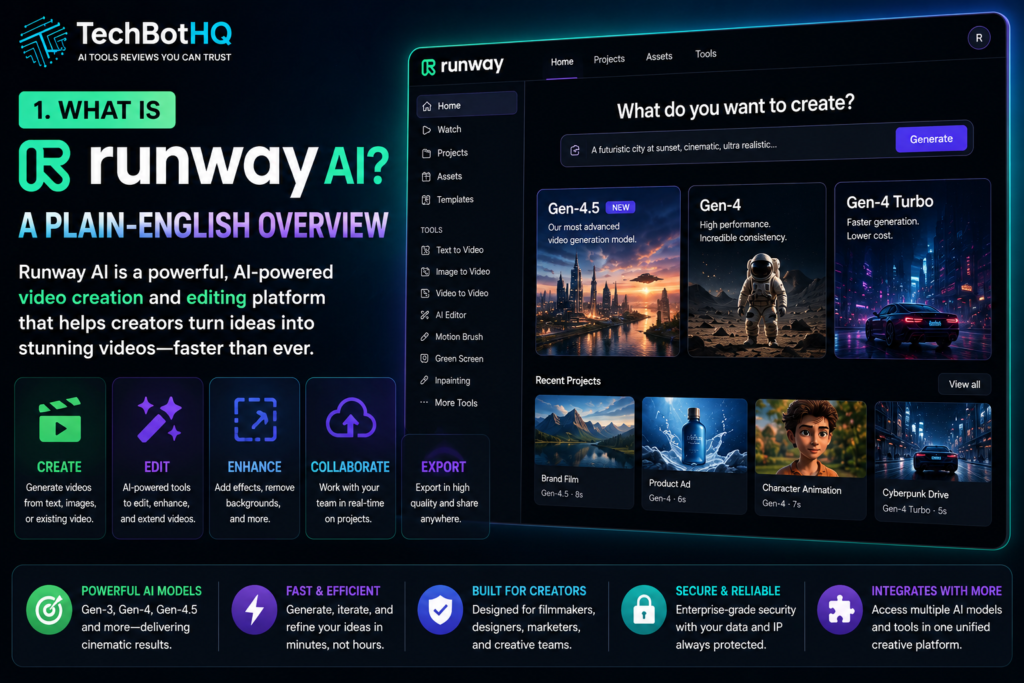
Runway AI (also known as RunwayML) is an AI-powered creative platform specializing in video generation and video editing. It lets you create video from text prompts, animate still images, transform existing video with AI style transfer, and edit footage using a full suite of AI-powered tools — all in a browser-based interface without downloading any software.
The platform’s headline feature is its AI video generation models: Gen-3 Alpha, Gen-4, and Gen-4.5. These models produce 5-10 second video clips from text descriptions or images with a level of motion realism, character consistency, and cinematic quality that has made Runway a go-to tool for filmmakers, visual effects artists, and high-end content creators.
What makes this Runway AI review different from a review of simpler AI video tools is the depth of the platform. Runway is not just a text-to-video generator. It includes video editing tools like AI green screen removal, motion brush, inpainting for object removal, super slow motion, video extension, and a full canvas-based editor called Aleph. It also integrates third-party models including Veo 3.1 and Kling 3.0 Pro on paid plans.
Used by professional filmmakers, advertising agencies, social media creators, and visual effects teams, Runway has positioned itself at the professional end of the AI video market — a position it defends with consistent model updates and a feature set that goes well beyond what most competitors offer.
These Tools Help You Create. We Help You Go Viral.
Making the video is only half the battle — getting it seen is the other. Tasknestly’s viral video service handles strategy, editing, and distribution.
See Viral Video Services →2. How Runway AI Works: The Generation Models ( Runway AI Review )
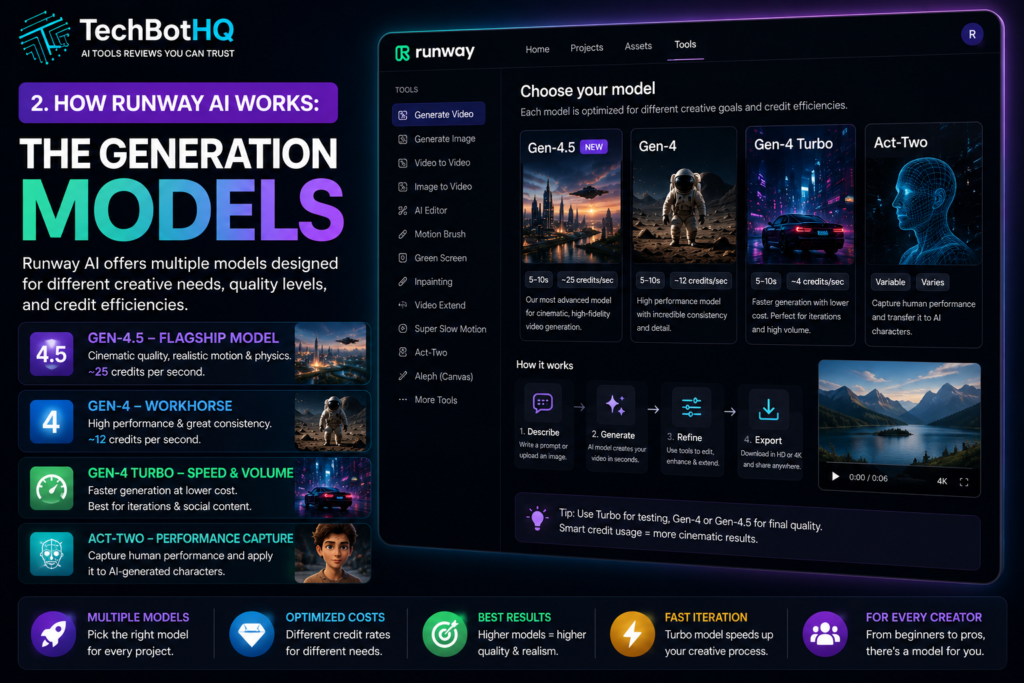
Understanding which model to use for what purpose is one of the most important things to grasp before using Runway. The platform offers multiple models at different quality levels and credit costs.
Gen-4.5 — The Flagship Model
Gen-4.5 is Runway’s most advanced video generation model in 2026 and the one this Runway AI review focuses on primarily. It generates 5-10 second clips from text prompts or images with genuinely cinematic output — smooth motion, consistent character appearance across frames, realistic lighting, and physically plausible movement. At approximately 25 credits per second of video, it is the most credit-intensive option, but it produces output at a quality level that justifies the cost for professional use.
Gen-4 — The Workhorse
Gen-4 is the primary model for most production workflows. It generates video at a high quality level — above Gen-3 but slightly below Gen-4.5 — at approximately 12 credits per second. For teams producing high volumes of content, Gen-4 is the better balance of quality and credit efficiency. On the Pro plan with 2,250 credits, you get approximately 187 seconds of Gen-4 video per month.
Gen-4 Turbo — Speed and Volume
Gen-4 Turbo generates video significantly faster than standard Gen-4 and at lower credit cost per second. The quality is strong for social media content, quick concept testing, and iterative work. For creators who need to test multiple variations before committing to a final generation, Turbo is the model that makes iteration practical without burning through your monthly credits.
💡 Credit strategy: Use Gen-4 Turbo for rapid iteration and concept testing. Once you have a prompt and style you are happy with, switch to Gen-4 or Gen-4.5 for your final production-quality output. This approach dramatically extends how far your monthly credits go.
Act-Two — Performance Capture
Act-Two is one of the more distinctive features in this Runway AI review. It allows you to capture human performance — facial expressions, body movement, gestures — and apply it to AI-generated characters. Upload a video of yourself performing an action and Act-Two transfers that performance to an animated character or AI-generated figure. For filmmakers and animators, this capability bridges the gap between traditional motion capture and fully AI-generated content.
Aleph — AI Canvas Editor
Aleph is Runway’s canvas-based video editor that combines AI generation with traditional editing in a single workspace. You can extend video sequences, inpaint sections, composite multiple AI generations, and build longer scenes from shorter clips. It is the tool that moves Runway from a clip generator toward a genuine production environment for longer-form AI video projects.
Third-Party Model Integration
On all paid plans, Runway also gives you access to third-party AI video models including Veo 3.1 (Google’s video model) and Kling 3.0 Pro, as well as image models including BFL FLUX.2 and Seedream 5.0. This model marketplace approach means you are not locked into Runway’s own outputs — you can choose the model that best suits each specific creative task.
These Tools Help You Create. We Help You Go Viral.
Making the video is only half the battle — getting it seen is the other. Tasknestly’s viral video service handles strategy, editing, and distribution.
See Viral Video Services →3. Key Features of Runway AI in 2026 ( Runway AI Review )
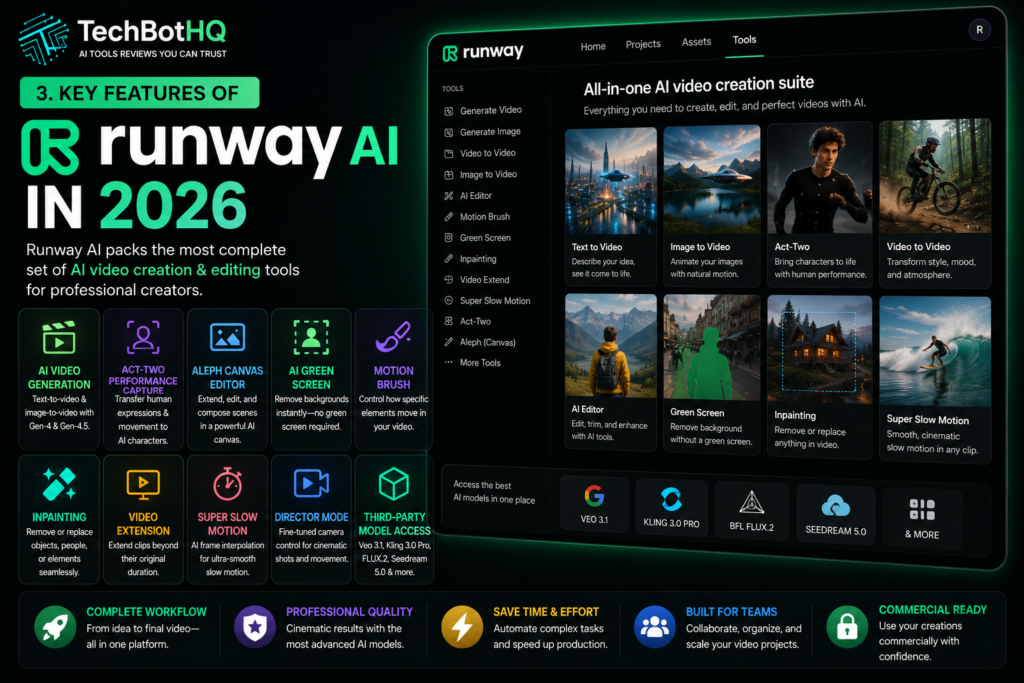
- Gen-4 and Gen-4.5 Video Generation: Text-to-video and image-to-video at cinematic quality. The benchmark for AI video generation quality in 2026.
- Act-Two Performance Capture: Transfer human facial expressions and body movement to AI-generated characters.
- Aleph Canvas Editor: Full canvas-based video editing environment for building longer AI video sequences.
- AI Green Screen: Remove video backgrounds without a physical green screen — works on standard footage.
- Motion Brush: Select areas of a generated image and define how they move in the resulting video.
- Inpainting: Remove or replace objects, people, or elements within existing video footage.
- Video Extension: Extend AI-generated clips beyond their original duration to build longer sequences.
- Super Slow Motion: AI-generated frame interpolation for smooth slow-motion effects from standard footage.
- Director Mode: Fine-grained camera control for AI video generations — specify camera movement, angle, and shot type.
- Third-Party Model Access: Veo 3.1, Kling 3.0 Pro, BFL FLUX.2, Seedream 5.0, and more on all paid plans.
- Workflow Automation: Build automated generation pipelines for repeatable video production workflows.
- Team Collaboration: Shared workspaces, project organization, and team access on higher plans.
These Tools Help You Create. We Help You Go Viral.
Making the video is only half the battle — getting it seen is the other. Tasknestly’s viral video service handles strategy, editing, and distribution.
See Viral Video Services →4. Runway AI Review: Pricing and Credit System Explained
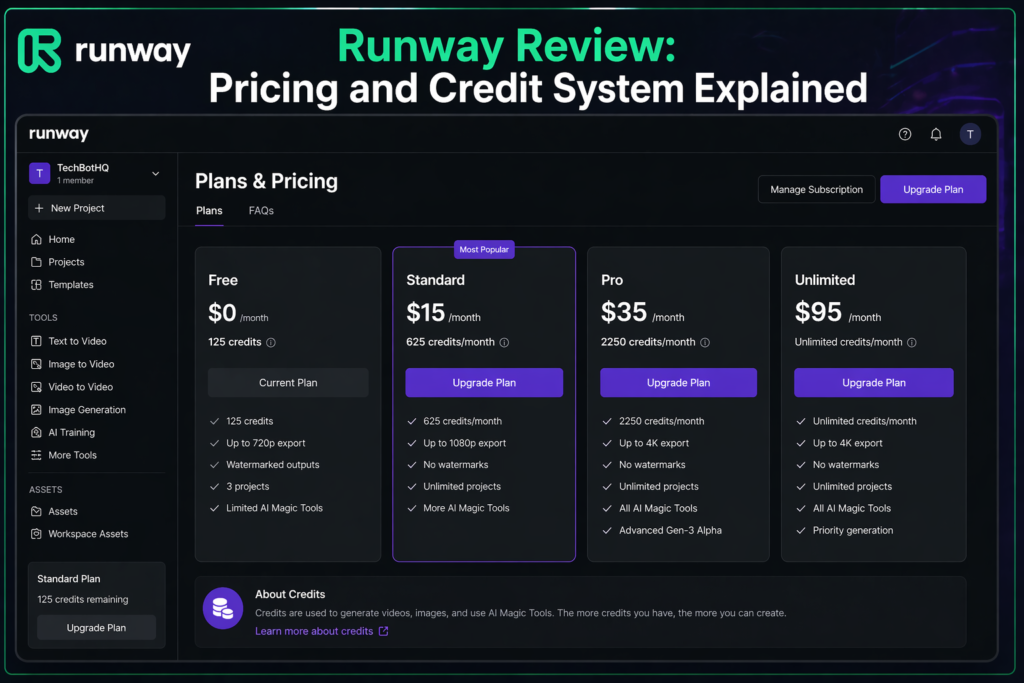
Runway AI pricing is credit-based, and understanding the credit system before you subscribe is essential. Different models consume credits at different rates — which means the same plan gives you very different amounts of video depending on which model you use. Here is the full breakdown.
| Plan | Monthly (Annual) | Credits/Month | What You Get |
|---|---|---|---|
| Free | $0 | 125 one-time | Limited models, watermark on exports, no commercial license |
| Standard | $12/month | 625/month | All models, no watermark, 720p, Gen-3/4 access, 100GB storage |
| Pro | $28/month | 2,250/month | Everything in Standard plus Gen-4 Turbo, 4K upscaling, priority queue |
| Max | $76/month | 9,500/month | Everything in Pro plus native 4K, highest priority rendering, advanced controls |
| Enterprise | Custom (~$800+/month) | Custom | SSO, custom models, dedicated support, API access, SLA |
What credits actually buy you — this is the part most Runway AI reviews skip:
- Gen-4.5 costs ~25 credits per second: Standard plan (625 credits) = ~25 seconds of Gen-4.5 video. Pro plan (2,250 credits) = ~90 seconds. Max plan (9,500 credits) = ~380 seconds.
- Gen-4 costs ~12 credits per second: Standard plan = ~52 seconds. Pro plan = ~187 seconds (~3 minutes). Max plan = ~790 seconds (~13 minutes).
- Gen-4 Turbo costs far less: Credits stretch much further with Turbo — useful for iterative testing and social media content where Gen-4.5 quality is not required.
- Annual billing saves ~20%: Standard drops from $15 to $12/month, Pro from $35 to $28/month, Max from $95 to $76/month. Worth committing to if Runway fits your workflow.
- Free plan is a demo, not a working tier: 125 one-time credits that do not renew. Enough to evaluate generation quality, not enough for ongoing production work.
💰 Honest take: Pro at $28/month annually is the sweet spot for most serious creators — 2,250 credits gives you roughly 3 minutes of Gen-4 video or 90 seconds of Gen-4.5 per month. For professional production work, that goes faster than you expect. Heavy users producing video daily should look at Max or Enterprise seriously. The Standard plan at $12/month is genuinely cheap for the model access it unlocks, but 625 credits limits what you can practically produce each month.
These Tools Help You Create. We Help You Go Viral.
Making the video is only half the battle — getting it seen is the other. Tasknestly’s viral video service handles strategy, editing, and distribution.
See Viral Video Services →5. Runway AI Review: Honest Pros and Cons
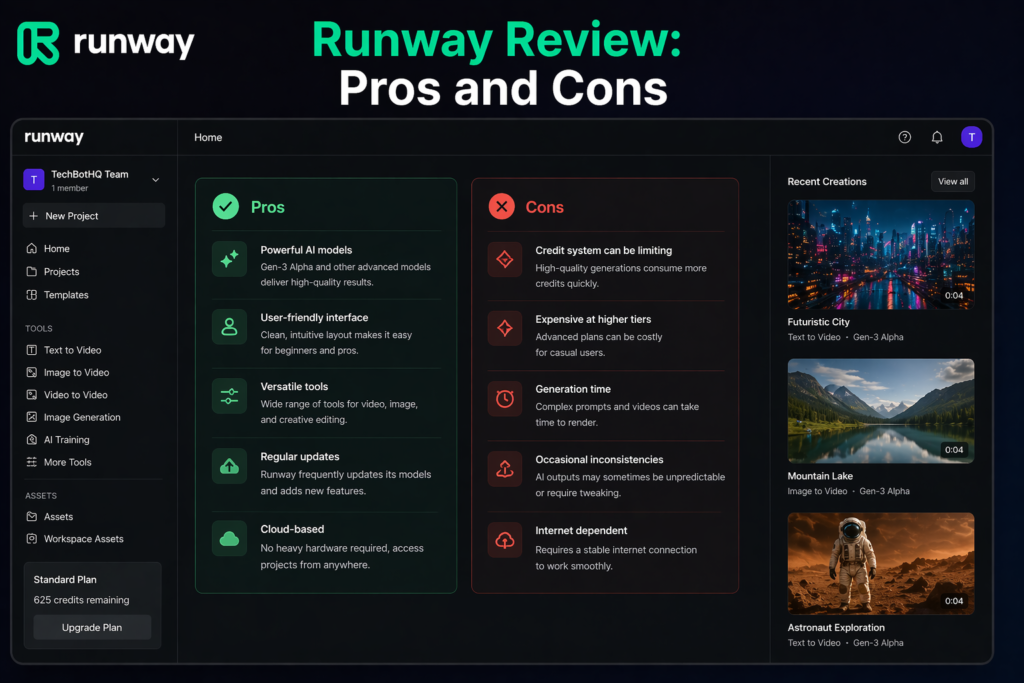
Every honest Runway AI review needs to address both sides. Here is what genuinely impressed us and what fell short during testing.
What Runway AI Gets Right
- Gen-4.5 video quality is genuinely cinematic: This is the headline finding of this Runway AI review. The temporal consistency, realistic motion, and character coherence across frames sets a standard that competitors have not matched. For B-roll, social media content, and creative projects, it is production-ready.
- The broadest feature set in AI video: Text-to-video, image-to-video, video-to-video, performance capture, canvas editing, background removal, inpainting, slow motion, video extension — no competitor offers this range at a similar price point.
- Third-party model marketplace: Access to Veo 3.1, Kling 3.0 Pro, and other leading models means you are not locked into Runway’s own outputs. Choose the best tool for each specific creative task.
- Director Mode gives real creative control: Specifying camera movement, angle, and shot type in your generations produces much more intentional, cinematic output than free-form prompt generation.
- Act-Two is genuinely innovative: Performance capture that transfers human movement to AI characters is a capability that opens creative possibilities not available in any other consumer AI video tool.
- Aleph canvas bridges generation and editing: The ability to composite multiple AI generations and extend sequences in a single workspace moves Runway toward a genuine production environment rather than just a clip generator.
- Strong free tier for evaluation: 125 free credits with access to generation features gives you a real sense of the platform quality before spending any money.
- Consistent model improvements: Runway ships meaningful model updates regularly. The platform in 2026 is dramatically better than it was two years ago, and the trajectory suggests continued improvement.
Where Runway AI Falls Short
- Credits run out faster than expected: This is the most consistent frustration in user Runway AI reviews. Professional-level generation is expensive in credits, and even the Pro plan can feel limiting for teams generating video daily.
- Hands and complex anatomy remain challenging: Even Gen-4.5 struggles with hands, complex body positioning, and multiple people interacting realistically in the same frame. This is an industry-wide AI video limitation, not unique to Runway, but worth knowing.
- 5-10 second clip limit requires assembly: Individual generations max out at 10 seconds. Building longer video sequences requires assembling multiple clips in Aleph or an external editor — which adds time and workflow complexity.
- Learning curve for advanced features: Basic text-to-video is intuitive. Director Mode, Act-Two, Aleph canvas, and workflow automation take time to master. New users often underutilize the platform’s most powerful capabilities.
- No offline access: Runway is entirely cloud-based. A stable internet connection is required for everything, and there is no local rendering option.
- Enterprise pricing is opaque: Custom pricing starting around $800/month for a team of five is not published transparently. Teams evaluating enterprise deployment need to go through a sales process to get numbers.
- Not suitable for simple, fast social content: If you need quick, casual video for TikTok or Instagram Stories without caring about cinematic quality, cheaper and simpler tools like Pictory or Pika serve that need more efficiently.
These Tools Help You Create. We Help You Go Viral.
Making the video is only half the battle — getting it seen is the other. Tasknestly’s viral video service handles strategy, editing, and distribution.
See Viral Video Services →6. Who Should Use Runway AI? ( Runway AI Review )
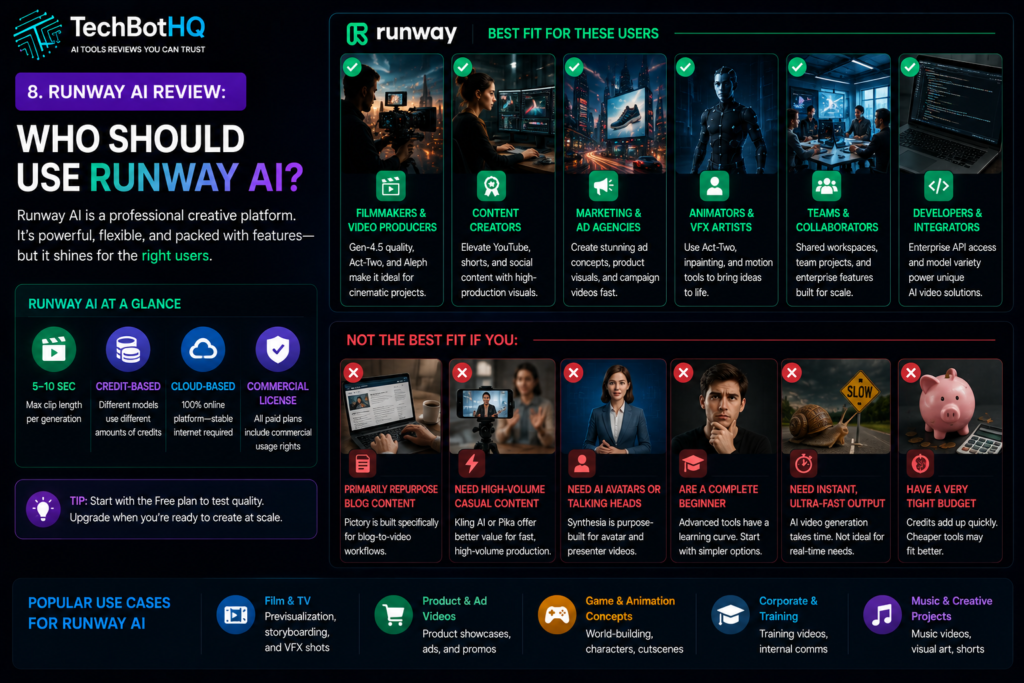
Our Runway AI review found a very clear pattern: Runway excels for users who value quality and creative depth over speed and price. Here is the breakdown.
Runway AI Is a Great Fit If You Are:
- A filmmaker or visual effects artist — Gen-4.5 video quality, performance capture, and canvas editing place Runway at a professional production level that no other consumer AI video tool currently matches.
- A content creator building a high-quality YouTube channel — for channels where production value matters, AI-generated B-roll, animated sequences, and visual effects from Runway can elevate content significantly.
- A marketing or advertising agency — producing AI video for client campaigns, product visualizations, and ad creatives at a quality level that is actually usable in professional contexts.
- A social media creator focused on cinematic short-form content — Runway’s generation quality and Director Mode produce the kind of visually distinctive content that stands out on Instagram and YouTube Shorts.
- A brand building a video content library — the combination of text-to-video and image-to-video with brand-consistent visual style makes Runway practical for systematic video content production.
- A developer building AI video into a product — the API access on enterprise plans and the platform’s model breadth make Runway a practical foundation for video-AI-powered applications.
Runway AI Is Probably Not Right If You Are:
- A blogger or content marketer primarily repurposing written content into video — Pictory is purpose-built for that workflow and more cost-effective for text-to-video repurposing.
- A budget-conscious creator who needs high volume — if you need to produce many videos daily without significant per-video cost, Kling AI at $5.99/month or Pika at $8/month offer better volume economics.
- Someone who needs talking-head or avatar-based video — Synthesia is purpose-built for AI avatar videos and a much better fit for corporate training and presentation content.
- A complete video production beginner — the platform rewards users who understand basic cinematography concepts like framing, camera movement, and shot composition. True beginners may find simpler tools a better starting point.
These Tools Help You Create. We Help You Go Viral.
Making the video is only half the battle — getting it seen is the other. Tasknestly’s viral video service handles strategy, editing, and distribution.
See Viral Video Services →7. Runway AI Review: How It Compares to Competitors
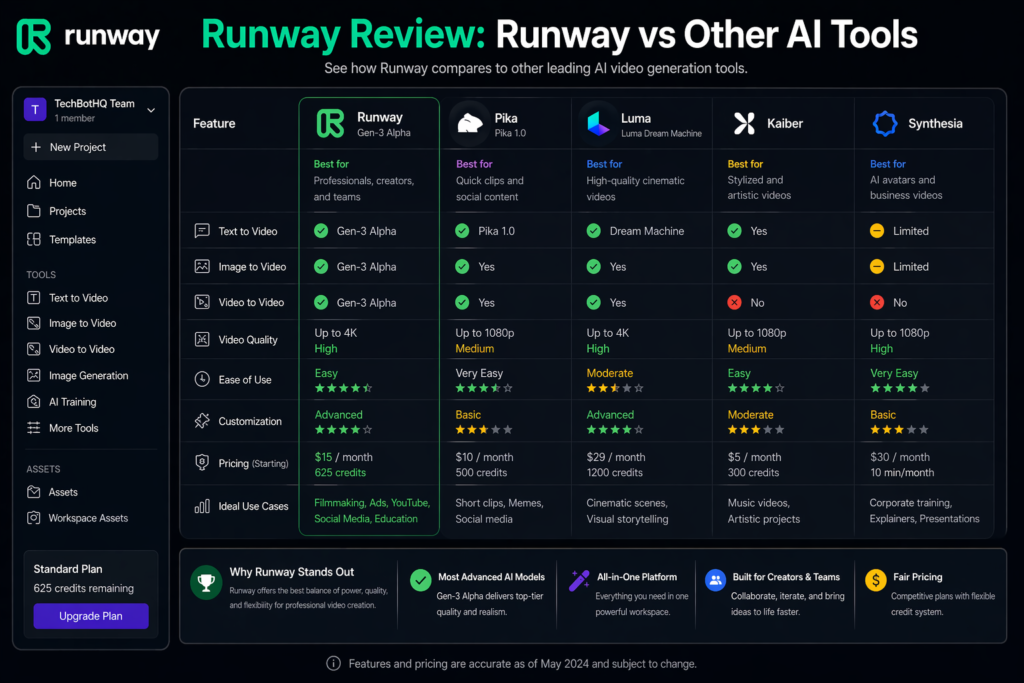
The most common Runway AI review comparisons are Runway vs Pika, Runway vs Sora, and Runway vs Kling AI. Here is the honest breakdown.
| Tool | Starting Price | Key Strength | Best For |
|---|---|---|---|
| Runway AI | $12/month | Gen-4.5 quality, broadest feature set | Filmmakers, agencies, serious creators |
| Pika | $8/month | Creative effects, affordable, easy to use | Social media creators, beginners |
| Kling AI | $5.99/month | Best price-to-quality ratio, high volume | Budget-conscious creators, volume production |
| Sora (OpenAI) | $20/month+ | High ceiling quality, OpenAI ecosystem | Creative professionals, high-end projects |
| Synthesia | $22/month | AI avatars, presenter videos, training content | Corporate teams, L&D, talking-head video |
| Pictory | $35/month | Blog-to-video, stock footage, easy repurposing | Content marketers, bloggers |
The clearest distinction worth making in any Runway AI review comparison is between Runway and Pictory. They are both AI video tools but they solve fundamentally different problems. Pictory is a content repurposing tool — it converts blog posts and scripts into polished stock-footage videos. Runway is a creative generation platform — it creates original video from text and images at cinematic quality. They serve different workflows and many professional content teams use both.
These Tools Help You Create. We Help You Go Viral.
Making the video is only half the battle — getting it seen is the other. Tasknestly’s viral video service handles strategy, editing, and distribution.
See Viral Video Services →8. What Real Users Say About Runway AI ( Runway AI Review )
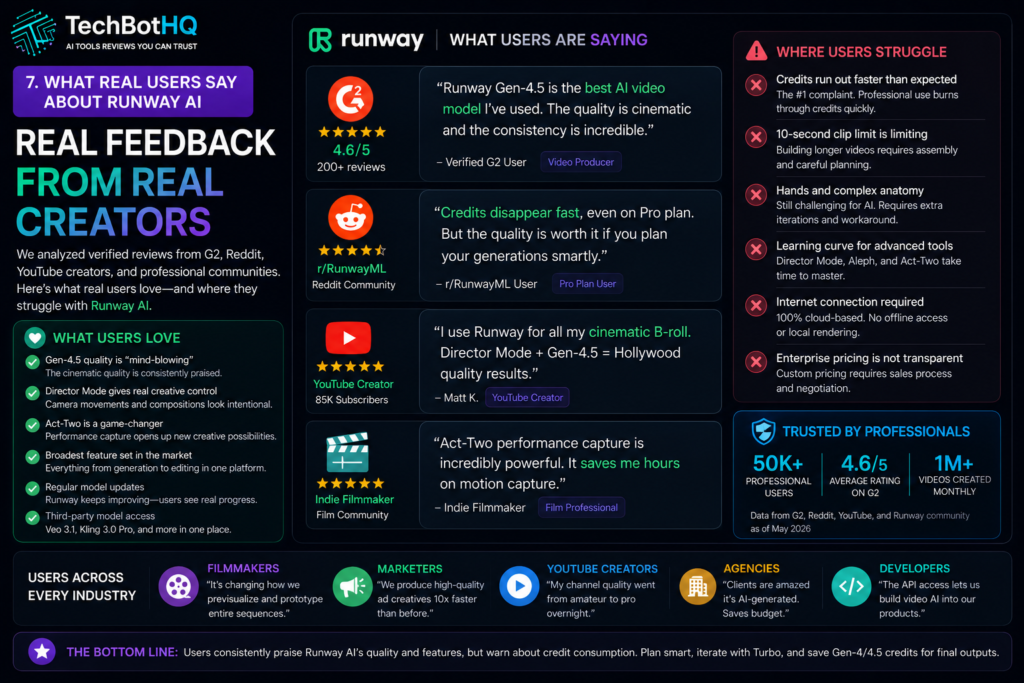
We reviewed verified feedback across G2, Reddit, and independent creator communities to understand what users actually experience with Runway day to day.
What Users Love
The generation quality is the universal standout in every Runway AI review from real users. Creators who have been following AI video since the early Gen-1 and Gen-2 days describe the leap to Gen-4 as genuinely remarkable — the kind of quality jump that makes a tool feel production-ready for the first time. Characters that maintain their appearance across frames, lighting that behaves physically correctly, and camera movements that feel intentional rather than chaotic are cited repeatedly as the reasons users stay subscribed despite the cost.
Director Mode and Motion Brush get strong praise from users with cinematography backgrounds. Being able to specify camera movement and select which elements of a scene should animate — rather than leaving everything to the AI’s interpretation — produces much more intentional, professional output. Creative professionals particularly highlight these features as what separates Runway from simpler text-to-video tools.
The model marketplace integration is also well-received. Having access to Veo 3.1 and Kling 3.0 Pro alongside Runway’s own models within a single platform means users can pick the best tool for each specific job without maintaining multiple subscriptions. Several agency users describe this as the primary reason they consolidated onto Runway rather than managing separate accounts.
Where Users Get Frustrated
Credit consumption is the most common frustration in Runway AI reviews from real users. Even experienced creators are regularly surprised by how quickly credits disappear when working with Gen-4.5. A session of prompt experimentation and iteration can consume a significant portion of a monthly credit allocation, leaving less for final production-quality generations than users expected. The general advice from the Runway community is to do all your iteration with Gen-4 Turbo and reserve Gen-4.5 credits for final outputs only.
The 10-second clip limit is the second consistent frustration. Building a 30-second or 60-second video from 5-10 second AI generations requires assembling multiple clips — and maintaining visual consistency across those clips takes skill and often multiple generation attempts. Users who expected to generate a complete 60-second video from a single prompt are consistently disappointed by this limitation, which is currently an industry-wide constraint across all AI video tools.
Hands and human anatomy in complex scenes also generate regular complaints. Even at Gen-4.5 quality, close-up shots of hands, complex physical interactions between multiple people, and fine anatomical detail in facial expressions can produce artifacts and distortions that require significant iteration to resolve or work around.
These Tools Help You Create. We Help You Go Viral.
Making the video is only half the battle — getting it seen is the other. Tasknestly’s viral video service handles strategy, editing, and distribution.
See Viral Video Services →9. Our Runway AI Review Rating Breakdown ( Runway AI Review )
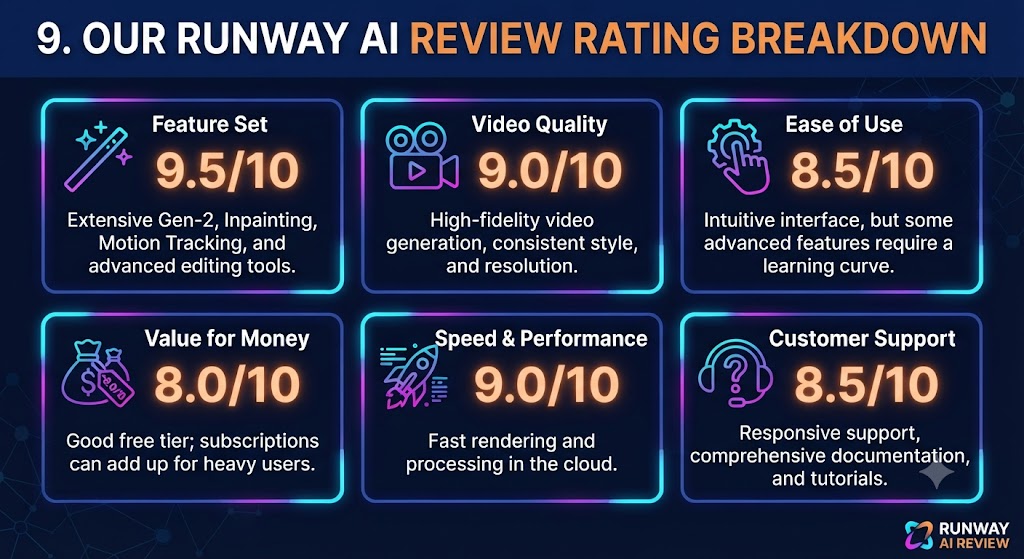
| Category | Score | Notes |
|---|---|---|
| Video Generation Quality | 4.8 / 5 | Gen-4.5 sets the quality benchmark for AI video in 2026 |
| Feature Breadth | 4.9 / 5 | No competitor offers this range of AI video and editing tools |
| Creative Control | 4.7 / 5 | Director Mode, Motion Brush, and Act-Two give genuine creative direction |
| Pricing Value | 3.9 / 5 | Competitive for quality delivered; credit limits frustrate heavy users |
| Ease of Use | 3.8 / 5 | Basic generation is intuitive; advanced features have a real learning curve |
| Model Variety | 4.8 / 5 | Gen-3, Gen-4, Gen-4.5, plus Veo 3.1, Kling 3.0 Pro, and more |
| Team Collaboration | 4.2 / 5 | Solid on higher plans; limited on Standard |
| Output Consistency | 4.3 / 5 | Strong but hands and complex anatomy still challenge the models |
| Overall | 4.5 / 5 | The benchmark AI video platform for professional creative work in 2026 |
These Tools Help You Create. We Help You Go Viral.
Making the video is only half the battle — getting it seen is the other. Tasknestly’s viral video service handles strategy, editing, and distribution.
See Viral Video Services →10. Final Runway AI Review Verdict: Is It Worth It in 2026?
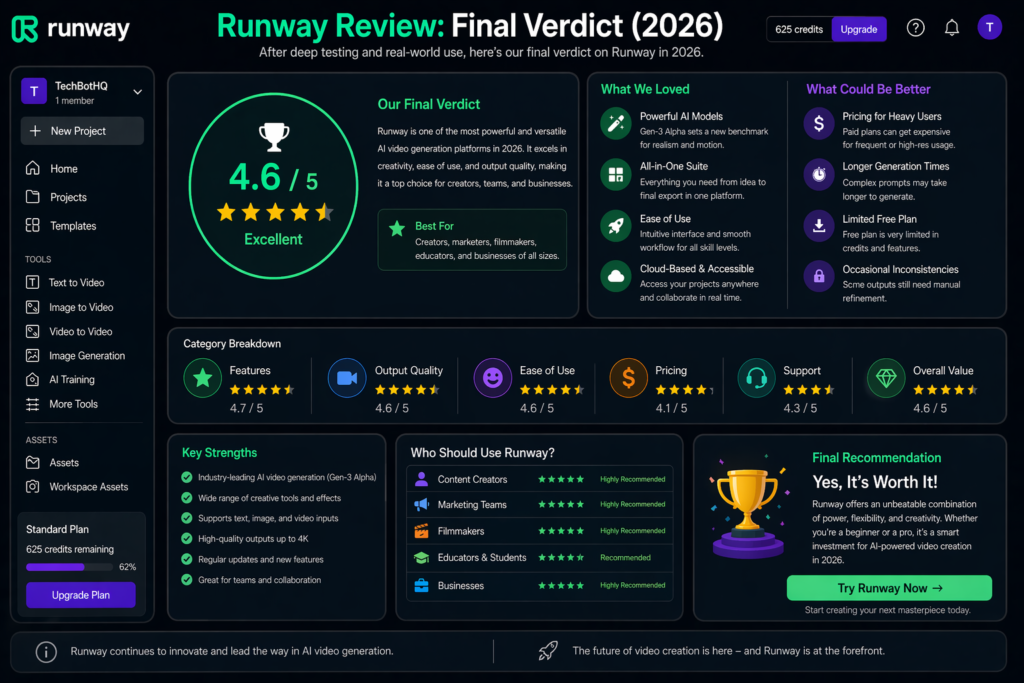
Here is the bottom line of this Runway AI review: Runway AI is the best AI video generation platform available for serious creative professionals in 2026. Gen-4.5 video quality, the breadth of the toolset, Director Mode’s creative control, Act-Two performance capture, and the third-party model marketplace combine into a platform that no competitor has matched at a similar price point.
The tradeoffs are real. Credits run out faster than most users expect. The 10-second clip limit requires assembling longer sequences from multiple generations. Advanced features take time to master. And for casual or budget-sensitive users, cheaper alternatives like Kling AI or Pika offer strong value without Runway’s complexity or pricing.
Our Runway AI review recommendation: start with the free plan and use your 125 one-time credits to test Gen-4 generation quality with prompts relevant to your actual creative work. If the output quality meets your standards — and for most professional use cases it will — start with the Pro plan at $28/month annually. Budget your credits with the strategy of using Gen-4 Turbo for iteration and Gen-4.5 for final outputs, and you will get significantly more production value from each monthly allocation.
| ✅ Get Runway AI If You…Need professional-quality AI video generationWork in film, video production, or advertisingWant the broadest AI video feature set availableCreate high-production-value YouTube contentNeed performance capture or canvas editingWant access to multiple AI models in one platform | ⚠️ Skip Runway AI If You…Primarily repurpose blog content into videoNeed high-volume casual social content cheaplyWant AI avatar or talking-head videoAre a complete beginner to video productionNeed a simple tool with no learning curveHave a very tight monthly budget |
These Tools Help You Create. We Help You Go Viral.
Making the video is only half the battle — getting it seen is the other. Tasknestly’s viral video service handles strategy, editing, and distribution.
See Viral Video Services →11. Runway AI Review: Frequently Asked Questions
Is Runway AI worth it in 2026?
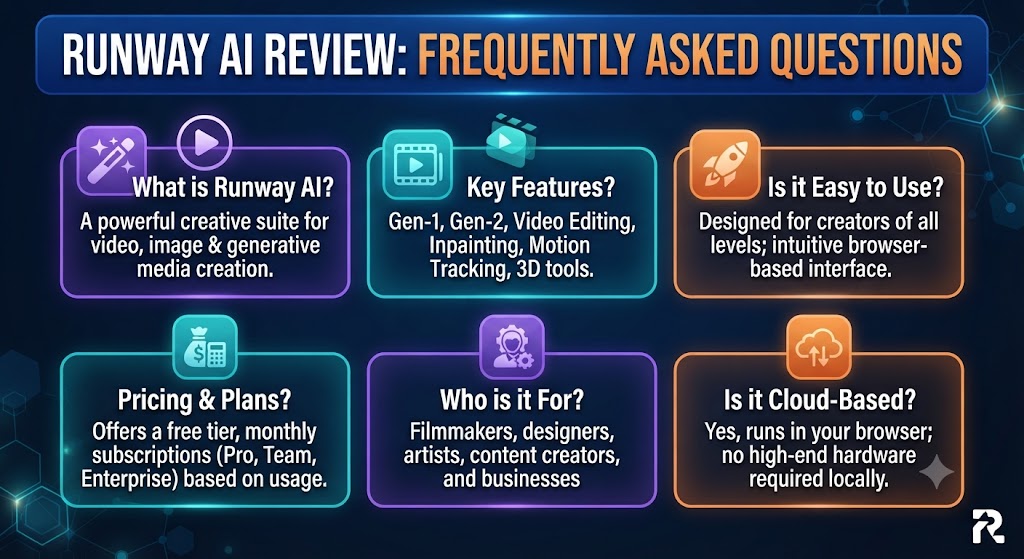
For professional video creators, filmmakers, and agencies who need cinematic AI video quality, yes — our Runway AI review rates it 4.5/5 and considers it the benchmark platform in its category. For casual creators or those primarily needing volume over quality, cheaper alternatives offer better value.
What is the best Runway AI plan for individual creators?
The Pro plan at $28/month annually is the sweet spot for most serious individual creators. It provides 2,250 credits per month — enough for approximately 3 minutes of Gen-4 video or 90 seconds of Gen-4.5 — plus 4K upscaling and priority rendering. As noted in this Runway AI review, the Standard plan at $12/month is a strong entry point but 625 credits limits productive monthly output.
How does Runway AI pricing work?
Runway AI pricing is credit-based, with different models consuming credits at different rates. Gen-4.5 costs approximately 25 credits per second, Gen-4 costs approximately 12 credits per second, and Gen-4 Turbo costs significantly less. Annual billing reduces all plan costs by approximately 20%. Credits do not roll over month to month.
Does Runway AI have a free plan?
Yes — Runway offers 125 one-time free credits that never expire but also never renew. This gives you enough to test generation quality across several short clips before committing to a paid plan. Free exports include a watermark and there is no commercial license on the free tier.
How does Runway AI compare to Pika?
Pika offers creative, effects-driven video generation starting at $8/month and is easier to use for beginners. Runway AI has significantly higher video quality at Gen-4 and Gen-4.5 levels, a much broader feature set, and professional-grade tools like Act-Two and Aleph. Our Runway AI review found that Pika is the better choice for casual social media content at lower cost; Runway wins decisively on quality and feature depth for professional work.
What is Gen-4.5 in Runway AI?
Gen-4.5 is Runway’s flagship video generation model in 2026. It produces 5-10 second video clips from text prompts or images at cinematic quality — with smooth motion, consistent character appearance across frames, realistic lighting, and physically plausible movement. This Runway AI review found it to be the highest-quality AI video generation available at a consumer price point, at the cost of approximately 25 credits per second of video generated.
Can Runway AI be used for commercial projects?
Yes — all paid Runway AI plans include a commercial license for generated content. Free plan outputs do not include commercial rights. If you are producing content for clients or commercial campaigns, any paid plan gives you the licensing you need. Enterprise plans include additional IP protections and dedicated support for commercial production workflows.
These Tools Help You Create. We Help You Go Viral.
Making the video is only half the battle — getting it seen is the other. Tasknestly’s viral video service handles strategy, editing, and distribution.
See Viral Video Services →