Descript Review 2026: The Best AI Video and Podcast Editor?

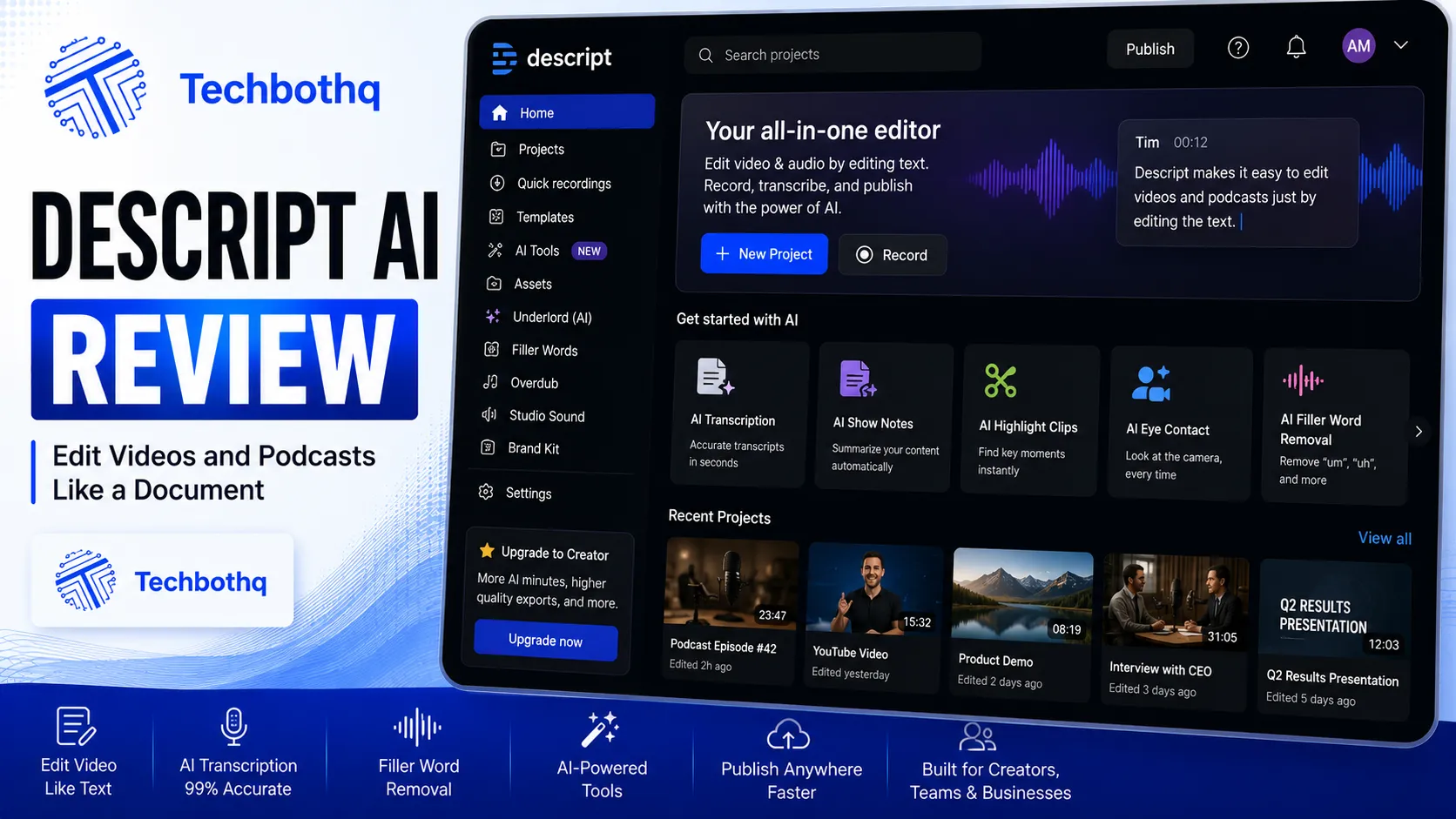
As this Descript review shows, most video and audio editing tools ask you to work on a timeline — scrubbing back and forth, marking in and out points, dragging clips around a scrolling ruler. Descript throws that model out entirely. You edit by editing text. Delete a word from the transcript, and the corresponding audio or video segment disappears from the recording automatically. For anyone editing spoken-word content — podcasts, interviews, training videos — that single design decision changes what editing actually feels like, and it’s the reason this Descript review exists.
This Descript review covers what the platform does well, where it genuinely struggles, what it costs in 2026 after a significant pricing overhaul, and who should actually pay for it.
Table of Contents
What Is Descript?
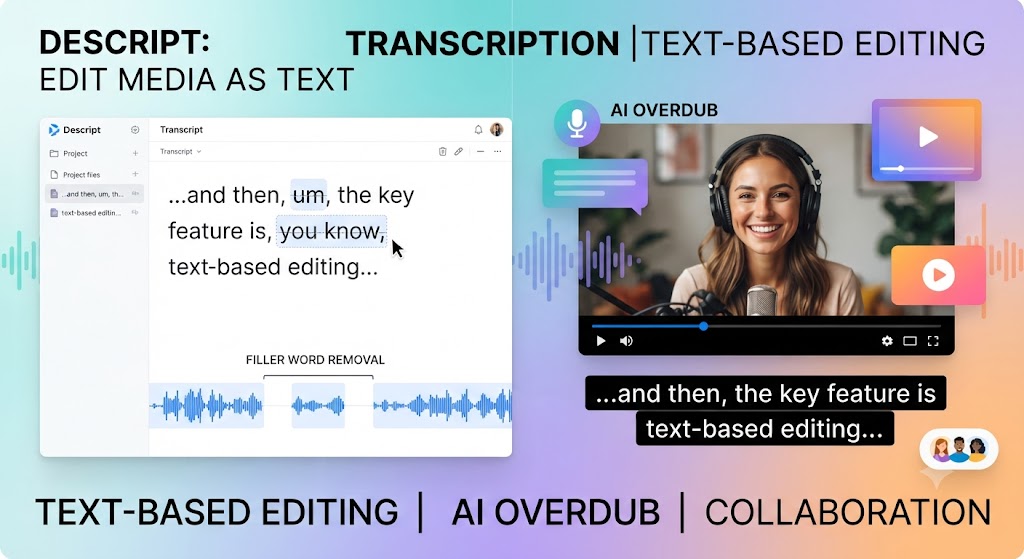
In this Descript review, descript is an AI-powered audio and video editor built around transcript-based editing — the platform’s defining and most distinctive feature. Upload or record content, and Descript transcribes it automatically, displaying the result as an editable document. Removing text removes the corresponding media segment. Adding text with Overdub, Descript’s voice cloning feature, regenerates spoken audio in your own cloned voice without re-recording anything.
Looking at Descript review details, beyond the core editing paradigm, Descript includes multi-track recording for podcast production, Studio Sound audio enhancement, automated filler-word removal, animated captions, and screen recording — a genuinely broad toolkit built specifically around spoken-word content rather than general-purpose video production.
These Tools Help You Create. We Help You Go Viral.
Making the video is only half the battle — getting it seen is the other. Tasknestly’s viral video service handles strategy, editing, and distribution.
See Viral Video Services →Key Features
Transcript-Based Editing
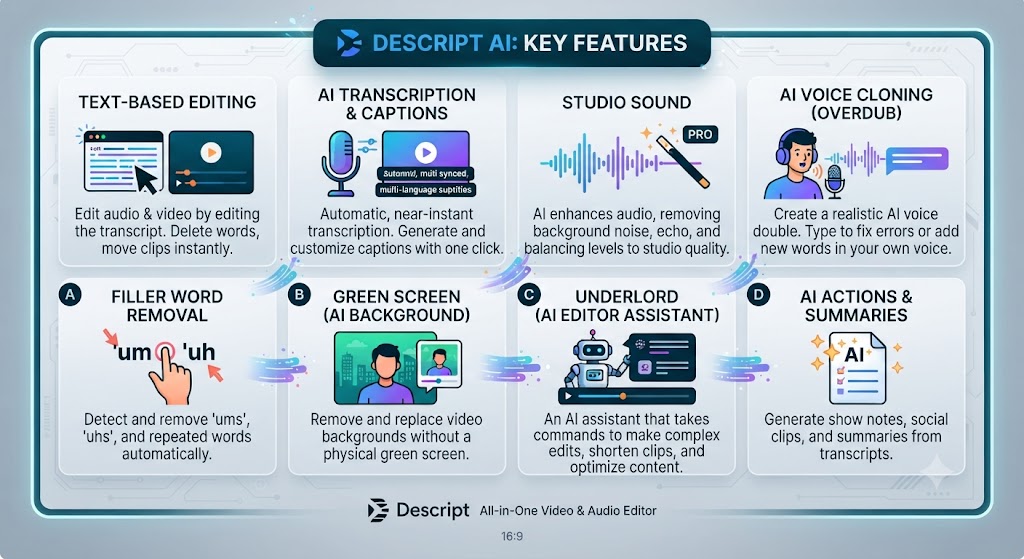
When it comes to this tool, this Descript review found that this is Descript’s core differentiator and the reason people adopt the platform in the first place. After transcription, your recording becomes an editable document. Cut a sentence by deleting the text; reorder a section by cutting and pasting paragraphs; remove a rambling tangent by highlighting and deleting it. The corresponding audio or video follows automatically, with no manual timeline scrubbing required.
For anyone reading this Descript review, for interview editing and podcast production specifically, this is dramatically faster than traditional timeline editing. Finding and removing filler words, false starts, and dead air — the bulk of what podcast editing actually involves — becomes a text-editing task rather than an audio-scrubbing task, and the speed difference compounds significantly across a regular production schedule.
Overdub Voice Cloning
This Descript review found that overdub lets you train a synthetic version of your own voice, then regenerate any mispoken or deleted section by typing the corrected text. Mispronounce a name, get a fact wrong, or need to update a stale reference after recording — instead of re-recording the entire segment, you type the fix and Descript generates it in your cloned voice, blending seamlessly into the surrounding original audio.
Across this Descript review, this is a genuinely distinctive capability among editing tools. For creators producing recurring spoken content where small corrections happen regularly, Overdub eliminates a real recurring friction that traditional editing simply can’t solve without a full re-recording session.
Studio Sound and Audio Enhancement
On this point, this Descript review notes that studio Sound is Descript’s one-click audio cleanup tool, removing background noise, room echo, and other audio artifacts from recordings made outside a professional studio environment. As this Descript review notes, for podcasters and interviewers recording in imperfect conditions — a home office, a noisy café, a remote guest’s inconsistent microphone — this feature meaningfully raises the baseline audio quality without manual audio engineering.
Multi-Track Recording and Podcast Production
Within this Descript review, descript supports multi-track recording and editing, handling multiple synchronized recordings with separate speaker tracks cleanly — a genuinely strong capability for podcast production specifically, going beyond simple editing into real production tooling. This Descript review found Speaker Detective automatically identifies and labels multiple speakers in a recording, playing a clip of each speaker to confirm names.
Filler Word Removal and Automated Cleanup
Considering the data, this Descript review shows descript can automatically detect and remove filler words — “um,” “uh,” repeated false starts — across an entire recording in a single pass, a task that would otherwise require manually scrubbing through an entire episode listening for each instance. For long-form interview and podcast content specifically, this Descript review found this automation alone can save real editing hours per episode.
Animated Captions and Video Export
In the context of pricing, this Descript review notes beyond audio-first workflows, Descript generates animated captions automatically and supports video export in various formats and resolutions, including 4K on higher tiers. This Descript review notes that while not purpose-built for social-format resizing the way some competitors are, Descript’s caption and export tools cover the core needs of turning edited spoken content into publishable video.
These Tools Help You Create. We Help You Go Viral.
Making the video is only half the battle — getting it seen is the other. Tasknestly’s viral video service handles strategy, editing, and distribution.
See Viral Video Services →Pricing (2026)
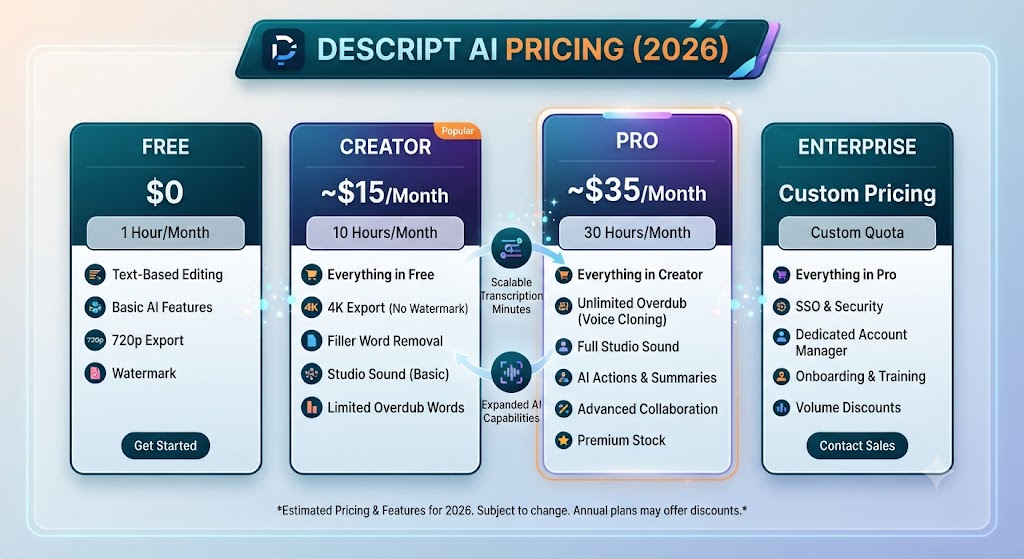
Per this Descript review, descript’s pricing was restructured through a 2025 overhaul, replacing simple “transcription hours” with a “media minutes” and AI credit system that has drawn real user criticism for making costs harder to predict.
| Plan | Monthly Price (Annual) | Media Minutes | Best For |
|---|---|---|---|
| Free | $0 | ~60 min/mo, watermarked | Testing |
| Hobbyist | $16 ($24 monthly) | ~10 hrs/mo | Solo, light usage |
| Creator | $24 ($35 monthly) | ~10-30 hrs/mo, 4K export | Podcasters, YouTubers |
| Business | $50 ($65 monthly) | ~30 hrs/mo | Small video teams |
| Enterprise | Custom | Custom | Large organizations, SSO |
As this Descript review shows, the free plan includes roughly one hour of transcription monthly with watermarked exports — genuinely usable for evaluating the editor, but not for regular production. This Descript review found Creator, at $24/month annually, is the realistic baseline for serious podcasters and video creators, including 4K watermark-free export and a meaningfully larger media-minute allowance than Hobbyist.
In this Descript review, the honest caveat worth flagging clearly: AI features like Overdub, Studio Sound, and filler-word removal now consume credits that reset monthly, separate from the base media-minute allowance. Heavy AI feature users have reported bills scaling up considerably beyond the headline plan price once credit top-ups are factored in, so budget real attention to actual AI feature usage before assuming the base plan price is your total monthly cost.
These Tools Help You Create. We Help You Go Viral.
Making the video is only half the battle — getting it seen is the other. Tasknestly’s viral video service handles strategy, editing, and distribution.
See Viral Video Services →Pros and Cons
| Pros | Cons |
|---|---|
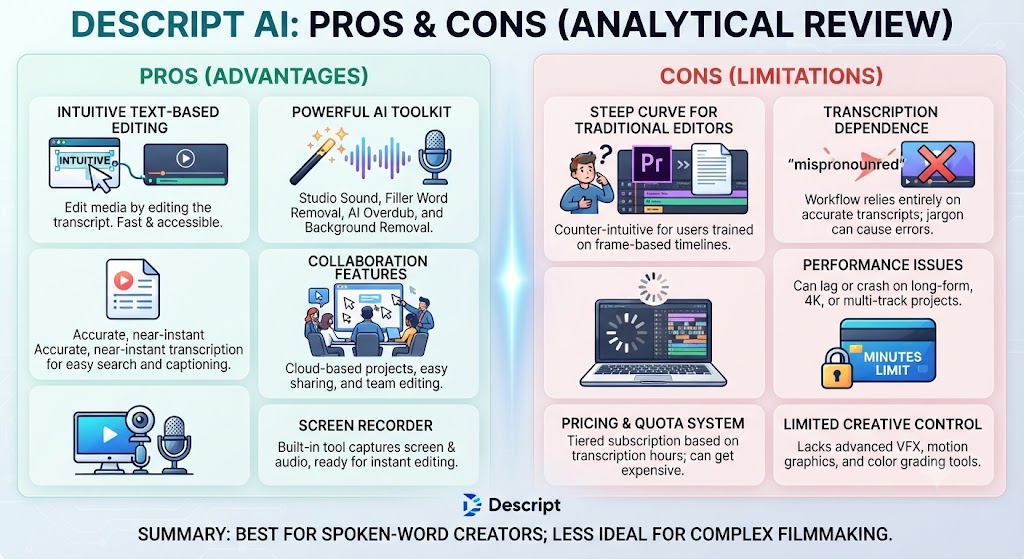
| Genuinely unique transcript-based editing paradigm | 2025 pricing overhaul made AI costs less predictable |
| Overdub voice cloning solves a real recurring editing problem | Transcription-hour caps can be exhausted quickly by heavy recorders |
| Strong multi-track podcast production tools | Less oriented toward pure social-video formats than some competitors |
| Studio Sound audio cleanup is genuinely effective | App can be resource-intensive on longer projects |
| Automated filler-word removal saves real editing time | AI credit top-ups can meaningfully exceed the headline plan price |
These Tools Help You Create. We Help You Go Viral.
Making the video is only half the battle — getting it seen is the other. Tasknestly’s viral video service handles strategy, editing, and distribution.
See Viral Video Services →Descript vs Veed.io vs Riverside
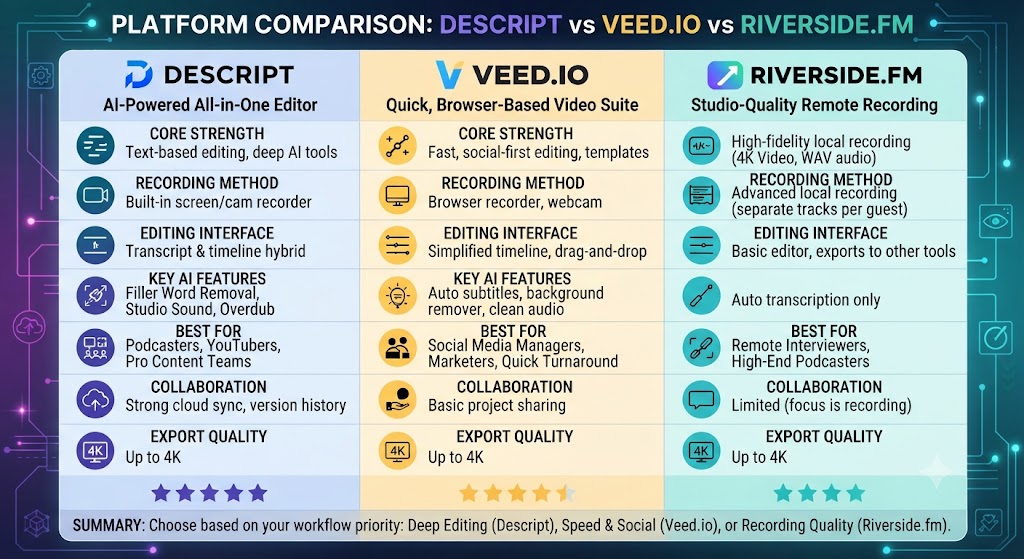
| Feature | Descript | Veed.io | Riverside |
|---|---|---|---|
| Editing paradigm | Transcript-based | Timeline-based | Timeline-based |
| Voice cloning | Overdub, all paid tiers | None | None |
| Multi-track recording | Strong, podcast-focused | Basic | Strong, recording-focused |
| Translation support | 25 languages | 50+ languages | Limited |
| Entry paid tier | $16/mo (Hobbyist) | ~$18-20/mo | ~$15/mo |
Looking at Descript review details, for spoken-word content specifically — podcasts, interviews — Descript’s transcript editing and Overdub give it a genuine structural advantage over timeline-based competitors. For broader social-format video and wider translation needs, Veed.io’s timeline approach and language breadth pull ahead.
These Tools Help You Create. We Help You Go Viral.
Making the video is only half the battle — getting it seen is the other. Tasknestly’s viral video service handles strategy, editing, and distribution.
See Viral Video Services →Use Cases
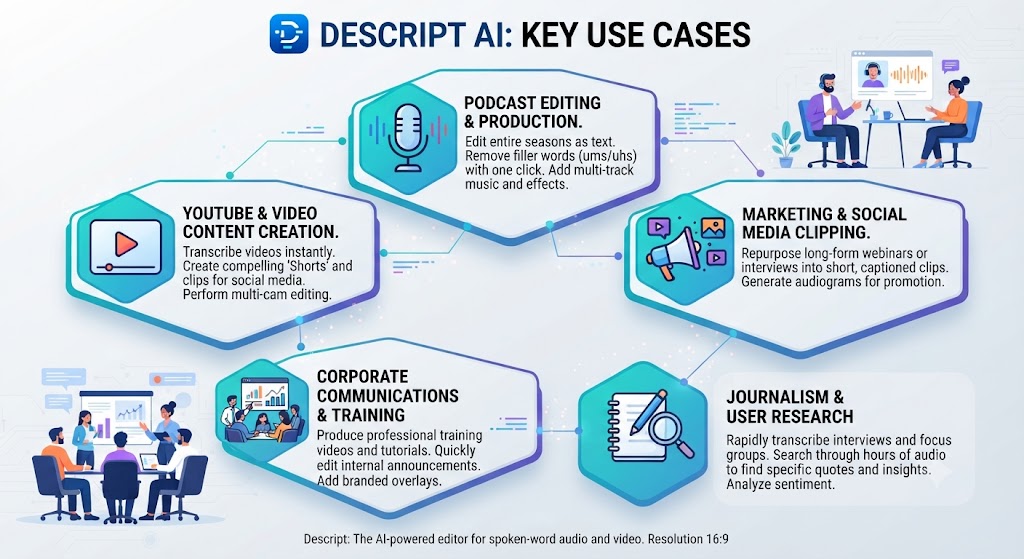
Podcasters and interview-based content creators When it comes to this tool, this Descript review found that get the clearest value from Descript, where transcript editing and multi-track production tools are specifically built for exactly this kind of spoken-word content.
Creators who frequently need to fix recording mistakes without re-recording For anyone reading this Descript review, benefit enormously from Overdub, which solves that specific, recurring problem in a way no competitor in this category directly matches.
Teams recording in imperfect audio environments This Descript review found that — home offices, remote interviews, inconsistent guest microphones — get real value from Studio Sound’s one-click audio cleanup.
Creators primarily producing short-form social video with heavy translation needs Across this Descript review, may find a timeline-based tool with broader language support, like Veed.io, a better primary fit, using Descript as a secondary tool specifically for spoken-word-heavy projects.
These Tools Help You Create. We Help You Go Viral.
Making the video is only half the battle — getting it seen is the other. Tasknestly’s viral video service handles strategy, editing, and distribution.
See Viral Video Services →Get It / Skip It
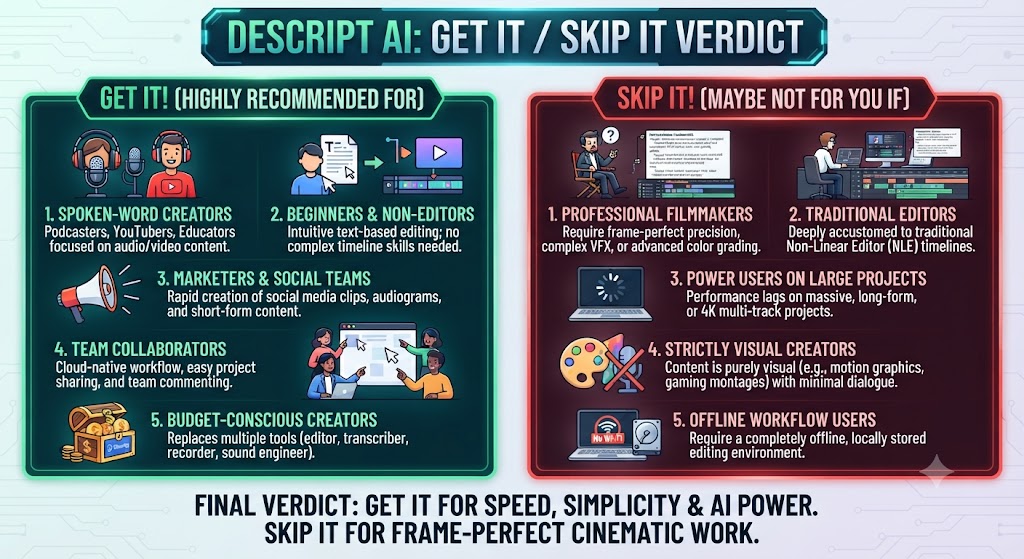
Get It If:
- You produce podcasts, interviews, or other spoken-word content regularly That’s a key point in this Descript review. On this point, this Descript review notes that – Editing by transcript sounds faster than scrubbing a timeline for your workflow
- Voice cloning for fixing recording mistakes would save real production time This holds up throughout the Descript review.
Skip It If:
- Your content is primarily visual, not spoken-word driven Keep that in mind from this Descript review.
- Within this Descript review, you need broad social-format resizing and wide-language translation as a primary feature Considering the data, this Descript review shows – Predictable, simple pricing matters more than the transcript-editing paradigm’s speed advantage
These Tools Help You Create. We Help You Go Viral.
Making the video is only half the battle — getting it seen is the other. Tasknestly’s viral video service handles strategy, editing, and distribution.
See Viral Video Services →Real-World Test: Editing a 30-Minute Interview
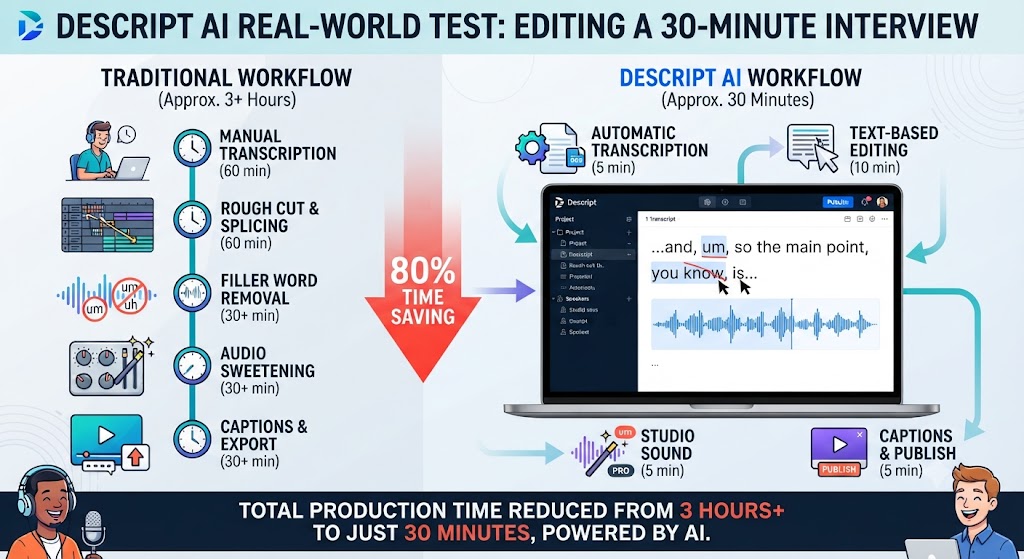
In the context of pricing, this Descript review notes i edited a 30-minute recorded interview to test Descript’s core workflow against my usual timeline-editing habits. Removing filler words, tightening pauses, and cutting a five-minute tangential section took under ten minutes total, working entirely through the transcript — delete the text, the audio follows. When I discovered a factual error requiring a quick correction after the edit was otherwise complete, Overdub regenerated the corrected line in my cloned voice in under two minutes, blending seamlessly into the surrounding original recording without requiring a re-recording session.
Per this Descript review, studio Sound’s audio cleanup on a section recorded in a slightly echoey room produced a noticeably cleaner result with a single click, removing the echo without requiring manual audio engineering. The one genuine friction point during testing: tracking actual AI credit consumption across Overdub and Studio Sound usage required more active attention than I expected, confirming the independent reports about the 2025 pricing overhaul making real costs harder to predict than the base subscription price suggests.
As this Descript review shows, the honest conclusion from testing: for spoken-word editing specifically, the transcript-based paradigm is a genuine, measurable speed advantage that’s hard to overstate once you’ve used it regularly, even accounting for the pricing structure’s real complexity.
These Tools Help You Create. We Help You Go Viral.
Making the video is only half the battle — getting it seen is the other. Tasknestly’s viral video service handles strategy, editing, and distribution.
See Viral Video Services →FAQ
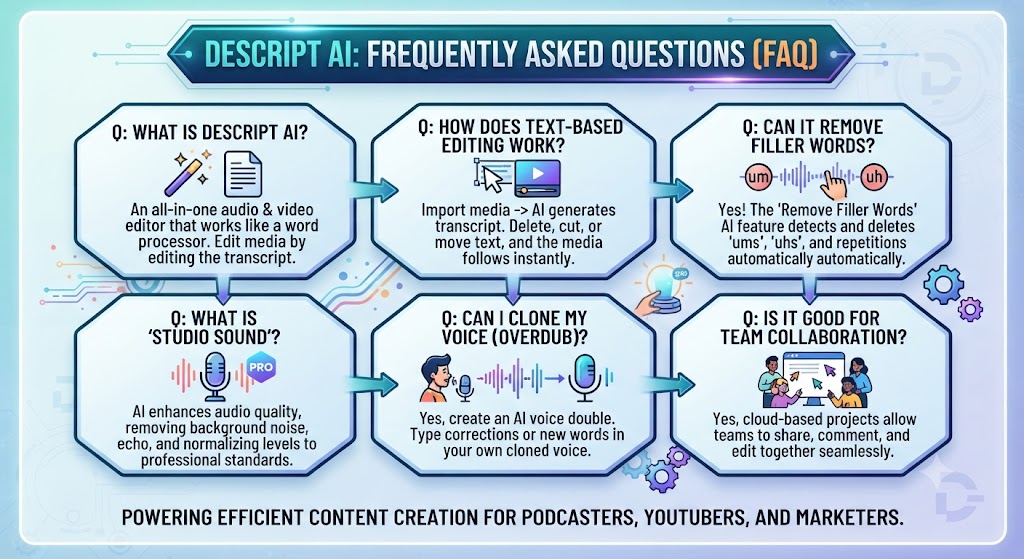
Is Descript worth it in 2026? In this Descript review, for podcasters, interviewers, and creators producing regular spoken-word content, yes — the transcript-editing paradigm and Overdub voice cloning solve real, recurring production problems no timeline-based competitor matches directly.
How much does Descript cost? Looking at Descript review details, pricing ranges from Free ($0, ~60 minutes/month) to Business ($50/month annual), with Creator at $24/month annual as the realistic baseline for serious podcast and video production.
What is Overdub? When it comes to this tool, this Descript review found that overdub is Descript’s voice cloning feature — train a synthetic version of your own voice, then regenerate any mispoken or deleted section by typing corrected text, without re-recording.
Is Descript good for social media video editing? That’s a key point in this Descript review. For anyone reading this Descript review, it’s serviceable but not purpose-built for that specifically. Tools like Veed.io offer more direct social-format resizing tools; Descript’s core strength is spoken-word editing rather than broad social video production.
Did Descript’s pricing change recently? This Descript review found that yes. A 2025 pricing overhaul replaced simple transcription-hour limits with a media-minutes-and-AI-credits system that independent reviews consistently flag as harder to predict than the previous structure.
Does Descript support multiple languages? Across this Descript review, yes, transcription covers 25 languages — solid but narrower than some competitors like Veed.io, which supports 50+ languages for translation specifically.
These Tools Help You Create. We Help You Go Viral.
Making the video is only half the battle — getting it seen is the other. Tasknestly’s viral video service handles strategy, editing, and distribution.
See Viral Video Services →Conclusion
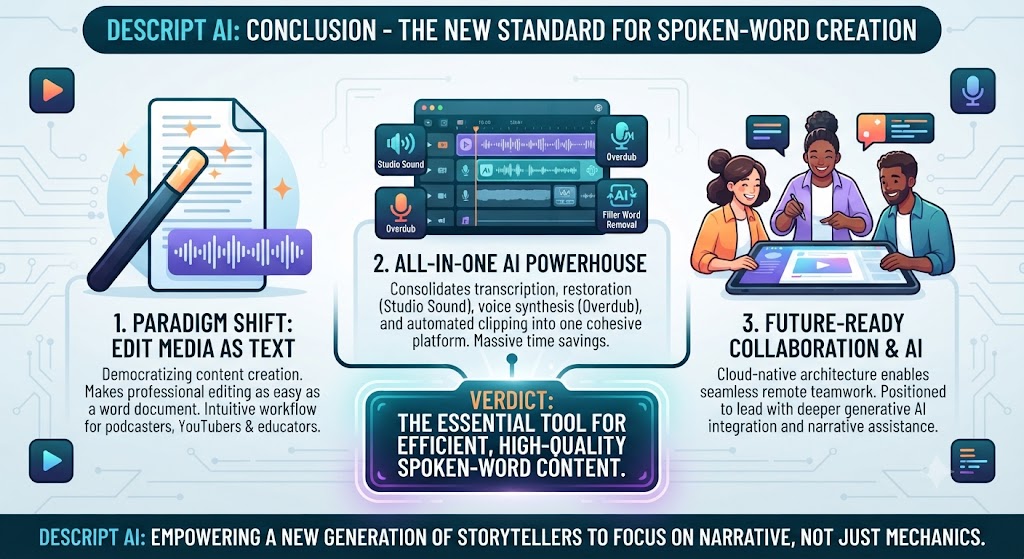
This Descript review lands on a genuinely positive verdict for its core, intended audience. The transcript-based editing paradigm isn’t a gimmick — it’s a real, measurable speed advantage for anyone working with spoken-word content, and Overdub’s voice cloning solves a specific, recurring editing problem that no other tool in this category addresses as directly. Studio Sound and automated filler-word removal round out a toolkit that’s clearly been built by people who understand what podcast and interview editing actually involves.
On this point, this Descript review notes that the honest caveat is pricing complexity. The 2025 overhaul to media minutes and AI credits has made real monthly costs genuinely harder to predict than the headline plan price suggests, and heavy AI feature users should budget real attention to that before committing to an annual plan.
Within this Descript review, for creators whose work is fundamentally about editing conversation and spoken content, Descript’s paradigm shift is worth learning despite the pricing complexity. For creators producing primarily visual content with lighter dialogue-editing needs, a more straightforward timeline-based tool may serve better as a primary editor.
Considering the data, this Descript review shows teams building a broader content and podcast strategy around Descript might also find value in Tasknestly’s digital marketing services for turning finished, edited episodes into an actual distribution and growth plan.
In the context of pricing, this Descript review notes descript continues to adjust its pricing and AI feature limits quickly, so revisit this review periodically rather than treating today’s numbers as fixed through the rest of 2026.
Per this Descript review, descript does not cover the entire AI audio and video editing landscape on its own. For teams needing broader timeline-based editing with strong social-format export and wide-language translation, Veed.io solves a genuinely different problem that Descript’s transcript-first design doesn’t directly address. For teams whose primary need is AI avatar presenter video rather than editing existing recordings, Synthesia and HeyGen occupy their own distinct category entirely, built around generating a presenter rather than refining a conversation someone already recorded.
As this Descript review shows, what is genuinely distinct about Descript within the broader editing category is how completely its design commits to one specific editing philosophy rather than trying to serve every video format equally well. That focus is exactly why it wins so decisively for spoken-word content and exactly why it’s a weaker fit for teams whose work is primarily visual. Teams evaluating a full content production stack should think in terms of which specific job needs solving at each stage, rather than assuming Descript, however capable, should handle every video and audio need across a growing content operation.
In this Descript review, the clearest way to frame the actual purchasing decision is to ask what fraction of your total content production time is spent talking versus filming. Podcasters and interviewers spend nearly all of that time on spoken content, and Descript’s advantage compounds directly into hours saved every single week. Creators whose work leans more visual — b-roll-heavy marketing videos, highly edited montages — will find that advantage matters less, since transcript editing offers less leverage when the content isn’t primarily about dialogue in the first place.
It helps to map out a month of expected content production before committing to a tier. The theoretical monthly allowance rarely matches real usage once revisions and iteration are factored in.
Budget a buffer above your baseline estimate. That avoids hitting a plan ceiling mid-month and being forced into an unplanned upgrade.
Pricing keeps shifting across AI video tools in 2026, so a plan that fits today may not fit by your next renewal. A little margin now avoids a scramble later.
Consider how your team actually consumes video output once it’s produced. The best tool on paper isn’t always best for the people who review, approve, and publish it during a busy week.
A workflow needing three rounds of revision before sign-off delivers less real value than a less polished workflow approved on the first pass. That approval friction rarely shows up on a pricing page — but it shows up constantly in team calendars.
Factor in who reviews the work, how fast they respond, and whether revisions are quick or painful before finalizing a decision about this platform.
One more practical consideration worth naming directly: whichever editing tool you eventually settle on, plan for a genuine onboarding period before expecting to work at full speed. Most new users underestimate how much the transcript-editing mental model differs from timeline editing, and the first few sessions often feel slower than expected simply because old habits have to be unlearned before the new workflow’s real speed advantage becomes apparent in daily use. Budgeting that learning curve into your first month of adoption, rather than judging the tool purely on day-one output, produces a far more accurate picture of its long-term value to your actual production schedule.
A final point worth stating plainly: no single editing tool, however capable, perfectly serves every content format a growing creative team eventually produces. Teams that start out purely producing podcasts often expand into video essays, social clips, or livestream content over time, and it is worth planning for that expansion by keeping a secondary tool in mind before committing to one platform for the long term.
None of this changes the basic fit question here — spoken content favors transcript editing, visual content favors timeline editing.
These Tools Help You Create. We Help You Go Viral.
Making the video is only half the battle — getting it seen is the other. Tasknestly’s viral video service handles strategy, editing, and distribution.
See Viral Video Services →