Reclaim AI Review 2026: Honestly the Best AI Scheduling Tool?

| ⚡ TechBotHQ Verdict This Reclaim AI review gives the platform a solid 4.2 out of 5 for its target user. Reclaim AI is the best-value AI calendar tool available in 2026 — automatically blocking time for tasks, habits, and focus work inside your existing Google Calendar workflow without forcing you to rebuild how you work. Starting free and scaling to $8 per user per month on Starter, this Reclaim AI review found it delivers more scheduling automation per dollar than any competing tool. The main limitations are real: no mobile app, Google Calendar dependency, and lighter autonomous scheduling than Motion AI. But for meeting-heavy professionals who want intelligent calendar protection without the complexity, Reclaim AI is the honest answer. Rating: 4.2/5 | Best For: Google Calendar users, knowledge workers in meeting-heavy environments, and small teams who want AI to protect focus time and schedule tasks automatically |
Table of Contents
Reclaim AI Review 2026: What You Need to Know First
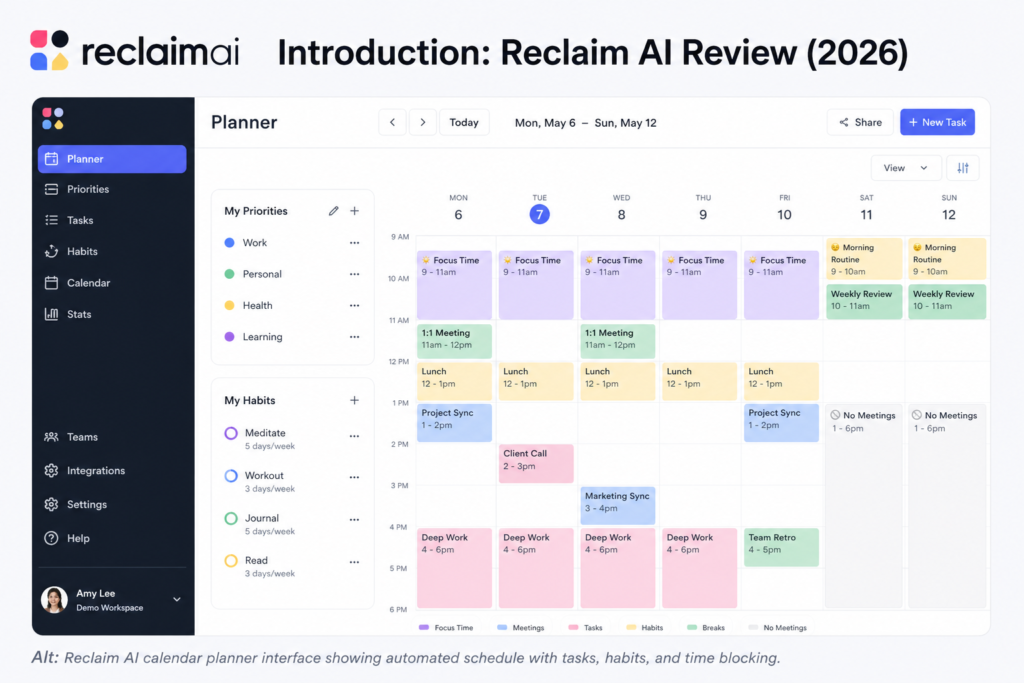
This Reclaim AI review is for a specific professional: someone whose calendar fills up with meetings faster than they can protect time for actual work, whose task list never shrinks because there is never a clear window to work through it, and who spends real mental energy every morning figuring out when to fit everything in. Reclaim AI was built specifically for that problem — and this Reclaim AI review found that it solves it well.
Reclaim AI works by connecting to your Google Calendar and automatically placing time blocks for your tasks, habits, and focus work around your existing meetings and commitments. When a new meeting is added, Reclaim AI adjusts. When a task deadline gets closer, Reclaim AI finds time. When your morning run needs protecting, Reclaim AI defends that slot automatically. The result — after a week or two of calibration — is a calendar that reflects your actual priorities rather than just your meeting schedule.
The most important framing for any Reclaim AI review is how it compares to Motion AI, its closest competitor. Motion rebuilds your entire daily schedule from scratch autonomously. Reclaim AI works within your existing calendar workflow, making gentler, more targeted interventions. Reclaim AI is also significantly cheaper: free on the Lite plan, $8 per user per month on Starter, compared to Motion’s $19 per month annual minimum. This Reclaim AI review helps you decide which approach is right for your situation.
Our Reclaim AI review tested the platform over three weeks with Google Calendar and ClickUp connected, focusing on task scheduling accuracy, habit protection reliability, Smart 1:1 scheduling, and whether the tool measurably reduced the time spent managing calendar overhead. Here is the honest and complete picture.
Whether you are a knowledge worker evaluating AI scheduling tools for the first time, a team lead looking for a calendar automation tool your whole team can use affordably, or someone deciding between Reclaim AI and Motion AI — this Reclaim AI review covers everything you need to make the right call.
Want The Time Savings Without Doing It Yourself?
These tools save you hours on your own tasks — but marketing is one job most people would rather hand off entirely. Tasknestly runs it for you, end to end.
Get a Free Marketing Quote →1. What Is Reclaim AI? A Plain-English Overview
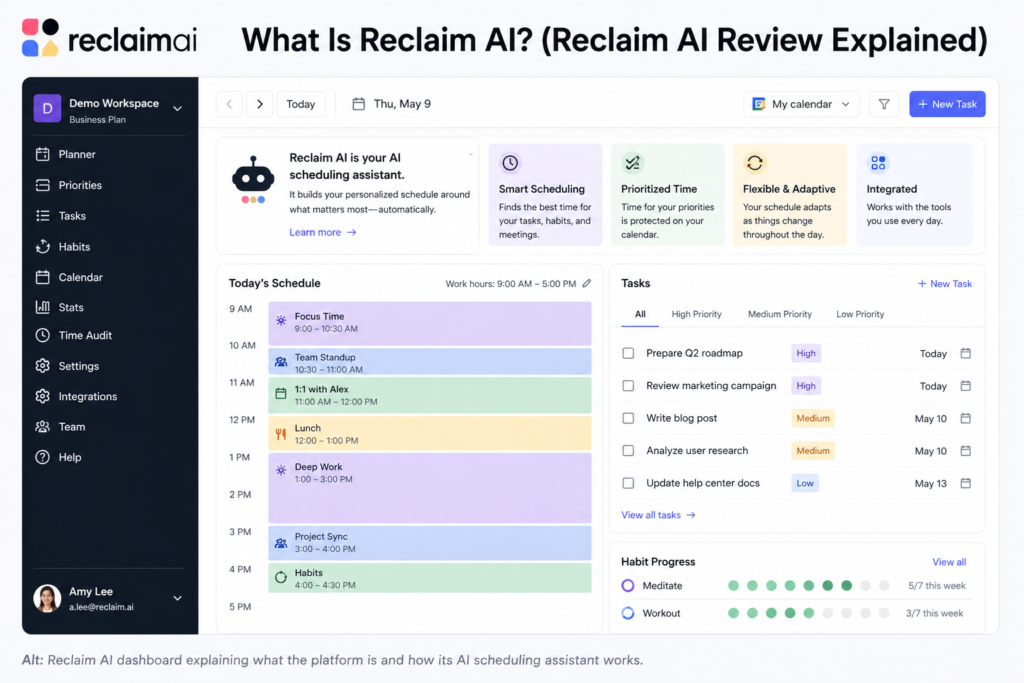
Reclaim AI is an AI-powered calendar management tool that automatically schedules tasks, habits, focus blocks, and meetings around your existing commitments. Founded in 2019 and now serving over 100,000 professionals, Reclaim AI integrates with Google Calendar — and more recently Outlook — as well as task management tools including Asana, Todoist, Linear, ClickUp, and Jira.
What makes this Reclaim AI review interesting is how Reclaim AI approaches the scheduling problem differently from competitors. Rather than replacing how you manage your calendar, Reclaim AI enhances it. Your Google Calendar remains your calendar — Reclaim AI simply adds intelligence to how that calendar fills up. Tasks get scheduled automatically. Habits get protected automatically. Meetings get optimized automatically. The intervention is surgical rather than wholesale, which makes adoption significantly easier than tools that require you to migrate your entire workflow.
The Reclaim AI scheduling engine uses AI to understand your work patterns over time — when you do your best focused work, which habits you consistently protect, how long tasks actually take versus how long you estimate them. This learning makes the Reclaim AI review experience significantly better at week four than at week one, as the platform calibrates to your actual patterns rather than generic assumptions.
Reclaim AI also includes Smart 1:1 scheduling — an intelligent meeting booking tool that finds optimal times for recurring meetings based on both participants’ work patterns and energy levels, not just calendar availability. For professionals who manage multiple regular check-ins with team members or clients, this alone saves meaningful calendar negotiation time every week.
Want The Time Savings Without Doing It Yourself?
These tools save you hours on your own tasks — but marketing is one job most people would rather hand off entirely. Tasknestly runs it for you, end to end.
Get a Free Marketing Quote →2. How Reclaim AI Works: Key Features
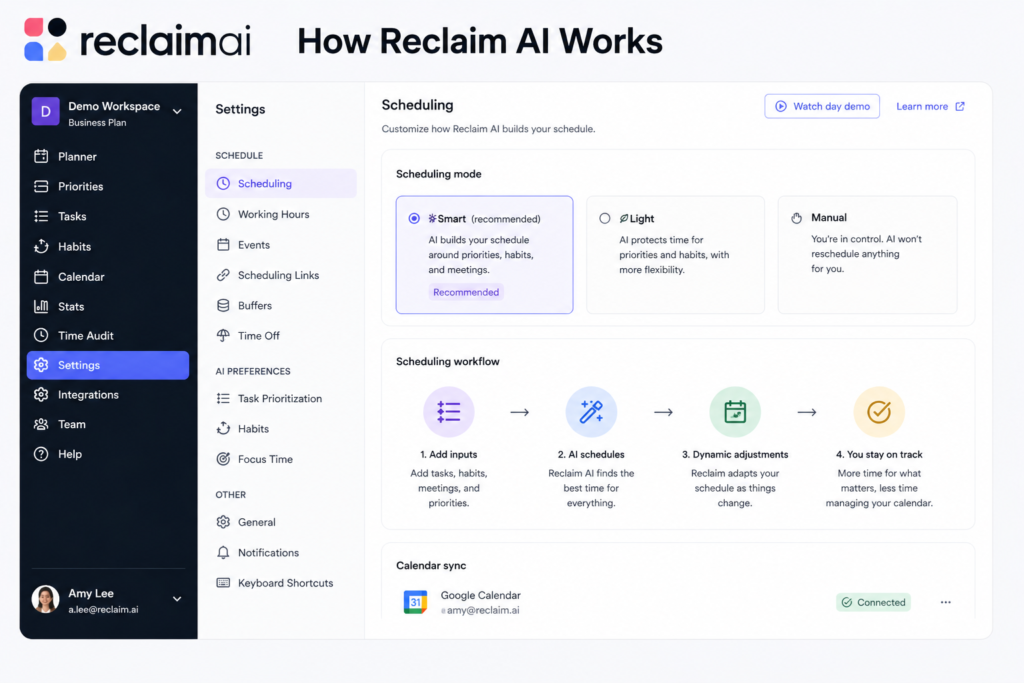
AI Task Scheduling
The core Reclaim AI feature and the reason most users start their Reclaim AI review with high expectations: connect your task management tool — Asana, Todoist, ClickUp, Linear, or Jira — and Reclaim AI automatically finds time in your calendar to work on your tasks based on their deadlines, priorities, and estimated durations. Tasks appear as calendar blocks that Reclaim AI moves and adjusts automatically as your schedule changes around them.
In direct testing for this Reclaim AI review, the task scheduling worked reliably for straightforward tasks with clear deadlines. The main variable is your time estimates — Reclaim AI’s scheduling quality is directly proportional to how accurately you estimate task duration. Overestimate consistently and your calendar looks more packed than it needs to be. Underestimate and tasks get rescheduled to tomorrow more often than you want.
💡 Pro tip: Track actual task completion times for your first two weeks with Reclaim AI and adjust your estimates accordingly. After two weeks of calibrated estimates, the scheduling quality improves dramatically and the Reclaim AI experience starts feeling genuinely useful rather than approximate.
Habit Scheduling and Protection
Set habits in Reclaim AI — exercise, deep work blocks, lunch breaks, learning time, end-of-day shutdown routines — and the platform protects these slots automatically, scheduling them into available windows and moving them when meetings conflict. In our Reclaim AI review testing, habit protection was the most consistently reliable feature. Unlike task scheduling, which depends on accurate estimates, habit protection works well from day one because habits have a fixed duration and flexible timing.
The habit scheduling is also where Reclaim AI’s calendar-aware intelligence shows most clearly. Rather than blocking habits at fixed times regardless of what else is happening, Reclaim AI finds the best available window for each habit within your defined range — protecting exercise during the morning hours you specify, not just at 7am every day regardless of your 6:30am client call.
Smart 1:1 Scheduling
Smart 1:1 scheduling is a Reclaim AI feature that optimizes when recurring meetings happen rather than just where they fit in open calendar slots. For each 1:1 relationship you set up in Reclaim AI, the tool analyzes both participants’ calendars, work patterns, and energy levels to find the optimal recurring meeting time — not just a time when both people are technically free. In our Reclaim AI review testing, Smart 1:1 scheduling consistently found better meeting times than we would have chosen manually, clustering meetings during natural meeting-mode periods and leaving focus time intact.
Focus Time Defense
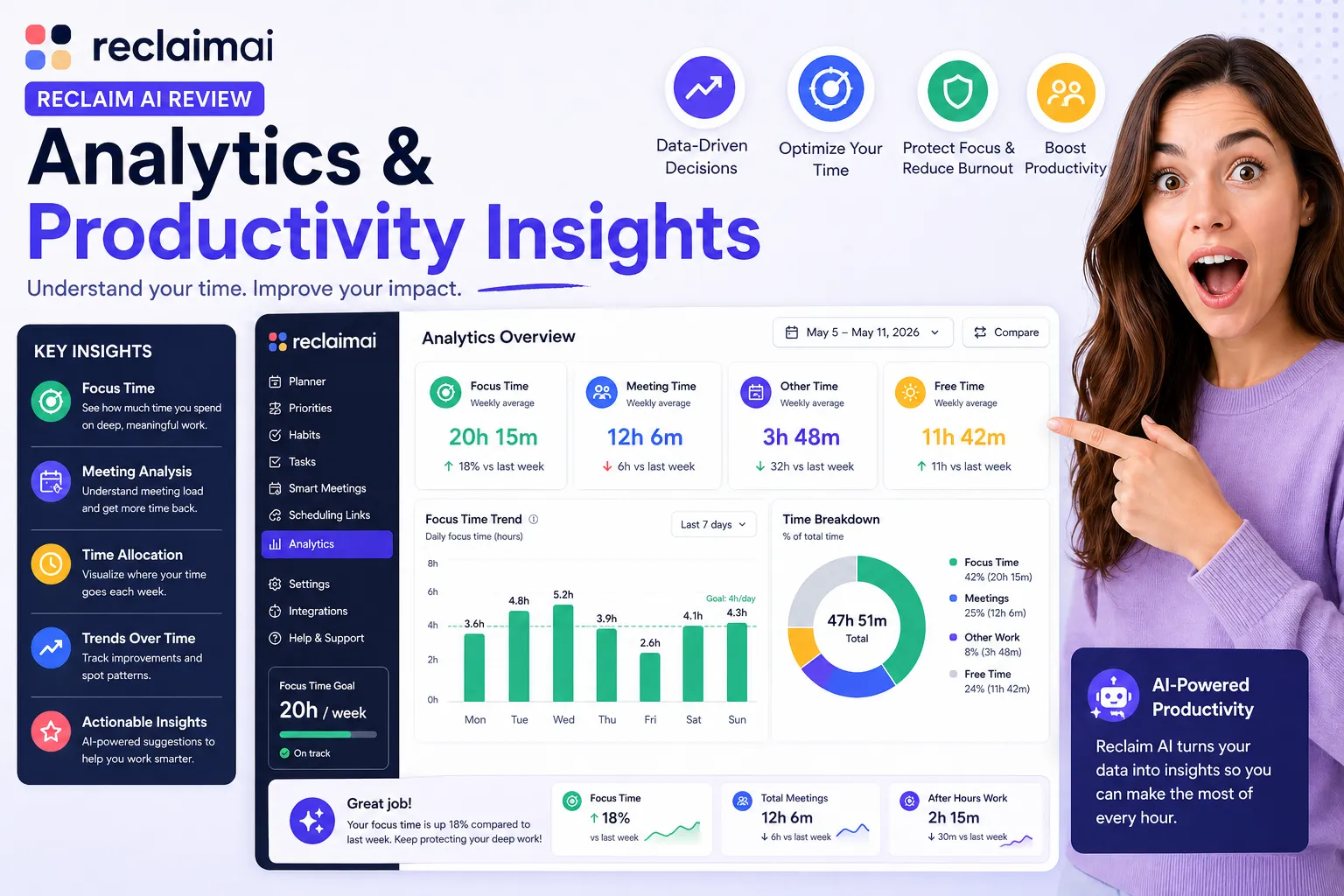
Reclaim AI automatically reserves blocks of uninterrupted focus time based on your focus time goals. If you set a goal of four hours of focus time per day, Reclaim AI works to protect that across your calendar — scheduling meetings into blocks that minimize fragmentation of your focus windows. This is the Reclaim AI review feature most commonly cited by users who work in high-meeting environments as the one that changed their workday most meaningfully.
Dynamic Rescheduling
When a new meeting gets added to your calendar, when an existing meeting shifts time, or when a task takes longer than expected, Reclaim AI automatically adjusts all affected time blocks. Tasks move to the next available window. Habits find new slots. Focus blocks compress or shift. The result is a calendar that adapts to reality rather than becoming immediately out of date when the first thing changes after Monday morning planning.
Scheduling Links
Reclaim AI includes shareable scheduling links that show your availability based on your actual priorities — not just open calendar slots — preventing people from booking the focus time and habit blocks that Reclaim AI is protecting. In our Reclaim AI review testing, scheduling links worked well and were noticeably more intelligent than basic Calendly-style availability links that show all open slots equally.
Want The Time Savings Without Doing It Yourself?
These tools save you hours on your own tasks — but marketing is one job most people would rather hand off entirely. Tasknestly runs it for you, end to end.
Get a Free Marketing Quote →3. Key Reclaim AI Features in 2026
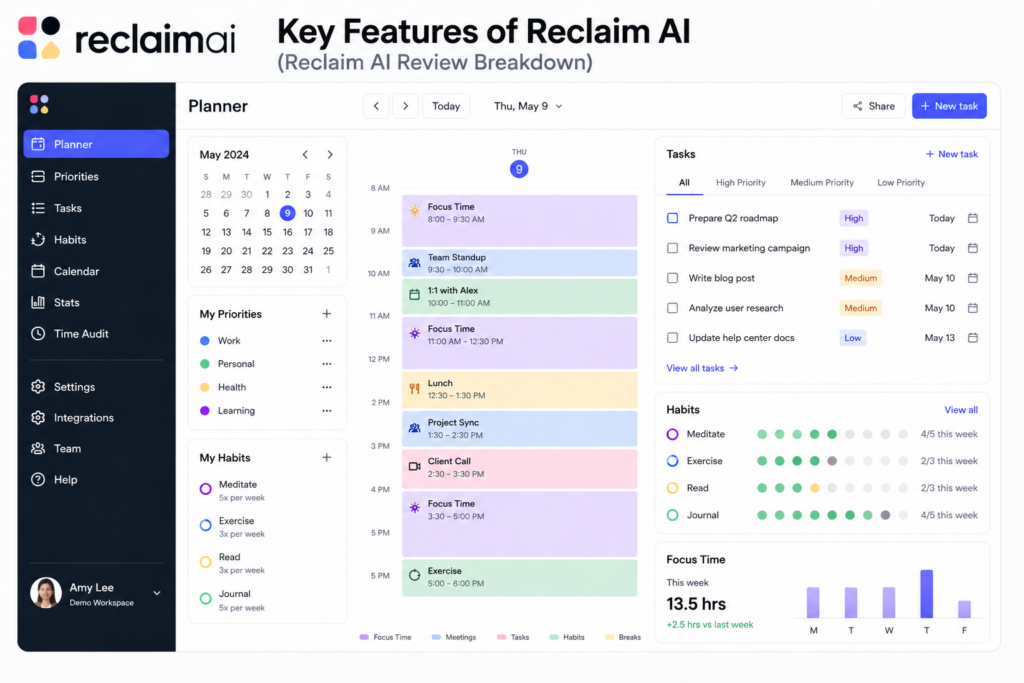
- AI Task Scheduling: Automatically places task time blocks in your calendar based on deadlines, priorities, and available time — syncs with Asana, Todoist, Linear, ClickUp, and Jira.
- Habit Scheduling: Set recurring habits and Reclaim AI protects these slots automatically, rescheduling around meetings while keeping habits on your calendar.
- Focus Time Defense: Automatically reserves uninterrupted focus blocks based on your daily focus time goals.
- Smart 1:1 Scheduling: Optimizes recurring meeting times based on both participants’ work patterns and energy levels — not just open slots.
- Buffer Time Automation: Automatically adds buffer time between meetings to prevent back-to-back scheduling burnout.
- Dynamic Rescheduling: When meetings shift or tasks run long, Reclaim AI automatically adjusts all affected time blocks in real time.
- Scheduling Links: Shareable booking links that show availability based on your actual priorities, protecting task and habit blocks from external bookings.
- Time Tracking: Built-in time tracking tied to tasks and projects — available on Business and Enterprise plans.
- Team Habits: Coordinate shared habits across team members — shared lunch blocks, no-meeting hours, team focus time.
- Analytics Dashboard: Track how your time is actually being spent versus how you want to spend it — available on Business plan.
- ClickUp and Asana Integration: Two-way sync that schedules your existing tasks directly from the project management tools you already use.
- Outlook Support: Microsoft 365 and Outlook calendar integration — newer and less mature than Google Calendar but functional.
Want The Time Savings Without Doing It Yourself?
These tools save you hours on your own tasks — but marketing is one job most people would rather hand off entirely. Tasknestly runs it for you, end to end.
Get a Free Marketing Quote →4. Reclaim AI Review: Pricing Breakdown
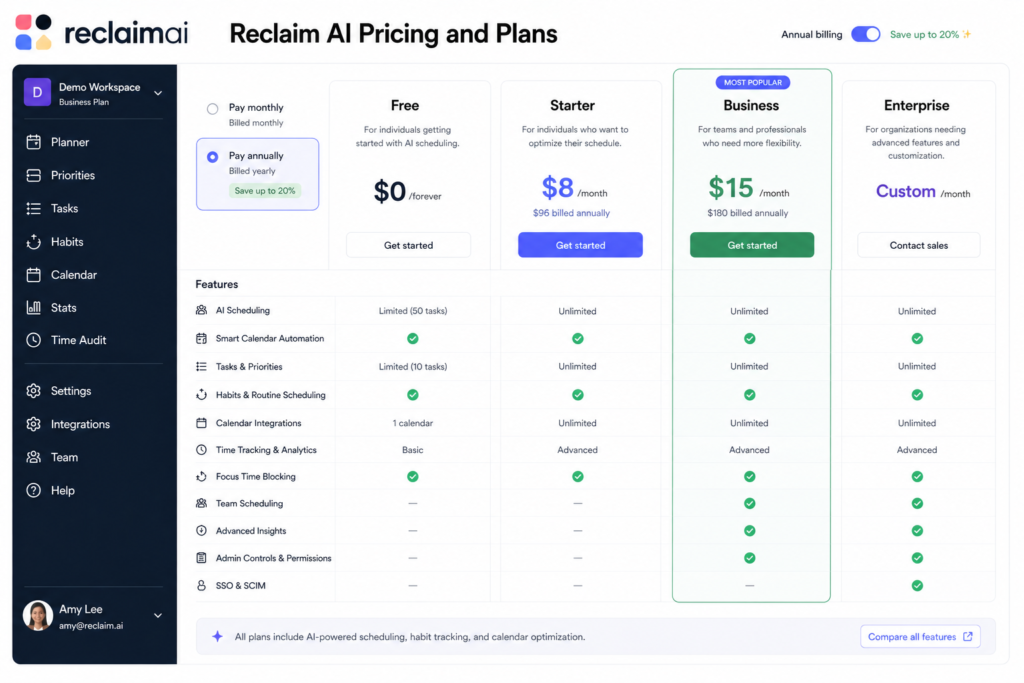
Reclaim AI pricing is one of the most attractive structures in the AI scheduling market and a significant advantage in this Reclaim AI review compared to competitors. Starting free with genuinely useful features, it is significantly more accessible than Motion AI at every tier.
| Plan | Price | What You Get |
|---|---|---|
| Lite | Free forever | Basic smart scheduling, 3 tasks, habits, scheduling links, Google Calendar sync |
| Starter | $8/user/month | Unlimited tasks, all habits, full ClickUp/Asana/Todoist/Linear sync, priority scheduling, analytics |
| Business | $12/user/month | Everything in Starter plus team habits, shared analytics, team coordination, priority support |
| Enterprise | $18/user/month | SSO, SCIM, advanced security, custom integrations, dedicated support, SLA |
Key Reclaim AI pricing notes:
- Free Lite plan is genuinely useful for evaluation: Unlike many tools with token free tiers designed to frustrate you into upgrading, Reclaim AI’s Lite plan covers the core scheduling features well enough to run a real evaluation. Three tasks and full habit scheduling are enough to test whether the approach works for your situation.
- Starter at $8/month is the best value in AI scheduling: Unlimited task scheduling with full integration support — ClickUp, Asana, Todoist, Linear, Jira — at $8 per user per month is the most competitive pricing in the AI scheduling category. This Reclaim AI review found no comparable tool that delivers as much automatic scheduling for as little cost.
- Business at $12/month is for teams: Team habits, shared analytics, and coordinated scheduling across colleagues make Business the right plan for teams of four or more who want consistent calendar coordination. At $12/month per user it remains significantly cheaper than Motion AI’s team equivalent.
- Annual billing saves approximately 20%: Reclaim AI offers annual billing discounts across all paid tiers. For teams committed to the tool, annual billing is worth taking.
💰 Honest take: The Reclaim AI pricing structure is the strongest in the AI scheduling market. Starter at $8/month with unlimited task scheduling and full project management tool integration is not a teaser price — it is what Reclaim AI genuinely costs. The value comparison with Motion AI at $19/month is stark, and for many professionals the Reclaim AI approach is actually the better fit at a third of the price.
Want The Time Savings Without Doing It Yourself?
These tools save you hours on your own tasks — but marketing is one job most people would rather hand off entirely. Tasknestly runs it for you, end to end.
Get a Free Marketing Quote →5. Reclaim AI Review: Honest Pros and Cons
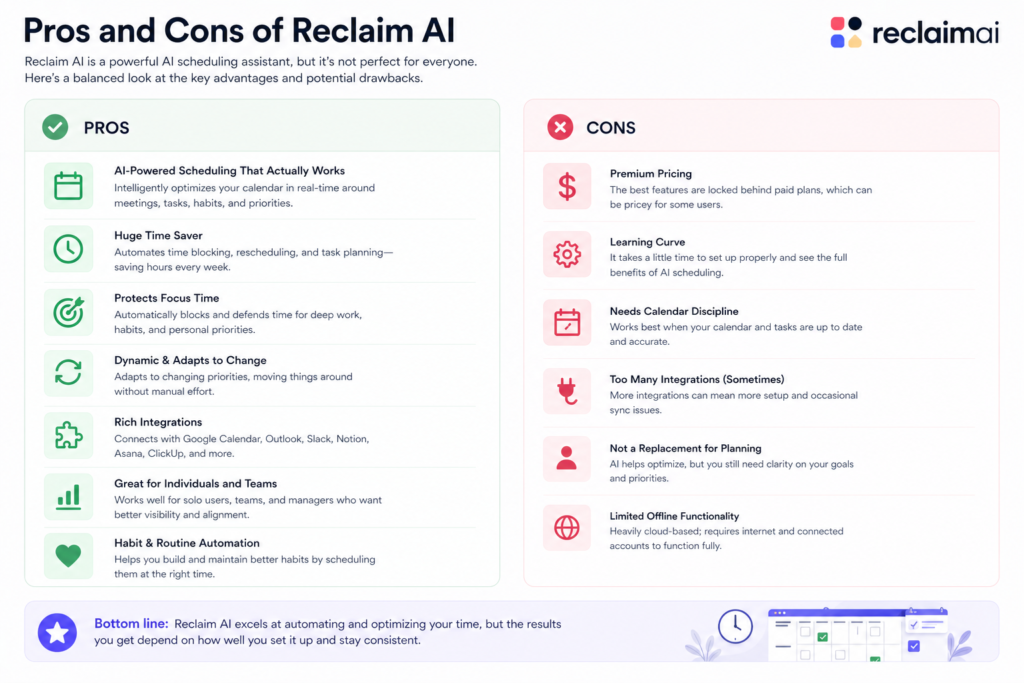
Every honest Reclaim AI review needs to give you both sides clearly. Here is what genuinely impressed us in our Reclaim AI review testing and where the real limitations show up.
What Reclaim AI Gets Right
- Best value in AI scheduling by a clear margin: At $8 per month for Starter with unlimited task scheduling and full integration support, Reclaim AI’s pricing is not matched by any comparable AI scheduling tool. For budget-conscious professionals and teams, this is the primary reason to choose Reclaim AI over Motion AI.
- Habit protection is the most reliable feature: Automatically defending exercise, lunch, learning time, and end-of-day routines against meeting creep is one of Reclaim AI’s most practically valuable features. It works reliably from day one and compounds in value as colleagues learn to use your scheduling link.
- Smart 1:1 scheduling is genuinely thoughtful: Optimizing recurring meeting times based on energy and work patterns — not just open slots — produces better meeting placement than any manual scheduling process most professionals use. This Reclaim AI review found Smart 1:1s saved approximately 15 minutes per week of meeting time negotiation on a schedule with six regular 1:1s.
- ClickUp and Asana integration is strong and reliable: Syncing with existing task management tools and scheduling the tasks automatically removes a major manual step that most productivity systems leave to the individual. The two-way sync works reliably in our Reclaim AI review testing with both ClickUp and Asana.
- Gentle adoption curve that does not disrupt existing workflows: Reclaim AI works within your existing Google Calendar workflow rather than replacing it. This makes adoption significantly less disruptive than Motion AI or other tools that require rebuilding how you manage your schedule from scratch.
- Focus time protection measurably improves deep work output: Professionals who set and protect daily focus time goals through Reclaim AI consistently report more deep work hours per week than before using the tool. The calendar evidence is visible — before Reclaim AI the calendar is fragmented, after Reclaim AI focus blocks are defended consistently.
Where Reclaim AI Falls Short
- No mobile app is a significant gap: Reclaim AI has no iOS or Android app as of this Reclaim AI review. For professionals who manage their schedule primarily from their phone, this is a deal-breaker. The mobile web experience exists but is not a substitute for a native app in terms of usability.
- Google Calendar dependency limits Microsoft 365 teams: Reclaim AI’s Outlook support exists but is newer and less mature than the Google Calendar integration. Teams standardized on Microsoft 365 and Outlook will find the Reclaim AI experience noticeably less polished than Google Calendar users.
- Lighter autonomous scheduling than Motion AI: Motion AI’s scheduling engine is more aggressive and comprehensive — it rebuilds your entire day from scratch. Reclaim AI makes more targeted interventions within your existing workflow. For professionals who want maximum scheduling autonomy, Motion AI is the stronger tool despite the higher price.
- Task management is scheduling only — not a task manager: Reclaim AI can schedule your tasks from connected tools but is not itself a task manager. You need a separate tool for task capture, management, and organization. This is not a flaw exactly — it is a deliberate product choice — but it means Reclaim AI is always part of a stack rather than a complete productivity solution.
- Learning curve on time estimates: The quality of Reclaim AI’s task scheduling is directly tied to the accuracy of your time estimates. Users who provide inaccurate estimates consistently report disappointment with the scheduling output. The calibration period takes two to three weeks of active tracking to produce reliable results.
Want The Time Savings Without Doing It Yourself?
These tools save you hours on your own tasks — but marketing is one job most people would rather hand off entirely. Tasknestly runs it for you, end to end.
Get a Free Marketing Quote →6. Who Should Use Reclaim AI?
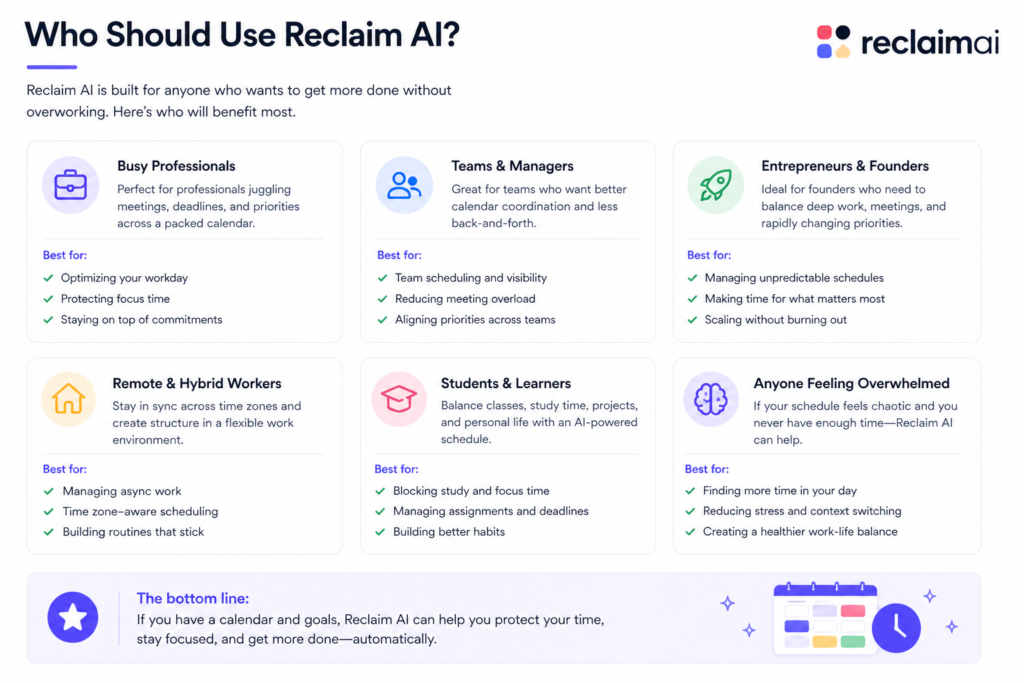
Our Reclaim AI review identified clear patterns in who benefits most from the platform and who should look elsewhere. The Reclaim AI use case is specific enough that being precise about fit is more useful than a generic recommendation.
Reclaim AI Is a Great Fit If You Are:
- A knowledge worker in a meeting-heavy environment who needs to protect focus time — Reclaim AI’s habit and focus defense features address this directly and reliably.
- A professional already using Google Calendar who wants AI scheduling without rebuilding how you work — Reclaim AI layers on top of existing habits and workflows rather than replacing them.
- Someone using Asana, Todoist, ClickUp, Linear, or Jira who wants tasks automatically scheduled on their calendar — the integration is one of Reclaim AI’s strongest and most practically valuable features.
- A budget-conscious professional or team — $8 per user per month on Starter is the most accessible price in the AI scheduling category for the features it delivers.
- A team lead who wants shared habit coordination and team analytics without a significant per-user cost — Business at $12 per user per month covers team scheduling coordination at a fraction of Motion AI’s team price.
- Someone who runs regular 1:1 meetings and wants them optimized for energy and work patterns rather than just open slots — Smart 1:1 scheduling consistently produces better meeting placement than manual scheduling.
Reclaim AI Is Probably Not Right If You Are:
- On Microsoft 365 and Outlook as your primary calendar — Google Calendar is where Reclaim AI is most mature and reliable.
- Someone who needs to manage your schedule primarily from a mobile device — no iOS or Android app is a real and significant gap.
- Wanting a fully autonomous daily schedule rebuild from scratch — Motion AI does this more aggressively and is the right choice if maximum scheduling autonomy is your priority.
- Looking for robust project management alongside your scheduling tool — Reclaim AI is a calendar tool that integrates with your project manager, not a replacement for it.
- Managing extremely complex multi-deadline project portfolios — Motion AI’s scheduling engine handles interdependent deadline complexity better than Reclaim AI’s more targeted approach.
Want The Time Savings Without Doing It Yourself?
These tools save you hours on your own tasks — but marketing is one job most people would rather hand off entirely. Tasknestly runs it for you, end to end.
Get a Free Marketing Quote →7. Reclaim AI Review: How It Compares
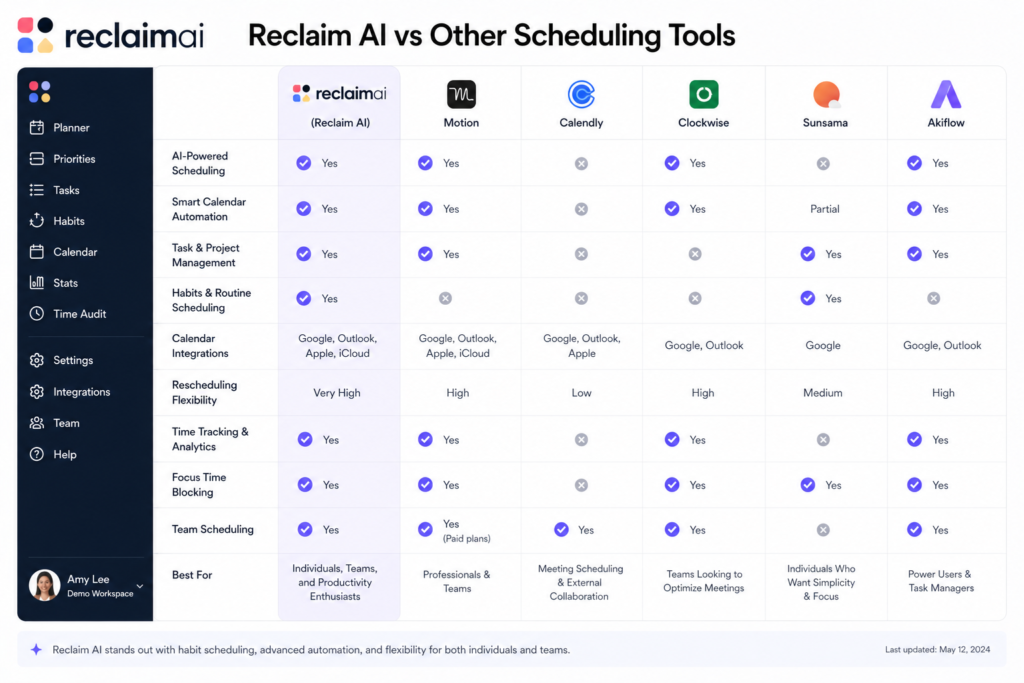
This Reclaim AI review compares Reclaim AI against the tools most commonly evaluated alongside it. The Reclaim AI vs Motion AI comparison is the one that matters most for most readers of this Reclaim AI review.
| Tool | Price | Key Strength | Best For |
|---|---|---|---|
| Reclaim AI | $8/month | Best value, habit protection, Google Calendar | Google Calendar users, budget-conscious teams |
| Motion AI | $19/month | Most autonomous scheduling, project management | Deadline-driven complex workloads |
| Clockwise | $6.75/month | Team calendar optimization, meeting clustering | Teams reducing meeting fragmentation |
| Cal.com | Free/open source | Flexible scheduling links, developer control | Developers wanting open-source scheduling |
The Reclaim AI vs Motion AI comparison deserves extended treatment in this Reclaim AI review because it is the most common decision readers face. Motion rebuilds your entire daily schedule autonomously and includes more project management features. Reclaim AI works within your existing calendar workflow and is significantly more affordable. This Reclaim AI review recommends Reclaim AI for budget-conscious professionals wanting gentle calendar automation, and Motion AI for professionals with complex deadline-driven workloads who want maximum scheduling autonomy and are willing to pay for it.
Want The Time Savings Without Doing It Yourself?
These tools save you hours on your own tasks — but marketing is one job most people would rather hand off entirely. Tasknestly runs it for you, end to end.
Get a Free Marketing Quote →8. What Real Users Say About Reclaim AI
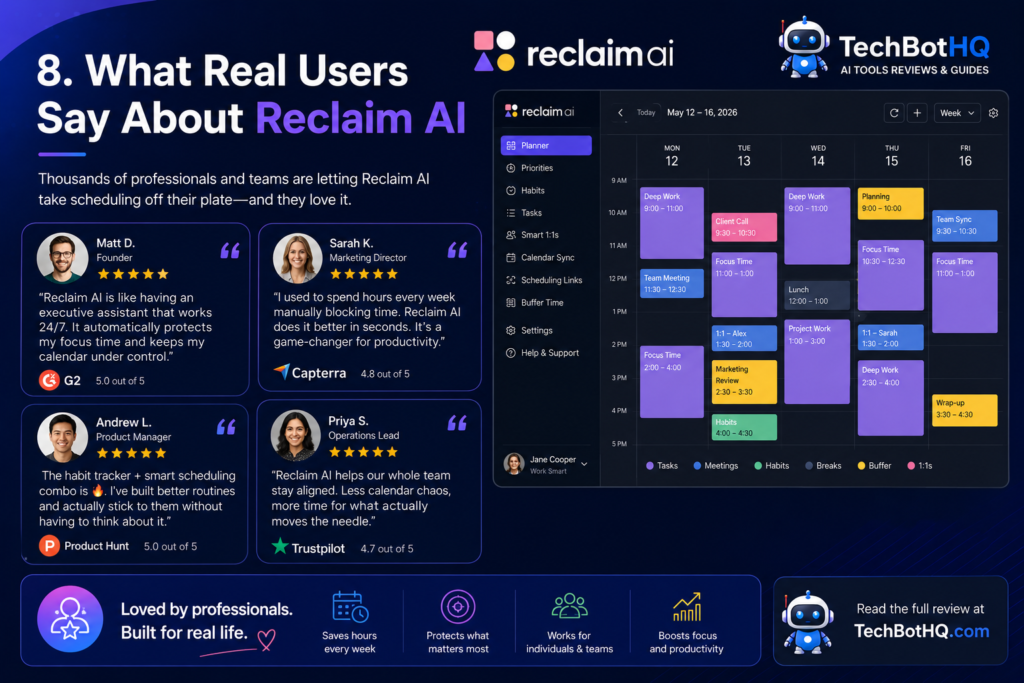
Verified user feedback in Reclaim AI review research across G2, Product Hunt, and Reddit tells a consistent story by user type. Meeting-heavy professionals — consultants, managers, customer success leads, and project managers who spend more than 50% of their working hours in meetings — consistently describe Reclaim AI as one of the most impactful calendar tools they have used. The habit protection feature in particular generates enthusiastic feedback from users who had previously failed to maintain consistent exercise, deep work blocks, or end-of-day routines because meetings always consumed those slots.
The Smart 1:1 scheduling feature generates positive but more measured feedback in Reclaim AI review research. Users who manage many recurring 1:1 relationships consistently find it saves time and produces better meeting placement. Users with fewer regular meetings find it less impactful — which makes sense given the feature is specifically designed for professionals with a high volume of recurring check-ins.
The most consistent criticism in Reclaim AI review feedback is the absence of a mobile app. Multiple reviews specifically call out the mobile gap as the thing that most limits Reclaim AI’s usefulness for professionals who manage their schedule and respond to scheduling changes from their phone throughout the day. This is a genuine product limitation that the Reclaim AI team has acknowledged and is reportedly working to address, but it remains a real constraint as of this Reclaim AI review.
The Outlook integration also generates criticism in recent Reclaim AI review feedback. Microsoft 365 users who tried Reclaim AI expecting the same experience as Google Calendar users consistently report that the integration feels less complete and reliable. If your team is on Outlook, this Reclaim AI review strongly recommends testing the free Lite plan thoroughly before committing to a paid tier.
Want The Time Savings Without Doing It Yourself?
These tools save you hours on your own tasks — but marketing is one job most people would rather hand off entirely. Tasknestly runs it for you, end to end.
Get a Free Marketing Quote →9. Our Reclaim AI Review Rating Breakdown
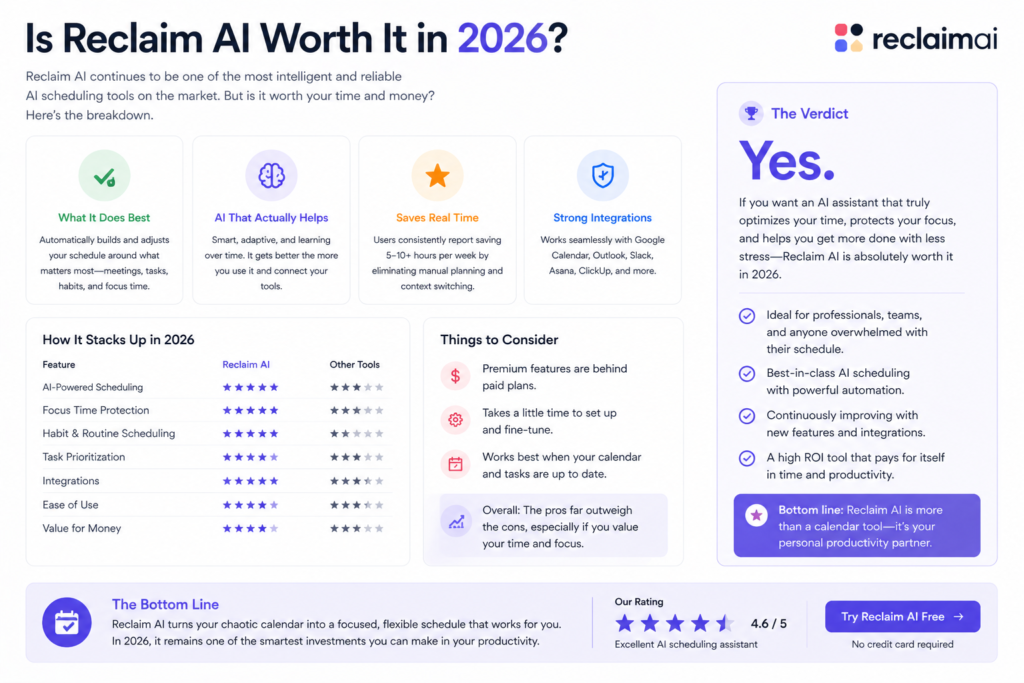
| Category | Score | Notes |
|---|---|---|
| AI Task Scheduling | 4.4 / 5 | Solid automatic task placement; quality depends on accurate time estimates |
| Habit Protection | 4.7 / 5 | The most reliable and immediately valuable feature — works well from day one |
| Smart 1:1 Scheduling | 4.5 / 5 | Thoughtful meeting optimization — consistently better than manual scheduling |
| Focus Time Defense | 4.6 / 5 | Measurably increases deep work hours for meeting-heavy professionals |
| Pricing Value | 4.9 / 5 | $8/month Starter is the best value in AI scheduling — not matched by any competitor |
| Google Calendar Integration | 4.8 / 5 | Deep, reliable, mature two-way sync |
| Outlook Integration | 3.2 / 5 | Functional but noticeably less mature than Google Calendar — test before committing |
| Mobile Experience | 2.0 / 5 | No native mobile app — a significant gap for mobile-first professionals |
| Autonomous Scheduling Depth | 3.8 / 5 | More targeted than Motion AI — right for some users, limiting for others |
| Overall Reclaim AI Review | 4.2 / 5 | The best-value AI scheduling tool for Google Calendar users in 2026 |
Want The Time Savings Without Doing It Yourself?
These tools save you hours on your own tasks — but marketing is one job most people would rather hand off entirely. Tasknestly runs it for you, end to end.
Get a Free Marketing Quote →10. Final Reclaim AI Review Verdict
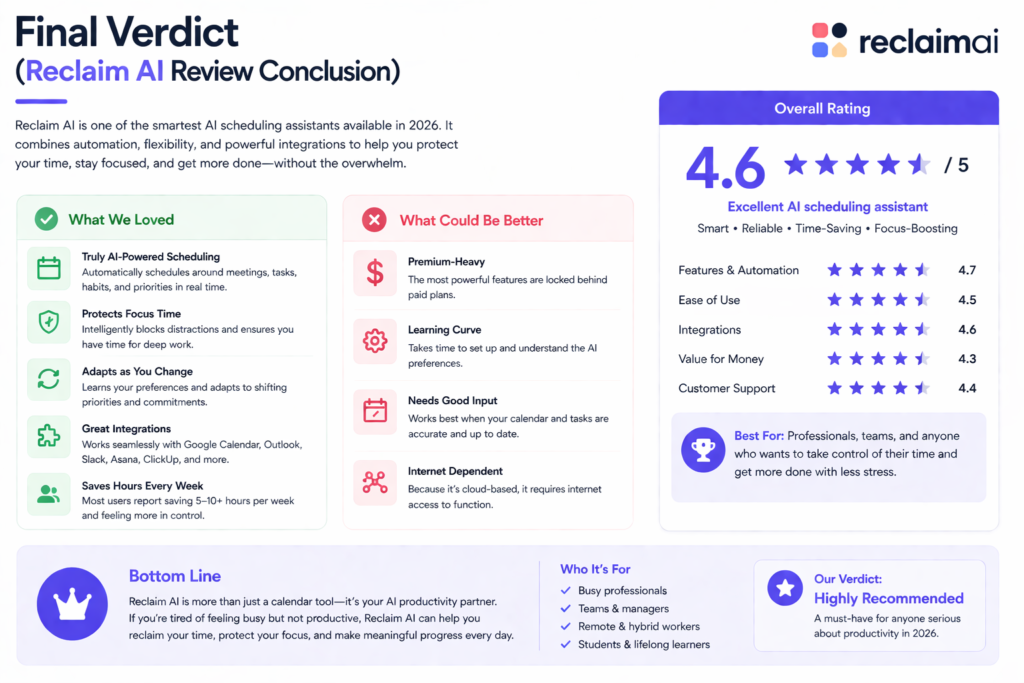
Here is the honest bottom line of this Reclaim AI review: Reclaim AI is the best-value AI scheduling tool for Google Calendar users in 2026. At $8 per month for the Starter plan, it delivers automatic task scheduling, habit protection, focus time defense, Smart 1:1 meeting optimization, and dynamic rescheduling at a price that makes it accessible to essentially anyone who works with a calendar. No comparable AI scheduling tool provides more value per dollar.
The mobile app gap and Google Calendar dependency are real limitations that this Reclaim AI review does not dismiss. If you manage your schedule primarily from your phone or your team is on Microsoft 365, these are genuine reasons to reconsider. But for Google Calendar users who work on desktop, the Reclaim AI pricing and feature combination is genuinely difficult to argue with.
Our Reclaim AI review recommendation: start with the free Lite plan and connect your Google Calendar and one task management tool. Run it for two weeks with accurate time estimates on your tasks. If the automatic scheduling saves you 30 or more minutes per week in calendar management overhead — and for most meeting-heavy professionals it does — upgrading to Starter at $8 per month is an easy decision that pays for itself in the first saved planning session.
| ✅ Get It If You…Use Google Calendar as your primary calendarWant habit and focus time automatically protectedUse Asana, Todoist, ClickUp, or Linear for tasksNeed the most affordable AI scheduling optionWant gentle adoption that works within your existing habits | ⚠️ Skip It If You…Are on Microsoft 365 and Outlook primarilyNeed to manage your schedule from mobileWant fully autonomous daily schedule rebuildingNeed robust task management included in the toolRun complex multi-deadline project portfolios |
Want The Time Savings Without Doing It Yourself?
These tools save you hours on your own tasks — but marketing is one job most people would rather hand off entirely. Tasknestly runs it for you, end to end.
Get a Free Marketing Quote →11. Reclaim AI Review: FAQ
Is Reclaim AI worth it in 2026?
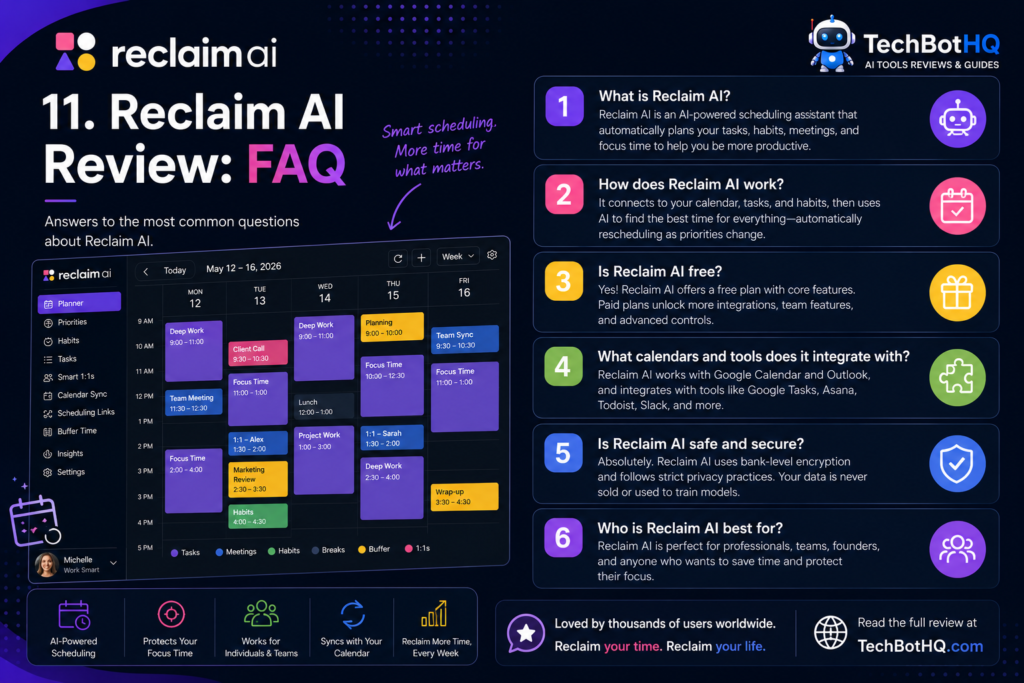
For Google Calendar users, yes — this Reclaim AI review rates it 4.2/5. The free Lite plan is a genuine starting point, and Starter at $8 per month is the best-value AI scheduling subscription available in 2026. The value is clearest for meeting-heavy professionals who want automatic task scheduling, habit protection, and focus time defense without rebuilding their entire workflow.
The Reclaim AI review caveat: if you are on Outlook or need a mobile app, test the free plan carefully before upgrading. The Google Calendar experience is noticeably more mature than the Outlook integration.
Does Reclaim AI have a free plan?
Yes — Reclaim AI’s Lite plan is free forever with no credit card required. It includes basic smart scheduling, up to three tasks, full habit scheduling, scheduling links, and Google Calendar sync. As this Reclaim AI review notes, the free Lite plan is genuinely useful for evaluation — not just a token trial designed to push you to pay immediately.
How does Reclaim AI compare to Motion AI?
This is the most common comparison question in any Reclaim AI review. Motion AI rebuilds your entire daily schedule autonomously and includes richer project management features. Reclaim AI works within your existing Google Calendar workflow with more targeted interventions and costs significantly less — $8/month versus Motion’s $19/month annual minimum. This Reclaim AI review recommends Reclaim AI for budget-conscious professionals wanting gentle calendar automation, and Motion AI for professionals with complex deadline-driven workloads who want maximum scheduling autonomy. See our [INTERNAL LINK: Motion AI Review 2026] for the detailed comparison.
Does Reclaim AI work with Outlook?
Reclaim AI now supports Microsoft 365 and Outlook, but Google Calendar integration is significantly more mature and fully featured. If you are primarily on Microsoft 365, this Reclaim AI review strongly recommends testing the Outlook integration carefully during the free Lite plan before upgrading. Multiple users in our Reclaim AI review research found the Outlook experience noticeably less complete than the Google Calendar experience.
What task management tools does Reclaim AI integrate with?
Reclaim AI integrates with Asana, Todoist, Linear, ClickUp, and Jira for two-way task sync — scheduling your existing tasks directly from the project management tools you already use. As this Reclaim AI review found in testing, the ClickUp and Asana integrations are the most polished and reliable. If you use a different task management tool, check the current integration list at reclaim.ai before committing.
Is Reclaim AI good for teams?
Yes — the Business plan at $12 per user per month adds team habits, shared analytics, and coordinated scheduling across colleagues. For small teams of four to ten people who want consistent calendar coordination without the cost of Motion AI’s team plans, this Reclaim AI review found Reclaim AI Business to be a genuinely strong value option. The shared team habits feature — coordinating no-meeting hours and shared lunch blocks across a team — is particularly useful for remote teams building intentional work culture.
Want The Time Savings Without Doing It Yourself?
These tools save you hours on your own tasks — but marketing is one job most people would rather hand off entirely. Tasknestly runs it for you, end to end.
Get a Free Marketing Quote →