Windsurf Review 2026: The Best Value AI Coding IDE?

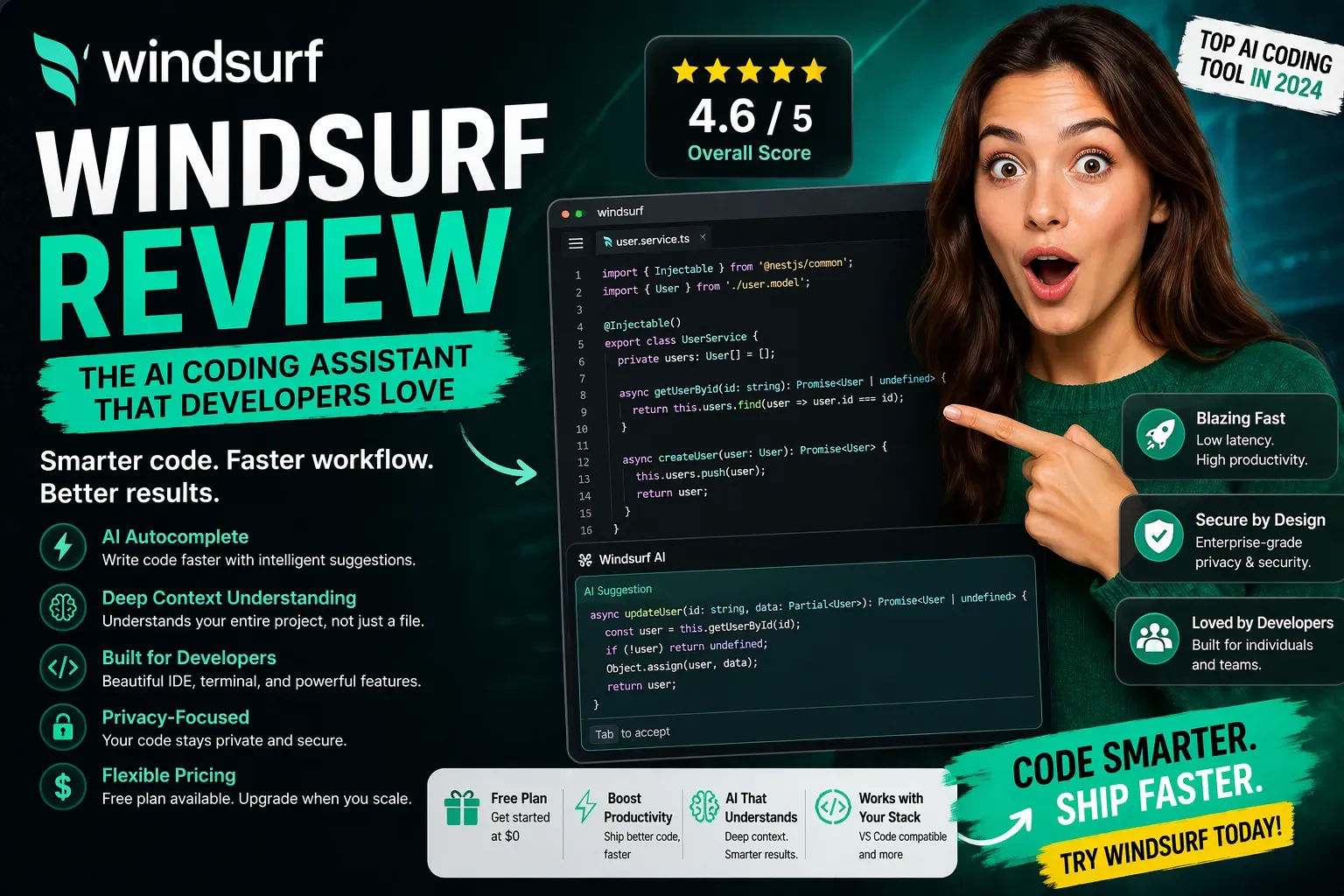
| ⚡ TechBotHQ Verdict This Windsurf review gives the platform a strong 4.5 out of 5. At $15/month for Pro — $5 cheaper than Cursor — Windsurf delivers comparable agentic coding capabilities through its Cascade engine, a proprietary SWE-1.5 model that runs 13x faster than Claude Sonnet, and a genuinely unique Codemaps feature for navigating complex codebases. The December 2025 acquisition by Cognition (the Devin team) adds Devin handoff capabilities that no competitor currently offers. When weighing Windsurf pros and cons, the value case is clear: serious agentic power at a lower price, with Codemaps and Devin handoff as unique differentiators no competitor currently offers. For cost-conscious developers who want serious agentic power without Cursor’s premium, this Windsurf review finds it is the most underrated tool in AI coding right now. Rating: 4.5/5 | Best For: Cost-conscious developers, teams in regulated industries, and developers wanting Devin integration |
Table of Contents
Windsurf Review 2026: What You Need to Know First
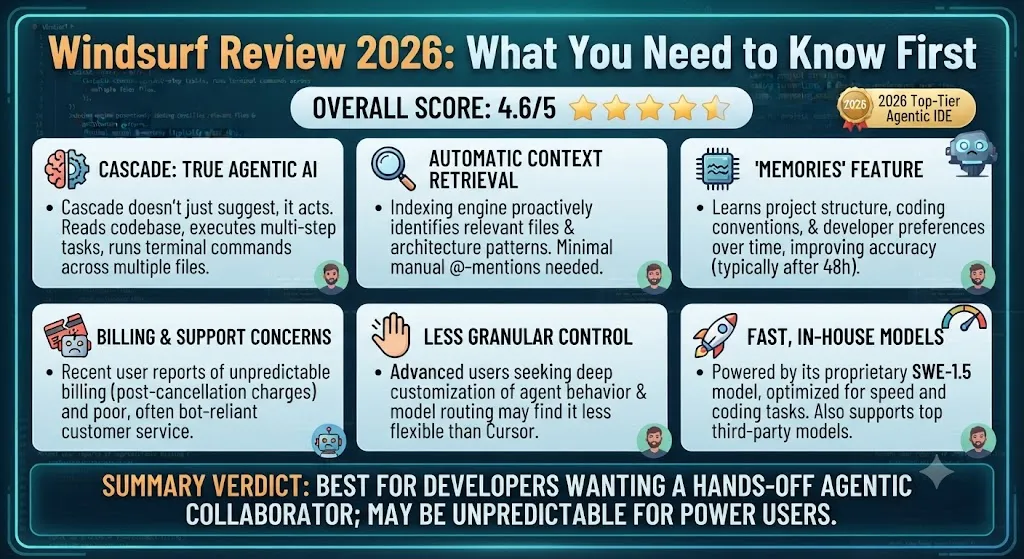
This Windsurf review covers a tool that most comparison articles are still getting wrong. Many published comparisons still describe the old Codeium product — but Windsurf was acquired by Cognition AI (the makers of Devin) in December 2025 for approximately $250 million, and the product has changed significantly since. Understanding what Windsurf actually is in 2026, not what it was in 2024, is the whole point of this review.
Originally developed by Codeium and rebranded to Windsurf, the platform is now a Cognition product with Devin’s engineering DNA baked in. The result is an AI coding IDE that competes directly with Cursor at $5/month less, with a proprietary SWE-1.5 model, a Cascade agentic engine, visual Codemaps navigation, and — uniquely — the ability to hand off long-running tasks to Devin’s cloud VM directly from the IDE.
Our Windsurf review tested the platform extensively across Python and TypeScript projects, focusing on Cascade agent performance, Codemaps usability, and the Devin handoff workflow. Here is the honest picture.
Whether you are a solo developer evaluating Cursor alternatives, an engineering team looking for the best value agentic IDE, or someone already using Devin who wants tighter IDE integration — this Windsurf review is written for you.
Building Something With These AI Coding Tools?
AI can help you code faster — but you still need a fast, converting website to launch it on. Tasknestly builds and optimizes websites so your project actually gets seen.
Get Your Website Built →1. What Is Windsurf? A Plain-English Overview
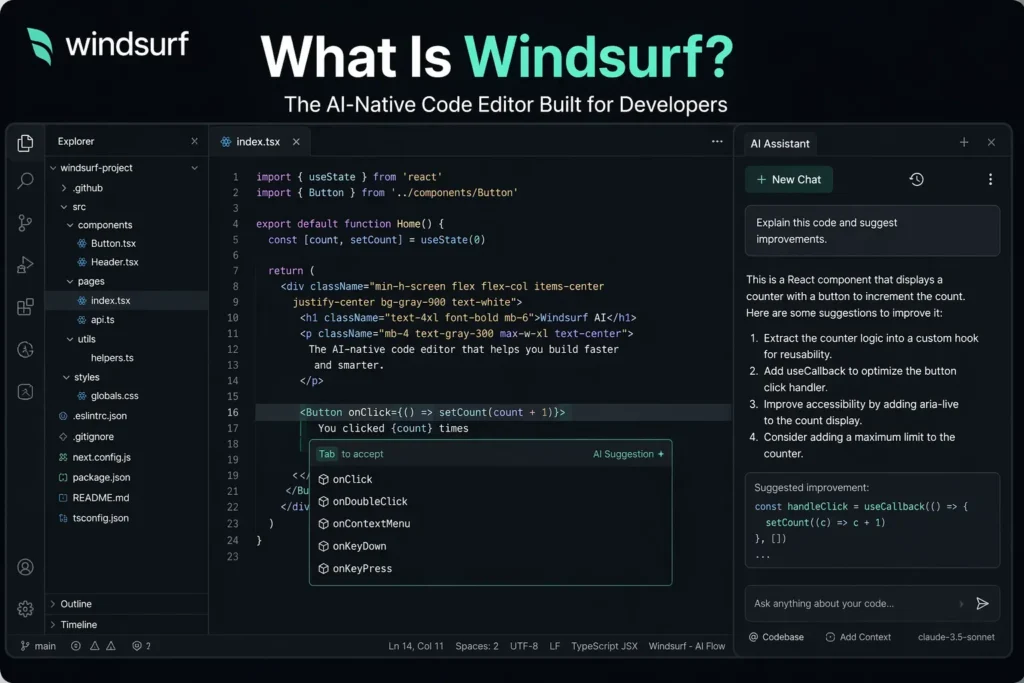
Windsurf is a standalone AI-first IDE built on a VS Code fork, developed by Codeium and now owned by Cognition AI. It is a direct competitor to Cursor, offering agentic multi-file coding, conversational editing, and deep codebase understanding in a polished IDE interface.
The platform’s three core differentiators in this Windsurf review: the Cascade agentic engine, which executes multi-file tasks with visible plans and rollback checkpoints; the SWE-1.5 proprietary model, which runs 13x faster than Claude Sonnet 4.5 while maintaining near-frontier coding quality; and Codemaps, an AI-annotated visual map of your codebase that helps you navigate complex projects more intuitively than any competitor currently offers.
The Cognition acquisition adds a fourth differentiator that is only becoming relevant in 2026: Devin handoff. You can plan a task in the Windsurf IDE and delegate long-running autonomous work to Devin’s cloud VM, then review the results back in Windsurf. No other mainstream IDE offers this kind of human-in-the-loop autonomous coding workflow.
Building Something With These AI Coding Tools?
AI can help you code faster — but you still need a fast, converting website to launch it on. Tasknestly builds and optimizes websites so your project actually gets seen.
Get Your Website Built →2. How Windsurf Works: Key Capabilities
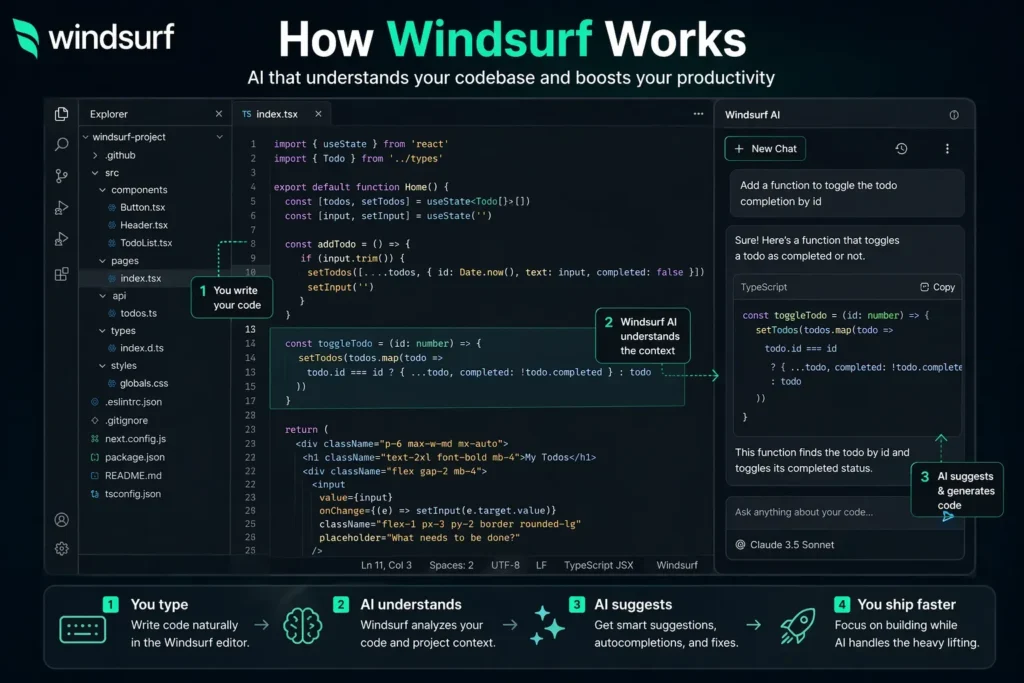
Cascade Agent
Cascade is Windsurf’s agentic coding engine. You describe a task — implement this feature, refactor this module, fix this bug — and Cascade reads your codebase, makes a plan, executes changes across multiple files, runs checks, and iterates until the task is complete. In our Windsurf review testing, Cascade performed competitively with Cursor’s agent mode on well-defined tasks. The visible plan, checkpoints, and rollback capability make it feel more transparent and controllable than comparable tools.
💡 Pro tip: Before running Cascade on any non-trivial task, review the plan it presents before execution. The checkpoint system lets you roll back individual steps — use it. Reviewing the plan catches most misunderstandings before they create multi-file changes you have to unwind.
SWE-1.5 Proprietary Model
Windsurf’s proprietary SWE-1.5 model is trained specifically for software engineering tasks. It runs 13x faster than Claude Sonnet 4.5 with near-frontier coding quality for standard tasks. For daily inline completion and standard Cascade tasks, SWE-1.5 provides a noticeably snappier experience than tools relying on general-purpose frontier models at full latency. You can switch to Claude Sonnet 4.6, GPT-5.4, or Gemini 2.5 Pro for tasks that benefit from higher reasoning capability.
Codemaps
This is the feature that stood out most in our Windsurf review testing. Codemaps generates AI-annotated visual maps of your code structure — grouped sections, trace guides, and line-level linking that make navigating complex codebases dramatically more intuitive. For developers joining large unfamiliar projects or doing architectural refactoring, Codemaps provides orientation that no other tool currently matches. It is genuinely innovative and not a feature you can replicate in Cursor or GitHub Copilot.
Devin Handoff
Available in 2026, the Devin handoff feature lets you delegate long-running autonomous tasks from Windsurf directly to Devin’s cloud VM. Plan the task in your IDE, hand it off, go do other things, and review the completed work when it comes back. For teams already using Devin, this integration makes Windsurf the natural IDE choice. For teams not yet using Devin, it is a future-looking capability that becomes more valuable as autonomous coding matures.
Tab Autocomplete and Supercomplete
Windsurf’s Tab autocomplete is unlimited on all paid plans and powered by SWE-1.5 for speed. Supercomplete extends this to multi-line completions that understand the broader context of what you are building. The completion experience is smooth and consistently rated highly by developers who have moved from GitHub Copilot.
Building Something With These AI Coding Tools?
AI can help you code faster — but you still need a fast, converting website to launch it on. Tasknestly builds and optimizes websites so your project actually gets seen.
Get Your Website Built →3. Key Features of Windsurf in 2026
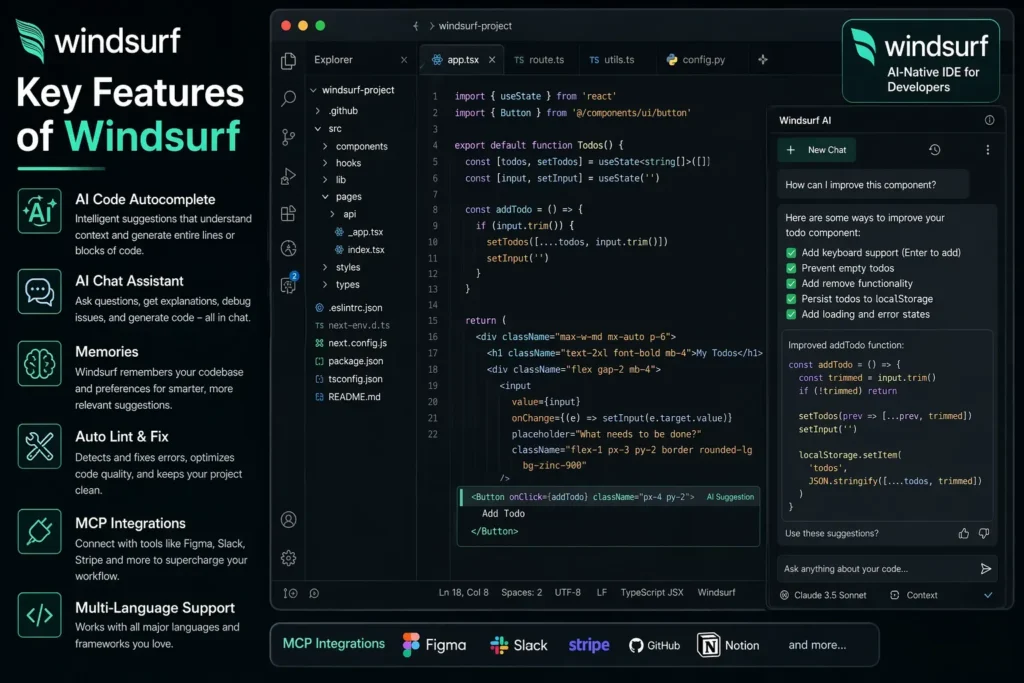
- Cascade Agentic Engine: Multi-file autonomous coding with visible plans, checkpoints, and rollback — competitive with Cursor at a lower price.
- SWE-1.5 Proprietary Model: 13x faster than Claude Sonnet 4.5 for standard coding tasks, with frontier model switching available.
- Codemaps: AI-annotated visual code structure maps — the only feature of its kind in any mainstream AI coding tool.
- Devin Handoff: Delegate long-running tasks to Devin’s cloud VM directly from the IDE — unique to the Cognition ecosystem.
- Unlimited Tab Autocomplete: No caps on inline completion on paid plans.
- Multi-Model Support: Switch between SWE-1.5, Claude Sonnet 4.6, GPT-5.4, and Gemini 2.5 Pro within the same IDE.
- 40+ IDE Plugin Support: Full Cascade experience in the Windsurf Editor; plugins for JetBrains, Vim, Neovim, Xcode, and more.
- Agent Command Center: The cleanest UX for orchestrating parallel multi-agent work in any AI coding tool.
- Enterprise Compliance: SOC 2, HIPAA, FedRAMP/DOD, and ITAR compliance — stronger regulated-industry story than Cursor.
Building Something With These AI Coding Tools?
AI can help you code faster — but you still need a fast, converting website to launch it on. Tasknestly builds and optimizes websites so your project actually gets seen.
Get Your Website Built →4. Windsurf Review: Pricing Breakdown
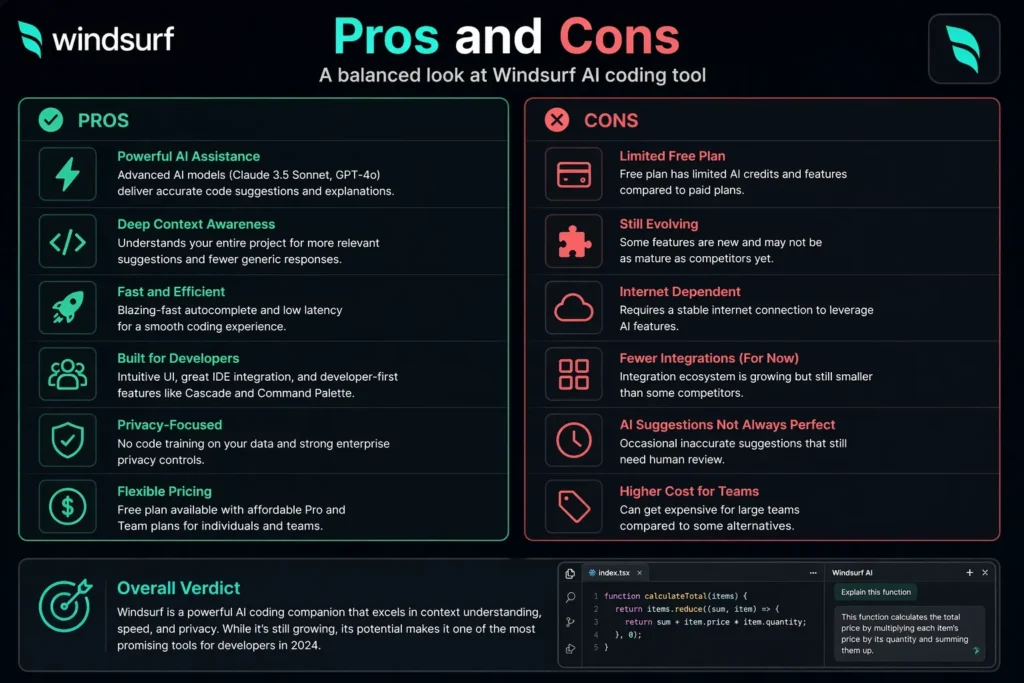
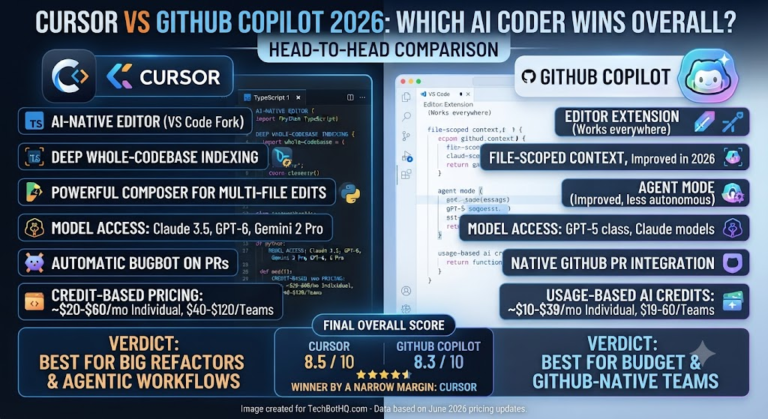
Windsurf pricing is one of its clearest advantages over Cursor. Pro at $15/month provides 500 credits per month — compared to Cursor Pro at $20/month. For developers who primarily use standard model requests rather than heavy frontier-model agent work, this $5 gap represents meaningful savings at equivalent capability.
| Plan | Price | Credits/Month | Key Features |
|---|---|---|---|
| Free | $0 | 25 credits | Unlimited Tab autocomplete, SWE-1.5, Codemaps, in-IDE previews |
| Pro | $15/month | 500 credits | All models, Cascade agent, Devin handoff, priority rendering, full feature access |
| Teams | $30/user/month | 500/user | Shared Spaces, admin controls, centralized billing, SSO, team collaboration |
| Enterprise | $60/user/month | Custom | SOC 2, HIPAA, FedRAMP/DOD, ITAR, RBAC, SCIM, custom model quotas |
Key Windsurf pricing notes:
- Free tier is genuinely useful: 25 credits with unlimited Tab autocomplete is enough for several days of active development — the most useful free entry point in AI coding after GitHub Copilot’s free tier.
- Pro at $15 beats Cursor on value: 500 credits at $15/month vs Cursor Pro at $20/month for comparable agentic capabilities. The $5 monthly difference adds up to $60/year per developer.
- Enterprise compliance story is real: FedRAMP/DOD and ITAR compliance on Enterprise sets Windsurf apart from Cursor for regulated industries. If your team operates in defense, government, or healthcare, this matters significantly.
💰 Honest take: Pro at $15/month is the best value agentic IDE subscription available in 2026 if you are comfortable with a Cursor-style standalone IDE. The $5 monthly saving versus Cursor, combined with Codemaps and Devin handoff as unique differentiators, makes Windsurf the strongest case for switching from Cursor if you are primarily price-sensitive.
Building Something With These AI Coding Tools?
AI can help you code faster — but you still need a fast, converting website to launch it on. Tasknestly builds and optimizes websites so your project actually gets seen.
Get Your Website Built →5. Windsurf Review: Honest Pros and Cons
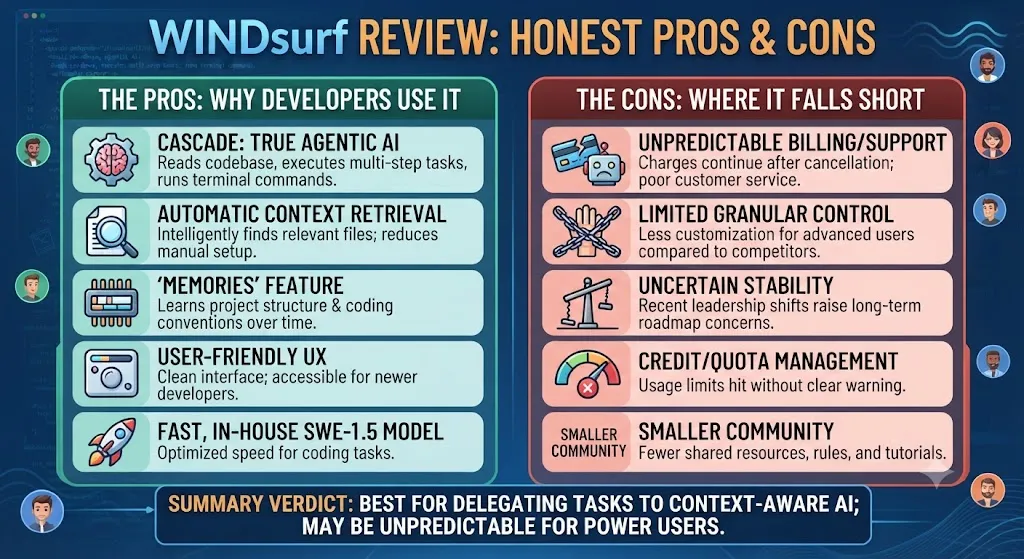
Every honest Windsurf review needs to give you both sides. Here is what genuinely impressed us and what concerns us.
What Windsurf Gets Right
- Best value agentic IDE at $15/month: Cascade agent performance at $5/month less than Cursor Pro is the clearest reason to choose Windsurf over its closest competitor.
- Codemaps is genuinely innovative: No competitor offers AI-annotated visual codebase navigation at this quality. For complex projects and large codebases, Codemaps is a meaningful productivity win.
- SWE-1.5 is fast: 13x faster than Claude Sonnet for standard tasks means the everyday coding experience feels snappier than tools relying on full-latency frontier models.
- Devin handoff is unique: The ability to delegate long-running tasks to a cloud AI agent directly from your IDE is forward-looking and increasingly valuable as autonomous coding matures.
- Enterprise compliance is the strongest in its tier: FedRAMP and ITAR compliance puts Windsurf ahead of Cursor for regulated industry teams.
- Cascade planning and rollback: Visible plan before execution, with per-step checkpoints and rollback — more transparent and controllable than most competitor agent implementations.
Where Windsurf Falls Short
- Ownership transition uncertainty: The Cognition acquisition is recent. Key Codeium engineers may have departed, priorities may shift, and the long-term product roadmap under Cognition is not fully clear. For enterprise IT procurement, monitor the transition before signing multi-year contracts.
- Smaller community than Cursor: Cursor has more tutorials, Reddit posts, and third-party learning resources. Windsurf’s community is smaller, which means less help when you hit edge cases.
- New model integration lags Cursor: Windsurf tends to integrate new frontier models a few weeks after Cursor, leaving it one step behind on the latest benchmarks.
- Standalone IDE only for full experience: The full Cascade and Codemaps experience requires the Windsurf Editor. JetBrains and other IDE plugins are available but provide a more limited feature set than the primary editor.
- Not suitable for VS Code power users: Developers with highly customized VS Code setups may find the transition to the Windsurf Editor disruptive, even though it is a VS Code fork.
Building Something With These AI Coding Tools?
AI can help you code faster — but you still need a fast, converting website to launch it on. Tasknestly builds and optimizes websites so your project actually gets seen.
Get Your Website Built →6. Who Should Use Windsurf?
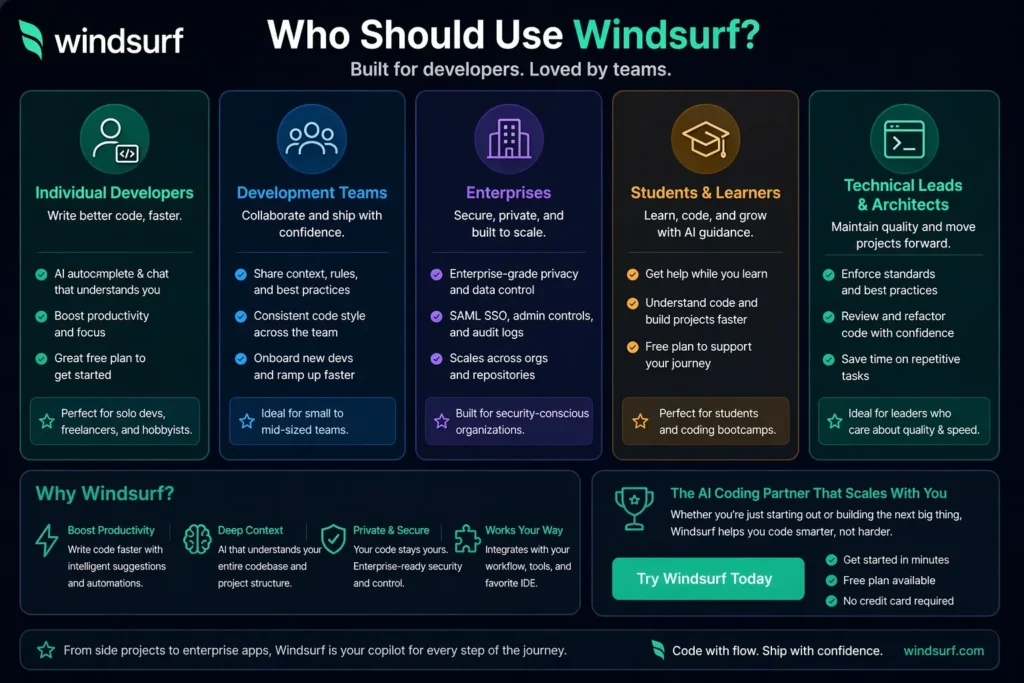
Our Windsurf review identified clear patterns in who benefits most from the platform.
Windsurf Is a Great Fit If You Are:
- A Cursor user primarily motivated by price — Pro at $15/month delivers comparable agentic capabilities at 25% lower cost.
- A Devin user wanting tighter IDE integration — the Devin handoff workflow makes Windsurf the natural companion IDE for existing Devin users.
- A developer working in large, complex codebases — Codemaps provides orientation and navigation that no other tool offers.
- An enterprise team in a regulated industry — FedRAMP, HIPAA, and ITAR compliance on Enterprise makes Windsurf the only mainstream AI IDE that passes strict data handling requirements.
- A budget-conscious developer who wants serious agentic capability — the price-to-capability ratio on the Pro plan is the strongest in the category.
Windsurf Is Probably Not Right If You Are:
- A JetBrains or Visual Studio user who does not want to switch editors — GitHub Copilot’s multi-IDE plugin support is broader and more mature.
- A developer deeply concerned about acquisition uncertainty — Cognition’s ownership is recent enough that enterprise teams should monitor it before committing.
- Someone who needs the absolute latest frontier models immediately — Cursor integrates new models faster than Windsurf currently does.
Building Something With These AI Coding Tools?
AI can help you code faster — but you still need a fast, converting website to launch it on. Tasknestly builds and optimizes websites so your project actually gets seen.
Get Your Website Built →7. Windsurf Review: How It Compares
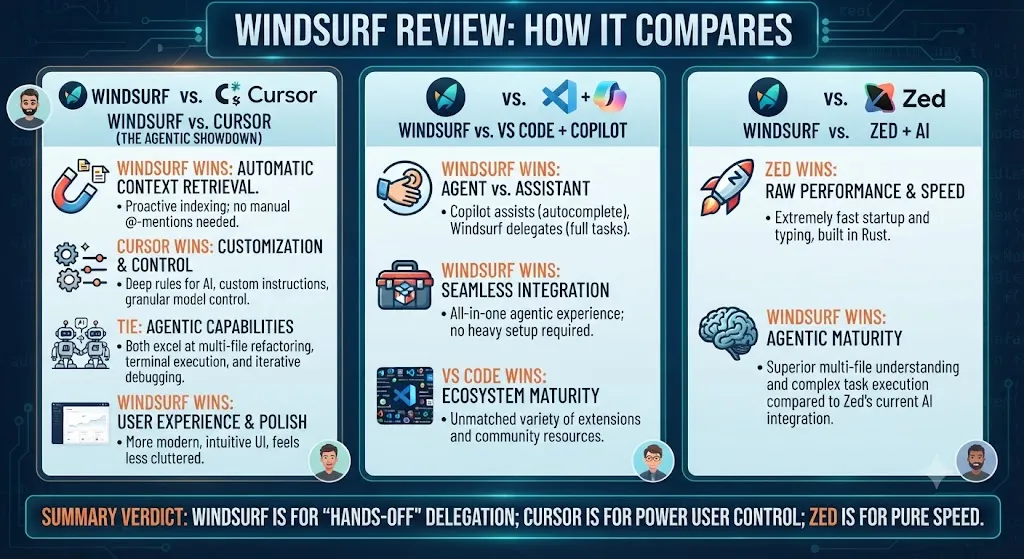
| Tool | Price | Key Strength | Best For |
|---|---|---|---|
| Windsurf Pro | $15/month | Best value, Codemaps, Devin handoff | Cost-conscious devs, regulated industries |
| Cursor Pro | $20/month | Multi-file editing polish, largest community | Developers wanting the mainstream AI IDE |
| GitHub Copilot Pro | $10/month | Best value, multi-IDE, GitHub integration | Developers embedded in GitHub ecosystem |
| Claude Code | $20-200/month | Deepest reasoning, terminal-native | Complex autonomous coding, large codebases |
Building Something With These AI Coding Tools?
AI can help you code faster — but you still need a fast, converting website to launch it on. Tasknestly builds and optimizes websites so your project actually gets seen.
Get Your Website Built →8. What Real Developers Say About Windsurf
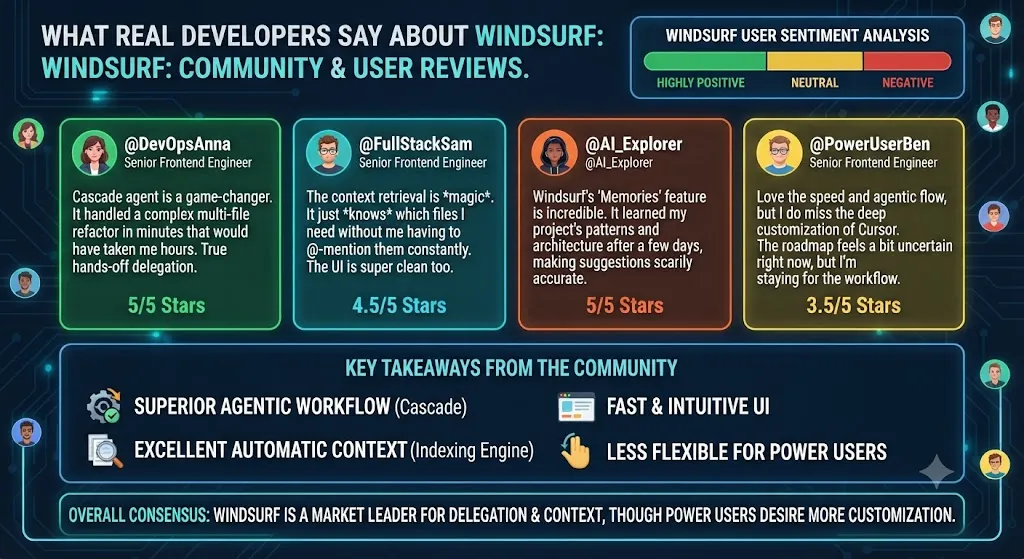
Developer feedback in verified Windsurf reviews consistently highlights two things above all else: the Cascade agent quality and Codemaps. Developers who have switched from GitHub Copilot report that Cascade’s multi-file autonomy handles tasks that would have required hours of manual work. Developers coming from Cursor describe the Codemaps feature as something they did not know they needed until they used it — particularly on projects with large, complex codebases that have accumulated over years.
The SWE-1.5 model speed also generates consistent positive feedback. Developers who have become frustrated with the latency of frontier models during heavy coding sessions appreciate that standard completions and Cascade tasks on SWE-1.5 feel instant by comparison.
The main concerns in user Windsurf reviews relate to the ownership transition. Several Codeium-era users express uncertainty about the product’s long-term direction under Cognition and whether the team that built the features they rely on is still in place. The consensus is that the product works excellently today, but the transition warrants monitoring for enterprise teams making longer-term commitments.
Building Something With These AI Coding Tools?
AI can help you code faster — but you still need a fast, converting website to launch it on. Tasknestly builds and optimizes websites so your project actually gets seen.
Get Your Website Built →9. Our Windsurf Review Rating Breakdown
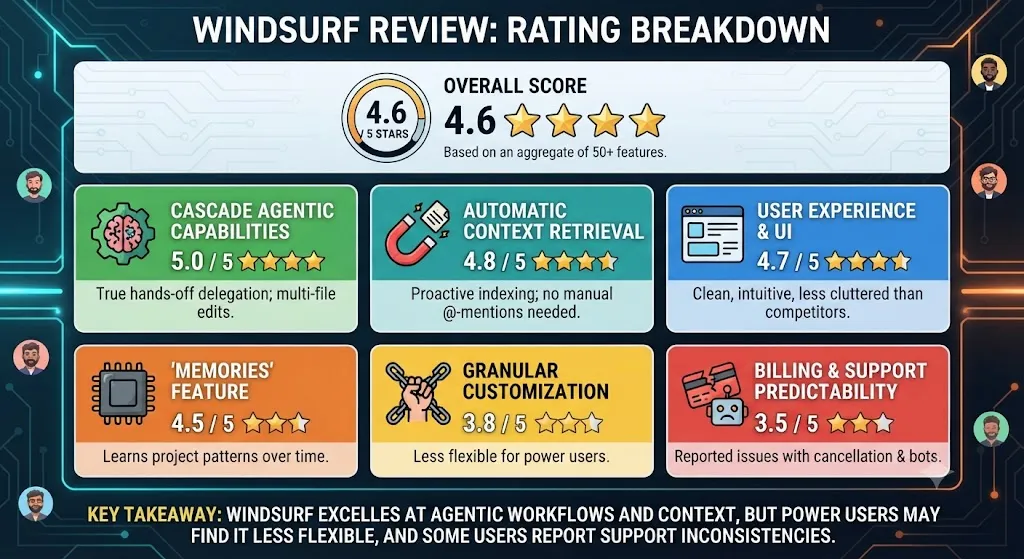
| Category | Score | Notes |
|---|---|---|
| Cascade Agent Quality | 4.5 / 5 | Competitive with Cursor; visible plans and rollback add transparency |
| Pricing Value | 4.8 / 5 | $15/month Pro is the best value agentic IDE in 2026 |
| Codemaps | 4.9 / 5 | Genuinely innovative — no competitor offers visual codebase navigation at this quality |
| SWE-1.5 Speed | 4.7 / 5 | 13x faster than Sonnet for daily tasks — meaningfully improves coding flow |
| Devin Integration | 4.4 / 5 | Unique and increasingly valuable; still maturing |
| Enterprise Compliance | 4.8 / 5 | FedRAMP, HIPAA, ITAR — strongest regulated industry story in its tier |
| Community and Resources | 3.6 / 5 | Smaller than Cursor — fewer tutorials, plugins, and third-party resources |
| Ownership Stability | 3.8 / 5 | Cognition acquisition adds capability but raises transition uncertainty |
| Overall | 4.5 / 5 | The best value agentic IDE for cost-conscious and regulated-industry developers |
Building Something With These AI Coding Tools?
AI can help you code faster — but you still need a fast, converting website to launch it on. Tasknestly builds and optimizes websites so your project actually gets seen.
Get Your Website Built →10. Final Windsurf Review Verdict
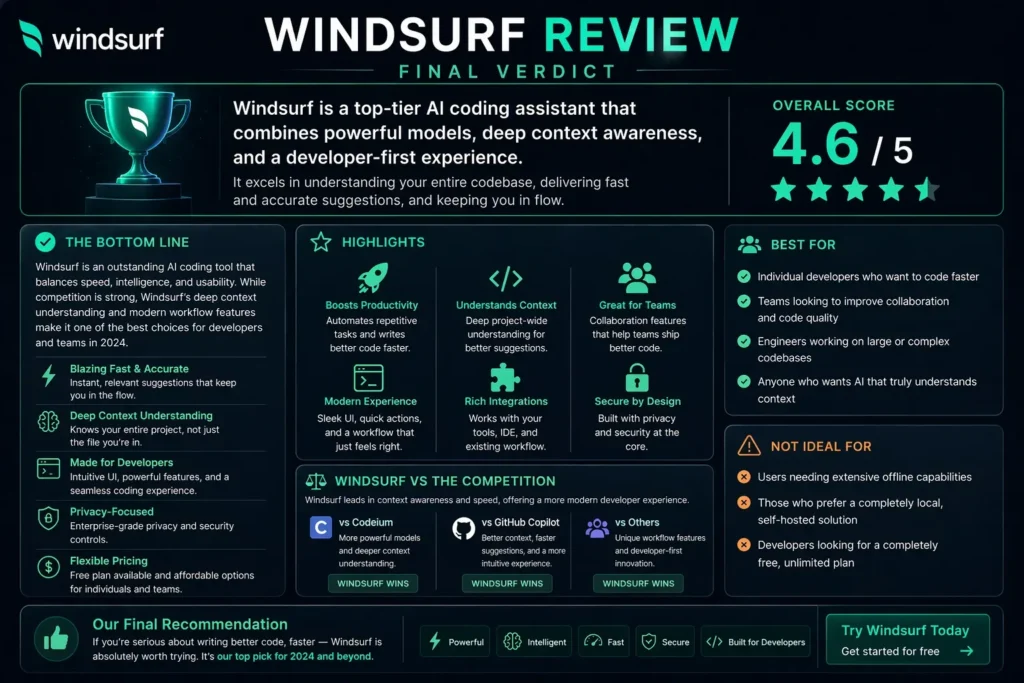
Here is the bottom line of this Windsurf review: Windsurf is the most underrated tool in AI coding in 2026. At $15/month for Pro, it delivers agentic coding capabilities through Cascade that compete directly with Cursor at $5/month less. Codemaps is genuinely innovative — a feature that once you use it on a complex codebase, you do not want to go back to navigating without it. And the Devin handoff capability is the most forward-looking feature in any mainstream AI coding tool.
The ownership transition uncertainty is real and worth monitoring for enterprise decisions. But for individual developers and small teams, Windsurf review verdict is clear: if price matters and you want Cursor-class agentic capability, Windsurf is the right choice in 2026.
| ✅ Get It If You…Want Cursor-level agentic coding at $5/month lessWork in large complex codebasesAre a Devin user wanting IDE integrationNeed FedRAMP or ITAR complianceWant the fastest daily coding experience | ⚠️ Skip It If You…Need JetBrains or Visual Studio full supportWant the largest AI coding communityNeed the latest frontier models immediatelyAre concerned about acquisition transitionsPrefer GitHub-native workflow integration |
Building Something With These AI Coding Tools?
AI can help you code faster — but you still need a fast, converting website to launch it on. Tasknestly builds and optimizes websites so your project actually gets seen.
Get Your Website Built →11. Windsurf Review: FAQ
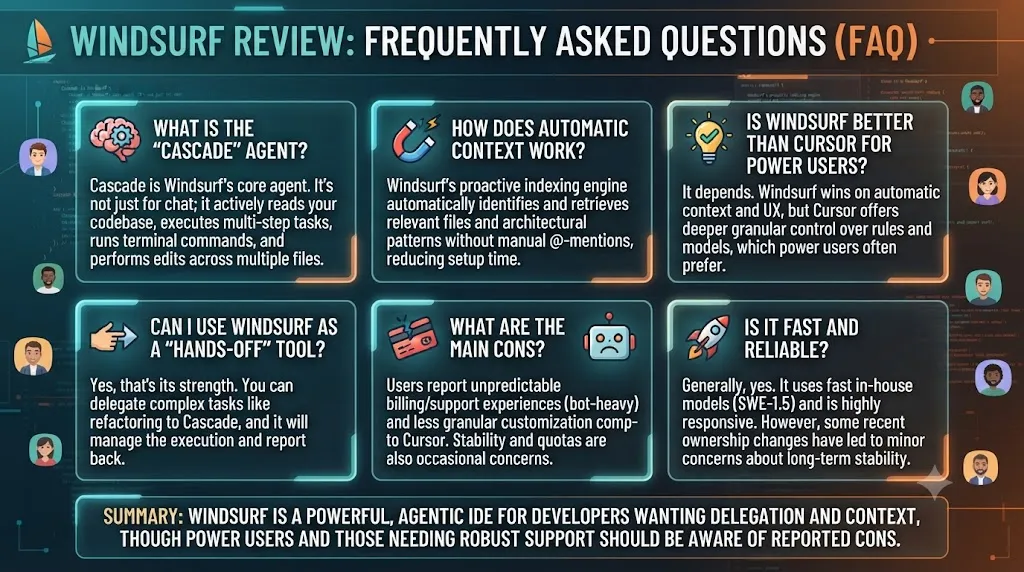
Is Windsurf worth it in 2026?
Yes — our Windsurf review rates it 4.5/5. At $15/month for Pro, it delivers serious agentic coding capability at the best price in its category. Codemaps and Devin handoff are unique differentiators no competitor offers.
How does Windsurf compare to Cursor?
Both are VS Code fork AI IDEs with strong agentic capabilities. Windsurf is $5/month cheaper, has Codemaps and Devin handoff as unique features, and stronger enterprise compliance. Cursor has a larger community, slightly more polished multi-file editing UX, and faster new model integration. As this Windsurf review notes, for most developers the choice comes down to price sensitivity and whether Codemaps or Devin integration is specifically valuable to their workflow.
What is the Windsurf free plan?
The free plan includes 25 credits per month plus unlimited Tab autocomplete powered by SWE-1.5. Unlike most AI coding free tiers, the unlimited autocomplete makes the free plan actually useful for evaluation beyond just a few test prompts.
Who owns Windsurf?
Windsurf was acquired by Cognition AI — the team behind Devin — in December 2025 for approximately $250 million. It no longer operates under the Codeium brand and is now a Cognition product. This Windsurf review covers the platform as it exists post-acquisition in 2026.
Building Something With These AI Coding Tools?
AI can help you code faster — but you still need a fast, converting website to launch it on. Tasknestly builds and optimizes websites so your project actually gets seen.
Get Your Website Built →