Cursor vs GitHub Copilot 2026: Which AI Coder Wins Overall?

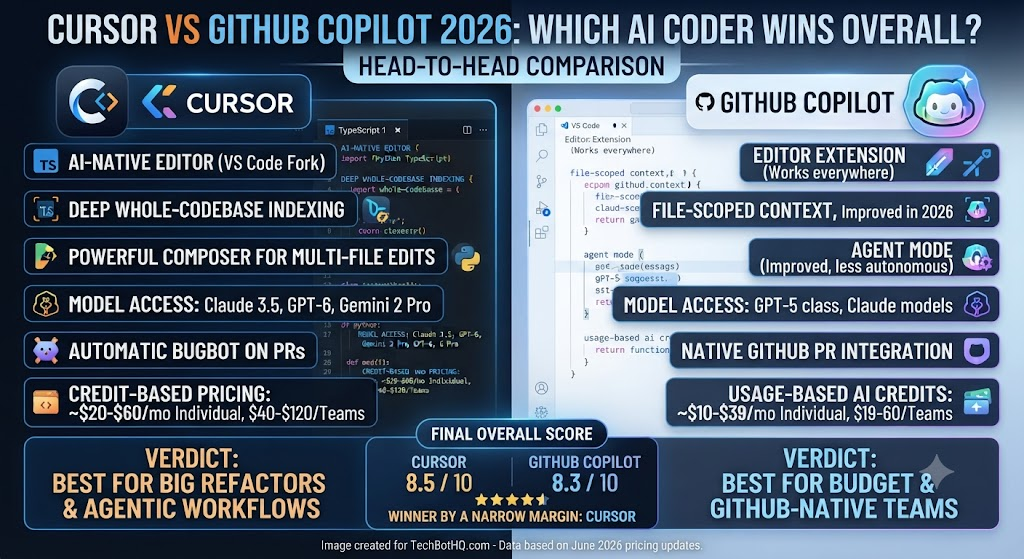
As this Cursor vs GitHub Copilot comparison shows, — a head-to-head comparison between two major AI coding tools for developers actively choosing between them.
I’ve spent the past few weeks running Cursor and GitHub Copilot side by side on the same codebase, alternating which tool handled which files to keep the test fair. This Cursor vs GitHub Copilot comparison lands at a genuinely interesting moment for both products: Cursor crossed a billion dollars in annualized revenue and over a million paying developers, while Copilot just completed its biggest pricing overhaul in years, moving to usage-based AI Credits on June 1, 2026. Neither tool is the same product it was twelve months ago.
As this Cursor vs GitHub Copilot comparison shows, the framing that matters most upfront: Cursor is a standalone, AI-native code editor built as a VS Code fork, while Copilot is an extension that lives inside whatever editor you already use. That architectural difference shapes almost everything else in this comparison — pricing, workflow, and how deeply each tool understands your codebase.
Table of Contents
Verdict Box
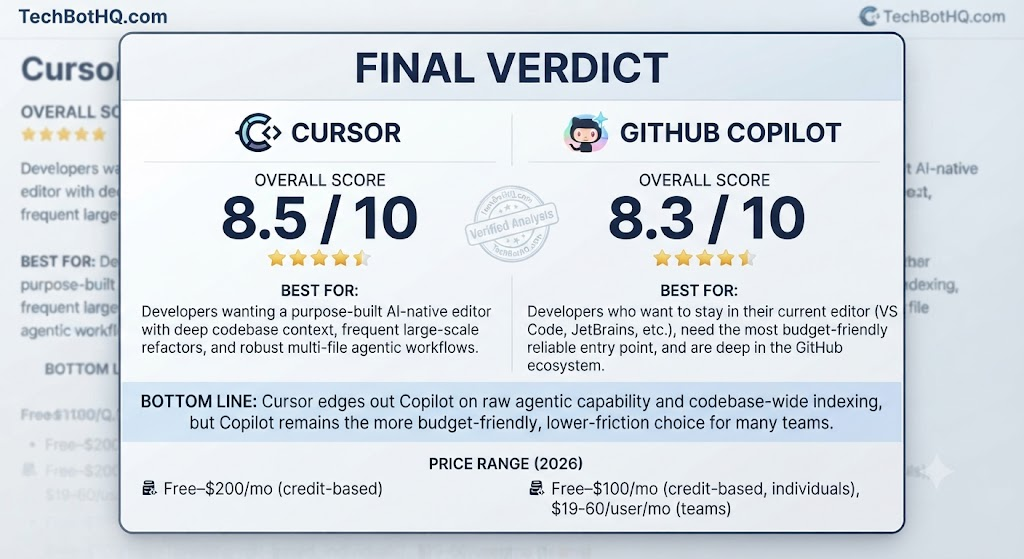
Overall Score: Cursor 8.5/10 | Copilot 8.3/10 Best For: In this Cursor vs GitHub Copilot breakdown, cursor — developers who want a purpose-built AI-native editor with deep codebase context. Copilot — developers who want to stay in their current editor and need the cheapest reliable entry point. Price: Looking at Cursor vs GitHub Copilot, cursor Free–$200/mo (credit-based) | Copilot Free–$100/mo (credit-based, individuals), $19-39/user/mo (teams) Bottom Line: When it comes to Cursor vs GitHub Copilot, cursor edges out Copilot on raw agentic capability and codebase-wide context, but Copilot remains the more budget-friendly, lower-friction choice for developers who don’t want to leave their existing editor or manage a second credit-based billing system.
Building Something With These AI Coding Tools?
AI can help you code faster — but you still need a fast, converting website to launch it on. Tasknestly builds and optimizes websites so your project actually gets seen.
Get Your Website Built →Feature Comparison: Cursor vs GitHub Copilot
Editor Architecture
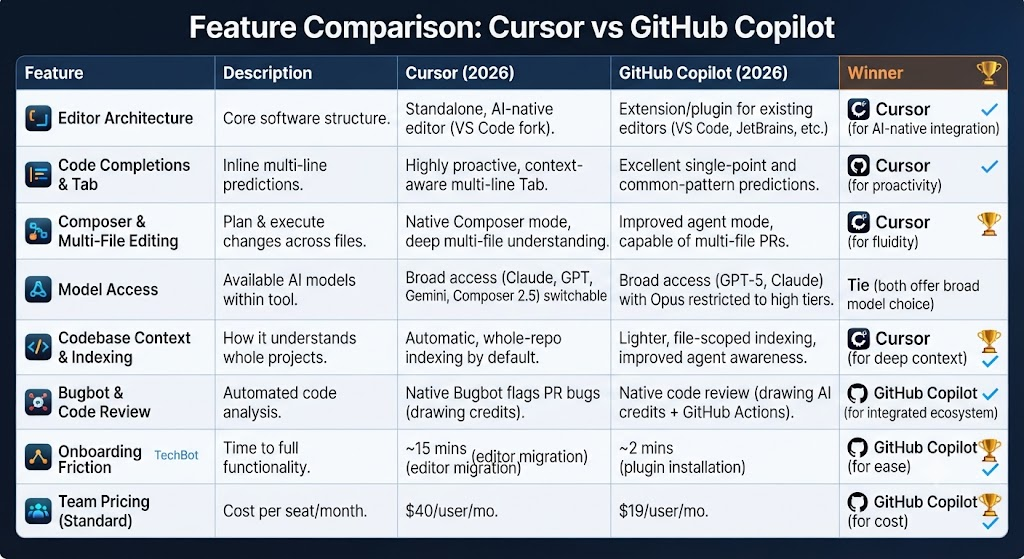
This is the single biggest structural difference in this Cursor vs GitHub Copilot comparison. Cursor is a complete VS Code fork — you install it as your primary editor, and it inherits full VS Code extension compatibility while adding AI-native features throughout. Copilot, by contrast, is a plugin that layers onto an editor you’re already using — VS Code, JetBrains, Neovim, Vim, or Visual Studio. If switching your entire editor feels disruptive, that alone might settle this comparison before you even look at pricing.
Code Completions and Tab
In this Cursor vs GitHub Copilot breakdown, both tools offer strong inline completions, and both keep this feature unmetered on paid plans. Cursor’s Tab feature specifically predicts multi-line edits based on your recent changes across the file, not just the next token — in testing, this felt noticeably more proactive than Copilot’s completions, which stick closer to traditional single-point autocomplete. Copilot’s completions are still excellent on common patterns, just less aggressive about anticipating broader edits.
Composer and Multi-File Editing
Looking at Cursor vs GitHub Copilot, cursor’s Composer mode is its standout feature: point it at a task, and it can plan and execute changes across multiple files in your codebase simultaneously, understanding dependencies between them. Copilot’s agent mode has closed much of this gap through 2026, now capable of editing files and opening pull requests autonomously, but Cursor’s Composer still felt more fluid and confident during multi-file refactors in direct testing.
Model Access
When it comes to Cursor vs GitHub Copilot, cursor gives you access to Claude, GPT, Gemini, and its own proprietary Composer 2.5 model, all switchable within one interface. Copilot’s post-June-2026 model catalog is similarly broad — GPT-5-class models and Claude models available across paid tiers — though Opus-family models specifically were pulled off the base Pro tier and restricted to Pro+ and above. Both tools give you real model choice; the practical difference is how each meters that choice against your credit pool.
Codebase Context and Indexing
For anyone weighing Cursor vs GitHub Copilot, cursor indexes your entire codebase for context by default on paid plans, which is a meaningful part of why Composer performs as well as it does on large, complex projects. Copilot’s context handling has improved but still leans more heavily on the currently open file and explicitly referenced files rather than automatic whole-repo indexing, unless you’re specifically using its cloud agent for a broader task.
Bugbot and Code Review
This Cursor vs GitHub Copilot analysis shows that cursor’s Bugbot flags bugs on pull requests automatically, typically within about 90 seconds, built on Cursor’s proprietary Composer model and drawing from the same credit pool as other agent actions. Copilot’s code review feature performs a similar function natively inside GitHub, and — notably — as of June 1, 2026, Copilot code review workflows also consume GitHub Actions minutes in addition to AI Credits, an added layer of cost to budget for if your team relies on it heavily.
Building Something With These AI Coding Tools?
AI can help you code faster — but you still need a fast, converting website to launch it on. Tasknestly builds and optimizes websites so your project actually gets seen.
Get Your Website Built →Cursor Pricing (2026)
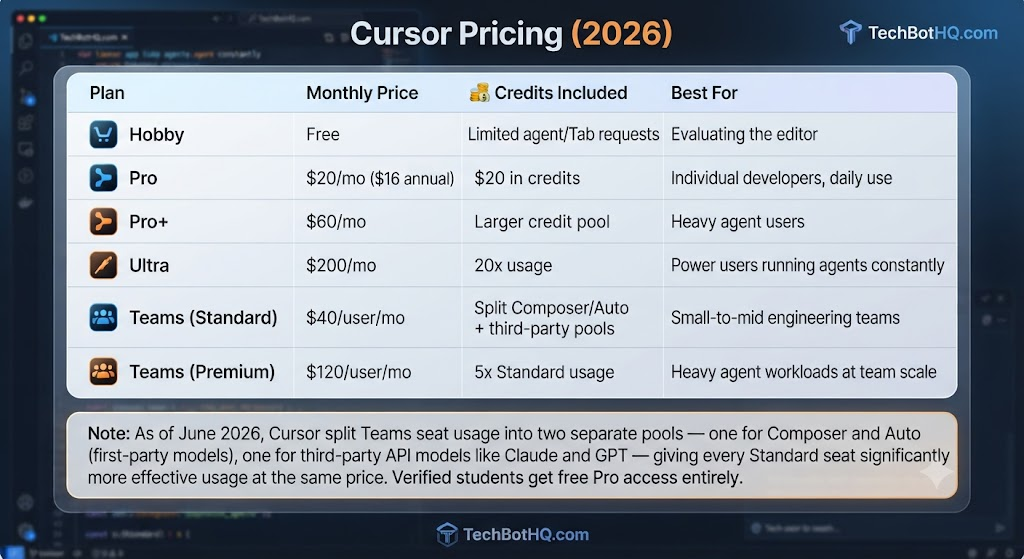
Across this Cursor vs GitHub Copilot review, cursor moved to a credit-based system in mid-2025, where paid plans include a monthly credit pool denominated in dollars that depletes based on which AI models you use — Auto mode remains unlimited on paid plans, while manually selecting frontier models draws down your credit balance.
| Plan | Monthly Price | Credits Included | Best For |
|---|---|---|---|
| Hobby | Free | Limited agent/Tab requests | Evaluating the editor |
| Pro | $20/mo ($16 annual) | $20 in credits | Individual developers, daily use |
| Pro+ | $60/mo | Larger credit pool | Heavy agent users |
| Ultra | $200/mo | 20x usage | Power users running agents constantly |
| Teams (Standard) | $40/user/mo | Split Composer/Auto + third-party pools | Small-to-mid engineering teams |
| Teams (Premium) | $120/user/mo | 5x Standard usage | Heavy agent workloads at team scale |
On the topic of Cursor vs GitHub Copilot, a meaningful June 2026 change: Cursor split Teams seat usage into two separate pools — one for Composer and Auto (first-party models), one for third-party API models like Claude and GPT — giving every Standard seat significantly more effective usage at the same price. Verified students get free Pro access entirely, waiving the $20/month fee for the duration of their eligibility.
Building Something With These AI Coding Tools?
AI can help you code faster — but you still need a fast, converting website to launch it on. Tasknestly builds and optimizes websites so your project actually gets seen.
Get Your Website Built →GitHub Copilot Pricing (2026)
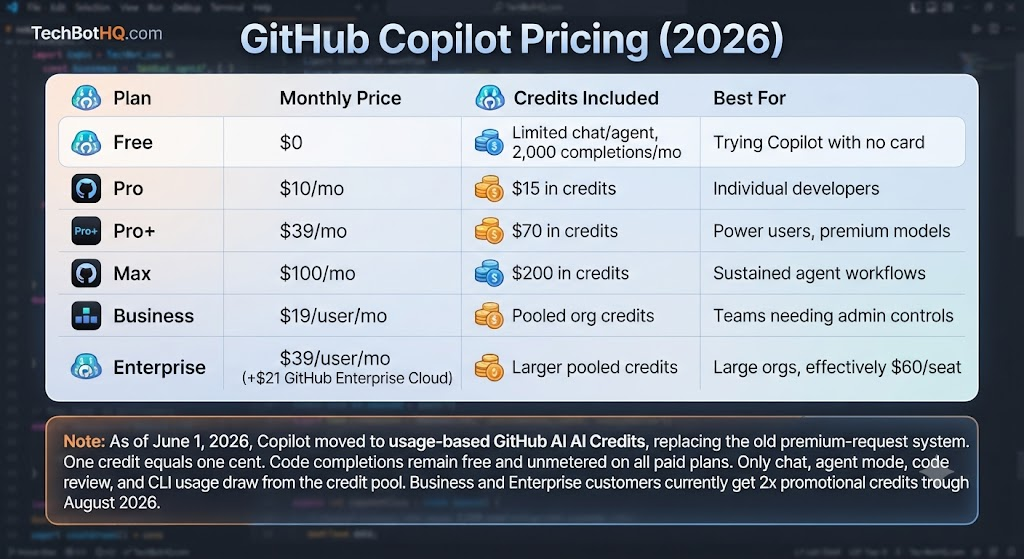
As this Cursor vs GitHub Copilot comparison shows, copilot moved to usage-based GitHub AI Credits on June 1, 2026, replacing its old premium-request system. One credit equals one cent, and code completions remain free and unmetered on all paid plans — only chat, agent mode, code review, and CLI usage draw from the credit pool.
| Plan | Monthly Price | Credits Included | Best For |
|---|---|---|---|
| Free | $0 | Limited chat/agent, 2,000 completions/mo | Trying Copilot with no card |
| Pro | $10/mo | $15 in credits | Individual developers |
| Pro+ | $39/mo | $70 in credits | Power users, premium models |
| Max | $100/mo | $200 in credits | Sustained agent workflows |
| Business | $19/user/mo | Pooled org credits | Teams needing admin controls |
| Enterprise | $39/user/mo (+$21 GitHub Enterprise Cloud) | Larger pooled credits | Large orgs, effectively $60/seat |
In this Cursor vs GitHub Copilot breakdown, copilot’s headline prices didn’t change in the June transition, but what they cover did — instead of a fixed premium-request count, you get a dollar-denominated credit pool metered by actual token consumption. Business and Enterprise customers currently get 2x promotional credits through August 2026.
Building Something With These AI Coding Tools?
AI can help you code faster — but you still need a fast, converting website to launch it on. Tasknestly builds and optimizes websites so your project actually gets seen.
Get Your Website Built →Cursor vs GitHub Copilot: How It Fits the Wider Landscape
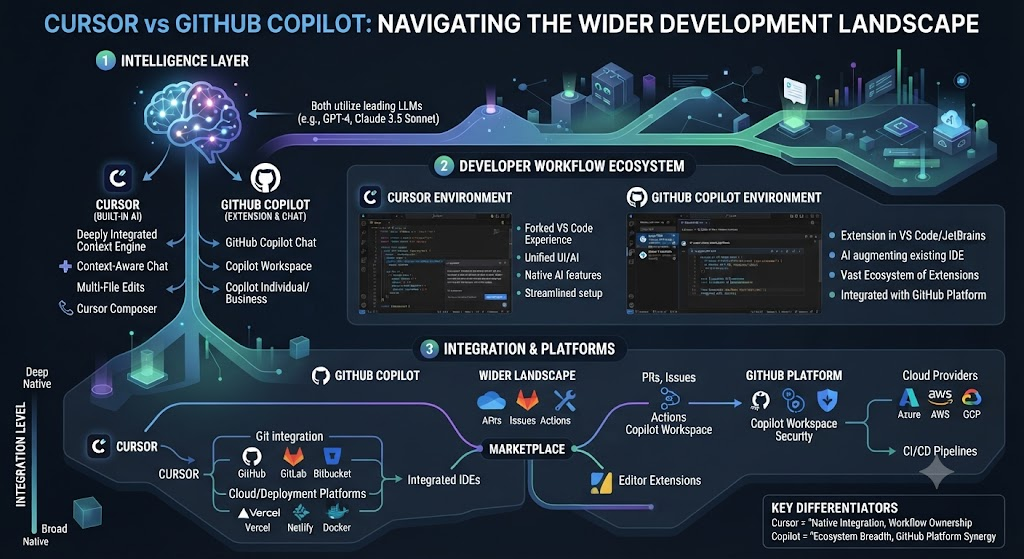
Looking at Cursor vs GitHub Copilot, cursor and Copilot don’t exist in a vacuum. The standalone Cursor AI review and GitHub Copilot review on this site go deeper into each tool’s individual feature set than a comparison piece has room for. Windsurf is worth knowing about too — it emerged as the default recommendation in parts of the Cursor community after the 2025 pricing changes, positioned as a lower-cost AI-native editor alternative at $15/month.
When it comes to Cursor vs GitHub Copilot, for teams with strict privacy or compliance requirements that neither Cursor nor Copilot can fully satisfy, Tabnine remains the only tool in this broader category offering genuine on-premises and air-gapped deployment. And for beginners specifically, Replit Ghostwriter targets a lower-friction, more beginner-focused experience that neither Cursor nor Copilot is really built for. The full AI Coding category on this site rounds up additional options beyond these five.
For anyone weighing Cursor vs GitHub Copilot, what’s notable about 2026 specifically is how much the pricing conversation has converged across this entire category — nearly every major AI coding tool has now moved to some flavor of usage-based or credit-metered billing, replacing the simpler flat-fee models that defined the category just two years ago.
Building Something With These AI Coding Tools?
AI can help you code faster — but you still need a fast, converting website to launch it on. Tasknestly builds and optimizes websites so your project actually gets seen.
Get Your Website Built →Cursor vs GitHub Copilot: Decision Framework
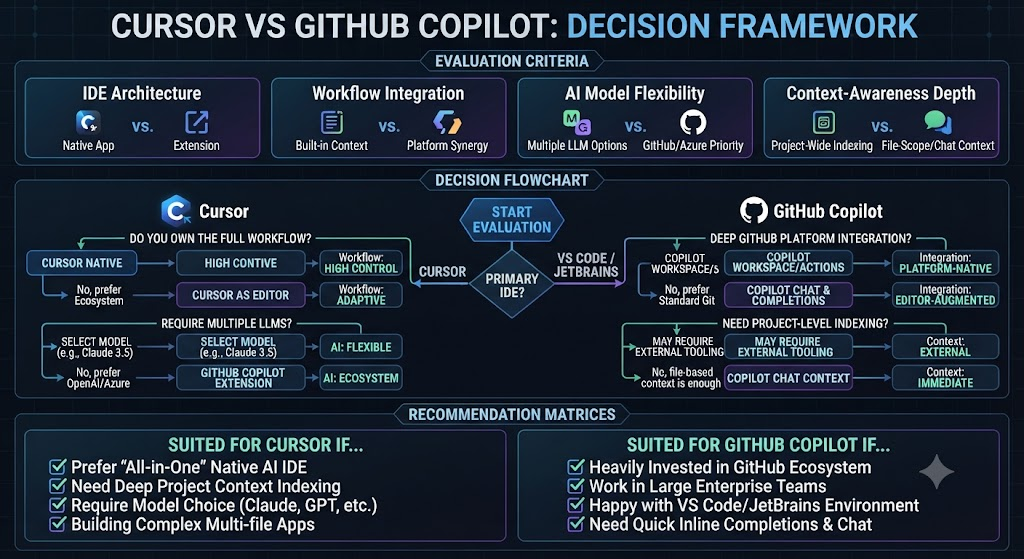
This Cursor vs GitHub Copilot analysis shows that strip away the feature lists and this decision usually comes down to two practical questions. First: does switching your primary editor feel like a real cost to you? If yes, that alone tilts hard toward Copilot, since it layers onto whatever you’re already using rather than asking you to relearn muscle memory in a new environment. If you’re editor-agnostic or already curious about a fresh setup, that constraint disappears and the comparison becomes purely about capability and price.
Across this Cursor vs GitHub Copilot review, second: how often does your actual work involve large, multi-file, structural changes versus incremental day-to-day edits? Teams doing frequent big refactors, migrations, or codebase-wide renames get measurably more value out of Cursor’s Composer than teams whose daily work is mostly small, contained changes — for the latter group, Copilot’s cheaper completions and chat cover most of what’s actually needed.
On the topic of Cursor vs GitHub Copilot, budget is the third and most concrete filter. At the individual level, the price gap is $10 a month — genuinely not a huge deal for most working developers. At team scale, that gap widens considerably: Copilot Business at $19/seat versus Cursor Teams at $40-120/seat is a real budget line item once you’re provisioning ten or more developers, and it’s worth running the actual math against your team size before committing either way.
Building Something With These AI Coding Tools?
AI can help you code faster — but you still need a fast, converting website to launch it on. Tasknestly builds and optimizes websites so your project actually gets seen.
Get Your Website Built →Pros & Cons
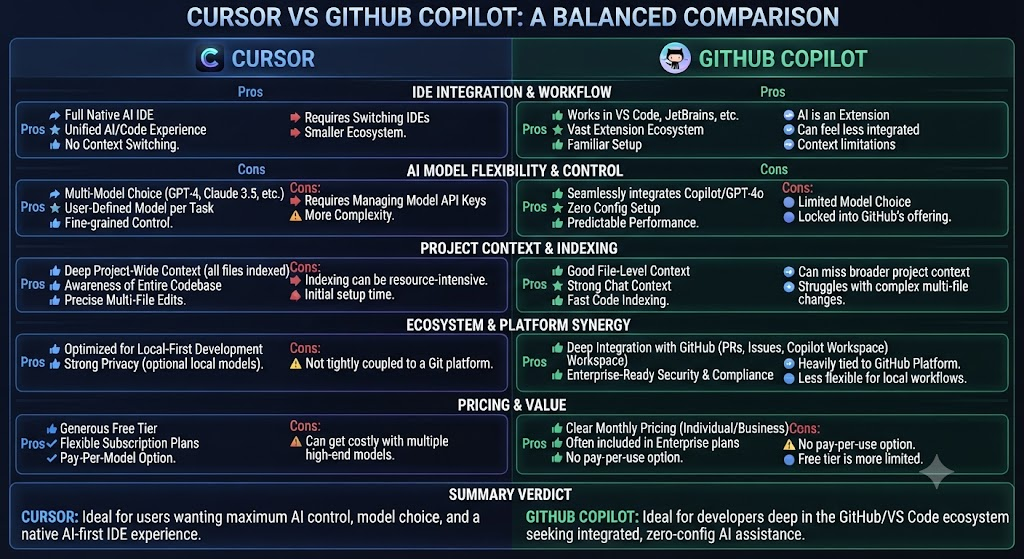
| Tool | Pros | Cons |
|---|---|---|
| Cursor | Deep codebase-wide context, powerful Composer multi-file editing, strong model variety | 2x the entry price of Copilot, requires switching editors, credit system can feel unpredictable |
| GitHub Copilot | Cheapest reliable entry point, works inside your current editor, native GitHub integration | Less aggressive codebase-wide context, Enterprise’s real cost is higher than advertised |
Building Something With These AI Coding Tools?
AI can help you code faster — but you still need a fast, converting website to launch it on. Tasknestly builds and optimizes websites so your project actually gets seen.
Get Your Website Built →Cursor vs GitHub Copilot: Head-to-Head Table
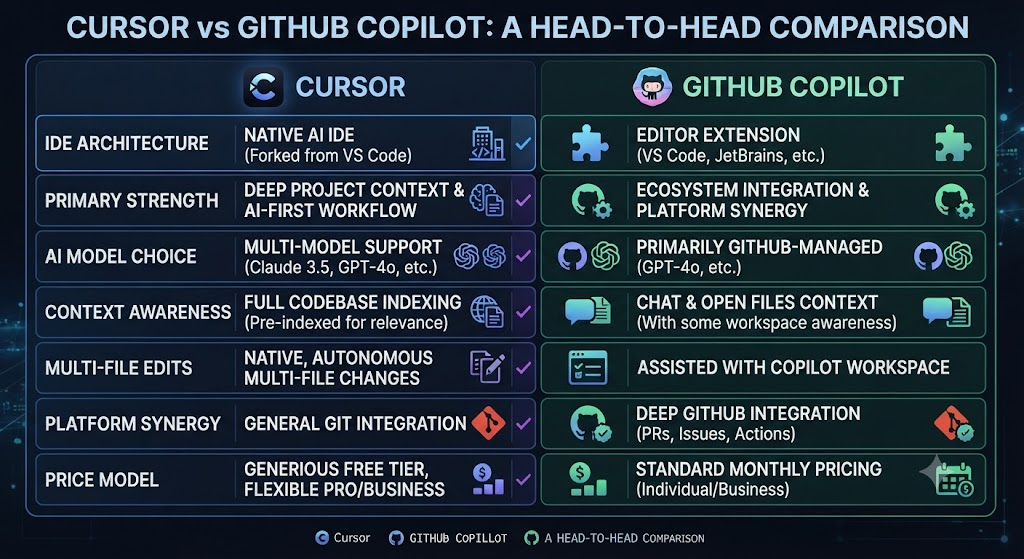
| Category | Cursor | GitHub Copilot |
|---|---|---|
| Entry price | Free (limited) | Free (limited) |
| Individual paid entry | $20/month | $10/month |
| Editor model | Standalone VS Code fork | Plugin inside existing editors |
| Multi-file editing | Composer (native, deep) | Agent mode (improved, less mature) |
| Codebase indexing | Automatic, whole-repo | Lighter, file-scoped by default |
| Team pricing | $40-120/user/mo | $19-39/user/mo (+ $21 Enterprise Cloud) |
| Best for | AI-native workflow, big refactors | Budget-conscious, GitHub-native teams |
Building Something With These AI Coding Tools?
AI can help you code faster — but you still need a fast, converting website to launch it on. Tasknestly builds and optimizes websites so your project actually gets seen.
Get Your Website Built →Cursor vs GitHub Copilot: Use Cases
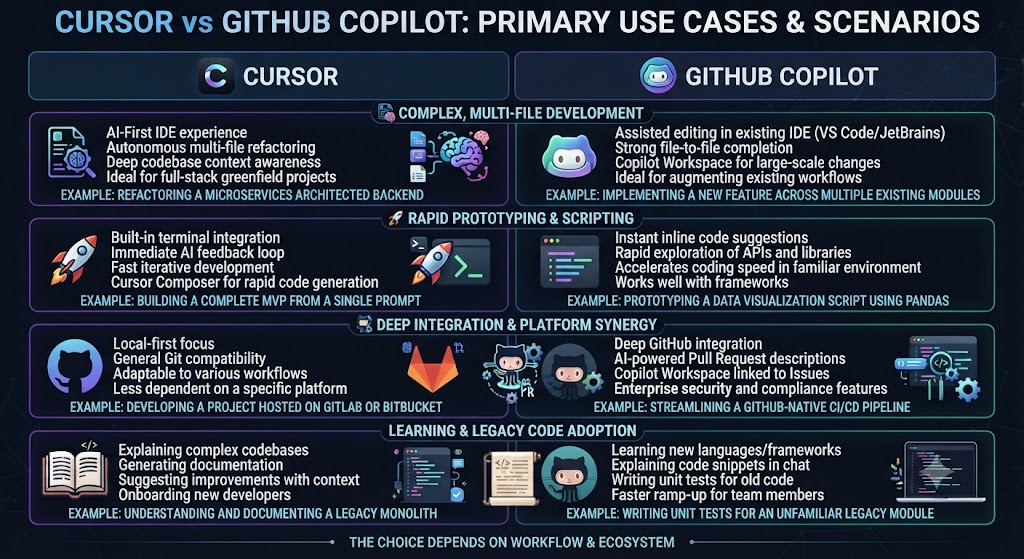
Solo developers on a budget For anyone weighing Cursor vs GitHub Copilot, are usually better served by Copilot Pro at $10/month — the completions and chat quality are strong enough for most day-to-day work without paying double for Cursor.
Developers doing frequent large-scale refactors This Cursor vs GitHub Copilot analysis shows that get real value from Cursor’s Composer and whole-codebase indexing, where the ability to plan and execute multi-file changes coherently justifies the higher price.
Teams already deep in the GitHub ecosystem Across this Cursor vs GitHub Copilot review, — using GitHub Issues, Actions, and native code review — get outsized value from Copilot’s platform-native integration that Cursor, as an outside tool, can’t fully replicate.
Teams that just switched from the old Cursor pricing model On the topic of Cursor vs GitHub Copilot, should specifically evaluate the June 2026 Teams changes, since the new dual-pool system meaningfully increases effective usage at the same seat price for most workloads.
Open-source maintainers and students Within this Cursor vs GitHub Copilot comparison, should check both tools’ free education programs before paying anything — Cursor waives its entire $20/month Pro fee for verified students, while Copilot offers free access to verified students and maintainers of popular open-source projects, making either tool genuinely free for a meaningful slice of the developer population.
Building Something With These AI Coding Tools?
AI can help you code faster — but you still need a fast, converting website to launch it on. Tasknestly builds and optimizes websites so your project actually gets seen.
Get Your Website Built →Cursor vs GitHub Copilot: Get It / Skip It
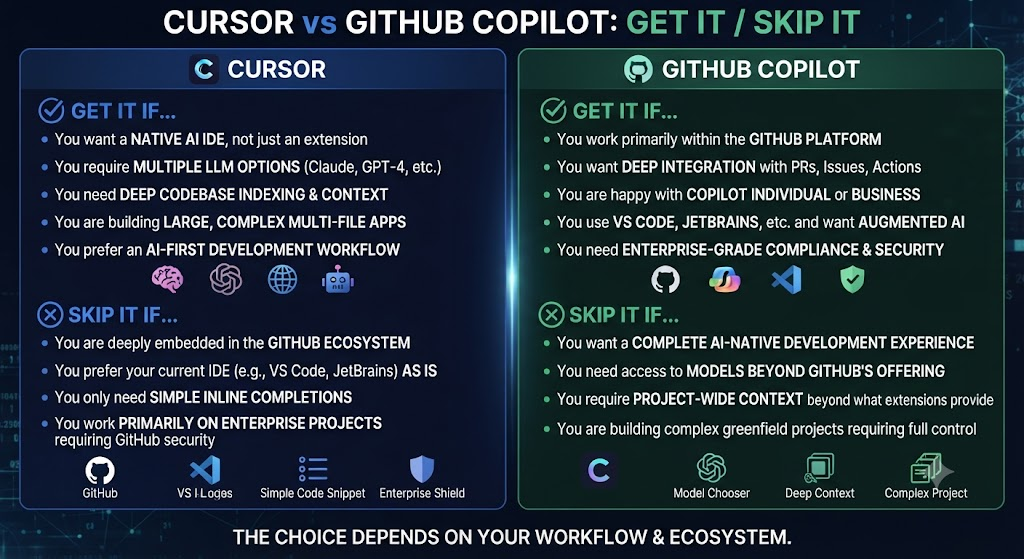
Get Cursor If: Considering Cursor vs GitHub Copilot specifically, – You want a purpose-built AI-native editor and don’t mind switching from your current one
- Multi-file refactors and whole-codebase context matter to your daily work
- Budget allows roughly double Copilot’s entry price
Get GitHub Copilot If:
- You want to stay in your current editor without switching
- Budget is the primary constraint and you want the cheapest reliable option
- Your team is already GitHub-native and wants tight platform integration
Skip Both If: In the context of Cursor vs GitHub Copilot, – You need a fully offline or air-gapped AI coding tool — neither offers this; look at Tabnine instead Regarding Cursor vs GitHub Copilot, – You’re building browser-native apps from scratch rather than editing an existing codebase
Building Something With These AI Coding Tools?
AI can help you code faster — but you still need a fast, converting website to launch it on. Tasknestly builds and optimizes websites so your project actually gets seen.
Get Your Website Built →Cursor vs GitHub Copilot Real-World Test
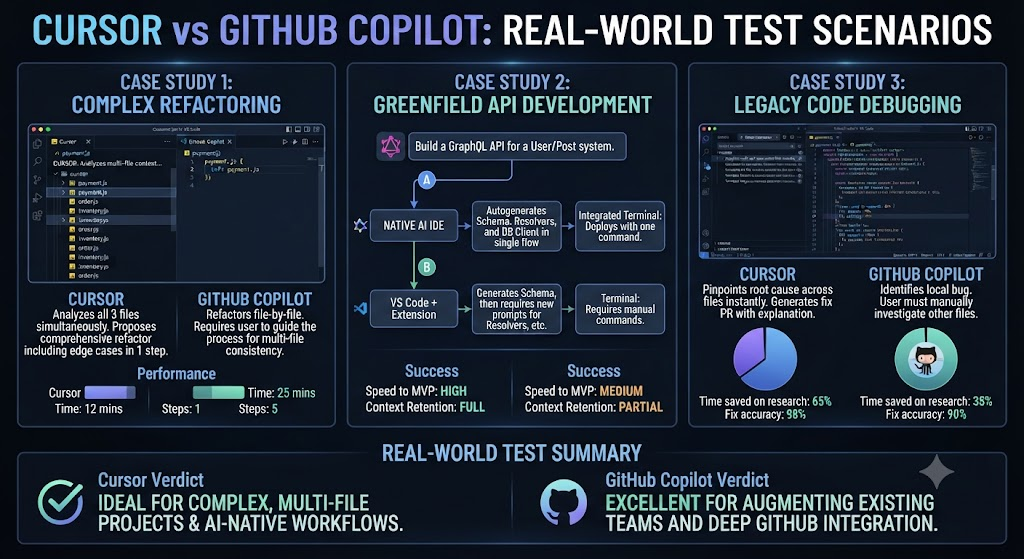
For this Cursor vs GitHub Copilot comparison, I ran both tools across the same TypeScript and Python codebase for two weeks, alternating which tool handled which files. On a multi-file refactor task — renaming a core interface and propagating the change across roughly 20 files — Cursor’s Composer handled the entire task in a single pass with minimal manual correction. Copilot’s agent mode got most of the way there but missed two edge-case files that referenced the interface indirectly, requiring manual cleanup.
As this Cursor vs GitHub Copilot comparison shows, on day-to-day completions and quick chat questions, the gap narrowed considerably. Both tools produced clean, idiomatic suggestions on common patterns, and Copilot’s tighter GitHub integration meant PR descriptions and commit messages it generated felt slightly more natural within our existing workflow. I ran the same test again on a smaller, five-file bug fix a few days later specifically to check whether Cursor’s advantage held for smaller tasks too — it did, but by a much narrower margin, suggesting the size and structural complexity of the task is the real variable that decides which tool pulls ahead.
In this Cursor vs GitHub Copilot breakdown, the honest friction point on Cursor: the credit system took real effort to understand fully, and I burned through a chunk of the Pro plan’s $20 credit pool faster than expected during a single heavy Composer session, similar to the exact complaint that pushed part of the Cursor community toward Windsurf after the 2025 pricing changes. On Copilot, the friction was different — after the June 2026 transition, agent-mode usage against the Pro+ credit allowance moved faster than the old premium-request system implied, a surprise GitHub’s own documentation now explicitly warns about.
Looking at Cursor vs GitHub Copilot, by the end of two weeks, Cursor was the tool I reached for specifically for large, structural changes, while Copilot remained the default for quick day-to-day completions and chat, largely because it didn’t require leaving VS Code at all.
When it comes to Cursor vs GitHub Copilot, i also specifically timed onboarding for both tools starting from zero. Copilot was fully functional within about two minutes — install the extension, sign in with a GitHub account, done. Cursor took closer to fifteen minutes end to end, mostly because switching editors means re-syncing extensions, settings, and keybindings from my previous setup, even with Cursor’s VS Code compatibility smoothing most of that transition. That upfront cost is real but one-time, and it’s worth weighing separately from the ongoing pricing comparison, since it doesn’t show up on any pricing table but genuinely affects how quickly a team can adopt either tool.
Building Something With These AI Coding Tools?
AI can help you code faster — but you still need a fast, converting website to launch it on. Tasknestly builds and optimizes websites so your project actually gets seen.
Get Your Website Built →Cursor vs GitHub Copilot FAQ
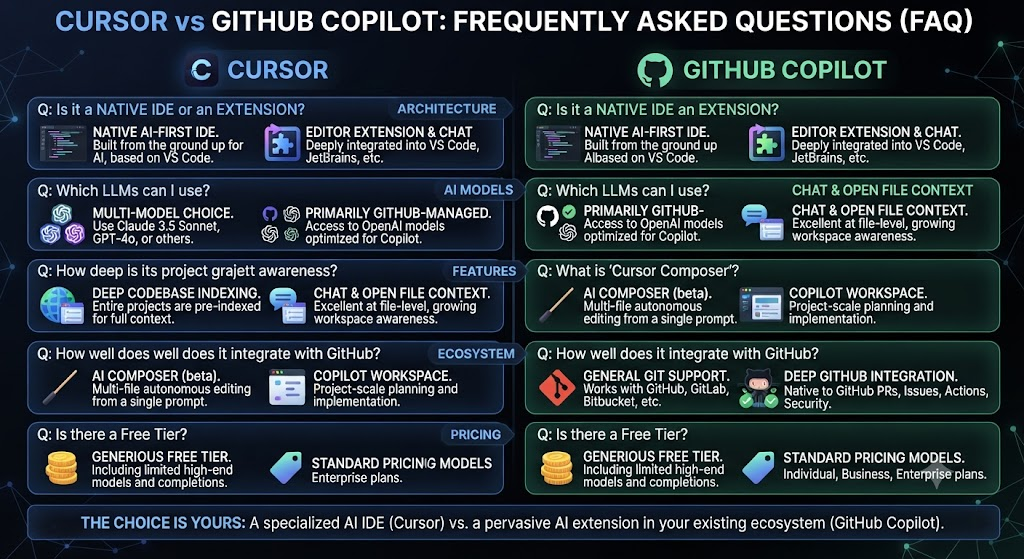
Is Cursor better than GitHub Copilot? For anyone weighing Cursor vs GitHub Copilot, for large-scale, multi-file refactoring and codebase-wide context, Cursor generally performs better. For budget-conscious individual use and staying inside your current editor, Copilot is the stronger pick.
How much does Cursor cost compared to Copilot? As this Cursor vs GitHub Copilot comparison shows, cursor Pro is $20/month versus Copilot Pro at $10/month — Cursor costs roughly double at the entry paid tier.
Does Cursor work with VS Code extensions? As this Cursor vs GitHub Copilot comparison shows, yes. Cursor is a VS Code fork, so it maintains full compatibility with the VS Code extension marketplace.
What changed with GitHub Copilot pricing in 2026? This Cursor vs GitHub Copilot analysis shows that on June 1, 2026, Copilot moved from counting premium requests to usage-based GitHub AI Credits, where plan fees convert into a dollar-denominated credit pool metered by actual token consumption.
Can I use Cursor and Copilot together? Across this Cursor vs GitHub Copilot review, not practically — Cursor is a standalone editor, so running Copilot as an extension inside Cursor isn’t the intended or well-supported use case. Pick one as your primary tool.
Which is cheaper for a team? On the topic of Cursor vs GitHub Copilot, copilot Business at $19/user/month is significantly cheaper than Cursor Teams at $40/user/month (or $120 for the Premium seat tier), before any usage overages are factored in on either side.
Does Cursor have a free plan? As this Cursor vs GitHub Copilot comparison shows, yes — the Hobby plan is free forever with no credit card required, offering limited Agent requests and Tab completions, enough to evaluate the editor before committing.
Building Something With These AI Coding Tools?
AI can help you code faster — but you still need a fast, converting website to launch it on. Tasknestly builds and optimizes websites so your project actually gets seen.
Get Your Website Built →Conclusion
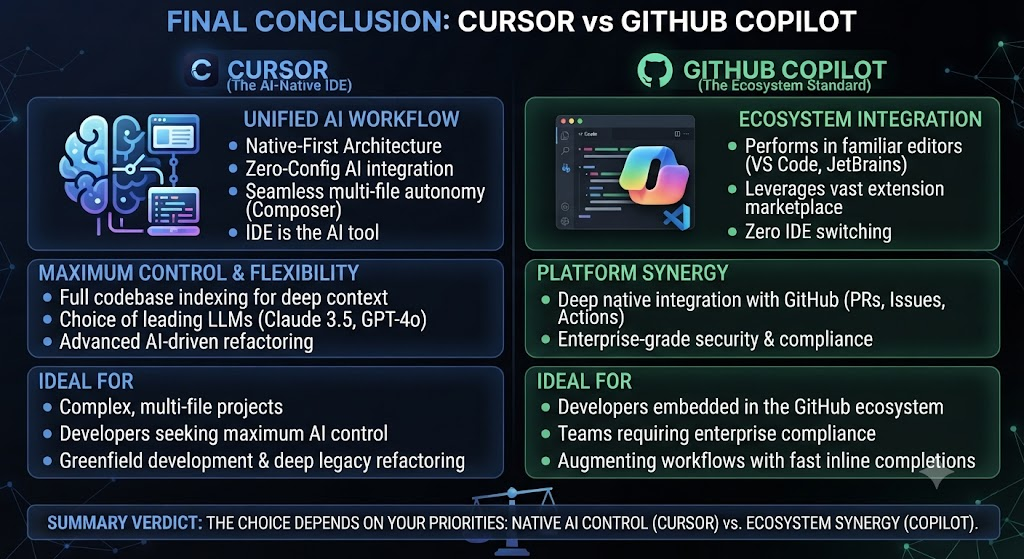
This Cursor vs GitHub Copilot comparison doesn’t have a universal winner, because the two tools optimize for different priorities. Cursor bets on being a complete, AI-native editor with the deepest possible codebase context and the most capable multi-file agent — and it delivers on that bet, at roughly double Copilot’s entry price. Copilot bets on meeting developers exactly where they already are, inside their existing editor, at the lowest reasonable price point in the category.
In this Cursor vs GitHub Copilot breakdown, if your work regularly involves large, structural refactors across many files, Cursor’s Composer is worth the premium — it’s currently the more capable tool for that specific job. If your budget is tight or switching editors isn’t worth the friction, Copilot Pro at $10/month remains one of the best per-dollar values in AI-assisted development, and the June 2026 pricing changes haven’t meaningfully hurt that value for anyone outside heavy agent workflows.
Looking at Cursor vs GitHub Copilot, teams weighing this decision at scale should also factor in the real Enterprise costs on both sides — Cursor’s Premium Teams seat at $120/user and Copilot’s true Enterprise cost near $60/user once GitHub Enterprise Cloud is included both look different from their headline numbers.
When it comes to Cursor vs GitHub Copilot, developers looking to turn faster AI-assisted coding into faster-shipped products might also find value in Tasknestly’s website services for the parts of product delivery that happen after the code is written.
For anyone weighing Cursor vs GitHub Copilot, both tools are evolving fast enough that this comparison is worth revisiting every few months — Cursor’s pricing model has already changed twice in the past year, and Copilot’s transition to usage-based billing is barely a month old as of this writing. Neither company has signaled that the pace of change is slowing, and a comparison that holds true today could look meaningfully outdated by the time your team’s next contract renewal comes around. Budget accordingly, and don’t assume either tool’s current pricing is the final word.
Building Something With These AI Coding Tools?
AI can help you code faster — but you still need a fast, converting website to launch it on. Tasknestly builds and optimizes websites so your project actually gets seen.
Get Your Website Built →