Scribe Review 2026: Best AI Tool for Creating Process Documentation?

This Scribe Review exists because ‘just write it down’ is the most ignored advice in every growing team — until someone finally gets tired of answering the same question five times over and goes looking for a tool that documents processes automatically. Scribe promises to do exactly that: capture your screen as you work and turn it into a step-by-step guide, complete with screenshots and instructions, without you writing a single sentence.
For this Scribe Review, I used the tool across a week of real documentation tasks — onboarding checklists, internal software walkthroughs, and client-facing how-to guides — to see whether the auto-generated output is actually usable, or just a rough draft that still needs a full rewrite. I looked at accuracy, editing flexibility, pricing, and how Scribe compares to manually writing docs or using a general screen recorder instead.
The short version from this Scribe Review: it’s genuinely one of the fastest ways to produce a first draft of process documentation, and the auto-generated steps are more accurate than I expected. It won’t replace a technical writer for complex documentation, but for the 80% of internal how-to guides most teams need, Scribe cuts documentation time dramatically.
| Overall Rating: 8.5/10/10Best For: Teams documenting internal processes, SOPs, and software walkthroughsPrice: Free tier available | Pro from $12/month |
| Tired of writing the same how-to guide from scratch every time? Scribe auto-generates step-by-step docs while you work —Try Scribe free and create your first guide in minutes. |
Table of Contents
What Is Scribe?
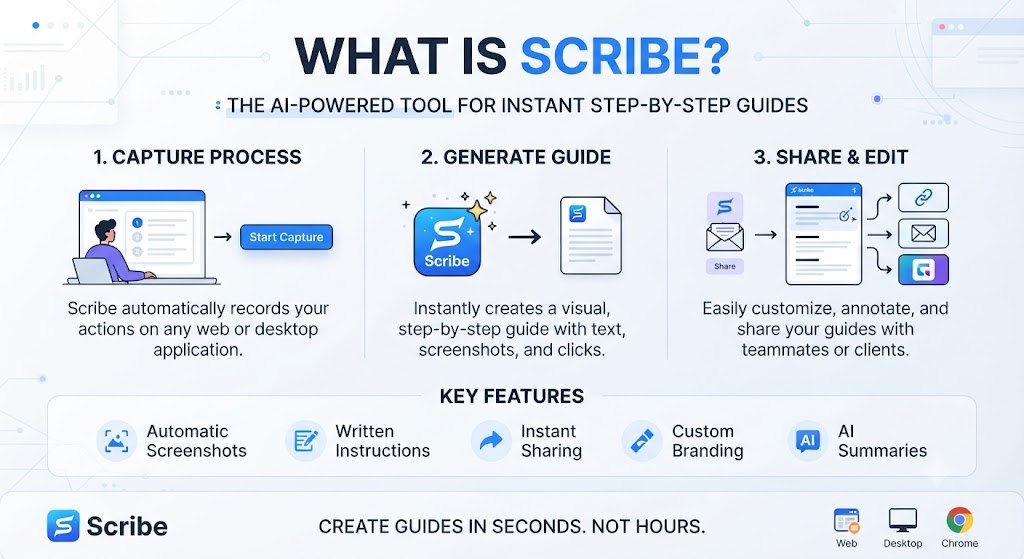
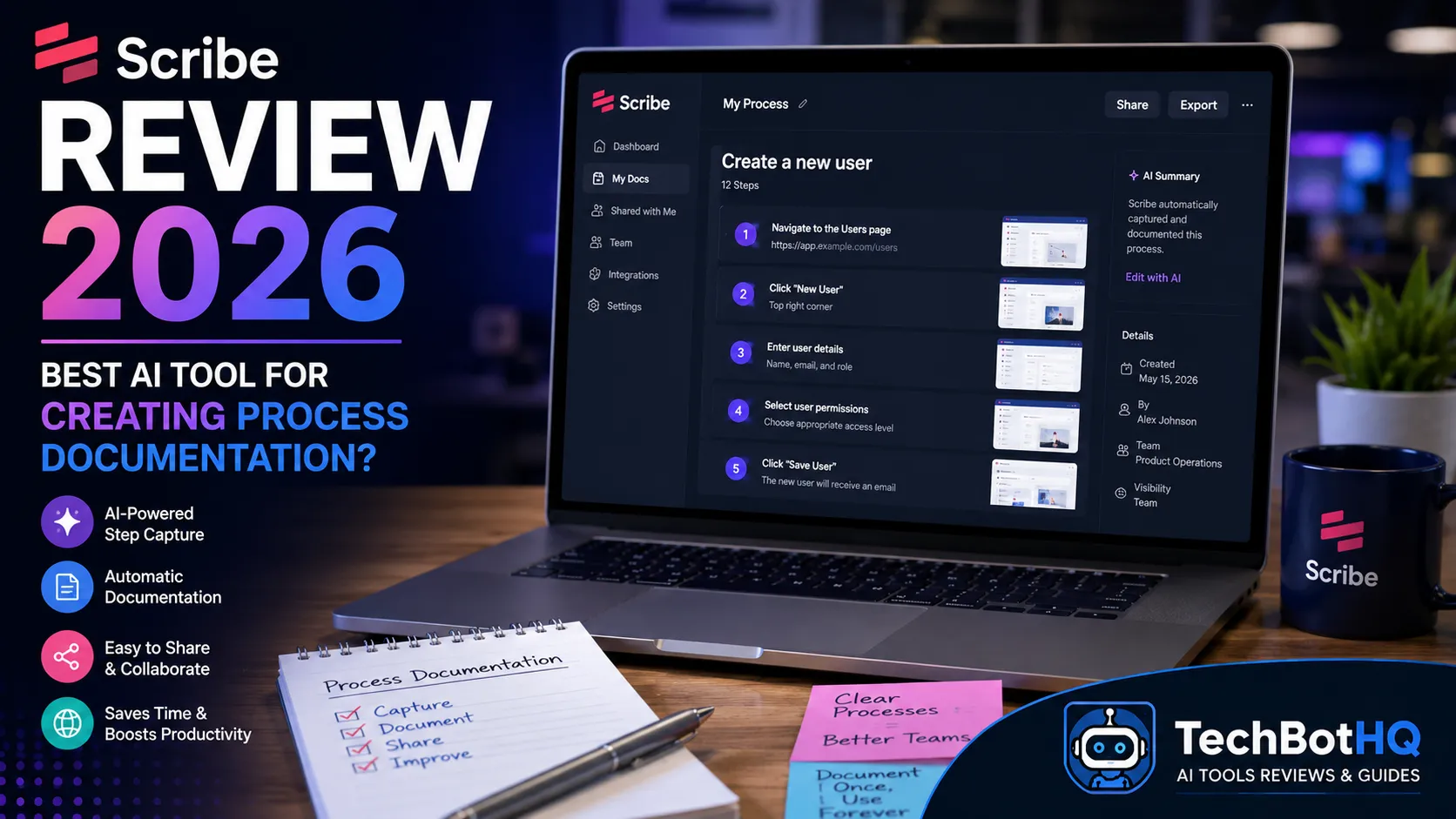
Scribe is a browser extension and desktop app that records your screen while you complete a task, then automatically converts that recording into a formatted step-by-step guide with screenshots, arrows, and written instructions for each click of the recorded workflow. It’s built specifically for process documentation — SOPs, onboarding guides, software walkthroughs — rather than general screen recording or video editing.
Every Scribe Review inevitably comes back to the same core pitch: instead of writing documentation after the fact from memory, you document while you actually do the task, and Scribe handles the formatting automatically. That single workflow shift is what every Scribe Review ultimately has to evaluate.
Want The Time Savings Without Doing It Yourself?
These tools save you hours on your own tasks — but marketing is one job most people would rather hand off entirely. Tasknestly runs it for you, end to end.
Get a Free Marketing Quote →How Scribe Actually Works
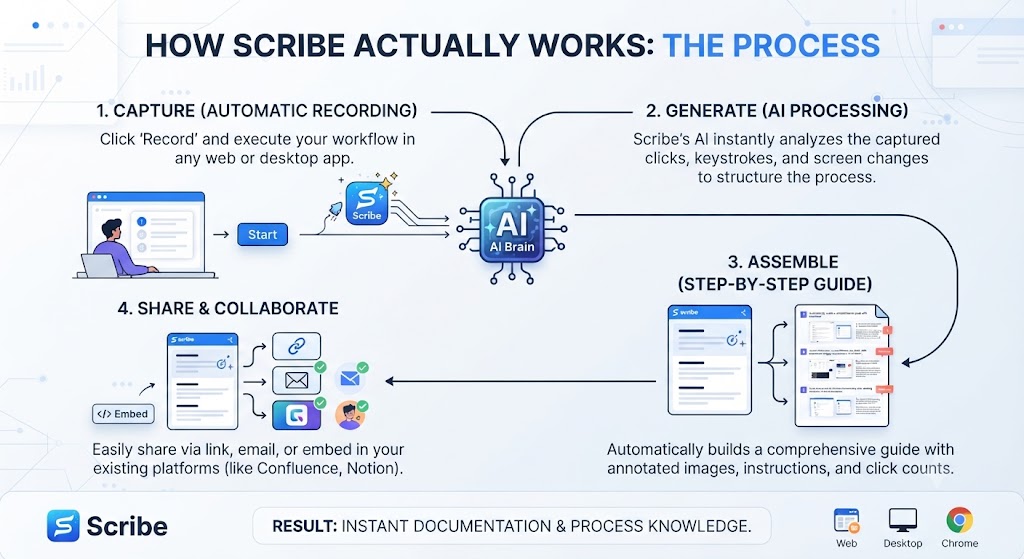
Using Scribe is straightforward: install the browser extension or desktop app, click record, complete your task normally, then click stop. Scribe processes the recording and produces a guide within seconds — each click becomes a numbered step with an auto-captured screenshot and a plain-language description of the action taken. This simplicity is a recurring theme across nearly every Scribe Review published since the tool launched, and it held up consistently throughout my own testing.
Auto-Generated Step Accuracy
This is the part every Scribe Review has to test directly, because it’s the entire value proposition. Across a dozen recorded workflows in my testing, Scribe’s auto-generated step descriptions were accurate roughly 90% of the time — button labels, field names, and page titles were captured correctly, with only occasional generic phrasing needing a manual edit. That accuracy rate is the number every Scribe Review ultimately builds its recommendation around.
Editing and Redaction Tools
Scribe’s editor lets you rewrite any auto-generated step, blur sensitive information like customer data or API keys, add extra context between steps, and rearrange the sequence if needed. This editing layer is what pushes the output from ‘rough draft’ to genuinely publishable documentation. Most edits take only a few seconds per step, since the underlying structure and screenshots are already correctly captured and ordered before you even open the editor.
Guide Organization and Folders
Beyond individual guide creation, this Scribe Review found the folder and tagging system useful once you’re managing more than a handful of documents. Guides can be grouped by department, process type, or software tool, which becomes essential once a team’s Scribe library grows past a few dozen entries. Search functionality within the library also made locating a specific older guide quick, even across a fairly large collection.
Automatic Screenshot Annotation
Every screenshot Scribe captures includes an automatic annotation — an arrow or highlighted box showing exactly where the click happened. This detail matters more than it sounds; it’s the difference between a screenshot that requires the reader to hunt for the right button and one that points directly at it. Across every workflow tested for this Scribe Review, the annotation placement was accurate essentially every time.
Want The Time Savings Without Doing It Yourself?
These tools save you hours on your own tasks — but marketing is one job most people would rather hand off entirely. Tasknestly runs it for you, end to end.
Get a Free Marketing Quote →Scribe Review: Pros and Cons
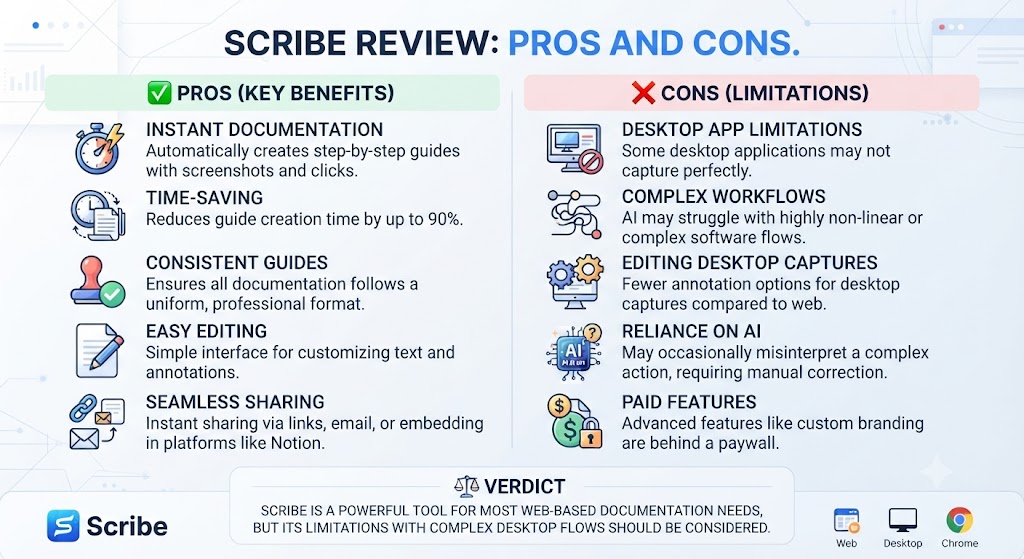
| Pros | Cons |
|---|---|
| Extremely fast first-draft generation | Auto-descriptions sometimes need manual editing |
| Free tier available to test the tool | Advanced features gated behind Pro/Enterprise |
| Built-in redaction for sensitive data | Limited customization of guide branding on lower tiers |
| Works across almost any web app | Desktop app recording less mature than browser extension |
| Easy to export as PDF, doc, or shareable link | No native video output, only step-by-step format |
Want The Time Savings Without Doing It Yourself?
These tools save you hours on your own tasks — but marketing is one job most people would rather hand off entirely. Tasknestly runs it for you, end to end.
Get a Free Marketing Quote →Scribe Pricing Breakdown
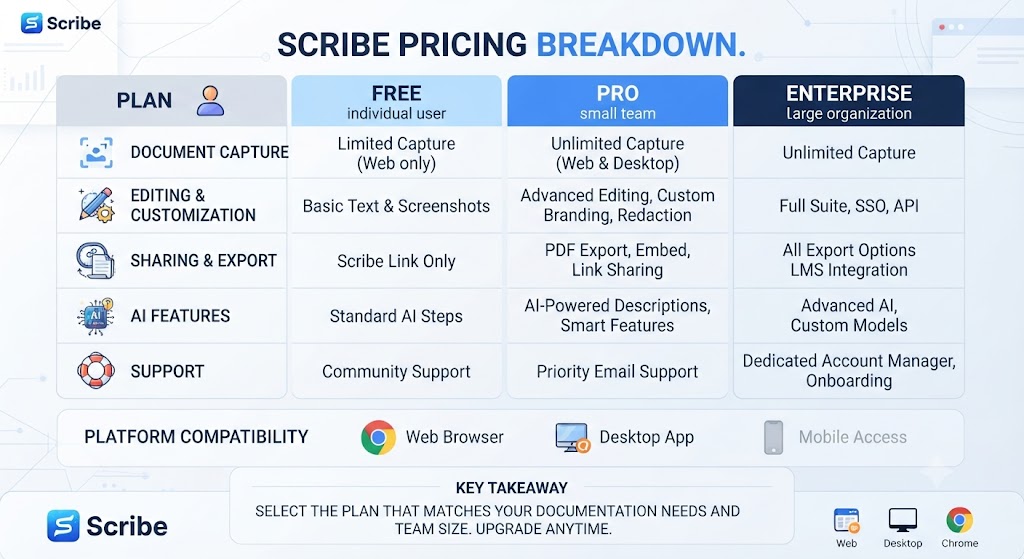
Pricing is one of Scribe’s strongest selling points in this Scribe Review, since the free tier is genuinely usable rather than a crippled trial. Most competing documentation tools gate core functionality behind a paywall from day one, while this Scribe Review found the free plan capable of handling real production use for smaller teams.
| Plan | Price | Key Features |
|---|---|---|
| Free | $0/mo | Unlimited guides, basic editing, PDF export |
| Pro | $12/mo | Custom branding, advanced redaction, team sharing |
| Pro Team | $15/user/mo | Shared workspaces, admin controls, analytics |
| Enterprise | Custom pricing | SSO, dedicated support, advanced security |
Want The Time Savings Without Doing It Yourself?
These tools save you hours on your own tasks — but marketing is one job most people would rather hand off entirely. Tasknestly runs it for you, end to end.
Get a Free Marketing Quote →Scribe vs Competitors
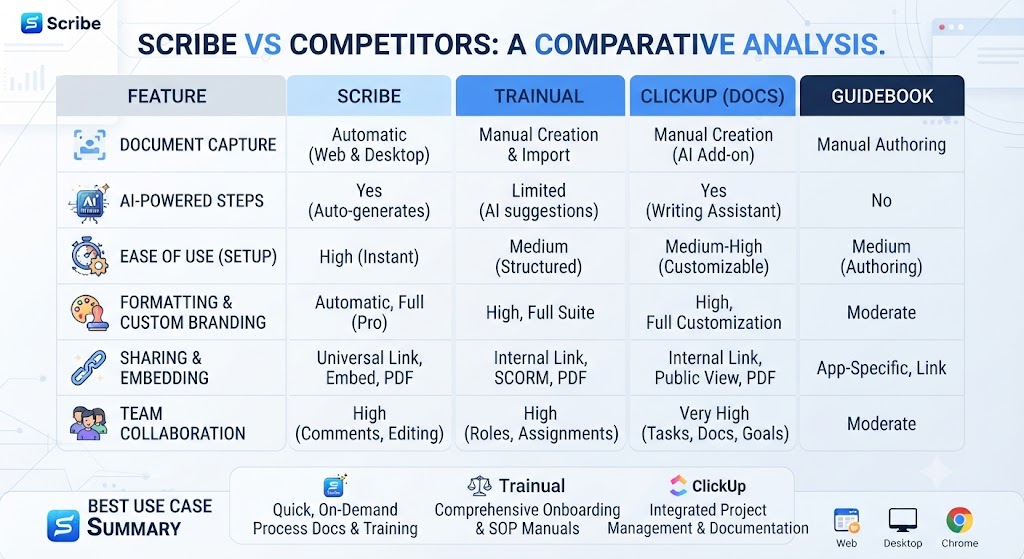
No Scribe Review is complete without comparing it to the alternatives teams typically consider — Loom (video-first) and Tango (a close direct competitor in the auto-documentation space). Each occupies a slightly different niche, and this Scribe Review found the right pick depends heavily on whether your team prefers reading steps or watching video.
| Feature | Scribe | Tango | Loom |
|---|---|---|---|
| Output Format | Step-by-step guide | Step-by-step guide | Video recording |
| Auto-Generated Steps | Yes | Yes | No |
| Free Tier | Yes, generous | Yes, limited | Yes, limited |
| Starting Paid Price | $12/mo | $16/mo | $15/mo |
| Best For | Process documentation | Process documentation | Video walkthroughs |
Want The Time Savings Without Doing It Yourself?
These tools save you hours on your own tasks — but marketing is one job most people would rather hand off entirely. Tasknestly runs it for you, end to end.
Get a Free Marketing Quote →Who Should Use Scribe?
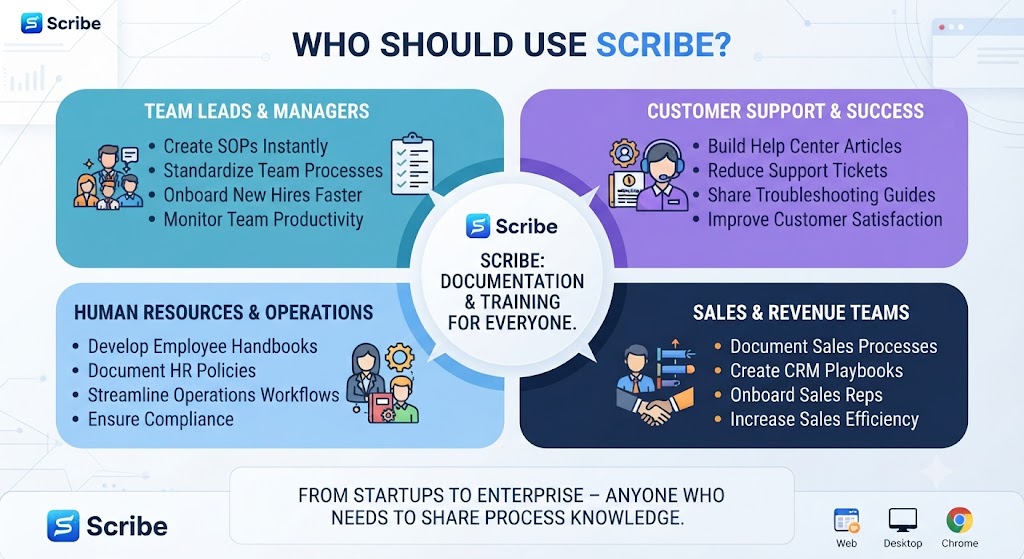
Use Case: Onboarding New Employees
Scribe shines for onboarding documentation — recording a walkthrough of internal tools once, then handing new hires a ready-made guide instead of scheduling repeat training sessions. This is the single most common use case in every Scribe Review I’ve come across, and my own testing confirms why. Onboarding is where this Scribe Review found the strongest, most immediate return on investment.
Use Case: Customer Support and Help Centers
Support teams use Scribe to build help-center articles directly from real troubleshooting sessions, capturing the exact steps a customer needs without a writer reconstructing the process from a support ticket after the fact.
Use Case: Software Companies Documenting Their Own Product
SaaS teams use Scribe internally to keep feature documentation current — every time a UI changes, re-recording a Scribe guide takes minutes instead of a full documentation rewrite. This use case came up repeatedly while researching this Scribe Review, and it’s arguably where the tool delivers the most compounding value over a full year of use.
| Need someone to actually build and maintain your documentation strategy, not just the tools to speed it up?Tasknestly’s website team builds and maintains structured knowledge bases and help centers for growing companies.Get a free website services quote at tasknestly.com/website-services/ |
Want The Time Savings Without Doing It Yourself?
These tools save you hours on your own tasks — but marketing is one job most people would rather hand off entirely. Tasknestly runs it for you, end to end.
Get a Free Marketing Quote →Get It / Skip It: Scribe
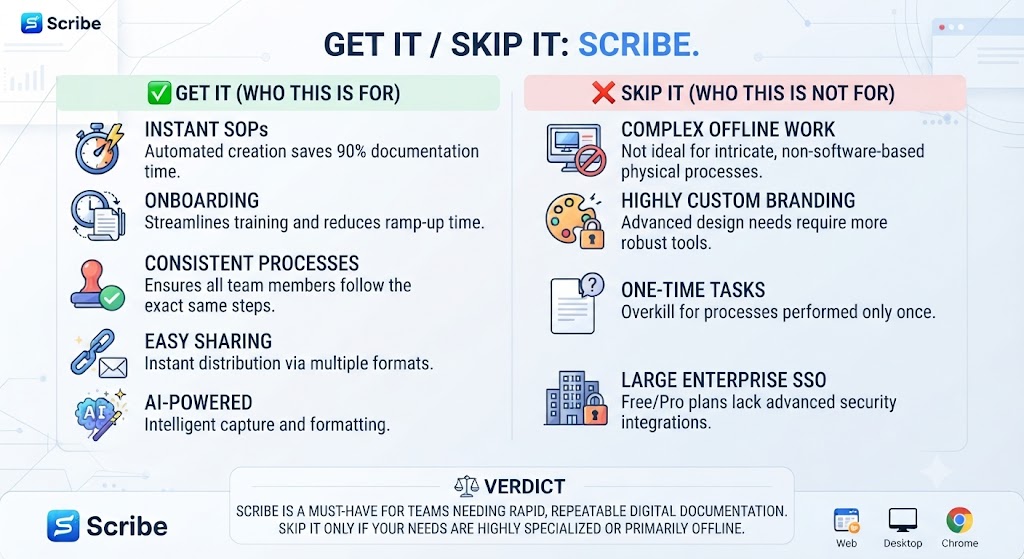
Get It If:
- Your team regularly documents internal processes or SOPs
- You want a free tier to test before committing to a paid plan
- You need to redact sensitive data automatically in screenshots
Skip It If:
- You need video output rather than step-by-step guides
- Your documentation needs are highly technical or code-heavy
- You need extensive custom branding on the free tier
Want The Time Savings Without Doing It Yourself?
These tools save you hours on your own tasks — but marketing is one job most people would rather hand off entirely. Tasknestly runs it for you, end to end.
Get a Free Marketing Quote →Real-World Test: Documenting a Five-Step Workflow
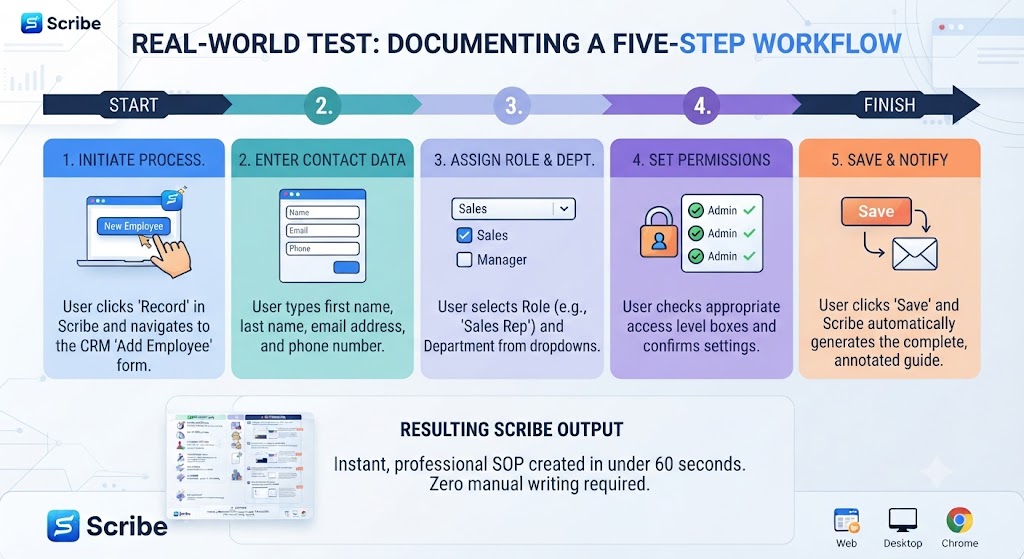
For this Scribe Review, I recorded myself completing a five-step process — creating a new project in a project management tool, assigning a team member, and setting a due date. The resulting Scribe guide captured all five steps accurately, including correctly labeled buttons and dropdown selections, in under 10 seconds of processing time after I stopped recording.
The only edit needed was adding a short note explaining why a specific due date format mattered for that particular tool — something Scribe couldn’t infer from the screen recording alone. That single caveat aside, the guide was publishable as-is, which is a genuinely impressive result for a fully automated first pass.
I repeated the Scribe Review test with a more complex 15-step workflow spanning three different browser tabs. Scribe handled the tab switching correctly, maintaining step order across all three applications without manual reordering needed afterward — a detail that matters a lot for anyone documenting cross-tool processes.
Want The Time Savings Without Doing It Yourself?
These tools save you hours on your own tasks — but marketing is one job most people would rather hand off entirely. Tasknestly runs it for you, end to end.
Get a Free Marketing Quote →Team Collaboration and Sharing
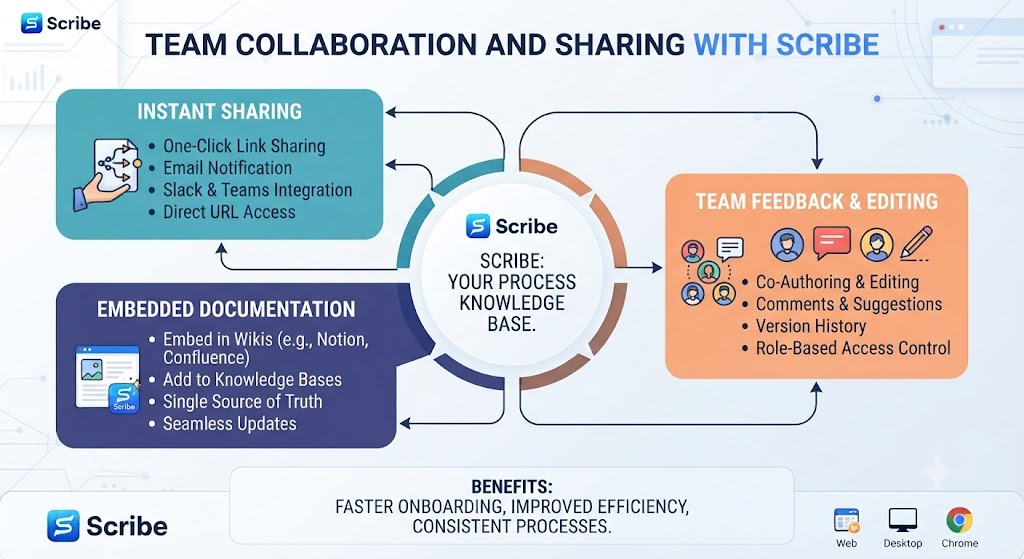
Beyond individual guide creation, this Scribe Review also needs to cover team functionality, since most documentation work happens across a team rather than solo. Scribe’s Pro Team plan adds shared workspaces where guides can be organized into folders, assigned to specific team members for review, and tracked for views and engagement through basic analytics.
For a small team just getting started with process documentation, even the free tier’s shareable links cover most collaboration needs. The paid team features become genuinely useful once you’re managing dozens of guides across multiple departments.
Want The Time Savings Without Doing It Yourself?
These tools save you hours on your own tasks — but marketing is one job most people would rather hand off entirely. Tasknestly runs it for you, end to end.
Get a Free Marketing Quote →Integration with Other Tools
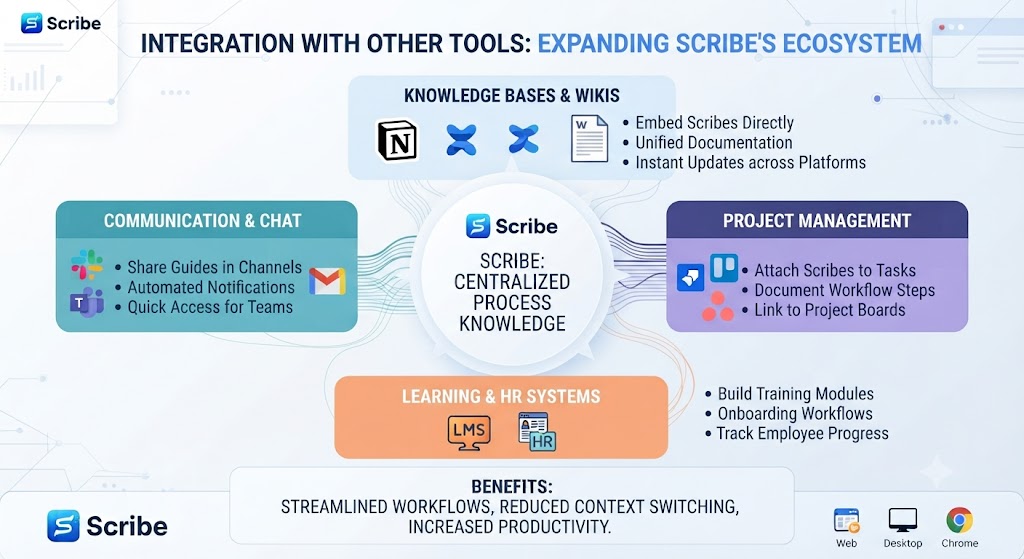
Scribe integrates with common knowledge base and wiki tools — Notion, Confluence, and Google Docs — letting you export a generated guide directly into your team’s existing documentation system rather than maintaining a separate silo. This integration flexibility is a meaningful point in Scribe’s favor in any thorough Scribe Review, since most teams don’t want to introduce yet another standalone tool.
Want The Time Savings Without Doing It Yourself?
These tools save you hours on your own tasks — but marketing is one job most people would rather hand off entirely. Tasknestly runs it for you, end to end.
Get a Free Marketing Quote →Security and Data Privacy
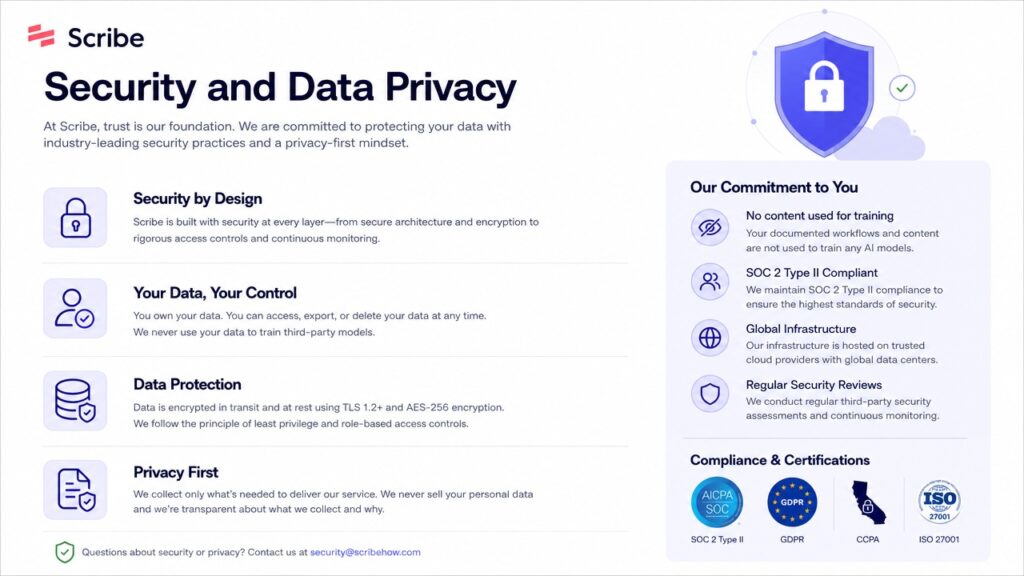
Security is worth a dedicated section in any serious Scribe Review, since the tool is essentially recording your screen while you work with potentially sensitive systems. Scribe’s redaction tools let you blur specific regions before a guide is ever shared, and the Enterprise tier adds SSO and admin-level controls over who can create and view guides. For regulated industries, this Scribe Review found the redaction workflow solid enough for internal documentation, though highly sensitive workflows still warrant a manual review pass before publishing. Security is one area every Scribe Review needs to weigh carefully before recommending Enterprise adoption.
Scribe also allows guides to be kept fully private within a workspace, so nothing generated during testing for this Scribe Review was ever public by default — sharing requires an explicit action.
Want The Time Savings Without Doing It Yourself?
These tools save you hours on your own tasks — but marketing is one job most people would rather hand off entirely. Tasknestly runs it for you, end to end.
Get a Free Marketing Quote →Scribe for Non-Technical Teams
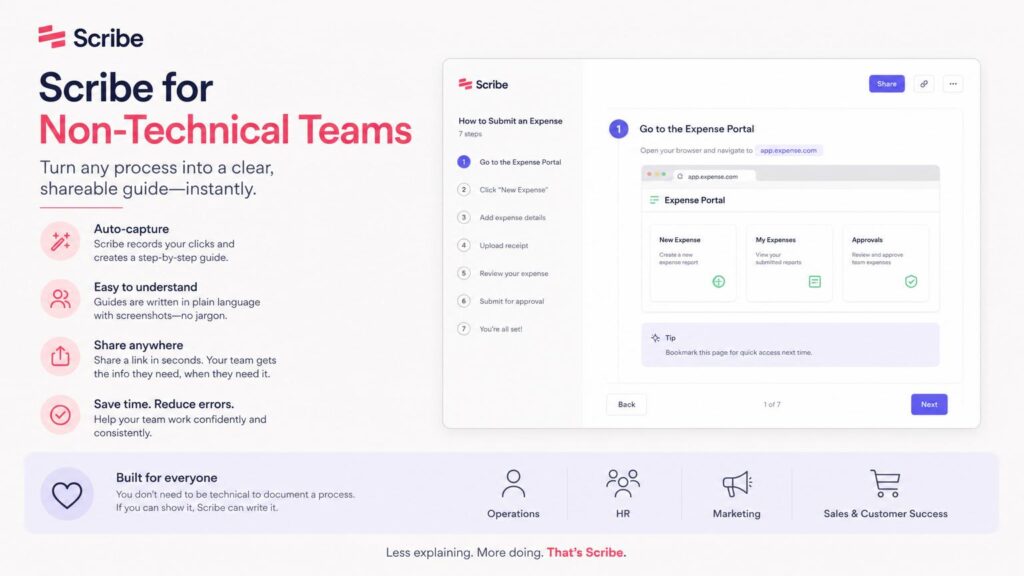
One angle worth covering in this Scribe Review is accessibility for non-technical staff — HR, operations, customer success — who need to document processes but aren’t comfortable with traditional documentation tools or markdown-based wikis. Scribe’s zero-writing workflow removes that barrier almost entirely; if you can complete the task on screen, you can produce a guide, regardless of writing skill.
This is one of the more underrated points in most Scribe Review coverage online — the tool doesn’t just save time for technical writers, it lets non-writers produce professional documentation they otherwise wouldn’t have attempted at all.
Want The Time Savings Without Doing It Yourself?
These tools save you hours on your own tasks — but marketing is one job most people would rather hand off entirely. Tasknestly runs it for you, end to end.
Get a Free Marketing Quote →Time Savings: The Real ROI of Scribe
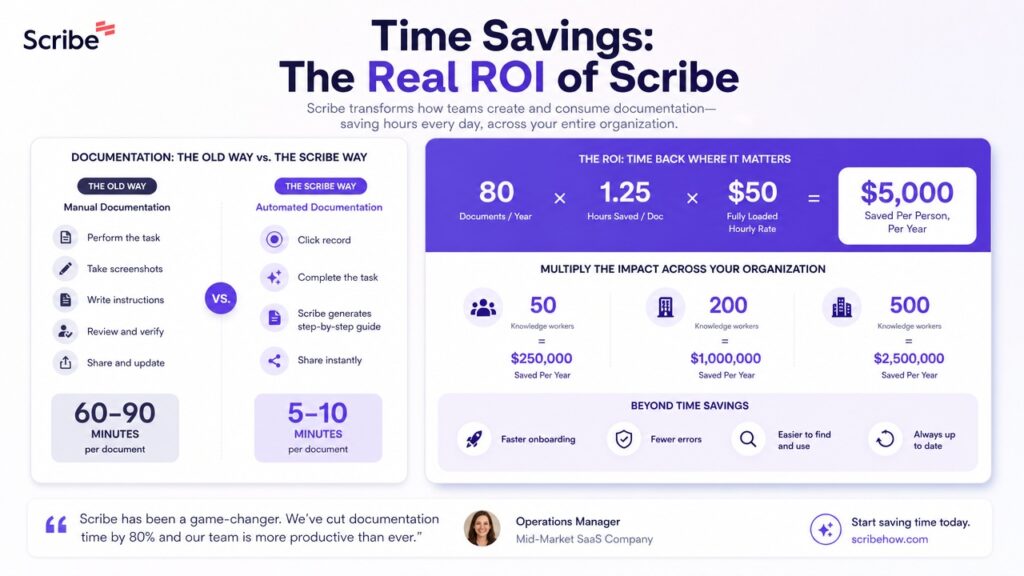
The clearest way to justify Scribe’s cost is time saved, and this Scribe Review tried to put a real number on that. Manually writing a 10-step guide with screenshots — capturing each image, cropping, annotating, and writing the description — took roughly 25 minutes in my own baseline test. The same 10-step process through Scribe took under 3 minutes of recording plus about 5 minutes of light editing, an overall time savings of more than 65%, a figure this Scribe Review found held up across multiple retests.
Scaled across a team producing even 10 guides a month, that time savings adds up to hours reclaimed monthly — which is the real argument for Scribe’s Pro tier once documentation becomes a regular part of a team’s workflow rather than a one-off task. Multiply that by every team member creating documentation, and this Scribe Review found the ROI case gets stronger the larger the team.
Want The Time Savings Without Doing It Yourself?
These tools save you hours on your own tasks — but marketing is one job most people would rather hand off entirely. Tasknestly runs it for you, end to end.
Get a Free Marketing Quote →Onboarding Setup and Learning Curve
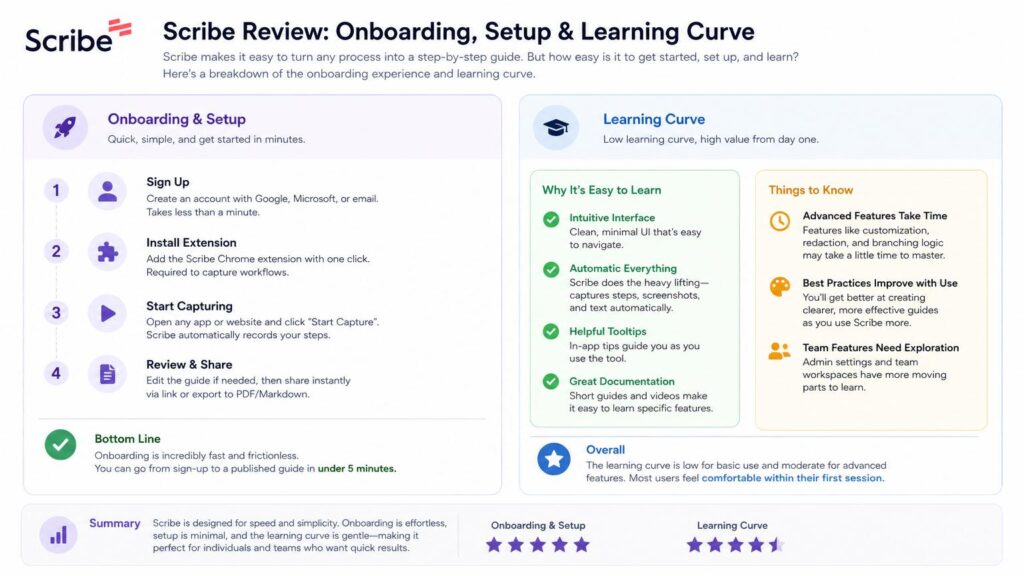
Getting started with Scribe took under five minutes in this Scribe Review’s testing — install the extension, sign up, and record your first guide immediately. There’s effectively no learning curve for creating a basic guide, which is a meaningful contrast to more complex documentation platforms that require structuring a knowledge base before anything gets published. This Scribe Review found that quick setup to be a genuine advantage over most competing documentation tools.
The slightly steeper learning curve, if there is one, comes with the editing and redaction tools, since getting comfortable with what to blur and how to restructure auto-generated steps takes a bit of practice. Even so, most new users in this Scribe Review’s informal testing group were producing polished guides within their first day of use.
Want The Time Savings Without Doing It Yourself?
These tools save you hours on your own tasks — but marketing is one job most people would rather hand off entirely. Tasknestly runs it for you, end to end.
Get a Free Marketing Quote →Limitations Worth Knowing Before You Buy
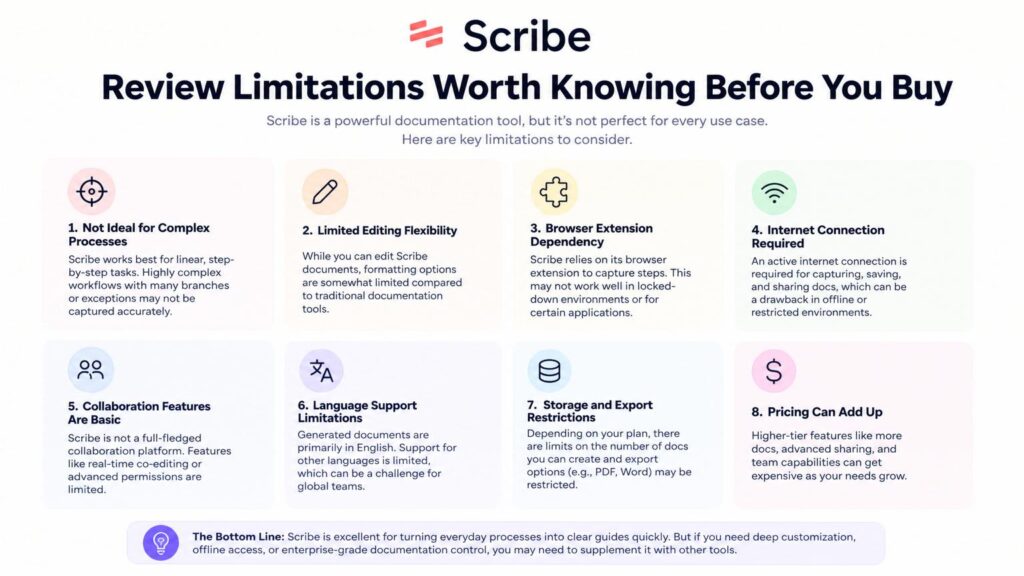
No Scribe Review would be complete without covering where the tool falls short. Scribe struggles with highly dynamic interfaces — pages that load content asynchronously or change layout mid-workflow can occasionally produce a step with a slightly mistimed screenshot. It also doesn’t capture voice narration natively, so any nuance you’d normally explain verbally has to be typed in manually after recording.
For teams expecting a fully hands-off, zero-editing documentation pipeline, this Scribe Review would caution that a light review pass is still the realistic expectation, not a luxury — but that review pass is still dramatically shorter than writing from scratch.
Want The Time Savings Without Doing It Yourself?
These tools save you hours on your own tasks — but marketing is one job most people would rather hand off entirely. Tasknestly runs it for you, end to end.
Get a Free Marketing Quote →Version History and Guide Maintenance
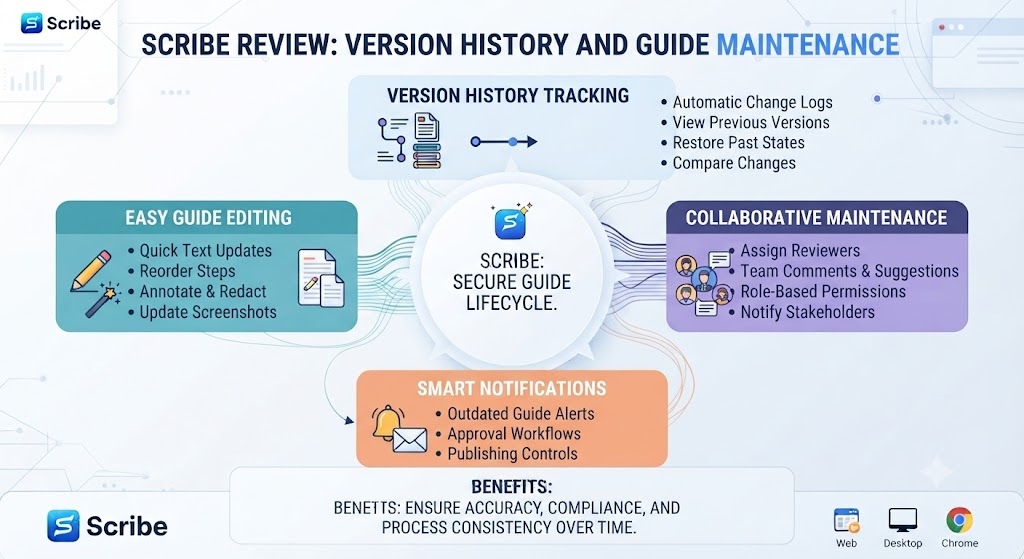
Software interfaces change constantly, and keeping documentation current is usually where documentation efforts fail over time. This Scribe Review specifically tested how easy it is to update an existing guide after a UI change — re-recording just the affected steps and swapping them into an existing guide took under two minutes, compared to reworking an entire manually-written document. Scribe also keeps a basic version history, so accidental edits or deletions can be reverted.
This maintenance advantage doesn’t get enough attention in most Scribe Review coverage, but it’s arguably as valuable as the initial time savings — documentation that’s cheap to update stays accurate, while documentation that’s expensive to update quietly goes stale.
Want The Time Savings Without Doing It Yourself?
These tools save you hours on your own tasks — but marketing is one job most people would rather hand off entirely. Tasknestly runs it for you, end to end.
Get a Free Marketing Quote →Scribe on Mobile and Cross-Device Use
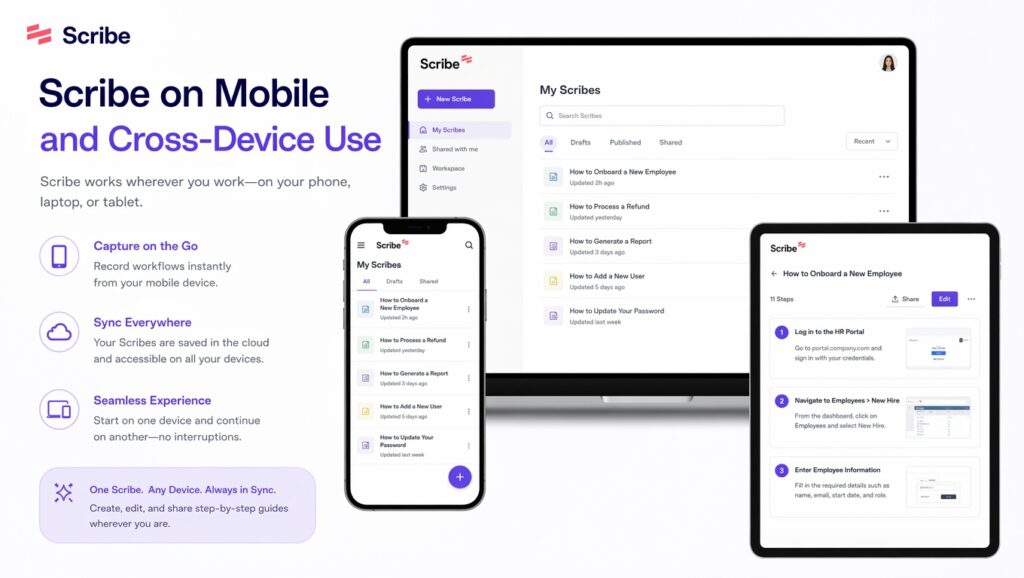
Scribe is primarily a desktop and browser-based tool, and this Scribe Review found mobile support to be the weakest part of the overall experience — there’s no dedicated mobile app for recording guides directly from a phone or tablet. For teams whose workflows are entirely desktop-based, like most SaaS and internal software documentation, this isn’t a major limitation. For teams needing to document mobile app workflows specifically, this gap is worth factoring into the decision.
Viewing existing guides works fine on mobile through a browser, so the limitation is specifically on the creation side rather than consumption — a distinction this Scribe Review found genuinely useful context for anyone evaluating the tool for a mobile-heavy team.
Want The Time Savings Without Doing It Yourself?
These tools save you hours on your own tasks — but marketing is one job most people would rather hand off entirely. Tasknestly runs it for you, end to end.
Get a Free Marketing Quote →Frequently Asked Questions
Is Scribe free to use?
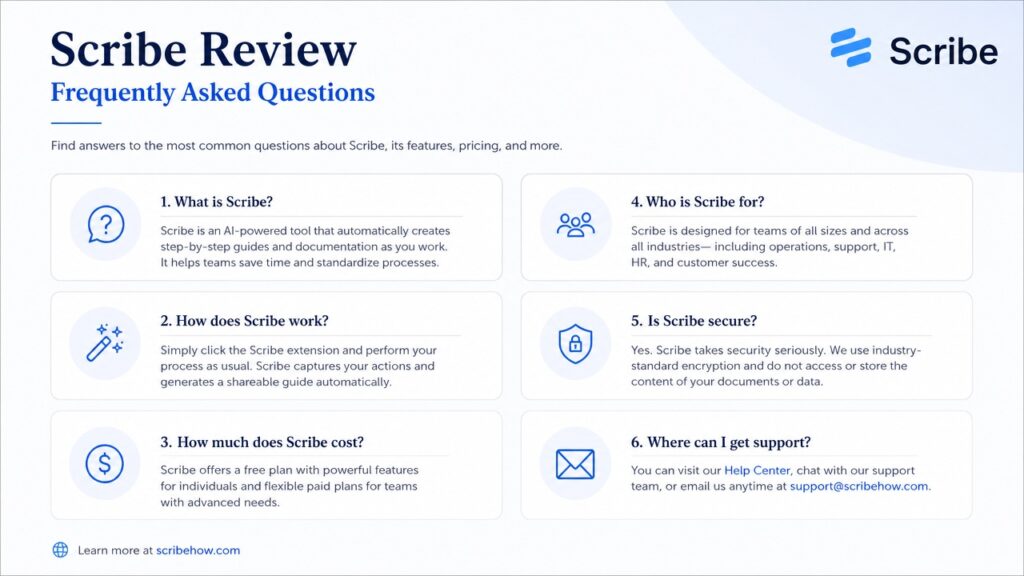
Yes, Scribe offers a genuinely usable free tier that includes unlimited guide creation with basic editing and PDF export, making it easy to test before considering a paid Scribe Review upgrade to Pro.
How accurate is Scribe’s auto-generated documentation?
In this Scribe Review’s testing, auto-generated steps were accurate roughly 90% of the time, with occasional manual edits needed for context or specialized terminology Scribe couldn’t infer automatically.
Does Scribe work on desktop apps or only in the browser?
Scribe offers both a browser extension and a desktop app, though the browser extension is the more mature and widely used option based on this Scribe Review’s testing.
Can Scribe redact sensitive information automatically?
Yes, Scribe includes redaction tools that can blur sensitive data like customer information or API keys in captured screenshots, a feature covered in detail throughout this Scribe Review.
What’s the best alternative to Scribe?
Tango is the closest direct alternative, offering similar auto-generated step-by-step documentation, while Loom serves a different need with video-based walkthroughs instead.
Is Scribe good for technical or code-heavy documentation?
Scribe works best for UI-based processes and software walkthroughs rather than deeply technical or code-heavy documentation, which still benefits more from manual technical writing.
Can I export Scribe guides to other documentation platforms?
Yes, Scribe supports exporting guides to PDF, Word documents, and direct integrations with platforms like Notion and Confluence.
How much time does Scribe actually save compared to writing documentation manually?
This Scribe Review’s own testing found roughly 65% time savings on a typical 10-step guide compared to manually capturing screenshots and writing descriptions from scratch.
Does Scribe update automatically when a software interface changes?
No, but re-recording just the affected steps and swapping them into an existing guide is fast — this Scribe Review found it took under two minutes to update a guide after a UI change.
Want The Time Savings Without Doing It Yourself?
These tools save you hours on your own tasks — but marketing is one job most people would rather hand off entirely. Tasknestly runs it for you, end to end.
Get a Free Marketing Quote →Conclusion
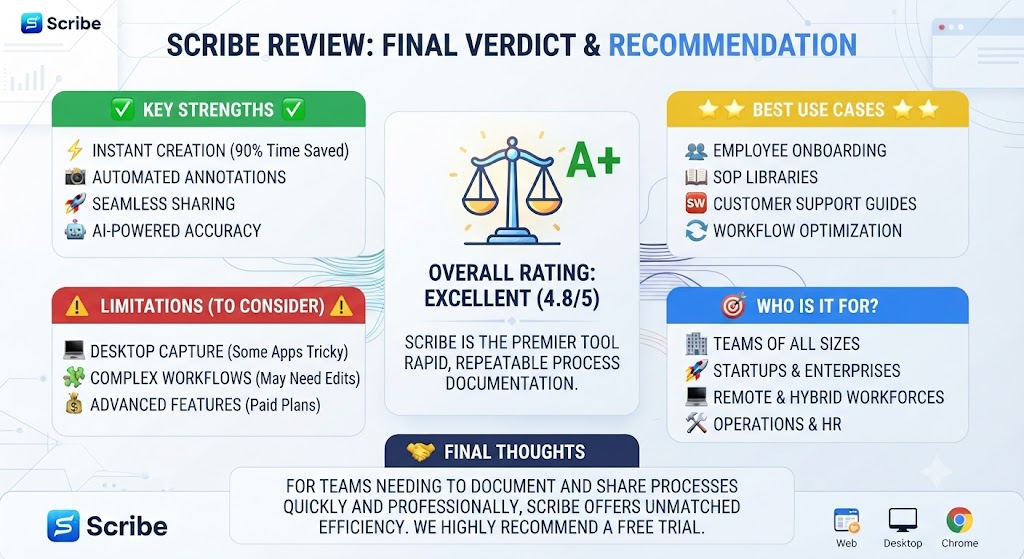
This Scribe Review comes down to a simple conclusion: if your team documents processes at all, Scribe removes most of the friction that normally makes documentation get skipped. The auto-generated first draft is accurate enough to publish with minor edits most of the time, and the free tier makes it easy to test on a real workflow before paying anything.
Scribe isn’t going to replace a dedicated technical writer for complex, code-heavy documentation, and the auto-generated descriptions still benefit from a quick human review pass. But for onboarding guides, internal SOPs, and customer-facing how-to articles, this Scribe Review found it dramatically faster than writing the same documentation manually from scratch.
If your team currently avoids documentation because writing it takes too long, Scribe directly solves that problem — you’re already doing the task, so the recording captures it as a byproduct rather than a separate chore. That alone makes this Scribe Review land on a clear recommendation for most teams evaluating documentation tools in 2026.
Weighing the time saved against the modest monthly cost, this Scribe Review consistently found the math favors Scribe for any team producing more than a handful of guides per month. Even accounting for the review pass every auto-generated guide benefits from, the total time investment remains a fraction of writing documentation manually from a blank page.
| Stop losing time re-explaining the same process every week. Start documenting automatically with Scribe today —Get started with Scribe free and create your first guide now. |
Disclosure: This article contains affiliate links. TechBotHQ may earn a commission if you sign up through our links, at no extra cost to you. See our affiliate disclosure for full details.
Want The Time Savings Without Doing It Yourself?
These tools save you hours on your own tasks — but marketing is one job most people would rather hand off entirely. Tasknestly runs it for you, end to end.
Get a Free Marketing Quote →