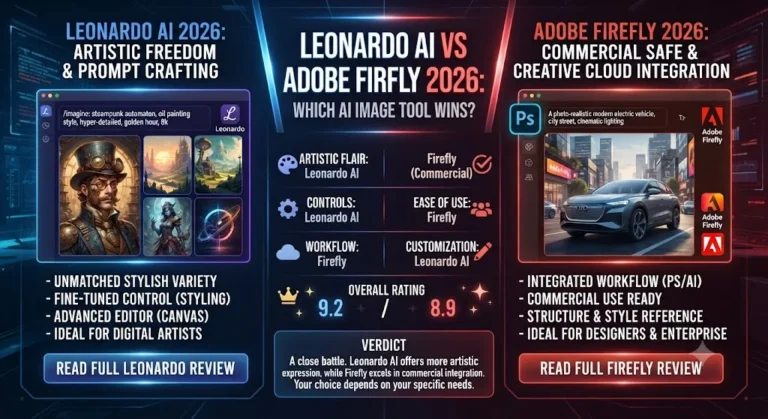
Adobe Firefly Review 2026: The Definitive Guide for Creators

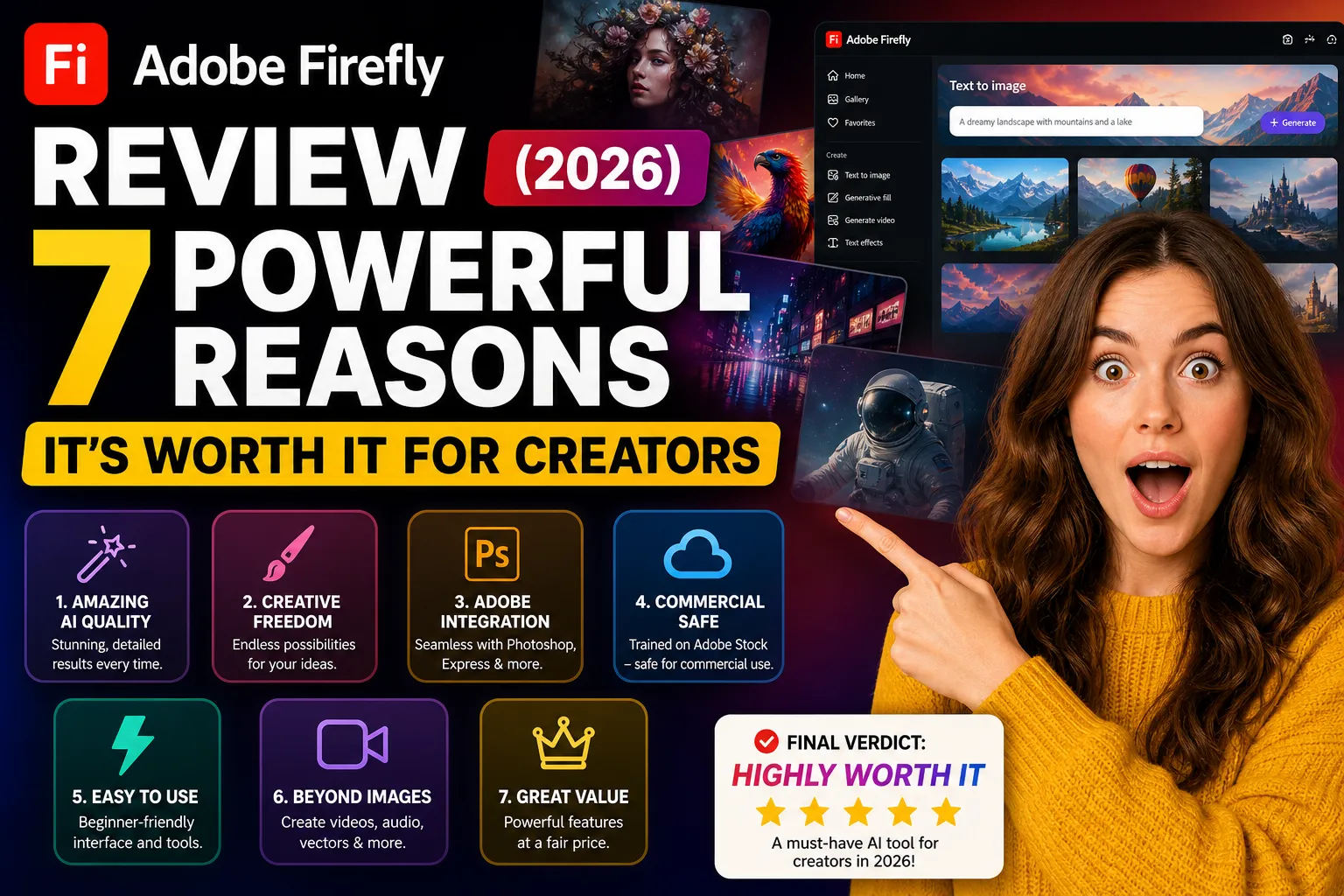
| ⚡ TechBotHQ Verdict This Adobe Firefly review gives the platform a solid 4.3 out of 5. Adobe Firefly is not trying to compete with Midjourney on artistic image quality — and understanding that distinction is the key to any honest Adobe Firefly review. Firefly competes on commercial safety and workflow integration. Trained exclusively on licensed content with IP indemnification on Enterprise plans, it is the safest AI image generator for commercial use in 2026. The Photoshop integration, Generative Fill, and Generative Expand are production-level tools that have changed how professional photographers, retouchers, and creative teams work. For creative professionals already in the Adobe ecosystem, this Adobe Firefly review finds the value proposition compelling and practically important. Rating: 4.3/5 | Best For: Creative professionals, agencies, and enterprise teams already in the Adobe ecosystem who need commercially safe AI image generation integrated into professional design workflows |
Table of Contents
Adobe Firefly Review 2026: What You Need to Know First

This Adobe Firefly review starts with the framing that most comparisons get wrong. If you open this Adobe Firefly review expecting to see Firefly compete with Midjourney on raw artistic quality, you will misunderstand what the product is designed to do and why professionals choose it. Adobe Firefly is not an artistic image generator competing on aesthetics. It is a commercially safe AI creative tool competing on two things: licensing clarity and workflow integration.
The licensing story is what makes this Adobe Firefly review matter for professional creative teams. Firefly was trained exclusively on Adobe Stock images, openly licensed content, and public domain material — no web scraping, no gray-area training data. On Enterprise plans, Adobe provides IP indemnification: a formal guarantee that if a third party makes an IP claim about Firefly-generated content you used commercially, Adobe covers the legal defense. In a market where most AI image generators make no such guarantee, this Adobe Firefly review position is genuinely distinctive.
The workflow story is the other reason this Adobe Firefly review matters. For the hundreds of millions of users who work in Photoshop, Illustrator, and Premiere Pro daily, Generative Fill, Generative Expand, and the Remove Tool are accessible directly within the workflows they already use. No new tools. No context switching. The AI is already there in the tools they know.
Our Adobe Firefly review tested the platform across Photoshop Generative Fill, Generative Expand, the standalone Firefly web app, and Illustrator vector generation over six weeks of professional creative workflow usage. Here is the complete and honest assessment.
Whether you are a photographer evaluating AI editing tools, an agency assessing commercial safety options, or a Creative Cloud subscriber deciding whether to activate Firefly features — this Adobe Firefly review has the answers you need.
Love What These AI Design Tools Can Do?
Great AI-generated visuals still need a cohesive brand identity holding them together. Let Tasknestly build your full branding — logo, guidelines, and visual system.
Explore Branding Services →1. What Is Adobe Firefly? A Plain-English Overview
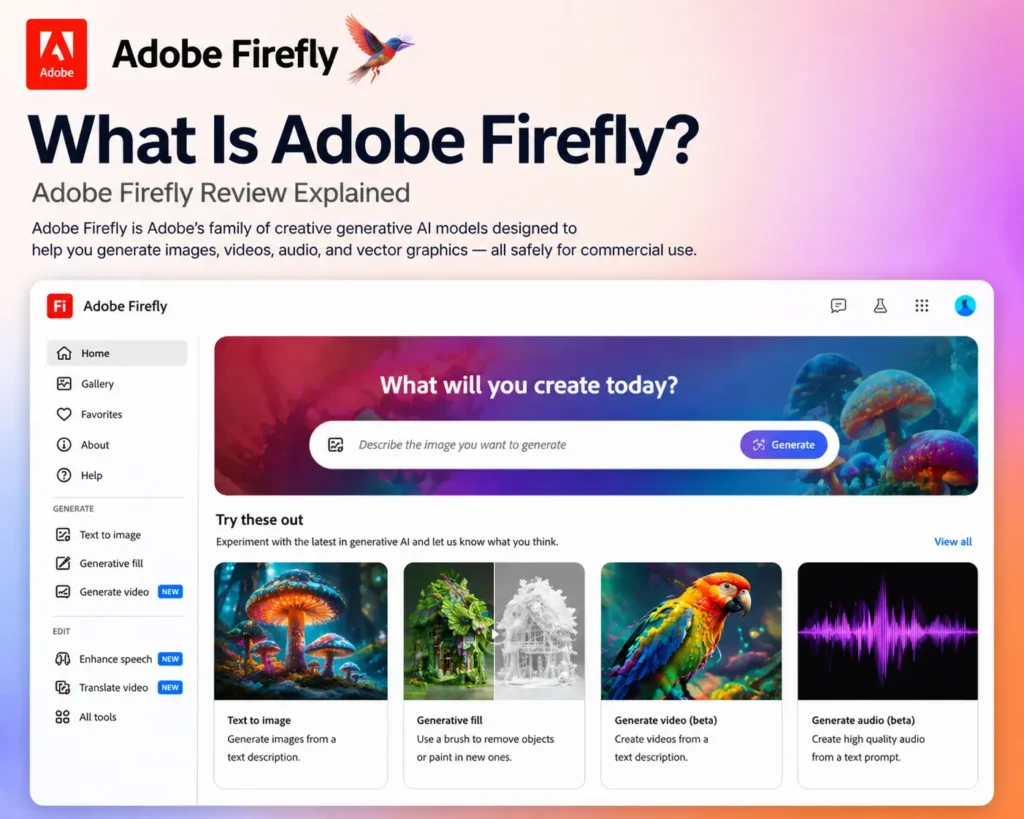
Adobe Firefly is Adobe’s generative AI engine integrated across Photoshop, Illustrator, Premiere Pro, Express, and the Firefly web app. It generates images, edits existing images, extends canvases, removes objects, generates vectors, creates video effects, and produces design elements — all from text prompts, all within the Adobe creative ecosystem.
The defining characteristic of this Adobe Firefly review is the training data approach. While most AI image generators trained on internet-scraped images with unclear licensing status, Adobe Firefly was built on content Adobe had explicit rights to use — Adobe Stock, openly licensed material, and public domain content. The result is an AI that Adobe can credibly stand behind for commercial use, which is why this Adobe Firefly review focuses heavily on the commercial safety story rather than purely on aesthetic output quality.
In 2026, Adobe Firefly Image Model 5 generates at 4-megapixel resolution natively. Topaz Astra integration on Pro Plus and above enables 4K and 8K upscaling for print and large-format professional use. The web app includes video generation via third-party model integration. And the Photoshop integration has matured to the point where this Adobe Firefly review considers Generative Fill and Generative Expand production-ready tools for professional retouching and editing workflows.
Love What These AI Design Tools Can Do?
Great AI-generated visuals still need a cohesive brand identity holding them together. Let Tasknestly build your full branding — logo, guidelines, and visual system.
Explore Branding Services →2. How Adobe Firefly Works: Key Features
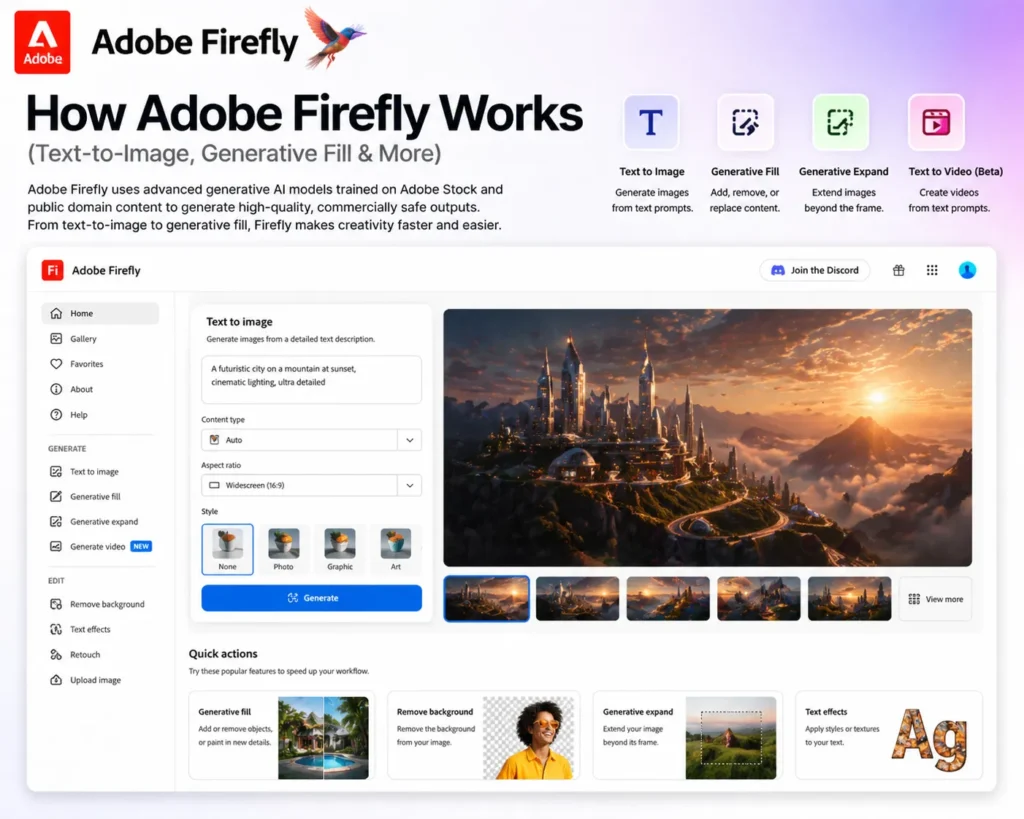
Generative Fill — In-Context AI Editing
Generative Fill is the feature that has changed professional photography and retouching workflows most significantly according to our Adobe Firefly review research. In Photoshop, you select any area of an image, type a text prompt describing what you want there, and Generative Fill replaces, extends, or adds to that area with AI-generated content that integrates naturally with the surrounding image. Background replacement, object addition, clothing modification, sky swaps — all handled directly within Photoshop without switching to a separate tool.
In direct Adobe Firefly review testing, Generative Fill performed at a production-ready level for standard retouching tasks — background removal and replacement, removing photobombers, extending product photography — and at a more variable level for complex compositional additions. The commercial safety advantage is significant here: every Generative Fill output is covered by Adobe’s commercial use rights, which is not true of equivalent outputs from Midjourney or Leonardo AI.
💡 Pro tip: Use Generative Fill with a blank prompt to let Firefly reconstruct the selected area based purely on surrounding context. This produces the most natural-looking results for background extension, object removal, and gap filling — better than describing what you want when the goal is seamless integration.
Generative Expand — Canvas Extension
Generative Expand extends the canvas of an image in any direction with AI-generated content that matches the original. In our Adobe Firefly review testing, this was consistently the most reliable Adobe Firefly feature — producing natural-looking extensions across portrait photography, landscape images, and product shots. For photographers who need to reformat an image for a different aspect ratio without cropping the subject, Generative Expand solves the problem elegantly.
Remove Tool — Context-Aware Object Removal
The Remove Tool in Photoshop uses Adobe Firefly to remove objects, people, text, logos, or elements from photos with intelligent background reconstruction. For photographers and retouchers, this handles the background reconstruction step that previously required significant manual masking and cloning work. The results are strong for standard removal tasks and more variable for complex backgrounds or subjects that overlap significantly with the removed element.
Text to Image — Standalone Generation
The Adobe Firefly web app provides text-to-image generation with extensive style, color, and lighting controls. The output quality is professional-grade — clean, neutral, and commercially safe — but does not match Midjourney’s artistic sophistication or Leonardo AI’s photorealistic ceiling. This is the expected trade-off in this Adobe Firefly review: Firefly prioritizes commercial safety and workflow integration over raw generative quality. For many professional use cases, that is the right trade-off to make.
Generative Vector — Illustrator Integration
Firefly generates scalable vector graphics from text prompts directly within Adobe Illustrator. For graphic designers who need custom vector icons, illustrations, or decorative elements, this is a significant productivity feature — generating a starting point that can be edited as a true vector rather than a rasterized image. In our Adobe Firefly review testing, Generative Vector produced usable starting points for icon design and decorative illustrations, with the expected need for manual refinement.
Love What These AI Design Tools Can Do?
Great AI-generated visuals still need a cohesive brand identity holding them together. Let Tasknestly build your full branding — logo, guidelines, and visual system.
Explore Branding Services →3. Key Adobe Firefly Features in 2026
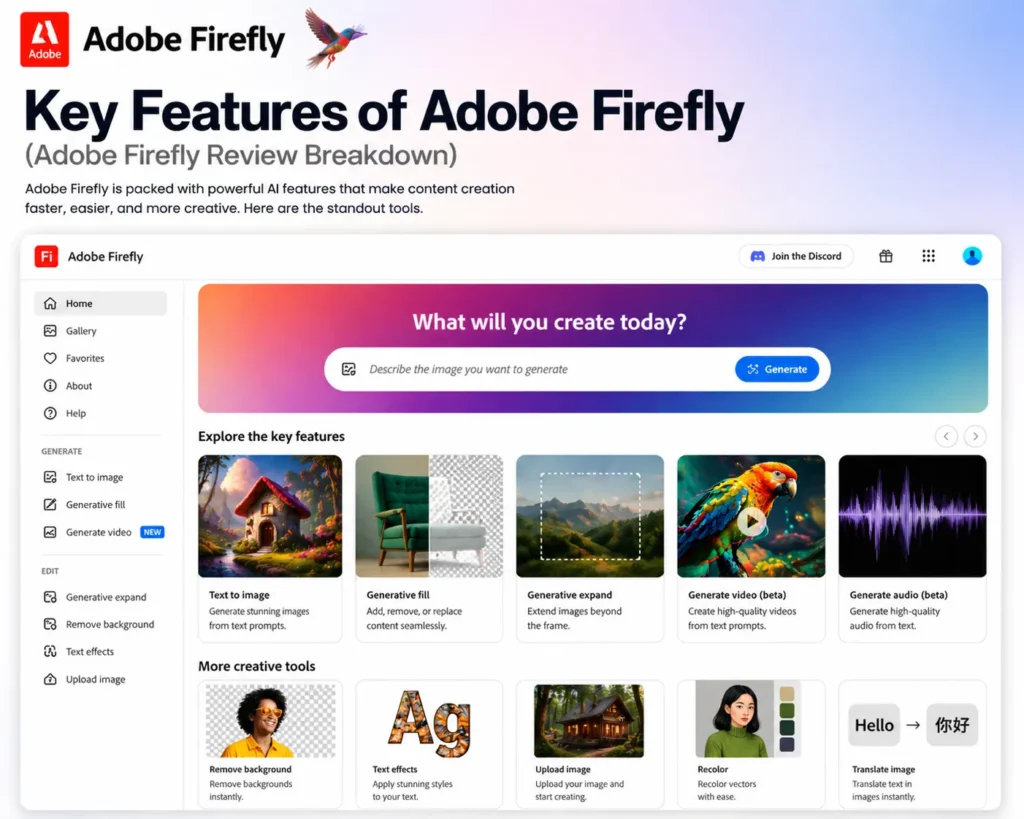
- Commercially Safe Training: Trained exclusively on Adobe Stock and openly licensed content — IP indemnification on Enterprise plans is the strongest commercial safety story in AI image generation.
- Generative Fill (Photoshop): Replace, extend, or add to any image area from a text prompt — production-ready for standard retouching and editing workflows.
- Generative Expand: Extend images in any direction with AI-generated content that integrates naturally — the most consistently reliable Adobe Firefly feature.
- Remove Tool: Context-aware object removal with background reconstruction — handles standard removal tasks at a professional level.
- Text to Image: Image generation from text prompts with style, color, and lighting controls — professional-grade, commercially safe output.
- Generative Vector (Illustrator): Generate scalable SVG vector graphics from text prompts directly within Illustrator.
- Structure Reference: Use reference images to control the composition structure of generated outputs.
- Style Reference: Guide generation aesthetic using uploaded style reference images for brand-consistent output.
- Topaz Astra Upscaling (Pro Plus+): 4K and 8K upscaling for print and large-format professional use.
- Creative Cloud Integration: Native access within Photoshop, Illustrator, Express, Premiere Pro — no workflow disruption for existing Adobe users.
- Generative Credits: Monthly credit allocation for web app generation — separate from Photoshop and Illustrator usage.
Love What These AI Design Tools Can Do?
Great AI-generated visuals still need a cohesive brand identity holding them together. Let Tasknestly build your full branding — logo, guidelines, and visual system.
Explore Branding Services →4. Adobe Firefly Review: Pricing Breakdown
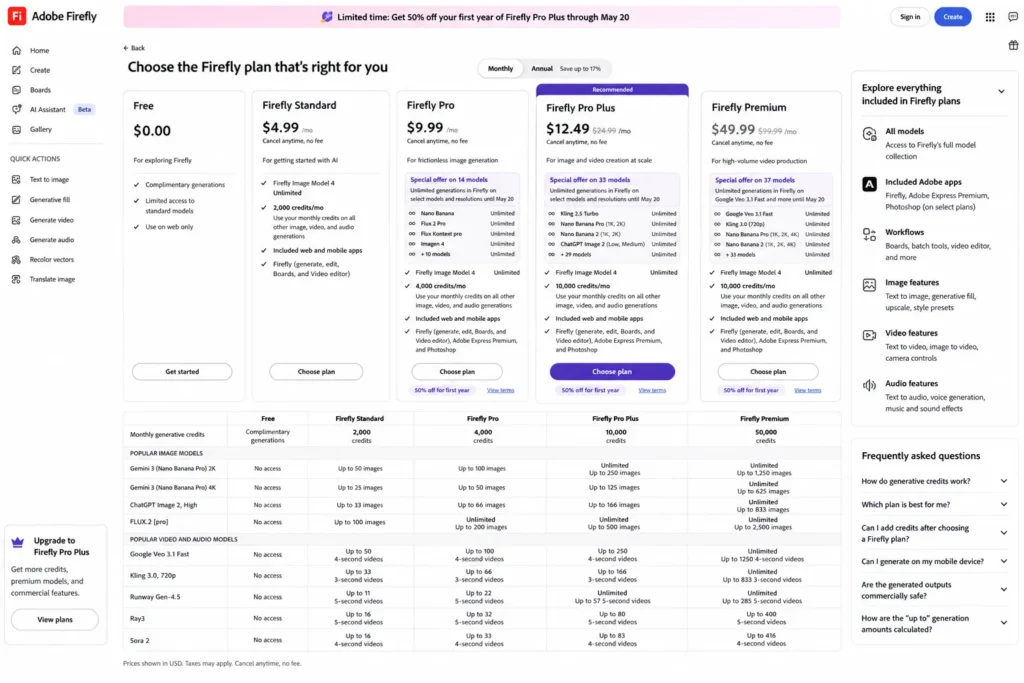
Adobe Firefly pricing is either standalone through the Firefly web app or bundled with Creative Cloud subscriptions. This Adobe Firefly review covers both paths.
| Option | Price | What You Get |
|---|---|---|
| Firefly Free (web) | $0 | 25 generative credits/month, basic image generation |
| Firefly Pro | $9.99/month | 100 credits, latest models, faster generation, no watermarks |
| Firefly Pro Plus | $29.99/month | 2,000 credits, Topaz Astra 4K/8K upscaling, video generation |
| Creative Cloud All Apps | $59.99/month | Photoshop, Illustrator, Premiere Pro + Firefly credits included |
- For existing Adobe users, Firefly is already included: If you pay for Photoshop, Illustrator, or any Creative Cloud plan, Adobe Firefly’s generative features are already accessible within those applications. This Adobe Firefly review recommends that existing Adobe subscribers activate and use Firefly in their current tools before evaluating the standalone web app.
- Firefly Pro at $9.99/month is accessible for non-Adobe users: For users who want Adobe Firefly’s commercial safety story without a full Creative Cloud subscription, the standalone Pro plan at $9.99 is a reasonable entry point — particularly for agencies that want to run Firefly alongside Midjourney for different use cases.
- Credit systems are confusing across products: This Adobe Firefly review flags the credit complexity as a real usability issue — generative credits work differently in the web app versus Photoshop versus Illustrator, and understanding which credits apply where takes time. Read the credit documentation before subscribing to a standalone plan.
💡 For Creative Cloud subscribers: You are likely already paying for Adobe Firefly. Open Photoshop, select any area, and click ‘Generative Fill’ to access it immediately. This Adobe Firefly review found many Creative Cloud subscribers who had never activated Firefly despite paying for it — activate it today.
Love What These AI Design Tools Can Do?
Great AI-generated visuals still need a cohesive brand identity holding them together. Let Tasknestly build your full branding — logo, guidelines, and visual system.
Explore Branding Services →5. Adobe Firefly Review: Honest Pros and Cons
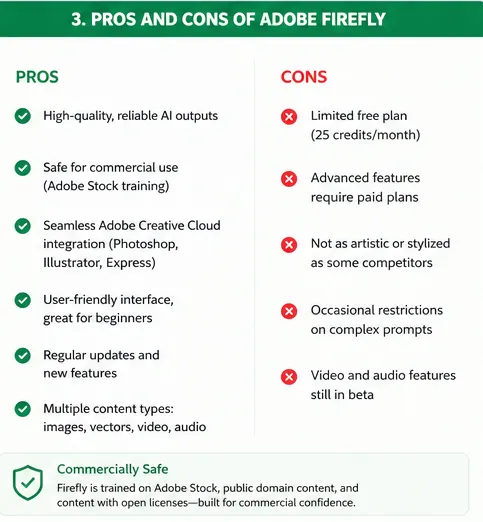
Every honest Adobe Firefly review needs both sides clearly presented. Here is what genuinely sets Adobe Firefly apart and where its limitations are real.
What Adobe Firefly Gets Right
- The strongest commercial safety story in AI image generation: Licensed training data, no web scraping, and IP indemnification on Enterprise plans. This Adobe Firefly review found no competitor that matches this level of commercial protection — it is why risk-averse agencies and enterprise teams choose Firefly when other generators have been blocked by legal review.
- Generative Fill is a production-level professional tool: The Photoshop integration for object replacement, background extension, and removal is genuinely ready for professional retouching workflows. This is not a gimmick feature — this Adobe Firefly review found it meaningfully changes how photography and retouching workflows operate for teams that invest time learning it.
- Creative Cloud integration eliminates workflow friction: For professionals who work in Photoshop and Illustrator daily, Firefly is already in their workflow. No context switching, no new tools, no file transfer. The AI is embedded where the work happens.
- Generative Expand is consistently reliable: The most dependable Adobe Firefly feature in this review — canvas extension produces natural results across a wide range of image types and is ready for production use without significant manual correction.
- Style and Structure Reference produce consistent brand output: Controlling generation aesthetic and composition with reference images produces more brand-consistent results than prompt-only generation — important for commercial teams with strict brand guidelines.
Where Adobe Firefly Falls Short
- Artistic quality below Midjourney: For visually striking, artistically sophisticated image generation, Midjourney consistently produces more compelling creative output. This Adobe Firefly review is direct: Firefly wins on safety and integration, Midjourney wins on artistic quality. Many professional agencies run both for different use cases.
- Credit system complexity across products: Understanding which credits apply in the web app versus Photoshop versus Illustrator takes time and the documentation is not as clear as it should be. This Adobe Firefly review found the credit complexity to be the most common point of user frustration.
- Standalone web app is less compelling without Creative Cloud: The strongest Adobe Firefly features — Generative Fill, Generative Expand, Remove Tool — are in Photoshop. The standalone web app text-to-image generation is professional-grade but not category-leading. Non-Adobe users who want the best standalone image generation get more from Midjourney or Leonardo AI.
- Enterprise pricing required for IP indemnification: The commercial safety guarantee that most justifies Adobe Firefly for agencies requires an Enterprise plan — the price of which requires a sales conversation and is typically above what smaller agencies budget.
Love What These AI Design Tools Can Do?
Great AI-generated visuals still need a cohesive brand identity holding them together. Let Tasknestly build your full branding — logo, guidelines, and visual system.
Explore Branding Services →6. Who Should Use Adobe Firefly?
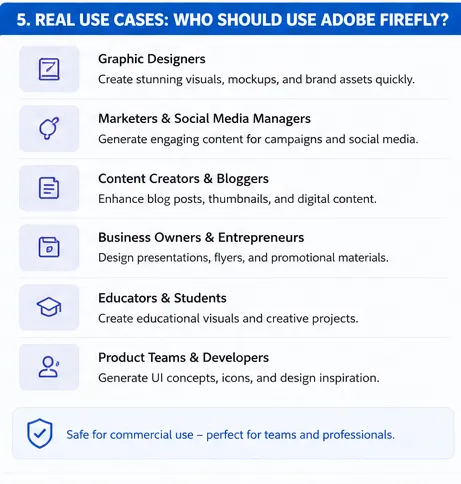
Our Adobe Firefly review found a clear and specific profile of users for whom Adobe Firefly is the right primary AI creative tool.
Adobe Firefly Is a Great Fit If You Are:
- A creative professional already in Photoshop or Creative Cloud — Generative Fill and Generative Expand are immediately practical and accessible at no additional cost.
- An agency delivering commercial content to clients with strict IP requirements — the licensed training data and Enterprise IP indemnification pass legal reviews that block other AI generators.
- An enterprise marketing team where AI-generated content must clear legal and compliance review — Firefly’s commercial safety story enables AI adoption in organizations where it would otherwise be prohibited.
- A photographer or retoucher integrating AI into editing workflows — Remove Tool, Generative Fill, and Generative Expand directly accelerate professional retouching tasks.
Adobe Firefly Is Probably Not Right If You Are:
- A creator primarily wanting artistic, visually striking image generation — Midjourney produces more compelling creative output for this use case.
- Someone outside the Adobe ecosystem without a specific commercial licensing requirement — Leonardo AI and Midjourney offer better standalone value for non-Adobe users.
- A team needing the lowest per-image cost at high volume — the credit system on standalone plans is more expensive per image than dedicated generators at scale.
Love What These AI Design Tools Can Do?
Great AI-generated visuals still need a cohesive brand identity holding them together. Let Tasknestly build your full branding — logo, guidelines, and visual system.
Explore Branding Services →7. Adobe Firefly Review: How It Compares
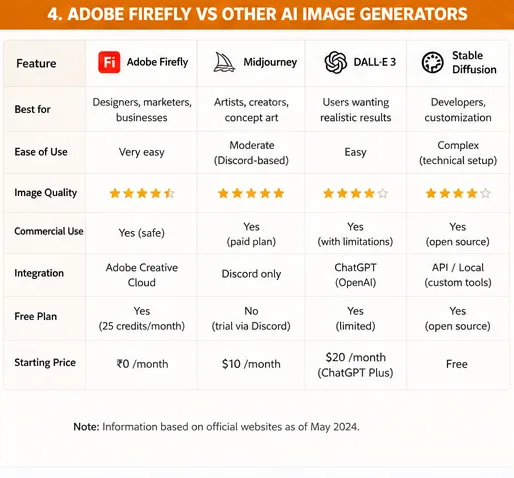
| Tool | Price | Key Strength | Best For |
|---|---|---|---|
| Adobe Firefly | $9.99/month | Commercial safety, Photoshop integration, IP indemnification | Adobe ecosystem, agencies, enterprise |
| Midjourney | $10/month | Best artistic quality, aesthetic sophistication | Artists, concept designers, creative directors |
| Canva AI | $15/month | All-in-one design workflow, Grow Insights, marketing focus | Non-designers, marketers, social media |
| Leonardo AI | Free/$12/month | Character consistency, fine-tuning, best free tier | Game devs, digital artists, high-volume creators |
Love What These AI Design Tools Can Do?
Great AI-generated visuals still need a cohesive brand identity holding them together. Let Tasknestly build your full branding — logo, guidelines, and visual system.
Explore Branding Services →8. What Real Users Say About Adobe Firefly
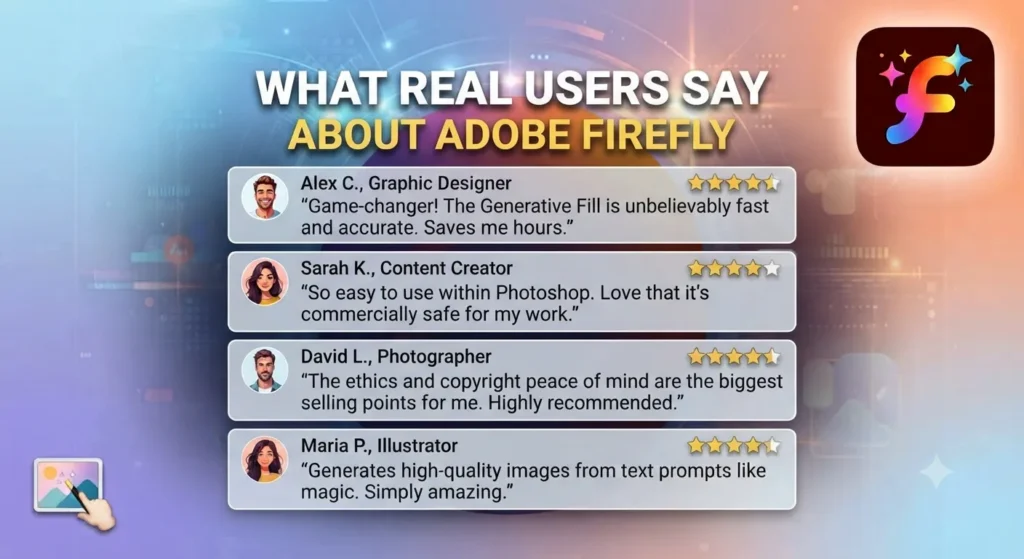
Verified user feedback in Adobe Firefly review research from G2 and Adobe’s own community forums splits clearly along the Creative Cloud subscriber versus non-subscriber divide. Creative Cloud subscribers — particularly Photoshop users — consistently describe Generative Fill and Generative Expand as the most impactful new features in Photoshop in years. Multiple professional photographers and retouchers describe tasks that previously took 30 to 45 minutes of manual masking and cloning work now completing in under five minutes with Generative Fill.
Agency creative directors and brand managers generate some of the most specifically positive Adobe Firefly review feedback around the commercial safety story. Multiple reviewers describe situations where their legal or compliance teams blocked adoption of Midjourney or other AI generators citing unclear licensing, and Adobe Firefly was the alternative that passed review. For these teams, the commercial safety is not a nice-to-have — it is the enabler that makes AI-assisted creative work possible within their organization’s guidelines.
The credit system complexity is the most consistently cited frustration in Adobe Firefly review feedback. Users who use multiple Adobe apps report confusion about which credits apply where, and several reviewers describe unexpected credit exhaustion in the first month after subscription. This Adobe Firefly review recommends reading the credit documentation carefully before subscribing to any standalone plan.
Love What These AI Design Tools Can Do?
Great AI-generated visuals still need a cohesive brand identity holding them together. Let Tasknestly build your full branding — logo, guidelines, and visual system.
Explore Branding Services →9. Our Adobe Firefly Review Rating Breakdown
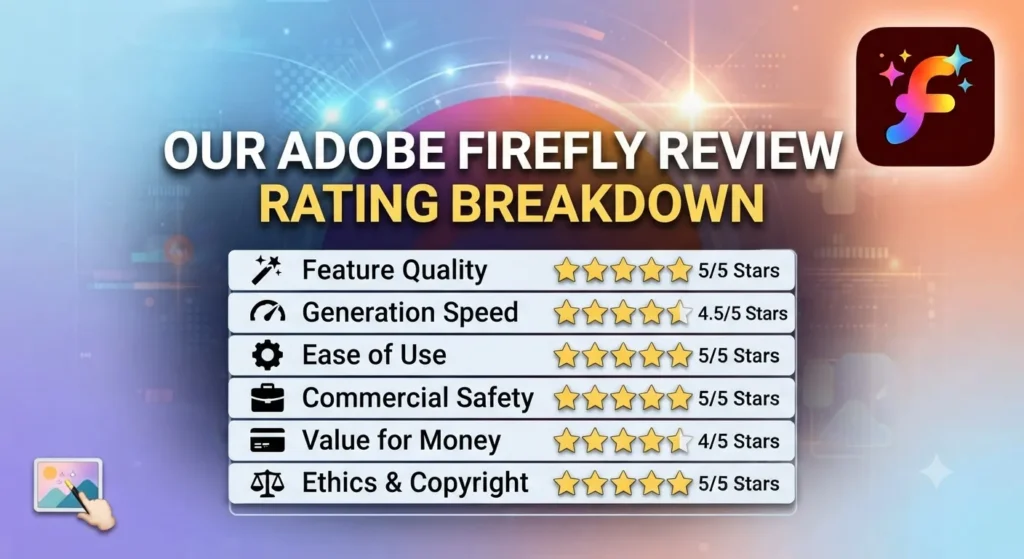
| Category | Score | Notes |
|---|---|---|
| Commercial Safety | 5.0 / 5 | Licensed training + IP indemnification — unmatched in the category |
| Generative Fill (Photoshop) | 4.9 / 5 | Production-level retouching tool — changes professional photography workflows |
| Generative Expand | 4.7 / 5 | Most consistently reliable Adobe Firefly feature across image types |
| Artistic Image Quality | 3.8 / 5 | Professional-grade and commercially safe — Midjourney produces more artistic output |
| Creative Cloud Value | 4.8 / 5 | Already included for Creative Cloud subscribers — significant unrealized value |
| Standalone App Value | 3.5 / 5 | Less compelling for non-Adobe ecosystem users without specific IP requirements |
| Credit System Clarity | 3.2 / 5 | Complex across products — the most consistent point of user frustration |
| Pricing | 4.2 / 5 | Fair for what is included; credit complexity makes budgeting harder than it should be |
| Overall Adobe Firefly Review | 4.3 / 5 | The definitive commercially safe AI image tool for Adobe ecosystem professionals |
Love What These AI Design Tools Can Do?
Great AI-generated visuals still need a cohesive brand identity holding them together. Let Tasknestly build your full branding — logo, guidelines, and visual system.
Explore Branding Services →10. Final Adobe Firefly Review Verdict
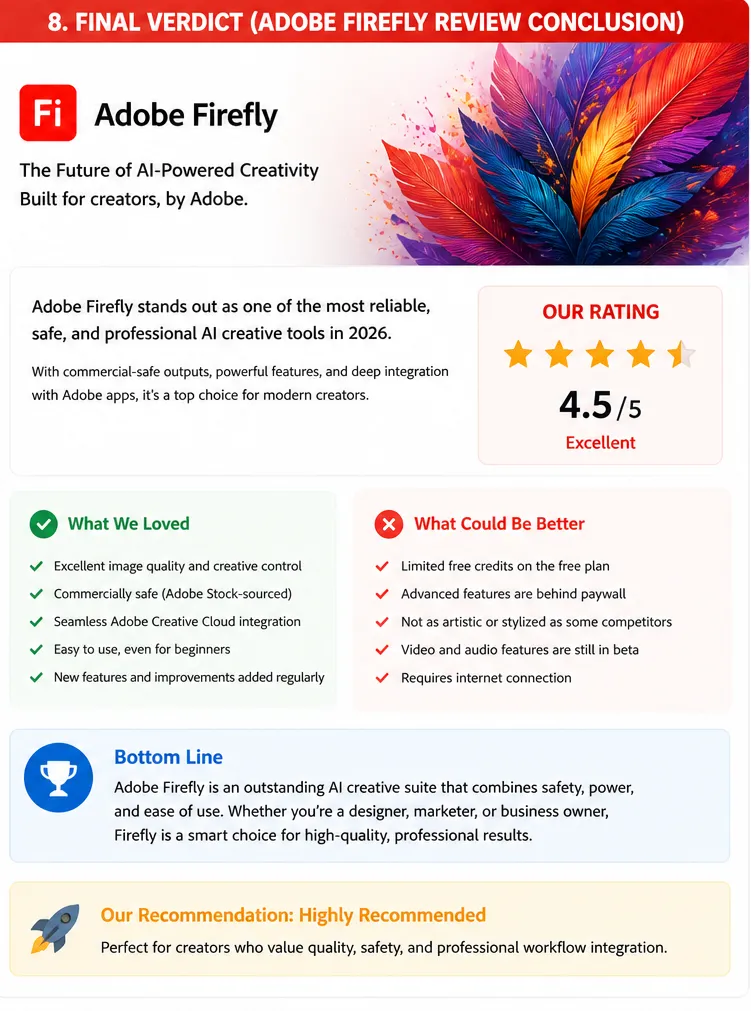
Here is the honest bottom line of this Adobe Firefly review: Adobe Firefly is the right AI creative tool for three specific situations — creative professionals who live in the Adobe ecosystem, agencies delivering commercial content where IP compliance is a client requirement, and enterprises where legal review has blocked other AI generators. For each of these situations, this Adobe Firefly review is unambiguous: Firefly is the only tool that addresses these needs fully.
For artistic image generation without commercial safety requirements, Midjourney is the stronger creative choice. For non-Adobe users wanting standalone image generation, Leonardo AI or Midjourney provide better value. But for the professional creative Adobe Firefly review audience — Adobe users, agencies, and compliance-constrained enterprises — Firefly’s value is real, specific, and not replicated by any competitor.
Our Adobe Firefly review recommendation: if you are already paying for Photoshop or Creative Cloud, activate Generative Fill today — it is already included and it will change how you handle retouching and editing. If you are not in the Adobe ecosystem, evaluate your specific use case honestly: if IP compliance is required, Firefly Pro at $9.99/month is the answer. If it is not required, Midjourney gives you more creative output per dollar.
| ✅ Get It If You…Already use Photoshop or Creative Cloud dailyDeliver commercial content requiring IP complianceNeed AI editing integrated in professional photo workflowsWork at an agency with risk-averse clients or legal reviewRequire enterprise AI content compliance for brand use | ⚠️ Skip It If You…Want the best artistic image quality — try MidjourneyAre not in the Adobe ecosystem without IP requirementsNeed the cheapest per-image generation at high volumePrimarily generate social content — try Canva AIWant character consistency for game assets — try Leonardo AI |
11. Adobe Firefly Review: FAQ
Is Adobe Firefly worth it in 2026?
For Adobe ecosystem users and agencies with IP compliance needs, yes — this Adobe Firefly review rates it 4.3/5. The commercial safety story and Photoshop integration make it the right tool for professional creative workflows. For pure artistic image generation without compliance requirements, Midjourney offers more creative output per dollar.
Is Adobe Firefly safe to use commercially?
Yes — Adobe Firefly has the strongest commercial safety story in AI image generation. Trained exclusively on licensed content with IP indemnification on Enterprise plans, it is designed specifically for commercial professional use. This is the defining feature of this Adobe Firefly review and the primary reason professional agencies and enterprise teams choose it over alternatives.
How does Adobe Firefly compare to Midjourney?
Midjourney produces more visually striking and artistically sophisticated images. Adobe Firefly is commercially safer — licensed training data and IP indemnification — and integrates directly into Photoshop. This Adobe Firefly review found many professional agencies run both: Midjourney for creative exploration and concept development, Firefly for commercially safe production work that must clear legal review.
What is Generative Fill in Adobe Firefly?
Generative Fill is Adobe Firefly’s AI editing feature in Photoshop. Select any area of an image, type what you want to replace, add, or change, and Firefly generates content that integrates naturally with the surrounding image. As this Adobe Firefly review found in testing, it is the feature that has changed professional photography and retouching workflows most significantly — turning 30-minute manual retouching tasks into five-minute AI-assisted ones.
Love What These AI Design Tools Can Do?
Great AI-generated visuals still need a cohesive brand identity holding them together. Let Tasknestly build your full branding — logo, guidelines, and visual system.
Explore Branding Services →