Honest Surfer SEO Review 2026: Best AI Content Optimiser Worth It?


If you’re serious about ranking content on Google, you’ve almost certainly encountered Surfer SEO. This Surfer SEO review puts one of the most talked-about content optimisation tools in the SEO industry through a thorough real-world evaluation — covering not just what the platform promises, but what it actually delivers when you sit down and use it on live content in competitive niches. The review process covers the content editor, SERP analyser, keyword research tools, AI writing features, and pricing — so you get the complete picture before committing.
Surfer SEO occupies a specific and well-defined position in the SEO tool landscape. This Surfer SEO review found a platform that doesn’t try to be an all-in-one marketing suite — it stays laser-focused on one goal: helping you write content that ranks. The platform analyses the top-ranking pages for your target keyword, extracts the NLP terms, heading structures, word count benchmarks, and structural patterns those pages share, and then guides you to match or exceed them as you write. Whether that approach is the right fit for your workflow is what this review is here to answer.
This Surfer SEO review is relevant whether you’re an in-house SEO manager, a freelance content writer, a digital marketing agency, or a blogger trying to compete in a crowded niche. The platform has a wide user base precisely because the core workflow it enables applies across all of those contexts. Let’s get into the detail.
VERDICT BOX
Overall Rating: 8.7 / 10
Best for: SEO professionals, content teams, and agencies who want the most accurate SERP-based content optimisation available and are willing to pay for it
Price: Essential plan from $89/month; Scale plan from $129/month; Scale AI from $219/month (billed annually)
Verdict: Surfer SEO is the gold standard for content optimisation — its SERP analysis is the most accurate in the category, the Content Score system is genuinely useful, and the workflow integrations with Google Docs and WordPress make it fit naturally into professional content pipelines.
Table of Contents
What Is Surfer SEO? Background for This Surfer SEO Review
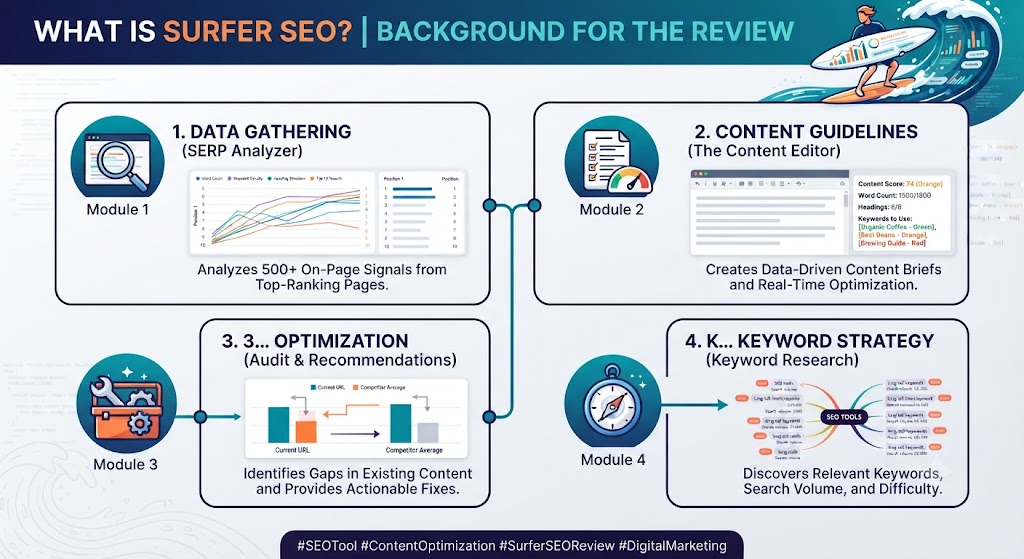
Surfer SEO is a Polish SaaS platform founded in 2017 and headquartered in Wrocław. The company has grown rapidly to serve tens of thousands of users across individual bloggers, SEO agencies, and enterprise content teams. This Surfer SEO review covers the 2026 version of the platform, which includes the Surfer AI writing assistant, a significantly upgraded keyword research module, and the Topical Map feature for building content cluster strategies. The platform has also deepened its integrations with Google Docs, WordPress, and Jasper over this period.
The core concept behind this Surfer SEO review is data-driven content optimisation. Rather than relying on general SEO best practice or keyword density rules, Surfer SEO analyses the actual top-ranking pages for your specific target keyword and extracts the patterns that correlate with high rankings. The Content Score — a 0–100 rating that updates in real time as you write — reflects how well your content matches those patterns across word count, NLP term coverage, heading structure, and more.
This Surfer SEO review positions the tool against Scalenut, Frase, MarketMuse, and Clearscope — the main alternatives in the content optimisation category. Where it wins and where it falls short is a central question addressed throughout. For a full picture of the AI writing and SEO content landscape, our AI writing tools category covers the complete range.
Skip The Learning Curve — Let Us Run It For You
These AI marketing tools are powerful, but strategy still takes time to master. Tasknestly runs done-for-you digital marketing campaigns using the same category of tools, professionally managed.
Get a Free Marketing Quote →Surfer SEO Review: Pros and Cons
| Pros | Cons |
|---|---|
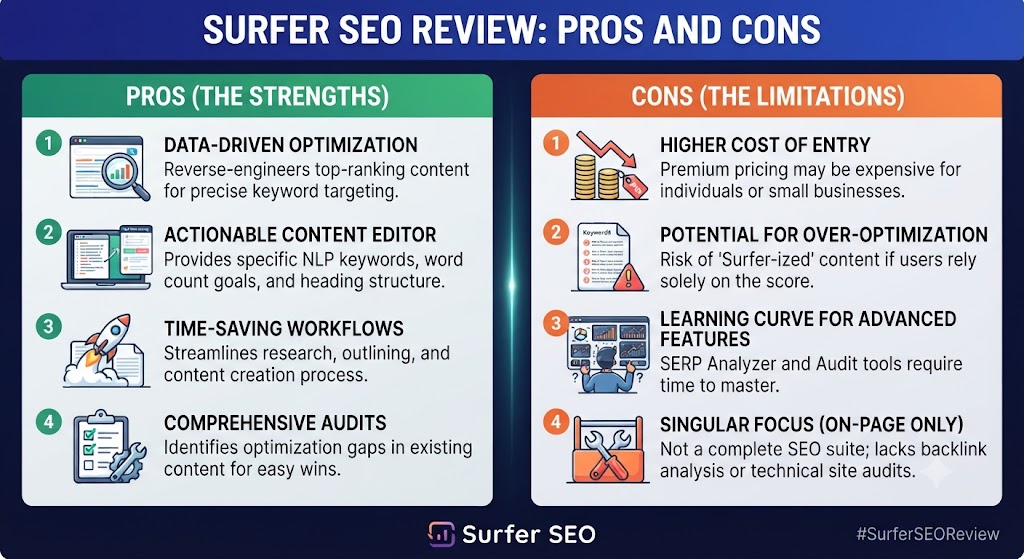
| Most accurate SERP-based content optimisation in the category | Pricing is high — $89/month minimum is a significant investment |
| Real-time Content Score gives clear, actionable feedback as you write | Content Score can be gamed — optimising for score without editorial judgment produces thin content |
| Google Docs and WordPress integrations fit naturally into existing workflows | AI writing quality (Surfer AI) is good but not best-in-class compared to dedicated writing tools |
| Topical Map feature accelerates content cluster strategy development | Keyword research module is useful but not a replacement for Ahrefs or Semrush for deep analysis |
| SERP Analyser gives deep competitive intelligence beyond just content optimisation | Steeper learning curve than all-in-one tools like Scalenut for users new to content SEO |
| Audit feature identifies optimisation opportunities in existing content | Monthly article limits on lower plans restrict high-volume content teams |
Skip The Learning Curve — Let Us Run It For You
These AI marketing tools are powerful, but strategy still takes time to master. Tasknestly runs done-for-you digital marketing campaigns using the same category of tools, professionally managed.
Get a Free Marketing Quote →Surfer SEO Review: Feature Deep-Dive
The Content Editor — The Heart of This Surfer SEO Review
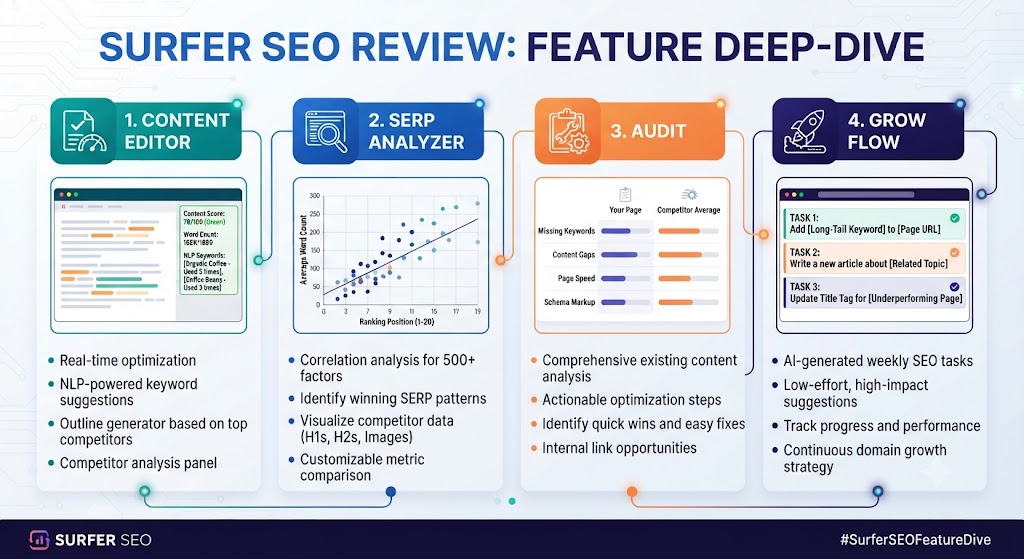
The Content Editor is the feature this Surfer SEO review spends the most time on, because it’s the feature most users interact with daily and the one that most directly drives ranking outcomes. Open the Content Editor for any target keyword and Surfer SEO analyses the top-ranking SERP results in real time, extracting NLP key terms, recommended word count ranges, heading structure patterns, and image count benchmarks. As you write — directly in the editor or through the Google Docs integration — a sidebar shows your live Content Score and a list of NLP terms with their recommended usage frequency.
This Surfer SEO review found the Content Score feedback loop to be genuinely useful for experienced SEO writers. Seeing the score update in real time as you add terms and expand sections creates a productive rhythm: write naturally, check score, identify gaps in NLP coverage, fill them with contextually appropriate content. The key finding of this Surfer SEO review is that the Content Score is best used as a coverage checklist — ensuring you’re addressing the full topical scope of the keyword — rather than as a strict target to hit at any cost.
The NLP term suggestions in this Surfer SEO review are consistently accurate and comprehensive for English-language content. Surfer SEO’s ability to identify the specific terminology that top-ranking content uses — terms that might not appear in a standard keyword tool — is one of its most distinctive advantages over simpler optimisation approaches. This Surfer SEO review found writers regularly discovering relevant subtopics and angle they hadn’t considered, surfaced purely by reviewing what competing content covers.
SERP Analyser — Deep Competitive Intelligence
The SERP Analyser is the research tool this Surfer SEO review found most useful for competitive content strategy. Enter any keyword and Surfer SEO generates a detailed breakdown of the top 20 SERP results: their word counts, number of headings, image counts, page speed metrics, domain authority, exact keyword usage, partial keyword usage, and more. This Surfer SEO review found the SERP Analyser to be a significantly faster way to understand what the competitive content landscape looks like for a given keyword than manually reviewing each page.
The correlation data in the SERP Analyser — showing which content characteristics correlate most strongly with high rankings for this specific keyword — is one of the more analytically sophisticated features this Surfer SEO review has encountered in any content tool. Understanding that top-ranking pages for a competitive keyword average 2,800 words, use 47 NLP terms, and have 12 headings gives you a concrete benchmark to build toward rather than a vague sense of what “good” looks like.
Topical Map — The Surfer SEO Review’s Strategic Feature
The Topical Map feature was added in 2023 and has become one of the most-discussed features in any Surfer SEO review published since. Enter a seed keyword or domain, and Surfer SEO generates a comprehensive topical cluster map showing the pillar topics, supporting cluster articles, and internal linking structure that would give your site topical authority in that area.
This Surfer SEO review found the Topical Map to be a genuine strategic accelerator for content teams that need to build out new topic areas quickly. The cluster suggestions are well-reasoned and the prioritisation recommendations (which articles to write first for fastest SEO impact) save meaningful planning time. For agencies onboarding new clients who need a content roadmap, this Surfer SEO review found the Topical Map can replace hours of manual keyword clustering work.
Surfer AI — Writing Assistance Assessment
Surfer AI — the platform’s AI writing assistant — can generate complete article drafts optimised for a target keyword. You provide the keyword, select a target word count, choose which competing articles to analyse, and Surfer AI produces a full draft with headings, body content, and NLP terms incorporated. This Surfer SEO review found the AI draft quality to be solid and the SEO structure to be notably better than generic AI writing tools — because the AI generates content specifically informed by Surfer SEO’s SERP analysis.
The honest Surfer SEO review assessment of Surfer AI: it accelerates first-draft production meaningfully and produces SEO-aware structure that would take a human writer longer to build from scratch. The output still requires significant human editing before publication — it’s a first-draft accelerator, not a publish-ready content machine. For the right workflow, this Surfer SEO review found it saves 1–2 hours per article compared to writing from scratch while using the Content Editor.
Keyword Research Module
Surfer SEO’s keyword research tool provides search volume data, keyword difficulty scores, and related keyword suggestions. This Surfer SEO review found the keyword data to be accurate and useful for content planning, though it doesn’t go as deep as dedicated keyword research tools like Ahrefs or Semrush for competitive backlink analysis, keyword tracking at scale, or historical trend data. Most serious SEO teams this Surfer SEO review observed use Surfer SEO’s keyword module for content-level research and a dedicated tool for broader SEO strategy — a combination that works well in practice.
Content Audit Feature
The Content Audit feature lets you import existing published URLs and run them through Surfer SEO’s optimisation analysis. The audit identifies which NLP terms are missing, where the content falls below the average word count benchmark, and what the current Content Score is for each piece. This Surfer SEO review found the audit to be particularly valuable for content teams with large existing libraries — identifying which articles are closest to ranking improvements with minimal additional work is a high-ROI activity that the audit makes systematic.
Skip The Learning Curve — Let Us Run It For You
These AI marketing tools are powerful, but strategy still takes time to master. Tasknestly runs done-for-you digital marketing campaigns using the same category of tools, professionally managed.
Get a Free Marketing Quote →Surfer SEO Pricing: What This Surfer SEO Review Found
| Plan | Price (Annual) | Key Features |
|---|---|---|
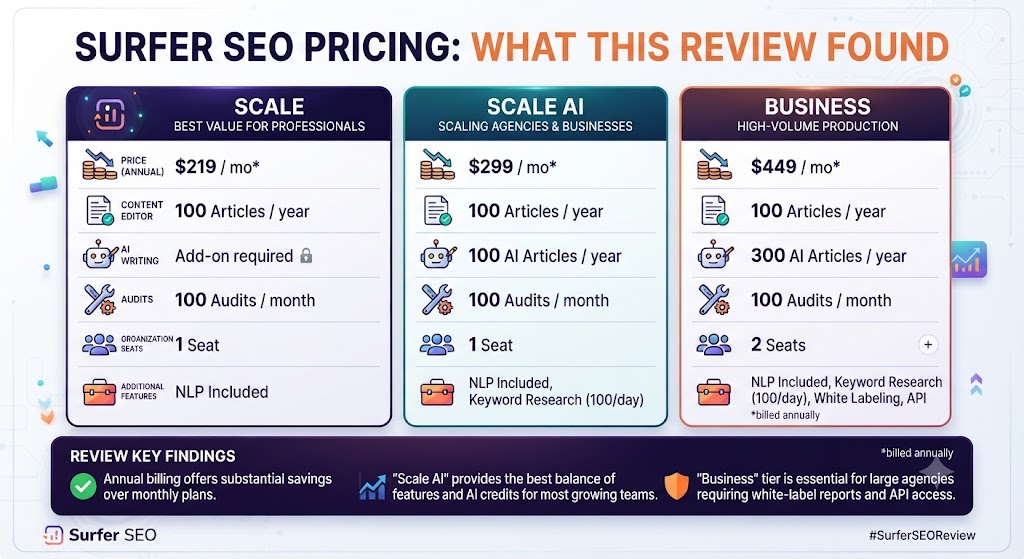
| Essential | $89/month | 30 articles/month, Content Editor, SERP Analyser, 1 user |
| Scale | $129/month | 100 articles/month, 5 users, Topical Map, Content Audit |
| Scale AI | $219/month | Everything in Scale + Surfer AI article generation |
| Enterprise | Custom | Unlimited articles, white-label, API access, dedicated support |
This Surfer SEO review must address the pricing directly: Surfer SEO is not cheap, and the $89/month Essential plan is a meaningful commitment for individual content creators or small blogs. For professional content teams and agencies, the pricing this Surfer SEO review found is competitive given the quality of the optimisation data — especially when compared to buying Surfer SEO and a separate AI writing tool. The Scale plan at $129/month is where this Surfer SEO review found the best value for active content teams: 100 articles per month, the Topical Map, and Content Audit access cover most agency and in-house team needs. A 7-day free trial is available on the Essential plan.
Skip The Learning Curve — Let Us Run It For You
These AI marketing tools are powerful, but strategy still takes time to master. Tasknestly runs done-for-you digital marketing campaigns using the same category of tools, professionally managed.
Get a Free Marketing Quote →Surfer SEO vs Competitors: The Surfer SEO Review Comparison
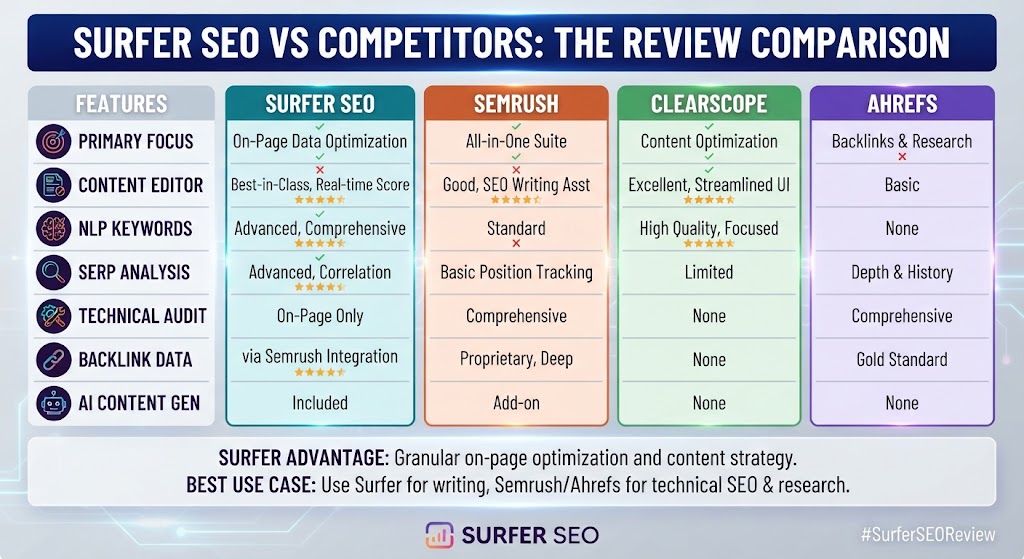
| Feature | Surfer SEO | Scalenut | Frase | Clearscope |
|---|---|---|---|---|
| Real-time Content Score | ✅ Best-in-class | ✅ Yes | ✅ Yes | ✅ Yes |
| SERP analysis depth | ✅ Most detailed | ✅ Good | ✅ Good | ⚠️ Limited |
| NLP term accuracy | ✅ Excellent | ✅ Good | ✅ Good | ✅ Good |
| AI writing built-in | ✅ Surfer AI (Scale AI plan) | ✅ Yes | ✅ Yes | ❌ No |
| Topical Map / cluster planning | ✅ Yes | ✅ Yes | ❌ No | ❌ No |
| Content audit feature | ✅ Yes | ✅ Yes | ⚠️ Limited | ✅ Yes |
| Google Docs integration | ✅ Native | ❌ No | ✅ Yes | ✅ Yes |
| WordPress integration | ✅ Native | ❌ No | ❌ No | ❌ No |
| Free trial | ✅ 7 days | ✅ 7 days | ✅ 5 days | ❌ No |
| Starting price | $89/month | $39/month | $45/month | $189/month |
This Surfer SEO review comparison positions the tool as the most accurate content optimisation platform in the category, with Clearscope as the main alternative for enterprise teams willing to pay more for a slightly different workflow experience. Scalenut and Frase offer comparable core functionality at lower price points — this Surfer SEO review recommends those tools for budget-conscious content teams and Surfer SEO for teams where optimisation accuracy and Google Docs integration are non-negotiable. More tool comparisons in our AI writing tools section.
Skip The Learning Curve — Let Us Run It For You
These AI marketing tools are powerful, but strategy still takes time to master. Tasknestly runs done-for-you digital marketing campaigns using the same category of tools, professionally managed.
Get a Free Marketing Quote →Who Is Surfer SEO Best For? The Surfer SEO Review Audience Assessment
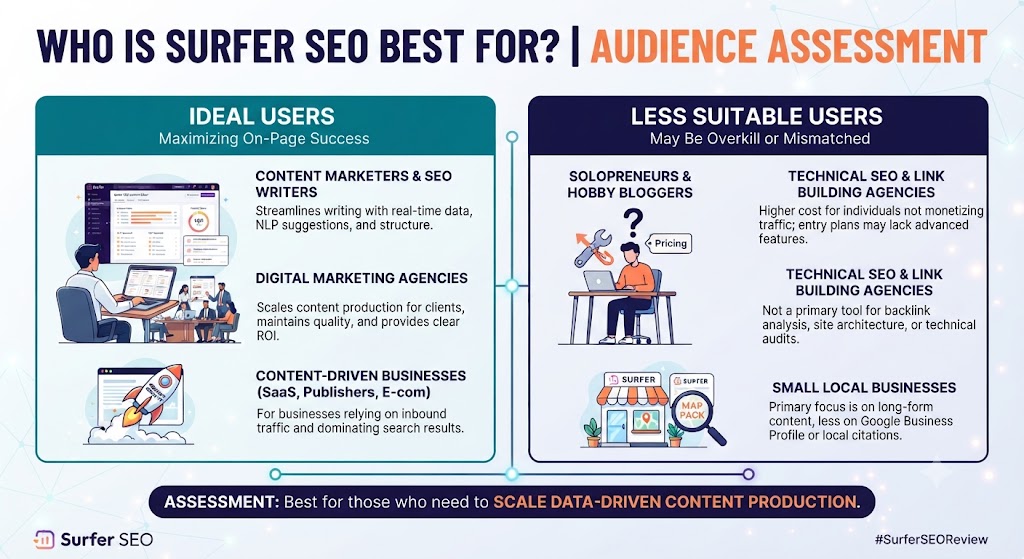
Surfer SEO works best for:
- SEO agencies and consultants managing content optimisation for multiple clients who need the most accurate SERP-based guidance available
- In-house content teams at established brands producing regular SEO content who need a reliable, repeatable optimisation workflow
- Freelance SEO writers who want to deliver measurably better-optimised content to clients and justify premium pricing
- Content marketers in competitive niches where ranking requires precision optimisation rather than general best-practice approaches
- Teams already using Google Docs or WordPress who want optimisation tools that fit into existing workflows without adding friction
Surfer SEO is less ideal for:
- Individual bloggers and creators on tight budgets — $89/month is hard to justify for low-volume publishing at early stages
- Teams who need enterprise-grade keyword intelligence — Ahrefs and Semrush provide significantly deeper data for full-spectrum SEO strategy
- Users who want the cheapest path to AI-assisted SEO content — Scalenut at $39/month covers most core needs at roughly half the price
Skip The Learning Curve — Let Us Run It For You
These AI marketing tools are powerful, but strategy still takes time to master. Tasknestly runs done-for-you digital marketing campaigns using the same category of tools, professionally managed.
Get a Free Marketing Quote →Get It / Skip It
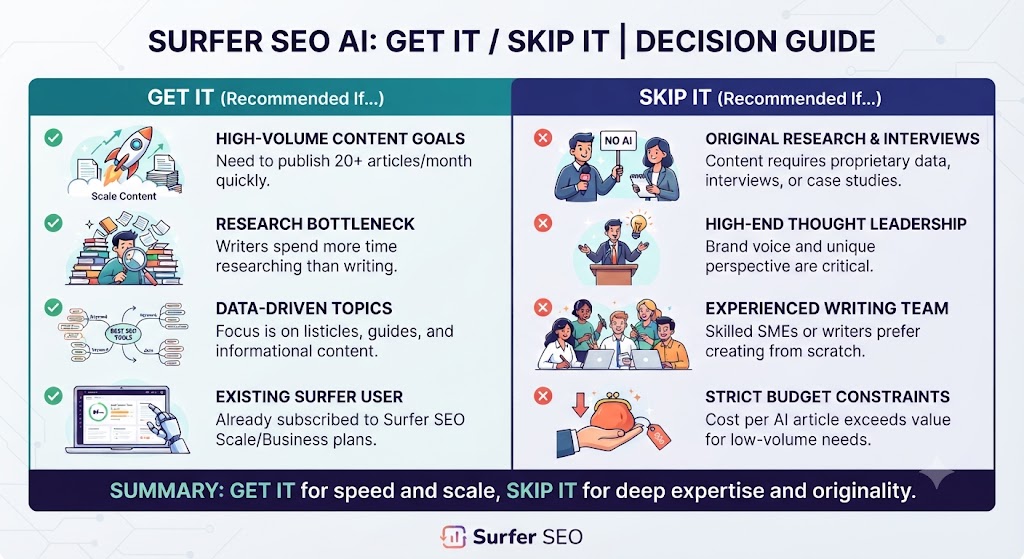
✅ Get Surfer SEO if:
- You’re a professional content team or agency producing regular SEO content and need the most accurate, SERP-based content optimisation available
- You work in Google Docs or WordPress and want optimisation tools that integrate natively into your existing workflow
- You want a Topical Map feature to accelerate content cluster strategy and identify your highest-priority articles
❌ Skip Surfer SEO if:
- Your budget doesn’t support $89/month — Scalenut at $39/month delivers the core content optimisation workflow at roughly half the cost
- You need deep keyword and backlink intelligence — Ahrefs or Semrush are the right tools for full-spectrum SEO strategy work
- You’re producing fewer than 10 articles per month — the platform’s value compounds at volume, and lower-output publishers won’t use enough of it to justify the cost
Skip The Learning Curve — Let Us Run It For You
These AI marketing tools are powerful, but strategy still takes time to master. Tasknestly runs done-for-you digital marketing campaigns using the same category of tools, professionally managed.
Get a Free Marketing Quote →Surfer SEO Review: Frequently Asked Questions
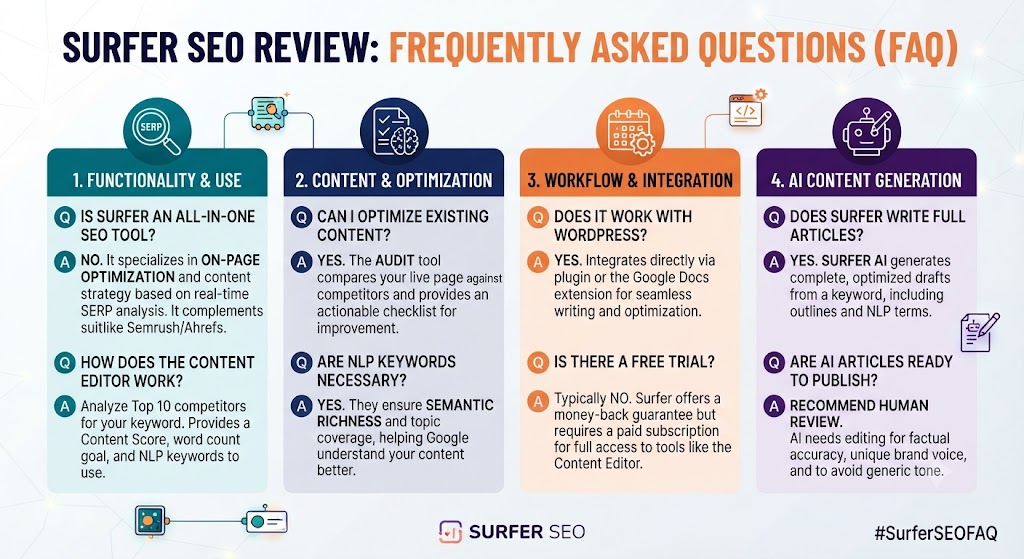
Q: Is this Surfer SEO review recommending it as the best SEO tool overall? This Surfer SEO review recommends it as the best content optimisation tool — not an all-in-one SEO platform. For full-spectrum SEO including backlink analysis, rank tracking, technical audits, and competitor research, Ahrefs or Semrush are necessary alongside or instead of Surfer SEO. Within the specific category of on-page content optimisation, this Surfer SEO review places it at the top of the market.
Q: Does Surfer SEO offer a free trial? Yes. This Surfer SEO review confirmed a 7-day free trial is available on the Essential plan, giving full access to the Content Editor, SERP Analyser, and keyword research features. The trial is sufficient to evaluate the core Surfer SEO review workflow — run three to five articles through the Content Editor and the quality of the optimisation guidance will be immediately apparent.
Q: How does Surfer SEO work with Google Docs? Surfer SEO integrates natively with Google Docs through a browser extension. Once installed, the Surfer SEO sidebar appears in any Google Doc where you’ve connected a Content Editor session, showing your live Content Score and NLP term list alongside your document. This Surfer SEO review found the Google Docs integration to be one of the most seamless workflow integrations in any SEO tool — it fits into existing writing processes without requiring writers to use an unfamiliar editor.
Q: Is Surfer SEO worth it for a small blog? This Surfer SEO review found Surfer SEO is hard to justify for small blogs publishing fewer than eight to ten articles per month at $89/month. For those users, Frase or Scalenut offer comparable core functionality at lower entry prices. Surfer SEO’s value compounds at volume — the more content you produce, the more the accuracy advantage and workflow integrations justify the premium pricing.
Q: Does Surfer SEO generate content as well as optimise it? Yes. The Scale AI plan includes Surfer AI, which generates full article drafts optimised for your target keyword based on SERP analysis. This Surfer SEO review found Surfer AI produces better SEO-structured drafts than generic AI writing tools because the generation is informed by real SERP data. The drafts require human editing before publication but save meaningful first-draft production time.
Q: How accurate is Surfer SEO’s Content Score? This Surfer SEO review found the Content Score to be the most accurate real-time optimisation metric in the content SEO category. It correlates well with ranking outcomes when used as a coverage guide rather than a target to maximise at all costs. Content that scores 70–85 while maintaining natural writing quality consistently outperforms content that scores 90+ but reads as keyword-stuffed or artificially structured.
Q: What are the best Surfer SEO alternatives? This Surfer SEO review points to Scalenut ($39/month — best value all-in-one), Frase ($45/month — strong AI writing integration), Clearscope ($189/month — enterprise teams), and MarketMuse (enterprise content intelligence). Our AI writing tools hub covers all of these with full detail.
Skip The Learning Curve — Let Us Run It For You
These AI marketing tools are powerful, but strategy still takes time to master. Tasknestly runs done-for-you digital marketing campaigns using the same category of tools, professionally managed.
Get a Free Marketing Quote →Conclusion: Final Surfer SEO Review Verdict
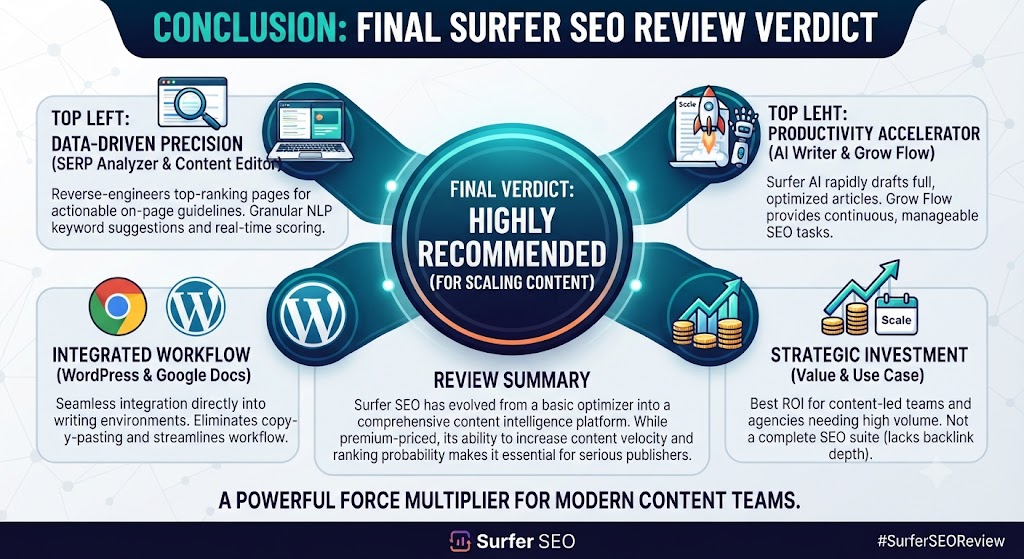
After completing a thorough Surfer SEO review across its full feature set, the conclusion is clear: Surfer SEO is the best content optimisation tool available for professional content teams and agencies who need accuracy and workflow integration above all else. The Content Editor is the most reliable real-time optimisation environment in the category, the SERP Analyser delivers the deepest competitive intelligence of any content tool this Surfer SEO review has tested, and the Google Docs and WordPress integrations make it genuinely invisible in well-established content workflows.
The pricing is the most significant friction point this Surfer SEO review identified. At $89/month for the Essential plan and $129/month for the Scale plan, Surfer SEO is a meaningful investment — one that requires either professional-level content output or demonstrable ranking improvements to justify. For agencies and established content teams, this Surfer SEO review found the ROI is consistently positive. For individual creators and early-stage bloggers, the value-to-cost ratio is harder to make work.
The Topical Map feature deserves special mention in this Surfer SEO review’s final assessment. For content teams building new topic authority or agencies onboarding new client verticals, the ability to generate a comprehensive content cluster strategy in minutes is a genuine time-saving capability that few competing tools offer at comparable quality.
This Surfer SEO review’s recommendation: if you’re producing SEO content professionally and content ranking is a core business outcome, Surfer SEO earns its price. Start with the 7-day trial, run your most competitive target keywords through the Content Editor, and the quality of the guidance will tell you immediately whether the investment makes sense. Explore more options in our AI writing tools hub.
Disclosure: This article contains affiliate links. TechBotHQ may earn a commission if you sign up through our links, at no extra cost to you. See our affiliate disclosure for full details.
Skip The Learning Curve — Let Us Run It For You
These AI marketing tools are powerful, but strategy still takes time to master. Tasknestly runs done-for-you digital marketing campaigns using the same category of tools, professionally managed.
Get a Free Marketing Quote →