Designs.ai Review 2026: Complete AI Design Suite for Creators

Looking at Designs.ai review details, here’s a question worth asking before you pay for any design platform in 2026: do you need the best tool for one job, or a solid tool for every job?
When it comes to this tool, this Designs.ai review found that most designers answer “best for one job” and reach for Canva, Figma, or Adobe. But for a specific type of user — the solo founder, the freelance content creator, the small marketing team wearing every hat — having ten professional tools under one subscription isn’t a compromise. It’s a genuine advantage.
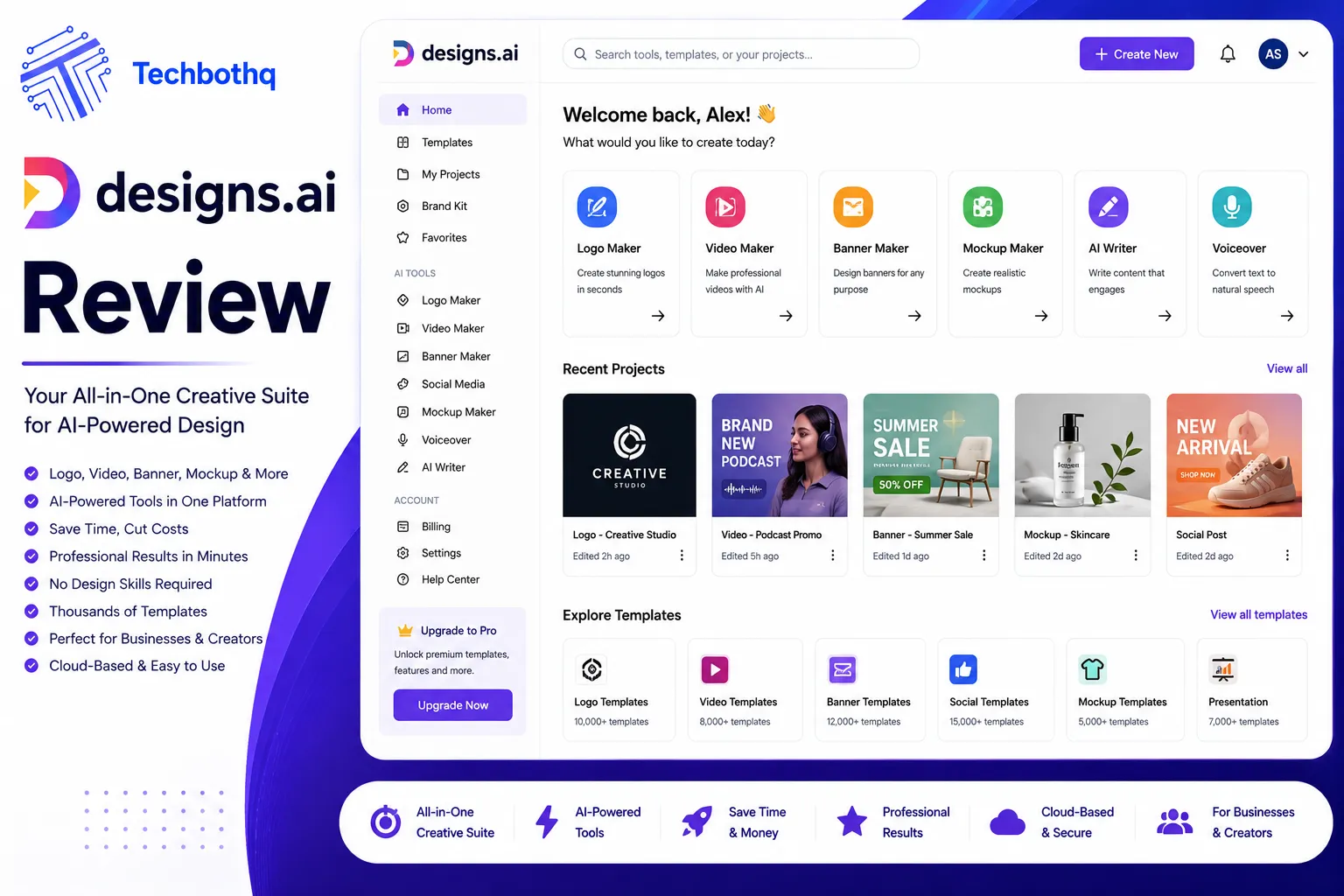
For anyone reading this Designs.ai review, that’s the case Designs.ai makes for itself. Launched in 2019 out of Singapore as part of the Inmagine Group, it bundles 11 AI-powered creative tools — logo maker, video maker, graphic designer, voiceover generator, AI writer, background remover, image maker, and more — under a single subscription starting at $29/month. The promise: one platform that handles your entire creative workflow without juggling multiple tools and accounts.
This Designs.ai review found that the reality is more nuanced. This review cuts through the marketing to tell you exactly what Designs.ai delivers, where it genuinely saves time, where it falls short against specialized competitors, and who should actually pay for it in 2026.
Table of Contents
What Is Designs.ai?
Company Overview
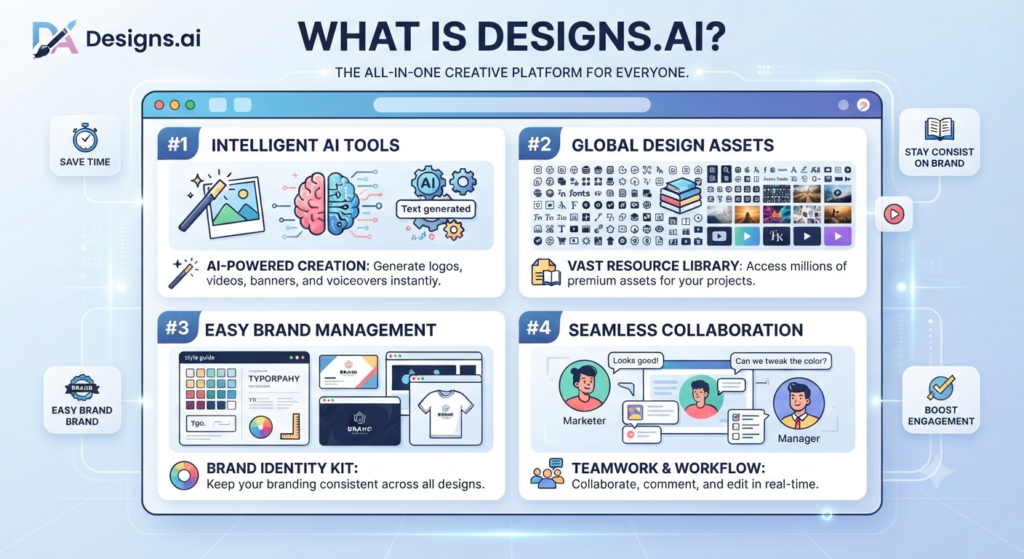
Across this Designs.ai review, designs.ai is an AI-powered all-in-one creative platform operated by the Inmagine Group, a Singapore-based company that also owns 123RF, the stock media library. That ownership matters in practice: Designs.ai users have access to a media library of over 170 million images, 10 million video clips, and 50,000 audio files — a content depth that rivals Canva and significantly exceeds what most standalone AI design tools offer.
On this point, this Designs.ai review notes that the platform has been active since 2019, making it one of the more established all-in-one AI design suites on the market. It’s not a VC-funded hypergrowth startup pivoting every quarter — it operates as a private subsidiary with a consistent product roadmap focused on breadth of tools and accessibility for non-designers.
In 2026, Designs.ai packages 11 AI-powered tools under one subscription: That’s a key point in this Designs.ai review.
- LogoMaker — AI logo generation from business name and style preferences This holds up throughout the Designs.ai review.
- DesignMaker Within this Designs.ai review, — graphic design for social media, banners, presentations, and marketing collateral
- VideoMaker — text-to-video and template-based video creation Keep that in mind from this Designs.ai review.
- SpeechMaker — text-to-speech voiceover generation in 20+ languages That’s a key point in this Designs.ai review.
- AI Writer — SEO content and marketing copy generation This holds up throughout the Designs.ai review.
- ImageMaker — AI image generation from text prompts Keep that in mind from this Designs.ai review.
- AI Chat — conversational AI assistant for creative tasks That’s a key point in this Designs.ai review.
- Copywriter — ad copy, social captions, email subject lines This holds up throughout the Designs.ai review.
- Face Swapper — AI face replacement for video and image content That’s a key point in this Designs.ai review.
- Background Remover — one-click background removal This holds up throughout the Designs.ai review.
- ColorMatcher — color palette generation from images
Considering the data, this Designs.ai review shows the architecture is breadth-first by design: every tool is available on every subscription tier, with differentiation coming through usage credits rather than feature gates. That’s a meaningful structural advantage over platforms that lock key features behind expensive upgrades.
Who Should Use Designs.ai?
Designs.ai is built for:
In the context of pricing, this Designs.ai review notes – Solo founders and entrepreneurs who need professional-quality logos, marketing content, videos, and voiceovers without hiring a designer, videographer, or copywriter
- Per this Designs.ai review, small marketing teams that need to produce varied content types — graphics, video, copy, voiceovers — without subscribing to five different specialized tools
- As this Designs.ai review shows, freelancers and agencies producing deliverables across multiple content types for clients on tight budgets
- In this Designs.ai review, content creators who need a steady supply of social graphics, short videos, and written content without the learning curve of professional tools
- Looking at Designs.ai review details, non-English market businesses who need multilingual voiceover and content capabilities — Designs.ai’s 20+ language support in SpeechMaker is a genuine differentiator
When it comes to this tool, this Designs.ai review found that designs.ai is not the right fit for: professional designers who need pixel-perfect control (Figma, Adobe), users who need only one specific tool done exceptionally well (Remove.bg for background removal, Coolors for color palettes), or enterprise teams with complex design system requirements.
For anyone reading this Designs.ai review, the honest positioning: Designs.ai is for creators who need 7 out of 10 quality across multiple content types, not 10 out of 10 quality in any single category.
Love What These AI Design Tools Can Do?
Great AI-generated visuals still need a cohesive brand identity holding them together. Let Tasknestly build your full branding — logo, guidelines, and visual system.
Explore Branding Services →Key Features
LogoMaker
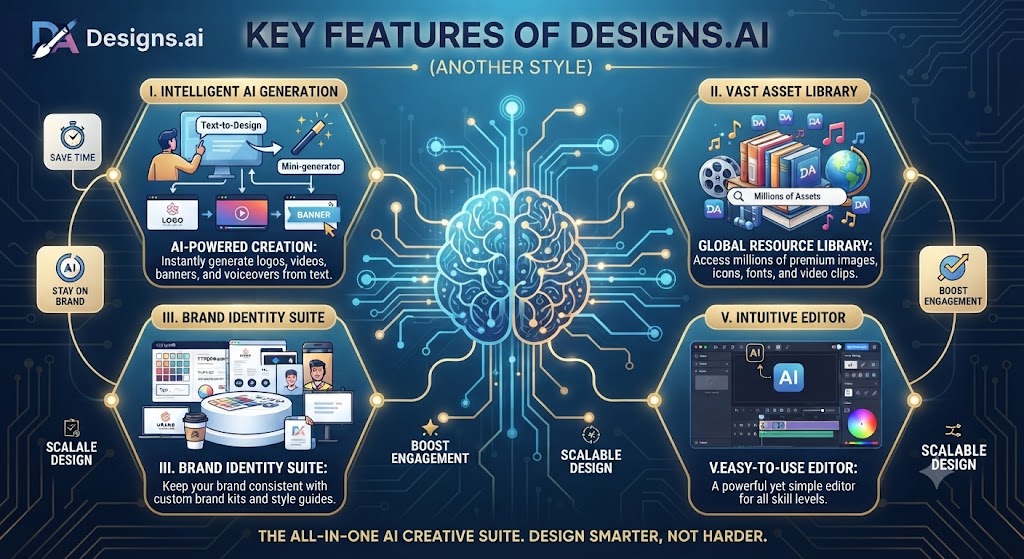
This Designs.ai review found that logoMaker is one of Designs.ai’s most developed and frequently used tools. The workflow is simple: enter your business name and industry, select style preferences (modern, classic, minimalist, bold, etc.), choose color directions, and the AI generates a variety of logo options within seconds.
Across this Designs.ai review, the output quality is good for a first pass — clean vector-based designs that work for small businesses, startups, and side projects. The AI pulls from a large icon library and pairs fonts, icons, and color schemes into coherent brand identity packages. You receive multiple variations and can customize fonts, colors, icon styles, and layout proportions in the editor.
On this point, this Designs.ai review notes that the honest assessment from independent reviews in 2026: LogoMaker produces logos that are professional enough for many real-world use cases but won’t replace a human designer for brands where visual identity is a primary competitive differentiator. For a startup that needs a clean, functional logo in an hour rather than waiting two weeks for a designer and spending $2,000, LogoMaker delivers genuine value.
Within this Designs.ai review, one notable strength: LogoMaker doesn’t just generate a single logo — it creates a complete brand identity package, including variations for different use cases (horizontal, vertical, icon-only) in multiple file formats.
DesignMaker
Considering the data, this Designs.ai review shows designMaker is Designs.ai’s graphic design tool, providing access to over 20,000 templates for social media posts, banners, presentations, email headers, flyers, and other marketing collateral. The editor is drag-and-drop with AI-assisted layout suggestions that adapt your content to different formats and dimensions.
In the context of pricing, this Designs.ai review notes the template library covers a wide range of industries and content types. The AI can resize and reformat designs across different social media dimensions automatically — create a LinkedIn banner and get Instagram and Facebook versions adapted in one click, which is genuinely useful for cross-platform content production.
Per this Designs.ai review, the media library integration is where DesignMaker pulls ahead of many competitors at this price point. Access to 170 million images and 10 million video clips from the parent company’s 123RF library means you’re rarely stuck with limited or low-quality stock — a real advantage over tools that offer thin free asset libraries and charge for anything decent.
As this Designs.ai review shows, where DesignMaker falls short compared to Canva: template variety and design quality. Canva’s 4.5 million template library dwarfs Designs.ai’s 20,000, and Canva’s template aesthetic quality is generally more polished. For teams accustomed to Canva’s template breadth, DesignMaker will feel limited.
VideoMaker
In this Designs.ai review, videoMaker is one of Designs.ai’s most distinctive features and the one that most clearly differentiates it from single-purpose design tools. Enter a text script or article, and the AI automatically selects relevant video footage from the media library, pairs it with music, and generates a complete video within minutes.
Looking at Designs.ai review details, the text-to-video workflow is particularly valuable for content creators and marketers who need to convert blog posts, product descriptions, or social media scripts into video content at scale. What would take hours of manual video editing compresses into a few minutes of AI-assisted production.
When it comes to this tool, this Designs.ai review found that the quality ceiling is real: VideoMaker produces broadcast-ready content for social media and explainer videos, but it doesn’t match the polish of professionally edited video for high-stakes production like ad campaigns or flagship brand content. The AI’s footage selection and pacing are good but not always perfect — review and minor adjustment is typically needed before publishing.
For anyone reading this Designs.ai review, for the target user — the solo marketer who needs to produce 10 social videos per month without hiring a video editor — VideoMaker’s speed and accessibility create genuine time savings that justify the subscription cost on its own.
This Designs.ai review found that videoMaker supports export in multiple formats and resolutions. The Pro plan and above unlock draft video downloads and storyboard PDF export — important for client approval workflows.
SpeechMaker
Across this Designs.ai review, speechMaker converts written text into natural-sounding voiceovers using AI voice synthesis. In 2026, the platform offers 50+ voice options across 20+ languages, covering a range of ages, accents, and tones.
On this point, this Designs.ai review notes that the voice quality has improved significantly from early text-to-speech tools. Modern AI voice synthesis produces output that’s natural enough for explainer videos, podcast intros, e-learning content, social media videos, and promotional materials. The voices won’t replace professional voice actors for premium brand content, but they’re more than adequate for the vast majority of content marketing use cases.
Within this Designs.ai review, the multilingual capability is a standout differentiator. For businesses operating in multiple markets, SpeechMaker eliminates the cost and complexity of commissioning separate voiceover recordings in each language. Create a video script once, generate voiceovers in English, Spanish, French, German, and Japanese, and have market-ready content for five audiences from a single workflow.
Considering the data, this Designs.ai review shows the Pro and Enterprise plans include voice clone slots — the ability to create a custom AI voice trained on your own voice recordings, maintaining brand voice consistency across all audio content without recording every piece manually.
AI Writer
In the context of pricing, this Designs.ai review notes designs.ai’s AI Writer generates SEO-friendly content across multiple formats: blog posts, social media captions, ad copy, email subject lines, product descriptions, and more. Input a topic, target keyword, or brief description, and the AI produces a first draft.
Per this Designs.ai review, the output is functional for content starting points but requires human editing before publishing — it’s a first-draft accelerator, not a finished content generator. Users in 2026 consistently report that AI Writer produces useful raw material that needs refinement, positioning it correctly as a tool that reduces time-to-draft rather than eliminating writing entirely.
As this Designs.ai review shows, for content teams producing high volumes of social captions, product descriptions, or email subject lines — formats where the creative bar is lower and speed matters — AI Writer delivers meaningful productivity gains. For long-form content or high-stakes copywriting, it’s a starting point that still needs a skilled human pass.
Brand Identity Tools
In this Designs.ai review, designs.ai’s Brand Kit feature allows users to store their brand colors, fonts, and logo across all tools, ensuring consistent visual identity across every asset produced in the platform. Once set up, your brand elements are automatically applied as defaults across LogoMaker, DesignMaker, VideoMaker, and other tools.
Looking at Designs.ai review details, this cross-tool brand consistency is a significant practical advantage of the all-in-one platform model. In a multi-tool workflow — using Canva for graphics, a separate video tool, a separate voiceover tool — maintaining brand consistency requires manual effort in each platform. In Designs.ai, it’s maintained automatically through the Brand Kit integration.
When it comes to this tool, this Designs.ai review found that the ColorMatcher tool extends this further, analyzing uploaded images to extract and suggest harmonious color palettes. For businesses that need to match their design palette to existing brand photography or packaging, this automates a process that previously required manual color sampling.
Love What These AI Design Tools Can Do?
Great AI-generated visuals still need a cohesive brand identity holding them together. Let Tasknestly build your full branding — logo, guidelines, and visual system.
Explore Branding Services →Content Creation Workflow
Branding
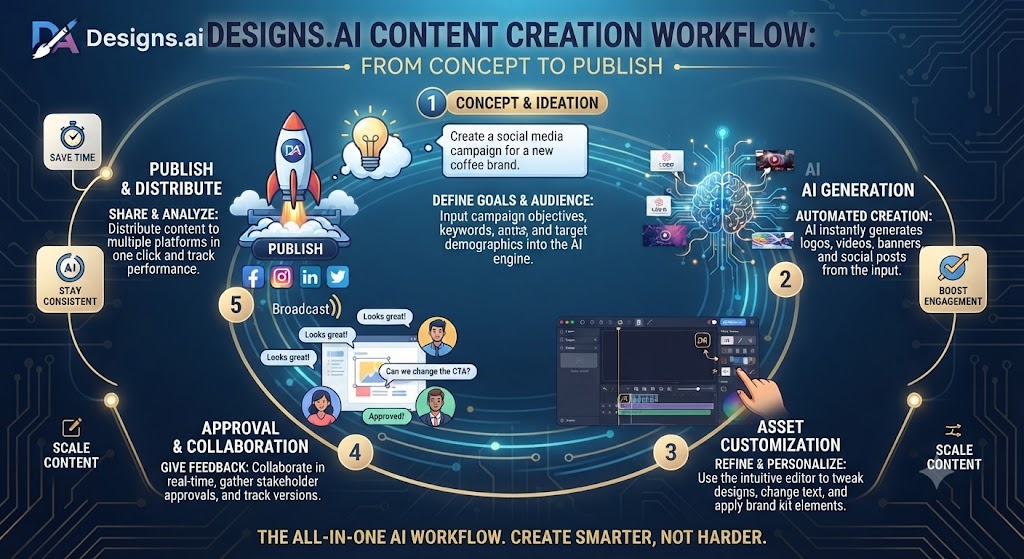
For anyone reading this Designs.ai review, for a new business setting up brand identity from scratch, Designs.ai offers a complete end-to-end workflow in a single platform. The sequence looks like this:
This Designs.ai review found that start with LogoMaker to generate and refine a logo. Feed the selected colors and fonts into the Brand Kit. Use DesignMaker to create business card, letterhead, and social media profile templates aligned to the new identity. Use VideoMaker to produce an intro video. Use SpeechMaker to generate a professional voiceover for the video. Use AI Writer to draft the brand’s core messaging and social media bio copy.
Across this Designs.ai review, that entire sequence — which might cost $3,000-5,000 outsourced to freelancers and take two to three weeks — can be completed in a few hours in Designs.ai for the cost of one monthly subscription. The quality ceiling is lower than professional freelance work, but for early-stage businesses, the speed and cost efficiency are compelling.
Marketing Content
On this point, this Designs.ai review notes that for ongoing marketing content production, Designs.ai’s tools cover the full content stack: visual assets from DesignMaker, video content from VideoMaker, voiceover from SpeechMaker, written copy from AI Writer, and social scheduling awareness from the Social Calendar feature.
Within this Designs.ai review, the Social Calendar is a unique addition in the platform — it displays upcoming international events, holidays, and trending occasions by country, helping content teams plan timely, relevant content in advance. It doesn’t include actual scheduling functionality (a gap compared to tools like Buffer or Later), but as a content planning reference it’s a useful addition.
Considering the data, this Designs.ai review shows the bulk design feature in DesignMaker is particularly valuable for marketing teams: import a data file with variable content (product names, prices, offers) and generate hundreds of design variations automatically. For e-commerce businesses running seasonal promotions across large product catalogs, this automation is a significant time saver.
Social Media Assets
In the context of pricing, this Designs.ai review notes social media content production is one of Designs.ai’s clearest sweet spots. The combination of DesignMaker’s template library, automatic cross-platform resizing, VideoMaker’s short-form video generation, and AI Writer’s caption output creates a fast pipeline from brief to publishable content.
Per this Designs.ai review, a content creator managing multiple social platforms can produce a week’s worth of varied content — static graphics, short videos, written captions — faster in Designs.ai than in a combination of separate specialized tools, even if the quality ceiling of any individual asset type is lower than a dedicated tool would produce.
Love What These AI Design Tools Can Do?
Great AI-generated visuals still need a cohesive brand identity holding them together. Let Tasknestly build your full branding — logo, guidelines, and visual system.
Explore Branding Services →Pros and Cons
Advantages
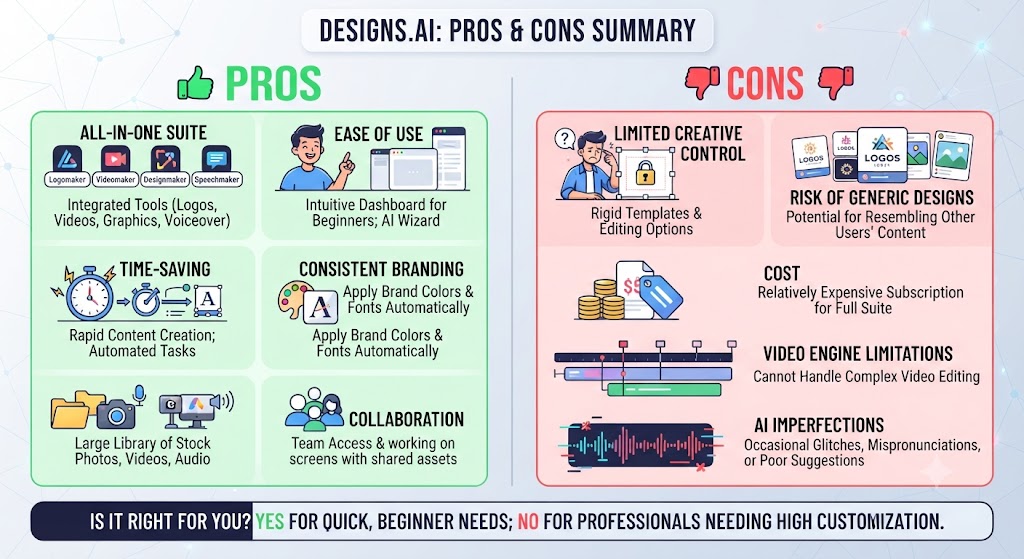
11 tools under one subscription is genuinely valuable. As this Designs.ai review shows, the breadth of Designs.ai’s toolkit is its primary differentiator. Replacing LogoMaker with a dedicated logo tool, VideoMaker with a dedicated video editor, SpeechMaker with a voiceover platform, and AI Writer with a content tool would cost significantly more than Designs.ai’s $29-69/month. For users who need all of these capabilities, the bundled pricing is difficult to beat.
170 million image and 10 million video clip library. In this Designs.ai review, the parent company’s 123RF media library access is a substantial asset. Deep, high-quality stock media significantly reduces the time spent searching for appropriate visuals and the cost of licensing assets separately.
No feature gating by tier — only credit volume. Looking at Designs.ai review details, all 11 tools are available on every paid plan. The difference between Basic and Pro is how much you can produce per month, not what tools you can access. This is a more user-friendly model than platforms that lock key features behind expensive tiers.
Multilingual support is a real differentiator. When it comes to this tool, this Designs.ai review found that speechMaker’s 20+ language support and the AI Writer’s multilingual content generation make Designs.ai particularly useful for businesses operating across multiple markets — a capability that would require multiple specialized tools or expensive professional services otherwise.
Brand Kit creates cross-tool consistency automatically. For anyone reading this Designs.ai review, the brand consistency that multi-tool workflows require manual effort to maintain happens automatically in Designs.ai through the Brand Kit. For small teams, this eliminates a real source of visual inconsistency.
Commercial licensing is included. This Designs.ai review found that all content produced in Designs.ai can be used for commercial purposes. No additional licensing fees for using assets in client work, advertising, or commercial products.
Limitations
AI output quality is broad but not deep. Across this Designs.ai review, this is the central trade-off of the all-in-one model. Designs.ai’s logo generator doesn’t match Looka for brand identity depth. Its background remover doesn’t match Remove.bg for edge accuracy. Its video output doesn’t match dedicated video tools for production quality. Its color palette tool doesn’t match Coolors or Khroma for design depth. Every tool does its job adequately — none of them does it exceptionally compared to specialized alternatives.
Generic AI output is a consistent user complaint. On this point, this Designs.ai review notes that independent reviews across 2026 note that Designs.ai’s AI-generated content — particularly logos and graphic designs — can feel generic and templated, lacking the creative distinctiveness of professionally designed assets or the personalized quality of tools with stronger AI customization. For brands where visual differentiation is a competitive advantage, this matters.
Free plan is very limited. Within this Designs.ai review, the free version restricts access to basic features only, without premium templates, effects, or advanced tool capabilities. A paid subscription is required for meaningful use of most tools — the free tier is a short preview rather than a genuinely usable plan.
DesignMaker template library is small vs. Canva. Considering the data, this Designs.ai review shows canva’s 4.5 million templates significantly outnumbers Designs.ai’s 20,000. For users accustomed to Canva’s template depth and aesthetic quality, DesignMaker will feel limited.
No content scheduling. In the context of pricing, this Designs.ai review notes the Social Calendar feature shows upcoming events but doesn’t allow you to schedule content directly. Users need a separate scheduling tool (Buffer, Later, Hootsuite) to complete the social media workflow — a gap that dedicated social media design tools like Canva (which integrates with scheduling) don’t have.
Customer support and billing issues reported. Per this Designs.ai review, independent review platforms note a recurring pattern of customer support responsiveness issues and billing friction. This is worth knowing before committing to a subscription — check current reviews on G2 and Capterra before purchasing.
Interface only in English. As this Designs.ai review shows, despite multilingual tool output, the platform interface itself is English-only, which limits accessibility for non-English speaking users managing their own workflow.
Love What These AI Design Tools Can Do?
Great AI-generated visuals still need a cohesive brand identity holding them together. Let Tasknestly build your full branding — logo, guidelines, and visual system.
Explore Branding Services →Pricing Plans
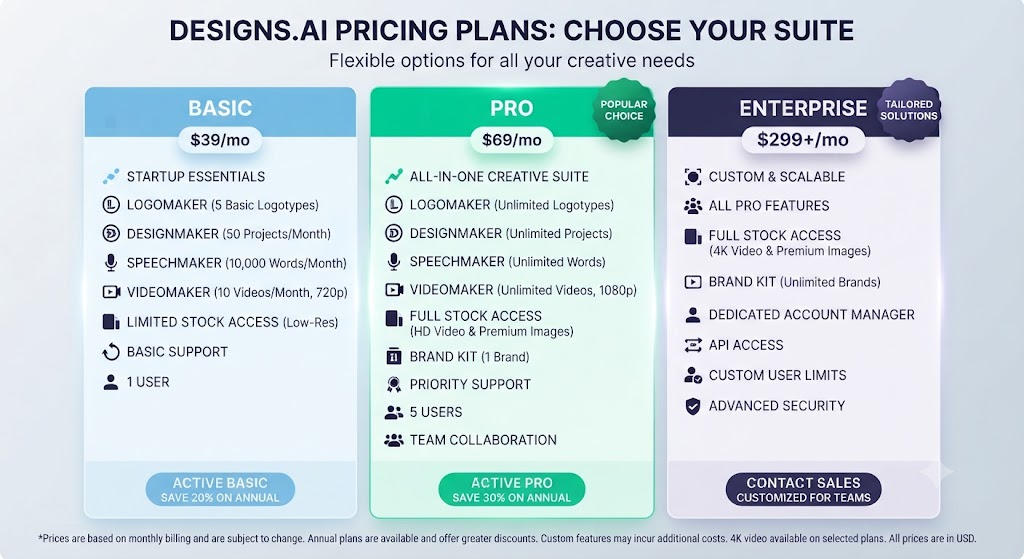
In this Designs.ai review, designs.ai uses a credit-based pricing model. All tools are accessible on every paid tier — the difference is monthly credit volume and a few advanced feature unlocks. Pricing below is based on 2026 data; always verify current pricing at designs.ai before purchasing.
Basic Plan — $29/month
- Access to all 11 tools
- Limited AI credits per month
- 1 voice clone slot
- 10 voiceover types
- Unlimited video generation (no draft downloads or storyboard export)
- Basic templates
- Brand Kit
Looking at Designs.ai review details, the Basic plan is suitable for solo users with moderate content production needs. The credit limits mean heavy users will hit the ceiling quickly.
Pro Plan — $69/month
- All Basic features
- 3,000 AI credits per month
- Collaboration for up to 3 team members
- Download draft videos
- Export storyboards in PDF
- More voiceover types unlocked
- Access to premium design templates
When it comes to this tool, this Designs.ai review found that pro is where most active individual users and small teams will land. The credit volume is sufficient for regular content production, and team collaboration makes it practical for small agency or marketing team use.
Enterprise Plan — $169/month
- All Pro features
- 15,000 AI credits per month
- Up to 5 team members
- 50 voiceover types
- 30 voice clone spots
- Advanced video creation services
- Priority support
For anyone reading this Designs.ai review, enterprise is designed for agencies and content teams producing high volumes across multiple clients or campaigns. The 30 voice clone spots and 50 voiceover types make it particularly suited to businesses with ongoing multilingual voiceover requirements.
Love What These AI Design Tools Can Do?
Great AI-generated visuals still need a cohesive brand identity holding them together. Let Tasknestly build your full branding — logo, guidelines, and visual system.
Explore Branding Services →Alternatives
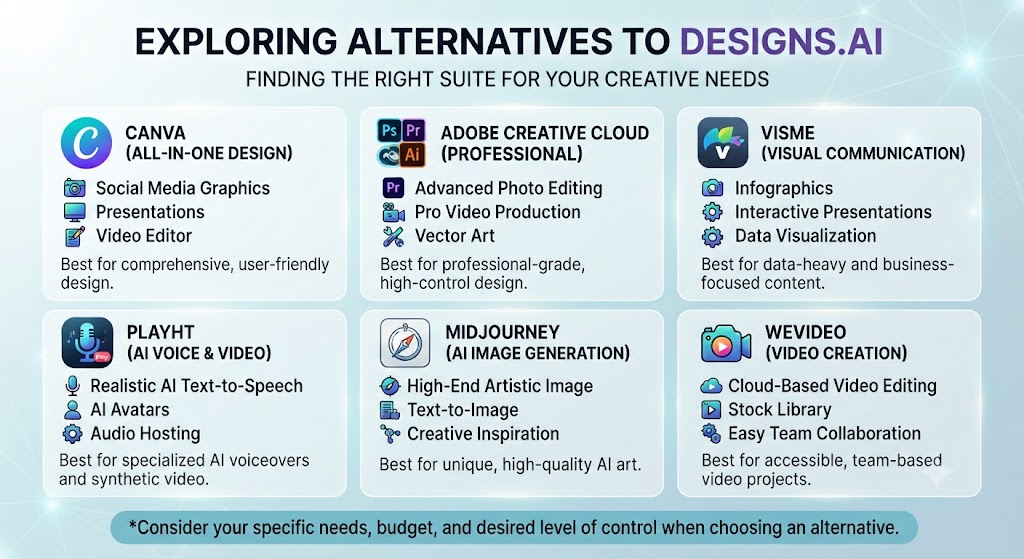
Canva AI
This Designs.ai review found that canva is the dominant all-in-one design platform in 2026 with over 220 million monthly active users, 4.5 million templates, and an expanding AI feature set through Magic Studio. It does graphic design, presentations, video, and social media content with a more polished template library than Designs.ai and a more refined editing experience.
Across this Designs.ai review, where Canva beats Designs.ai: template volume and quality, editing precision, social media content scheduling integration, brand recognition, and community resources. Where Designs.ai has an edge: the bundled voiceover (SpeechMaker), multilingual content output, and comprehensive video-from-text generation that Canva doesn’t natively match.
On this point, this Designs.ai review notes that canva Pro is $15/month — significantly cheaper than Designs.ai’s $29 Basic. For users who primarily need graphic design and don’t need integrated video or voiceover, Canva Pro is the better value.
Within this Designs.ai review, best for: anyone who prioritizes graphic design quality, template variety, and social media content. If you already use Canva and it covers your needs, Designs.ai doesn’t add enough to justify switching.
Adobe Express AI
Adobe Express is Adobe’s simplified design tool that includes Firefly AI image generation — trained on licensed content, making it commercially safe — along with background removal, templates, and Creative Cloud integration. It’s more affordable than Designs.ai at $7.99/month for premium and is included in most Creative Cloud subscriptions.
Adobe Express wins on AI image generation quality (Firefly is the commercial safety standard for AI image generation in 2026) and Creative Cloud ecosystem integration. It doesn’t match Designs.ai’s breadth of tools — no integrated video-from-text, no voiceover, no logo maker at the same depth.
Best for: Creative Cloud users who want AI design capabilities integrated into their existing Adobe workflow without additional subscription cost.
Looka
Looka is a dedicated AI logo and brand identity platform. Where Designs.ai’s LogoMaker is one of 11 tools, Looka’s entire platform is focused on logo creation and brand identity — and that focus shows in the output quality and customization depth.
Looka produces more distinctive, customizable logos than Designs.ai’s LogoMaker and includes a full Brand Kit that propagates your identity across business cards, social media assets, and branded merchandise mockups. It doesn’t offer any of Designs.ai’s video, voiceover, or content tools.
Best for: businesses where logo and brand identity quality is the priority and who don’t need Designs.ai’s broader content creation toolkit.
Love What These AI Design Tools Can Do?
Great AI-generated visuals still need a cohesive brand identity holding them together. Let Tasknestly build your full branding — logo, guidelines, and visual system.
Explore Branding Services →Final Verdict
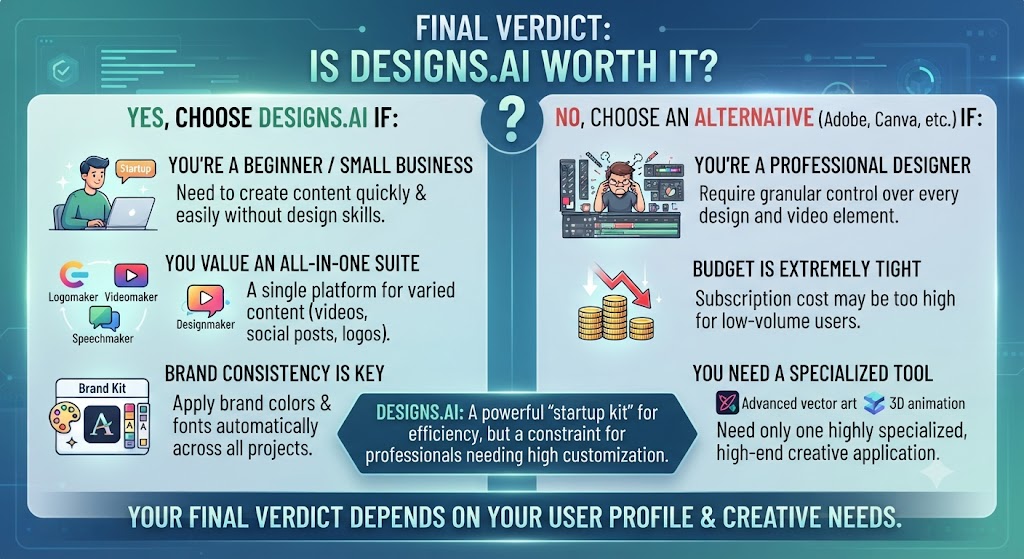
Is Designs.ai Worth It?
Yes — for the right user. The decision comes down to whether you need breadth or depth in your design toolkit.
If you need the best possible quality in any single category — the sharpest logo, the cleanest background removal, the most accurate color palettes, the most sophisticated UI prototyping — Designs.ai isn’t the answer. The specialized tools reviewed in this series (Coolors for color, Remove.bg for background removal, Uizard for prototyping) do their specific jobs better.
But if you’re a solo founder, freelance content creator, or small marketing team that needs to produce logos, marketing graphics, videos, voiceovers, and copy without separate subscriptions to five different tools, Designs.ai’s bundle genuinely delivers value that’s hard to match at the price point.
The $29/month Basic plan gives you access to a creative toolkit that, purchased separately at market rates, would cost significantly more per month. The quality at each individual tool may be 7 out of 10 rather than 10 out of 10, but for a large segment of real business use cases, 7 out of 10 is enough — and having it all in one place with brand consistency built in is a meaningful practical advantage.
The caveats to take seriously: if visual brand differentiation is critical to your business, the generic quality of AI-generated logos and designs is a real limitation. If you’re already paying for Canva and it covers your needs, Designs.ai doesn’t add enough in the graphic design category to justify the switch. And check current customer support reviews before purchasing — the billing and support friction reported by multiple users in 2026 is worth factoring into the decision.
Best Use Cases
Designs.ai is the right choice if you:
- Are a solo founder or early-stage startup that needs a logo, marketing assets, video content, and voiceovers quickly and affordably
- Run a small marketing team producing varied content types and want to reduce tool subscriptions
- Need multilingual voiceover content for multiple market audiences
- Are a freelancer producing full creative packages for clients across multiple content formats
- Want cross-tool brand consistency without managing brand assets across multiple platforms
Look elsewhere if you:
- Need graphic design at Canva’s template depth and quality → Canva Pro ($15/month)
- Are already in Adobe Creative Cloud → Adobe Express (often included)
- Need the best logo and brand identity output → Looka
- Need best-in-class background removal → Remove.bg
- Need AI color palette generation → Coolors or Khroma
- Need rapid UI prototyping → Uizard
Love What These AI Design Tools Can Do?
Great AI-generated visuals still need a cohesive brand identity holding them together. Let Tasknestly build your full branding — logo, guidelines, and visual system.
Explore Branding Services →Full Comparison: Designs.ai vs Alternatives
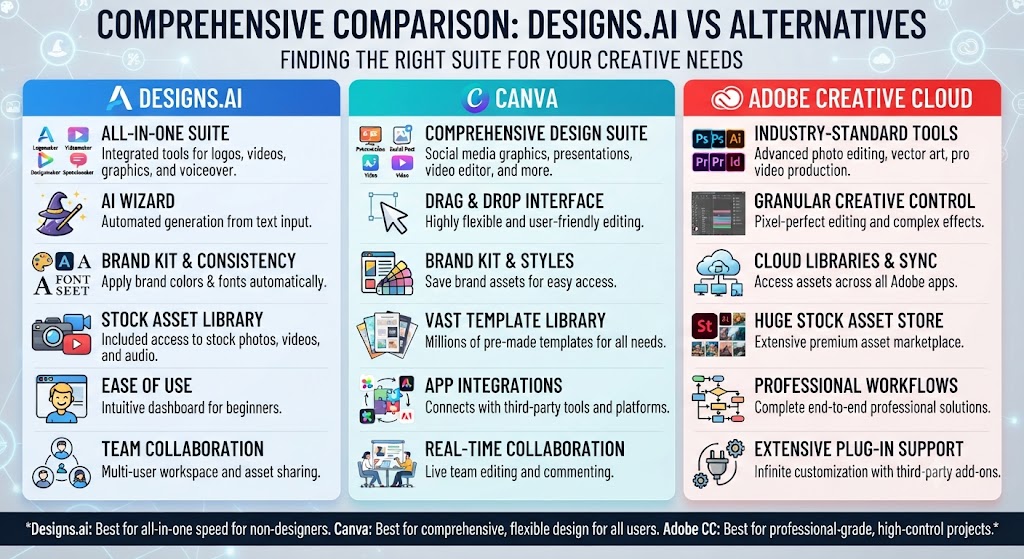
| Feature | Designs.ai Basic | Canva Pro | Adobe Express Premium |
|---|---|---|---|
| Price | $29/month | $15/month | $7.99/month |
| Logo Maker | ✅ Built-in | Limited | ❌ |
| Graphic Design Templates | 20,000+ | 4.5 million+ | 100,000+ |
| Video from Text | ✅ | Limited | ❌ |
| AI Voiceover (SpeechMaker) | ✅ 50+ voices | ❌ | ❌ |
| AI Writer / Copy | ✅ | ✅ Magic Write | Limited |
| Background Removal | ✅ | ✅ (Kaleido AI) | ✅ (Firefly) |
| AI Image Generation | ✅ ImageMaker | ✅ Magic Media | ✅ Firefly |
| Multilingual Support | ✅ 20+ languages | Limited | Limited |
| Brand Kit | ✅ | ✅ | ✅ |
| Stock Media Library | 170M+ images | 100M+ | Adobe Stock previews |
| Social Scheduling | ❌ | ✅ (integration) | ❌ |
| Creative Cloud Integration | ❌ | ❌ | ✅ |
| Team Collaboration | Extra cost | ✅ | ✅ |
Love What These AI Design Tools Can Do?
Great AI-generated visuals still need a cohesive brand identity holding them together. Let Tasknestly build your full branding — logo, guidelines, and visual system.
Explore Branding Services →How to Get the Most Out of Designs.ai
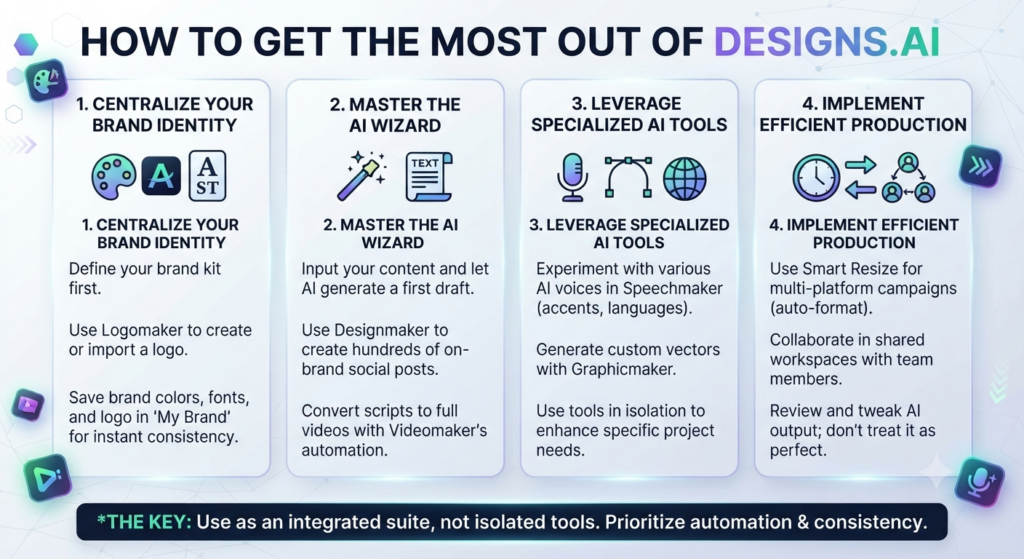
If you decide Designs.ai is the right fit, here are the highest-leverage ways to use it:
Start with the Brand Kit. Before using any individual tool, set up your Brand Kit with your colors, fonts, and logo. Every asset you produce will automatically reflect your brand without manual adjustment.
Use VideoMaker for repurposing written content. If you already write blog posts, newsletters, or social captions, feed them directly into VideoMaker. Turning existing written content into video is the fastest path to video output without additional creative work.
Use SpeechMaker for multilingual reach. If you serve multiple markets, create content in your primary language and use SpeechMaker to generate voiceovers in additional languages. It’s the fastest way to produce localized video content without translation and recording costs.
Use the Bulk Design Creator for e-commerce. If you have a product catalog, use the bulk design feature to generate social graphics for each product simultaneously rather than one at a time.
Pair Designs.ai with a specialized tool for high-stakes work. Use Designs.ai for the 80% of content production that doesn’t require exceptional quality, and reserve specialized tools (professional designers, Adobe, Figma) for the 20% that does.
Rating: 7.5/10
Best for: Solo founders, freelance content creators, and small marketing teams who need a complete AI creative toolkit under one affordable subscription.
Price: $29/month Basic — $69/month Pro — $169/month Enterprise
Continue reading our AI Design Tools series:
- Coolors AI Review 2026: Best AI Color Palette Generator
- Khroma Review 2026: AI Color Tool That Learns Your Taste
- Uizard Review 2026: AI Prototyping for Non-Designers
- Remove.bg Review 2026: Best AI Background Removal Tool?
Love What These AI Design Tools Can Do?
Great AI-generated visuals still need a cohesive brand identity holding them together. Let Tasknestly build your full branding — logo, guidelines, and visual system.
Explore Branding Services →