Physical Address
304 North Cardinal St.
Dorchester Center, MA 02124
Physical Address
304 North Cardinal St.
Dorchester Center, MA 02124

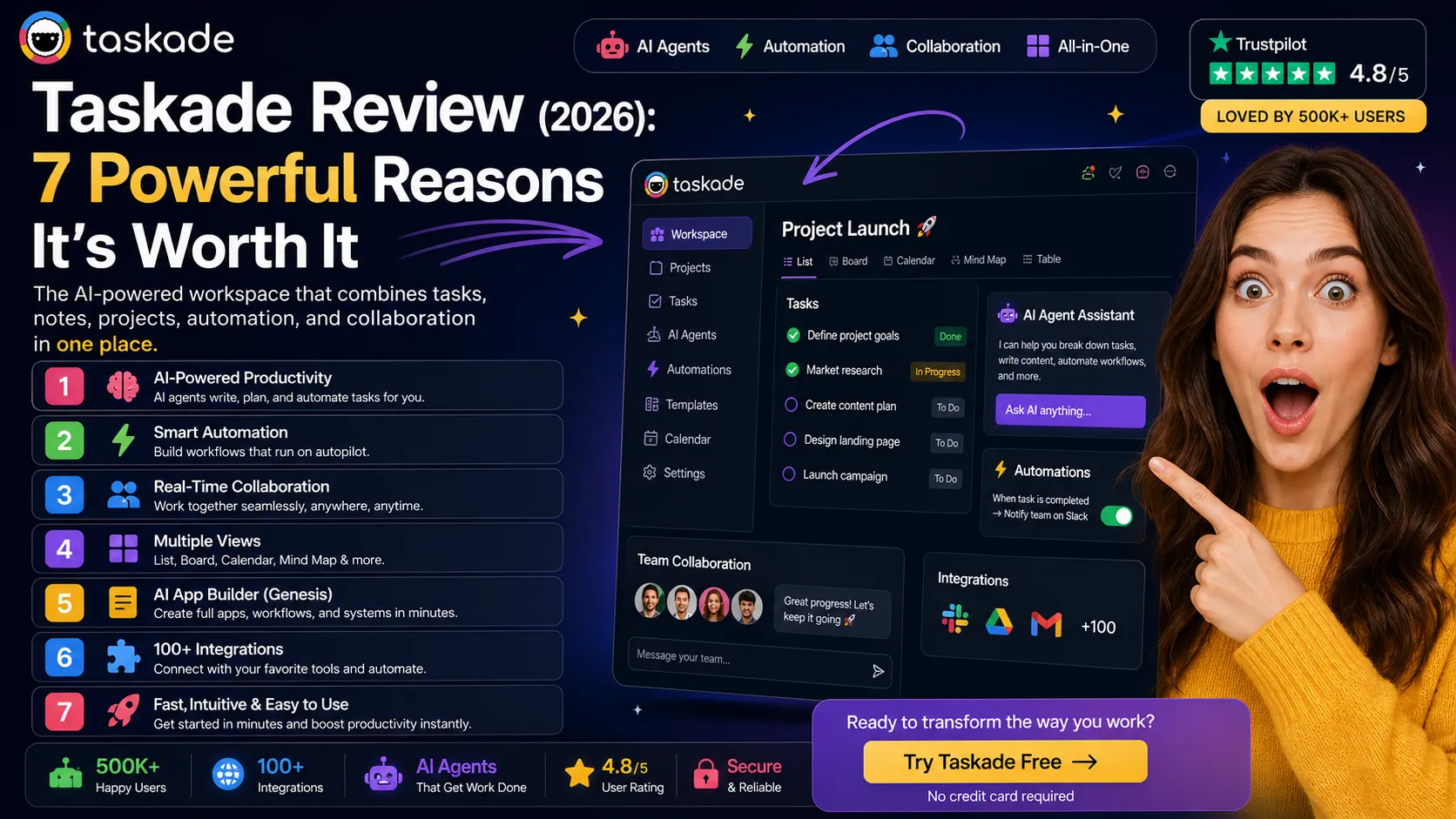
If you’re searching for a Taskade review, you’re likely trying to find a powerful all-in-one productivity tool that combines AI, task management, and collaboration in one place. Taskade has evolved rapidly in recent years—from a simple task manager into a full AI-powered workspace and app builder.
In this in-depth Taskade review, you’ll learn exactly what Taskade is, how it works, its real features, pricing, pros and cons, and whether it’s actually worth using in 2026.
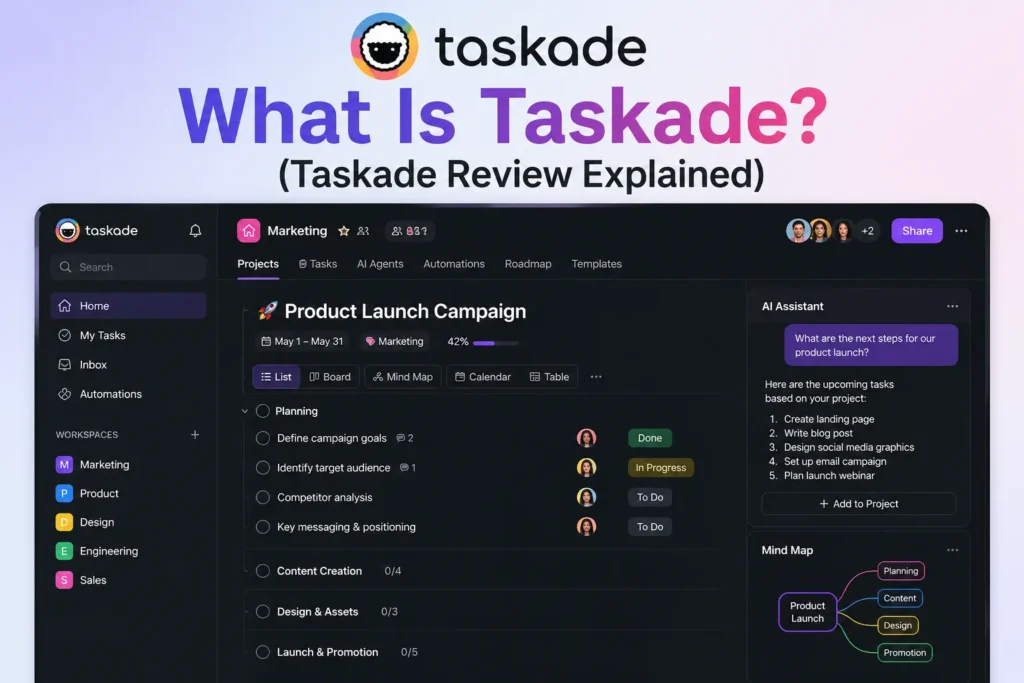
Taskade is an AI-powered productivity platform that helps individuals and teams manage tasks, projects, notes, and workflows in one unified workspace. Unlike traditional tools, Taskade integrates AI agents, automation, and collaboration features directly into the system.
Instead of using separate tools for task management, note-taking, automation, and AI writing, Taskade combines everything into one platform. You can plan projects, assign tasks, collaborate with your team, and even build AI-powered workflows using simple prompts.
Taskade is especially designed for:
What makes Taskade unique is its shift toward being an AI-first workspace, where automation and intelligent agents play a central role in getting work done faster.
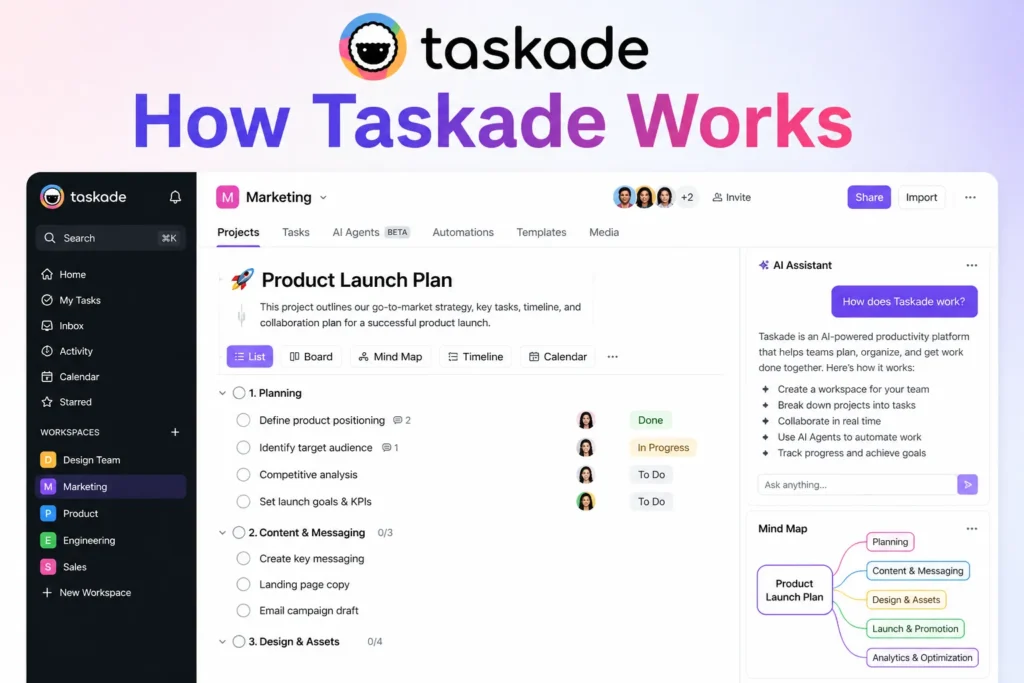
Taskade is built around a simple structure:
Workspace → Projects → Tasks
Inside a workspace, you can create multiple projects, and within each project, you manage tasks, notes, and workflows.
Here’s how it works in real use:
Taskade allows you to switch between multiple views like:
This flexibility makes it easy to manage projects visually depending on your workflow.
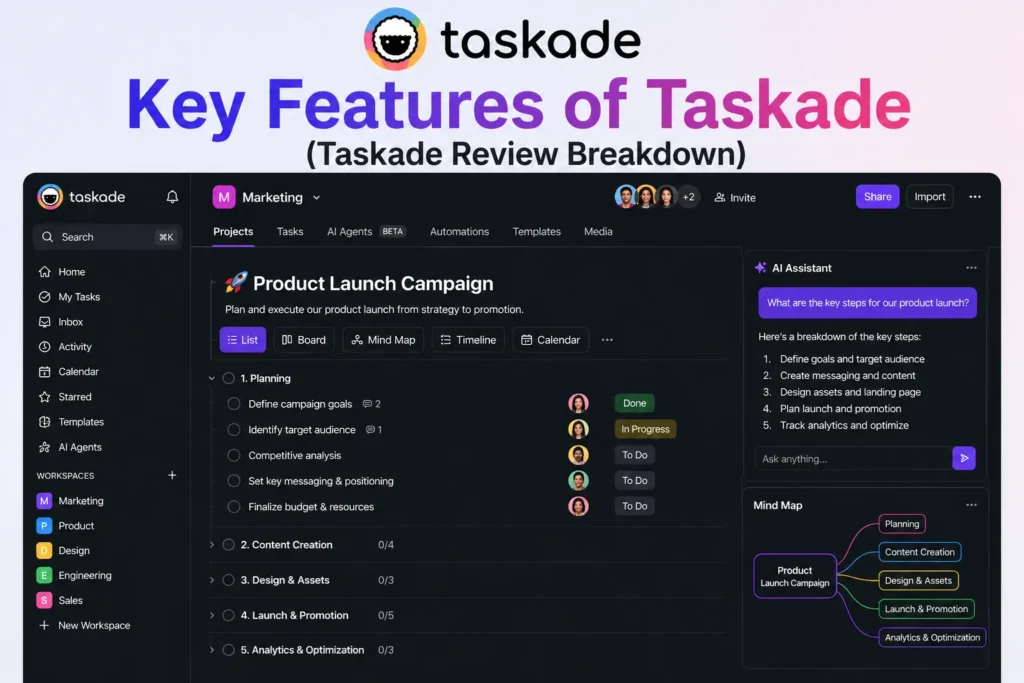
One of the most powerful and innovative capabilities within Taskade is its AI agent system.
Unlike traditional AI assistants that simply respond to questions, Taskade’s AI agents are designed to actively participate in work processes. They can understand information within your workspace, generate content, organize projects, automate tasks, and assist with ongoing execution.
This makes them significantly more capable than basic chatbots.
One of the standout Taskade features is the ability to create specialized AI agents for different responsibilities. Rather than relying on a single assistant for everything, users can build multiple agents that focus on specific roles and workflows.
These agents can:
• Understand workspace context
• Generate content and documentation
• Create and organize tasks
• Automate repetitive workflows
• Assist with planning and execution
• Analyze information and data
• Support team collaboration
• Manage project-related activities
The flexibility of the system allows users to create agents tailored to different business needs.
For example, you can build agents for:
• Content creation
• Project planning
• Data analysis
• Task automation
• Research assistance
• Marketing support
• Meeting preparation
• Knowledge management
This specialization helps improve accuracy and efficiency because each agent can be configured to focus on a specific purpose rather than attempting to handle every type of task.
One of the most impressive aspects is the ability to create multi-agent systems.
Instead of operating independently, multiple agents can work together to support more complex workflows. For example, one agent may perform research, another may generate content, and a third may organize tasks and deadlines. Together, they create an automated workflow that would normally require substantial manual effort.
This approach can be particularly useful for:
• Marketing campaigns
• Content production pipelines
• Product development projects
• Business operations
• Team management workflows
• Research and reporting processes
Another major advantage is automation. Many routine tasks consume valuable time but provide relatively little strategic value. AI agents can help reduce this workload by handling repetitive activities and allowing teams to focus on higher-priority work.
For businesses and growing teams, this can improve productivity while reducing administrative overhead.
The agents also benefit from workspace awareness. Because they can access relevant project information, tasks, notes, and documentation, their responses and actions are often more contextually relevant than those of standalone AI assistants.
This creates a more connected and intelligent work environment where information, planning, and execution are closely integrated.
As AI technology continues to evolve, systems that combine multiple specialized agents are becoming increasingly important. Taskade’s implementation provides users with a practical way to automate complex workflows without requiring extensive technical knowledge.
Overall, AI agents are among the most advanced Taskade features available today. Their ability to understand workspace context, automate workflows, generate content, and collaborate through multi-agent systems makes them a powerful productivity solution for individuals, teams, and organizations looking to streamline operations and scale their work more effectively.
Taskade introduced a major innovation called Genesis, an AI-powered app builder designed to help users create complete productivity systems from simple prompts.
Traditionally, setting up a project management system requires significant manual work. Users need to create tasks, organize workflows, build dashboards, configure automations, and establish project structures before any actual work can begin. Depending on the complexity of the project, this setup process can take hours or even days.
Genesis dramatically simplifies this process.
Using Taskade AI, users can simply describe what they want to build, and the platform generates a functional workspace automatically.
With Genesis, you can:
• Describe requirements using natural language
• Generate complete project systems instantly
• Create dashboards and workspaces
• Build workflows and automations
• Create internal business tools
• Generate AI-powered processes
• Set up collaborative work environments
For example, a user could type:
“Create a content marketing workflow.”
Instead of providing a simple template, Genesis can generate an entire operational system that includes:
• Task lists
• Project structures
• Workflow stages
• Automations
• AI agents
• Team collaboration elements
This allows users to move from an idea to a working system in minutes rather than spending hours building everything manually.
The feature is especially useful for:
• Content marketing teams
• Agencies
• Startup founders
• Project managers
• Operations teams
• Consultants
• Business owners
• Remote organizations
One of the biggest advantages is speed. Many productivity tools provide templates, but Genesis goes beyond templates by generating customized systems based on the user’s specific requirements.
For example, users can build:
• CRM systems
• Content production pipelines
• Client onboarding workflows
• Project management systems
• Marketing operations dashboards
• Knowledge management hubs
• Team collaboration workspaces
Another major benefit is accessibility. Traditionally, building internal business systems often required technical knowledge or extensive configuration work. Genesis lowers that barrier by allowing users to create sophisticated workflows using plain language instructions.
This makes powerful organizational systems accessible to non-technical users who may not have experience with workflow design or project management software.
The integration with AI agents is particularly impressive. Generated systems can include specialized agents that assist with planning, content creation, automation, task management, and execution. This creates an environment where workflows are not only organized but also actively supported by AI.
As projects evolve, users can continue refining and expanding their systems through additional prompts, making the workspace highly adaptable to changing business needs.
Perhaps the most significant advantage is the reduction in setup time. Many organizations spend substantial effort configuring productivity systems before any meaningful work begins. Genesis eliminates much of this friction by generating complete operational frameworks almost instantly.
Overall, Genesis represents one of the most innovative capabilities within Taskade AI. By allowing users to generate dashboards, workflows, automations, AI agents, and complete business systems from simple prompts, it transforms project setup from a time-consuming process into a matter of minutes, enabling teams to focus more on execution and less on configuration.
Taskade offers a streamlined yet highly effective task management system designed for individuals and teams that want to stay organized without dealing with unnecessary complexity.
Many project management platforms become overwhelming as features accumulate. While advanced tools can be powerful, they often require significant setup time and ongoing maintenance. Taskade takes a different approach by focusing on speed, simplicity, and ease of use while still providing the core functionality needed to manage projects effectively.
The platform includes essential task management features such as:
• Task creation and assignment
• Due dates and reminders
• Tags and priorities
• Subtasks and checklists
• Project organization
• Team collaboration
• Progress tracking
• Workflow management
One of Taskade’s biggest strengths is its lightweight design. Users can quickly create projects, organize tasks, and begin working without spending hours configuring dashboards, custom fields, and complex workflows.
This simplicity makes the platform especially attractive for:
• Small teams
• Startups
• Freelancers
• Content creators
• Entrepreneurs
• Students
• Remote workers
• Growing businesses
While tools like ClickUp offer extensive customization and advanced project management capabilities, they can sometimes feel overwhelming for users who simply want an efficient system for organizing work. Taskade prioritizes ease of use while still providing enough flexibility to manage a wide range of projects.
What makes the platform particularly interesting is the way AI enhances task management.
Instead of requiring users to manually break down every project, the AI can assist by:
• Breaking large tasks into smaller steps
• Suggesting logical subtasks
• Organizing workflows automatically
• Identifying missing action items
• Structuring project plans
• Improving task organization
For example, if a user creates a task such as:
“Launch a new website.”
The AI can automatically suggest subtasks like:
• Research competitors
• Create website wireframes
• Design page layouts
• Write website content
• Perform testing
• Launch the site
This helps transform broad objectives into actionable work plans that are easier to execute.
Another major benefit is workflow organization. As projects grow, maintaining structure can become difficult. Taskade’s AI can help arrange tasks logically, group related activities together, and create clearer execution paths for teams and individuals.
This reduces planning overhead and allows users to focus more on completing work rather than organizing it.
The platform is also highly effective for collaborative environments. Team members can assign tasks, track progress, communicate within projects, and stay aligned without needing a complex project management setup.
Because Taskade combines traditional task management with AI-assisted planning, it creates a workflow that feels both simple and intelligent. Users get the benefits of automation without sacrificing the speed and accessibility that make the platform easy to adopt.
Overall, Taskade’s task management system strikes a strong balance between simplicity and functionality. By combining core project management features with AI-powered task breakdown, workflow organization, and planning assistance, it helps users stay productive while keeping project management straightforward and efficient.
Taskade is built with collaboration at its core, making it much more than a personal productivity tool.
Modern teams often work across different cities, countries, and time zones. As a result, effective collaboration requires more than just task management—it requires real-time communication, shared visibility, and seamless coordination across projects.
Taskade combines these capabilities into a single workspace, allowing teams to plan, communicate, and execute work without constantly switching between multiple applications.
Teams can:
• Edit projects in real time
• Chat directly inside projects
• Leave comments on tasks
• Use mentions and notifications
• Share updates instantly
• Collaborate on documents and workflows
One of the biggest advantages is real-time editing. Similar to modern collaborative document platforms, multiple team members can work within the same project simultaneously. Changes appear instantly, ensuring everyone stays aligned without needing to refresh pages or exchange updated files.
This is especially useful during:
• Project planning sessions
• Team meetings
• Content creation workflows
• Marketing campaigns
• Product development projects
• Brainstorming sessions
Built-in communication features also help reduce the need for external messaging tools. Team members can discuss projects directly where the work is happening rather than moving conversations to separate applications.
The ability to leave comments on tasks creates additional context around assignments, helping team members understand expectations, provide updates, and ask questions without creating unnecessary communication gaps.
Mentions and notifications further improve collaboration by ensuring that important updates reach the right people at the right time. Team members can quickly bring colleagues into discussions, request feedback, or notify stakeholders about progress.
Taskade also supports:
• Video calls
• Shared workspaces
• Live updates across devices
• Cross-team collaboration
• Centralized project management
The video call integration is particularly useful for remote teams because it allows discussions and execution to happen within the same environment. Instead of jumping between video conferencing tools and project management platforms, teams can collaborate more efficiently within a unified workspace.
Another major benefit is device synchronization. Whether users are working from a desktop, laptop, tablet, or smartphone, updates are reflected instantly across all devices. This ensures that projects remain current regardless of where team members are working.
For organizations operating across multiple time zones, this real-time synchronization becomes especially valuable. Team members can continue making progress while others are offline, and everyone returns to an up-to-date workspace without needing lengthy status meetings.
This collaborative approach helps improve:
• Team communication
• Project transparency
• Accountability
• Workflow efficiency
• Decision-making speed
• Remote work coordination
By combining project management, communication, collaboration, and workspace sharing into a single platform, Taskade creates an environment where teams can move from ideas to execution with fewer barriers.
Overall, Taskade’s collaboration capabilities make it particularly well-suited for remote and distributed teams. Its combination of real-time editing, integrated communication, shared workspaces, video calls, and live synchronization helps teams stay connected, organized, and productive regardless of where they are located.
Taskade includes powerful automation capabilities that help teams eliminate repetitive manual work and create more efficient workflows.
As projects grow, many routine actions begin consuming valuable time. Sending reminders, updating statuses, notifying team members, and coordinating task handoffs may seem minor individually, but collectively they can take up a significant portion of the workday.
Taskade helps solve this problem by allowing users to create automated workflows that run in the background without requiring constant supervision.
Users can create rules such as:
• When a task is completed → notify the team
• When a deadline approaches → send a reminder
• When a task is added → trigger another action
• When a project status changes → update related workflows
• When work is assigned → notify responsible team members
These automations help ensure that important actions happen automatically and consistently.
One of the biggest advantages is reduced administrative overhead. Instead of manually managing every project update, teams can rely on automation to handle routine coordination tasks while they focus on higher-value work.
This is particularly useful for:
• Project management
• Marketing workflows
• Content production pipelines
• Client onboarding processes
• Team collaboration
• Operational workflows
• Remote team coordination
Another strength is integration with popular business and productivity tools.
Taskade can connect with platforms such as:
• Slack
• Google Sheets
• WordPress
• Calendly
These integrations allow information to move automatically between systems, reducing duplicate work and improving overall workflow efficiency.
For example, a content team could automatically trigger notifications when articles move to a new stage of production. A marketing team could update tracking spreadsheets when campaigns are completed. Client onboarding workflows could automatically schedule meetings and notify stakeholders as progress occurs.
Another major benefit is consistency. Human error often occurs when repetitive tasks are performed manually. Automation helps ensure that processes are followed the same way every time, reducing mistakes and improving reliability.
The platform also makes it easier to scale operations. As teams grow, manually managing every workflow becomes increasingly difficult. Automated processes allow organizations to handle more work without dramatically increasing administrative effort.
This can lead to improvements in:
• Productivity
• Team communication
• Project visibility
• Process consistency
• Response times
• Operational efficiency
For remote and distributed teams, automation is especially valuable because it helps keep everyone informed even when team members are working in different locations and time zones.
By automatically triggering actions, sending updates, and connecting workflows across multiple tools, Taskade helps create a more streamlined and efficient work environment.
Overall, Taskade’s automation features add significant value beyond traditional project management. By reducing repetitive work, integrating with essential business tools, and ensuring that important actions happen automatically, the platform helps teams work more efficiently while maintaining better organization and collaboration across projects.
One of Taskade’s most useful strengths is its ability to display the same project in multiple formats, allowing teams to work in the way that feels most natural to them.
Different people process information differently. Some prefer visual planning, while others work better with structured lists or timeline-based project management. Rather than forcing everyone into a single workflow, Taskade provides multiple project views that can be switched instantly without losing information.
Users can view projects as:
• Kanban boards
• Mind maps
• Lists
• Timelines
• Calendars
This flexibility makes it easier to organize work, track progress, and collaborate across different types of projects.
The Kanban board view is ideal for workflow management. Teams can move tasks between stages such as “To Do,” “In Progress,” and “Completed,” creating a clear visual representation of project status. This approach works particularly well for marketing campaigns, content production, software development, and operational processes.
The list view is perfect for users who prefer a more traditional task management experience. It provides a simple and organized way to manage projects without unnecessary complexity, making it easy to prioritize work and track progress.
Timeline and calendar views help teams understand deadlines, milestones, and project schedules. These views are especially useful for planning long-term initiatives where timing and dependencies are important.
However, one of the most unique features is the mind map view.
The mind map interface is especially valuable for:
• Brainstorming sessions
• Project planning
• Content strategy development
• Business planning
• Research projects
• Workflow design
• Product development
Instead of viewing information as a linear list, users can visualize relationships between ideas, tasks, and project components. This makes it easier to identify connections, organize complex concepts, and develop structured plans from broad ideas.
For example, a team planning a product launch could start with a central objective and branch out into marketing activities, design requirements, content creation, development tasks, and launch preparation. The visual layout makes large projects easier to understand and manage.
Another major advantage is adaptability. Team members often have different preferences regarding how they organize work. A project manager may prefer timelines, a designer may work better with mind maps, and a content creator may prefer Kanban boards. Taskade allows everyone to interact with the same project using the view that best supports their workflow.
This flexibility improves:
• Team collaboration
• Project visibility
• Planning efficiency
• Creative thinking
• Workflow management
• Organizational clarity
The ability to switch between views also helps teams throughout different stages of a project. Brainstorming may begin in a mind map, planning may move to a list, execution may occur in a Kanban board, and deadline management may happen through timeline or calendar views.
Rather than forcing users to adapt to the software, Taskade adapts to the way users prefer to work.
Overall, Taskade’s multiple project views provide a highly flexible and user-friendly experience. Whether teams prefer Kanban boards, mind maps, lists, timelines, or calendars, the platform makes it easy to organize information, manage projects, and collaborate effectively while supporting a wide variety of working styles.
Another feature that makes Taskade especially beginner-friendly is its extensive library of templates, cloneable apps, and community-created workflows.
One of the biggest challenges when adopting a new productivity platform is the initial setup process. Many users spend hours building project structures, creating workflows, organizing databases, and configuring task systems before they can begin actual work.
Taskade helps eliminate much of this friction by providing ready-made solutions that can be deployed in minutes.
The platform offers:
• Pre-built templates
• Cloneable applications
• Community-built workflows
• Ready-to-use project systems
• AI-powered workspace generation
• Customizable productivity frameworks
Instead of starting with a blank workspace, users can choose a template that closely matches their needs and begin working immediately.
Templates are available for a wide range of use cases, including:
• Project management
• Marketing campaigns
• Content planning
• CRM systems
• Team collaboration
• Product development
• Business operations
• Personal productivity
For example, a marketing team can launch a complete campaign management workspace without manually creating task lists, workflow stages, and project structures. Similarly, a business owner can deploy a CRM system within minutes rather than building one from scratch.
One of the most valuable aspects is the availability of cloneable apps. These allow users to duplicate proven systems and customize them to fit their own workflows. Rather than reinventing processes that already work, teams can adapt existing frameworks and focus on execution.
The community-built workflow library adds even more value. Users can benefit from systems created by other professionals, teams, and organizations, gaining access to workflow ideas and best practices that might otherwise take significant time to develop independently.
This is particularly useful for:
• Entrepreneurs launching new projects
• Startups building operational systems
• Marketing teams managing campaigns
• Agencies handling client work
• Content creators organizing production workflows
• Remote teams improving collaboration
Another major benefit is speed. Setting up project management systems, CRM workflows, and operational processes can often take several hours or days. Templates dramatically reduce this setup time, allowing teams to become productive much faster.
The feature also lowers the learning curve for new users. Instead of figuring out how to structure a workspace from scratch, users can study existing templates and learn effective workflow design through practical examples.
Flexibility remains a key advantage as well. Templates are not fixed systems. Users can modify structures, add automations, integrate AI agents, adjust workflows, and customize projects to fit their specific requirements.
As organizations grow, these templates can serve as foundations for more advanced workflows without requiring a complete rebuild.
Overall, Taskade’s library of templates, cloneable apps, and community-built workflows helps users move from setup to execution far more quickly. By providing ready-made systems for project management, marketing, content planning, CRM management, and many other use cases, the platform saves valuable time and eliminates much of the complexity associated with building productivity systems from scratch.
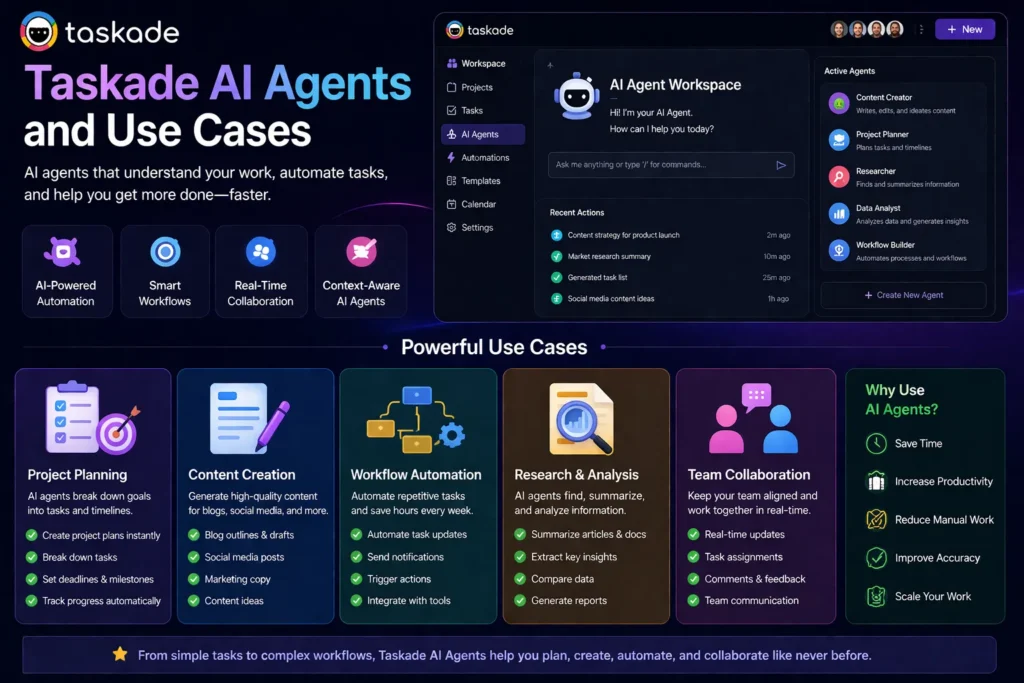
Taskade’s AI agents enable multiple real-world use cases:
Generate full project plans instantly with tasks and timelines.
Create blog outlines, social media posts, and marketing copy.
Automate repetitive tasks like notifications and updates.
Summarize documents and extract insights.
Coordinate tasks and communication within one platform.
These use cases make Taskade more than just a productivity tool—it becomes a complete workflow system.
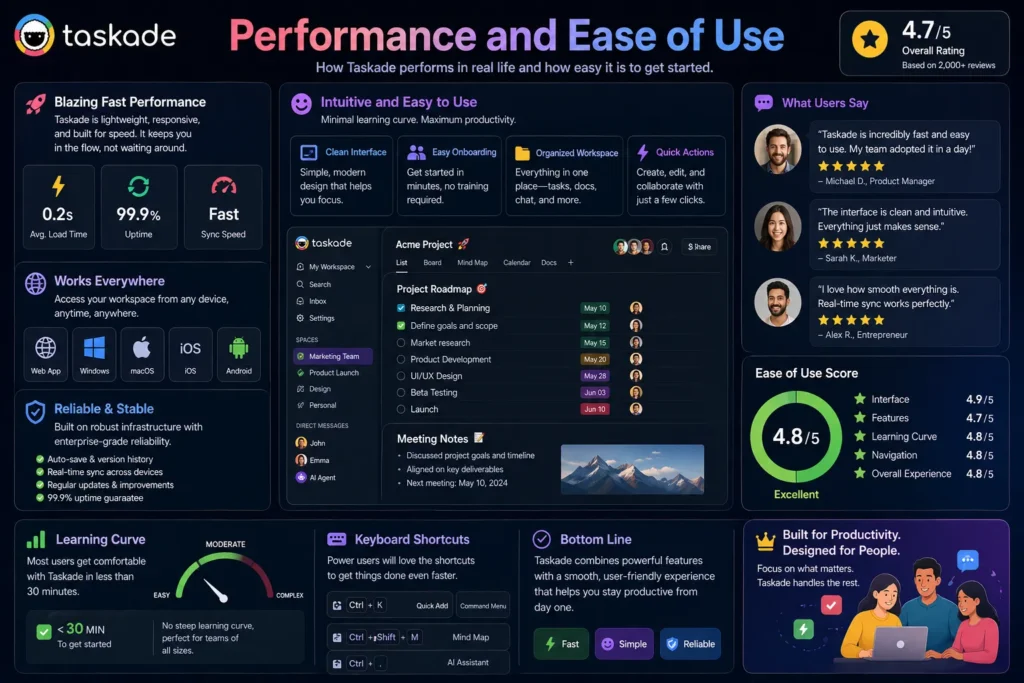
Taskade is known for its:
Most users can learn the platform within a few hours.
The interface is intuitive and minimal, which reduces the learning curve compared to more complex tools.
Even though Taskade includes advanced features like AI agents and automation, it still maintains a user-friendly experience.
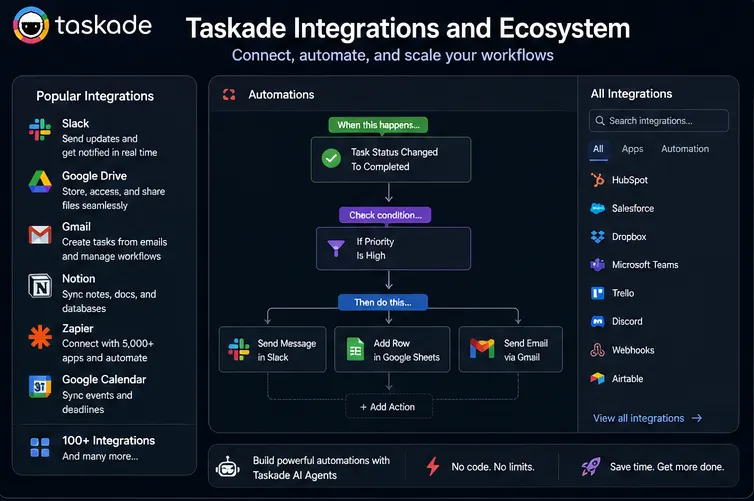
Taskade integrates with over 100 tools, including:
Using Zapier, it can connect with thousands of additional apps.
This allows Taskade to fit into existing workflows without replacing everything.
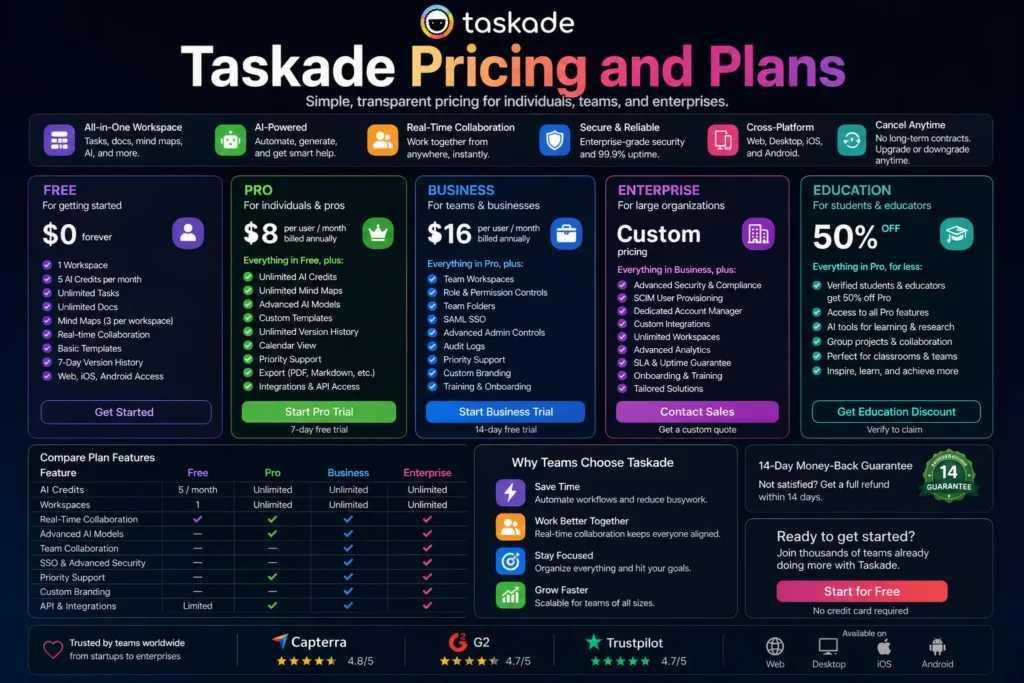
Taskade offers multiple pricing tiers:
Taskade pricing is based more on AI usage and automation activity rather than just the number of users.
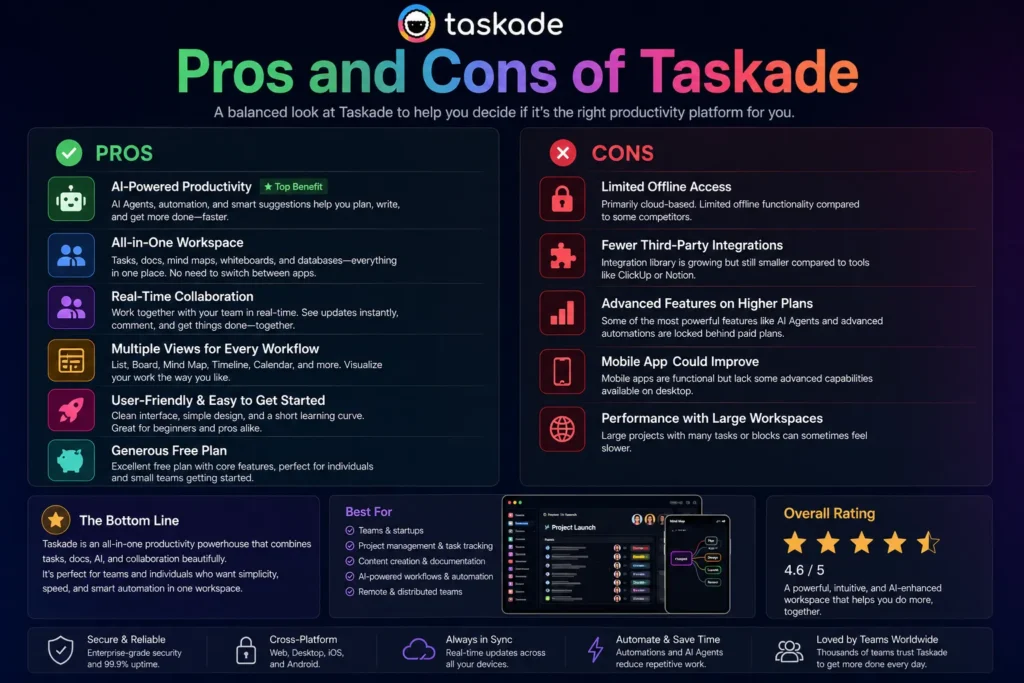
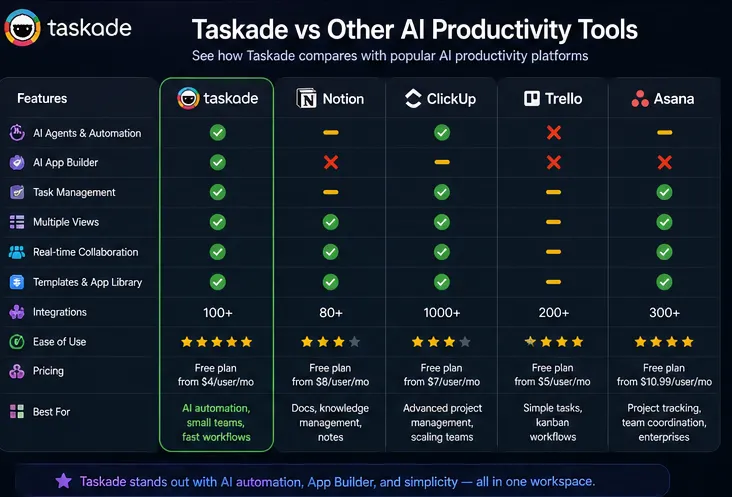
Compared to tools like Notion, ClickUp, and Trello:
Taskade stands out as a lightweight, AI-first productivity platform rather than a traditional project management tool.
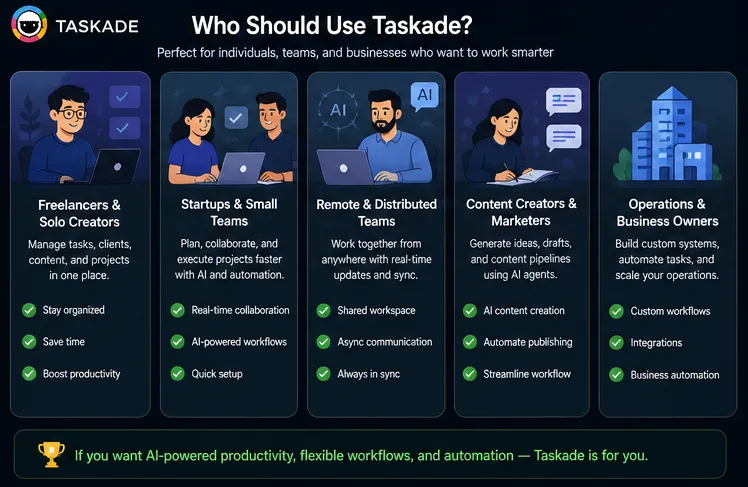
Taskade is best for:
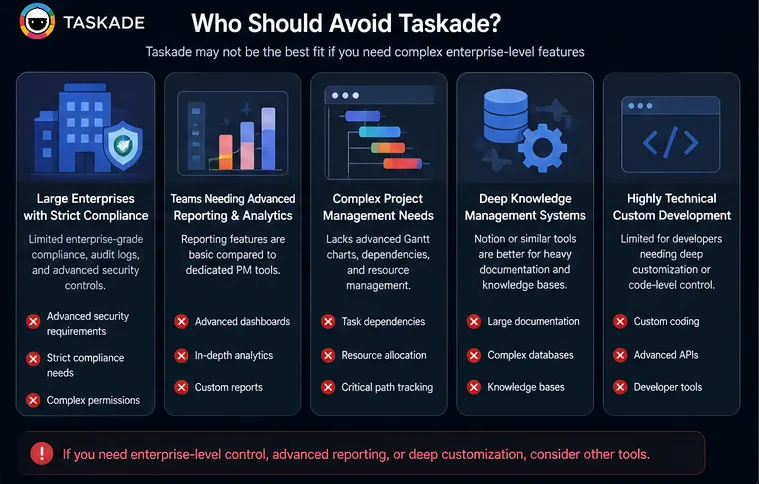
Taskade may not be ideal for:
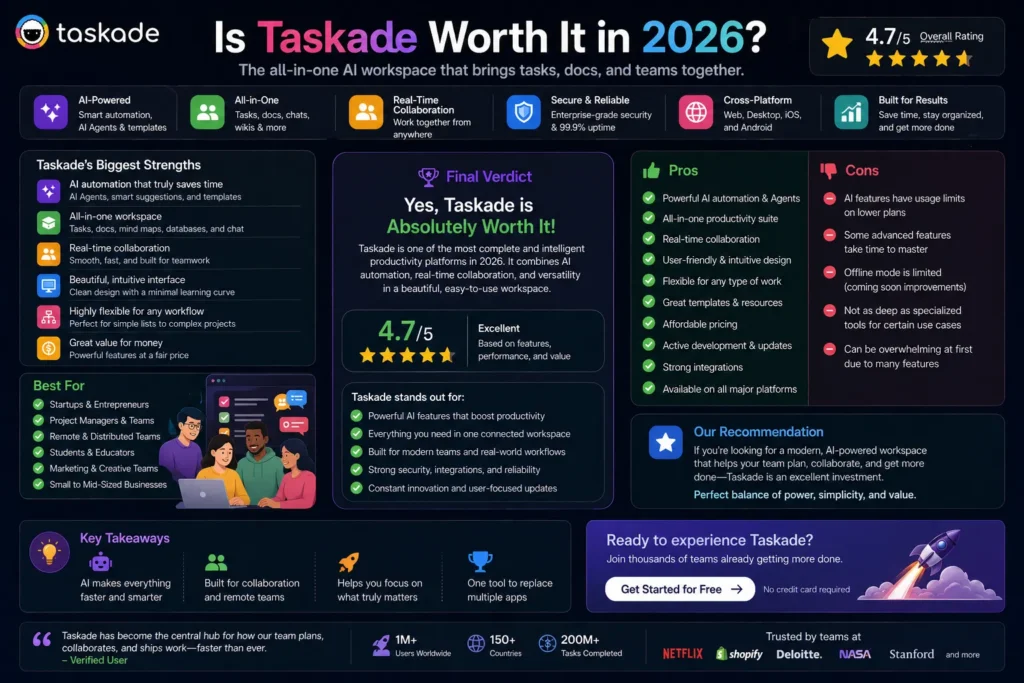
Taskade is one of the most interesting productivity tools in 2026.
It successfully combines:
into one unified system.
While it may not replace advanced project management tools, it excels in:
Most reviews and real-world testing show strong performance, with high ratings around usability and collaboration.
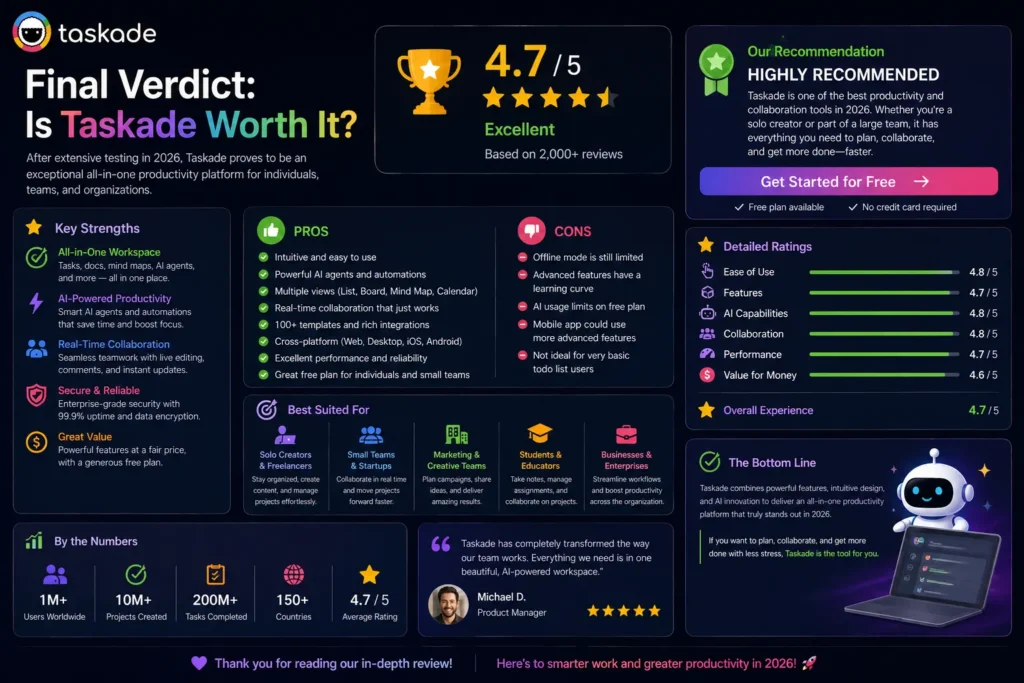
Taskade is a powerful AI productivity platform that transforms how individuals and teams manage work.
Its biggest strengths are:
Its limitations are mainly in:
Overall, Taskade is an excellent choice if you want a modern, AI-powered workspace that helps you plan, collaborate, and execute faster.
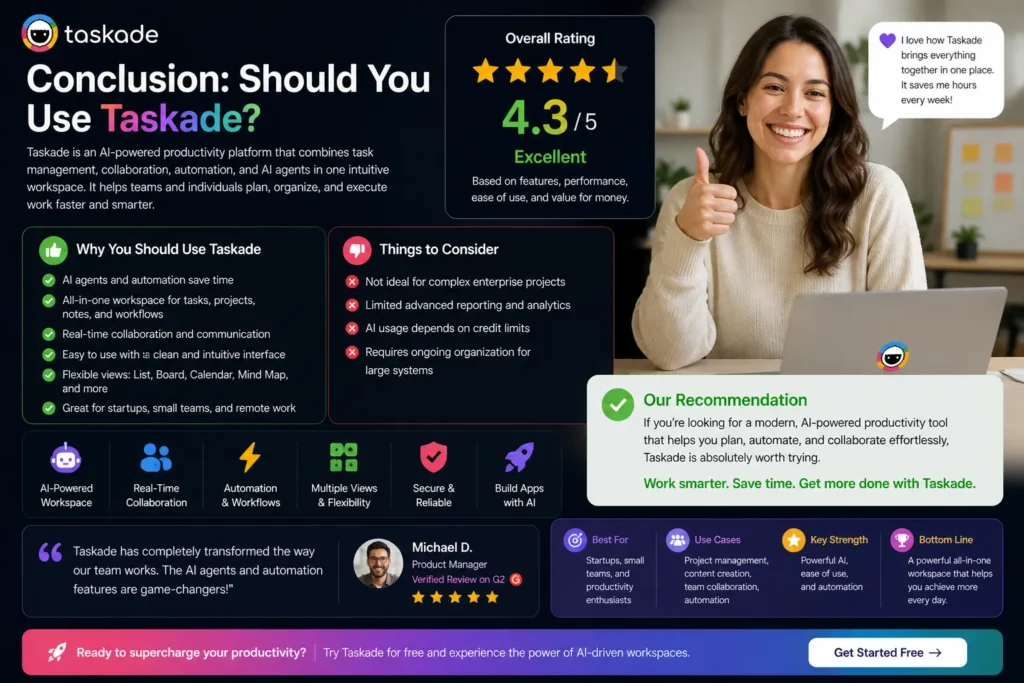
If you’re looking for a simple yet powerful AI productivity tool, Taskade is absolutely worth trying.
It’s not just another task manager—it’s a complete AI workspace that helps you:
For individuals, freelancers, and small teams, Taskade offers one of the best combinations of AI + productivity + automation available today.
If your goal is to work smarter, faster, and more efficiently in 2026, Taskade is a strong choice.