Physical Address
304 North Cardinal St.
Dorchester Center, MA 02124
Physical Address
304 North Cardinal St.
Dorchester Center, MA 02124

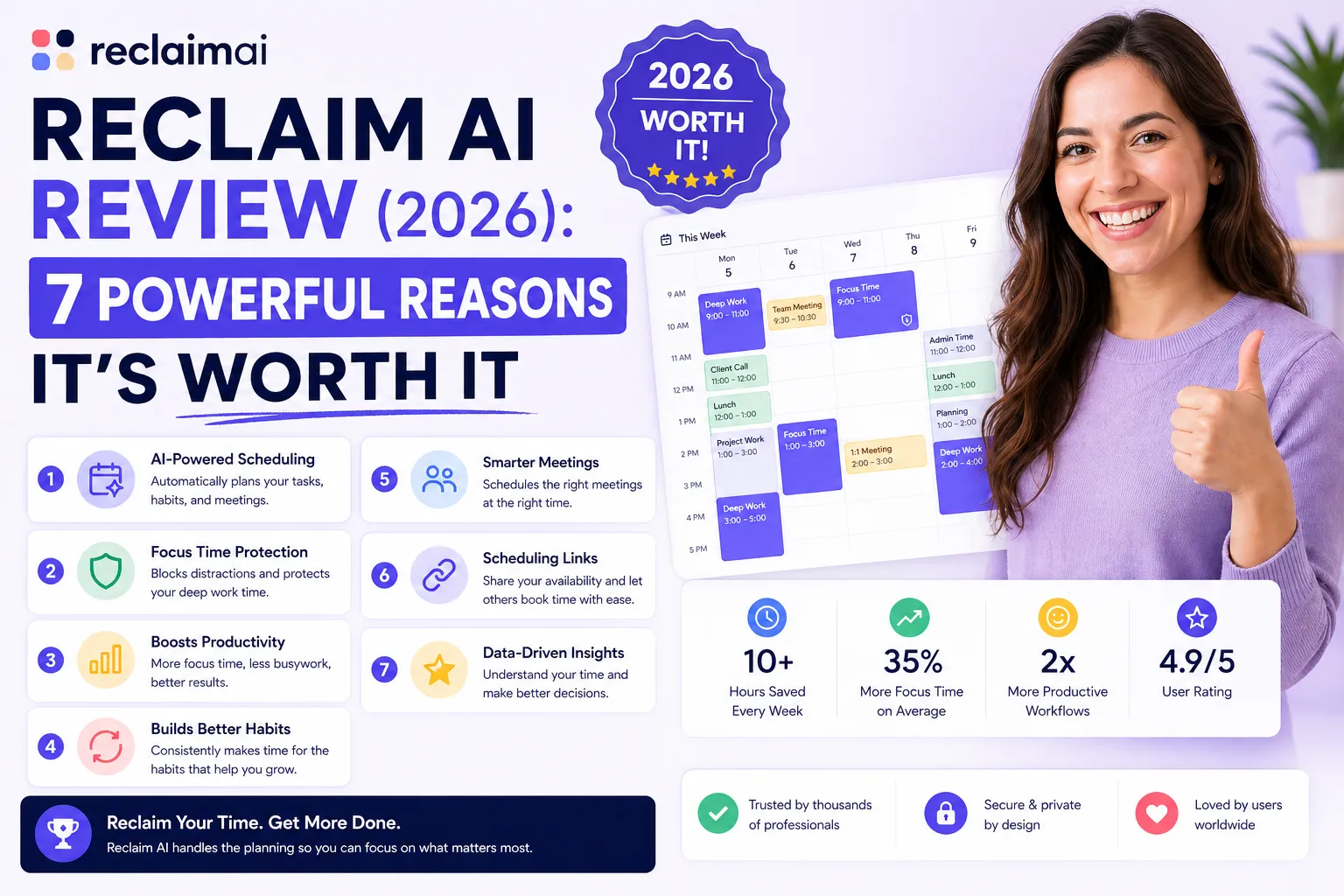
Reclaim AI review (2026): If you’re struggling to manage your time, constantly juggling meetings, tasks, and personal habits, you’re not alone. Most productivity tools promise organization—but few actually take control of your schedule.
That’s where Reclaim AI stands out.
Instead of just helping you plan your day, Reclaim AI automatically builds and optimizes your calendar using artificial intelligence. It schedules your tasks, protects your focus time, reschedules conflicts, and even ensures your habits don’t get lost in a busy week.
But is it really worth it in 2026?
In this detailed Reclaim AI review, you’ll discover exactly how it works, its real strengths, weaknesses, pricing, and whether it’s the right tool for you.
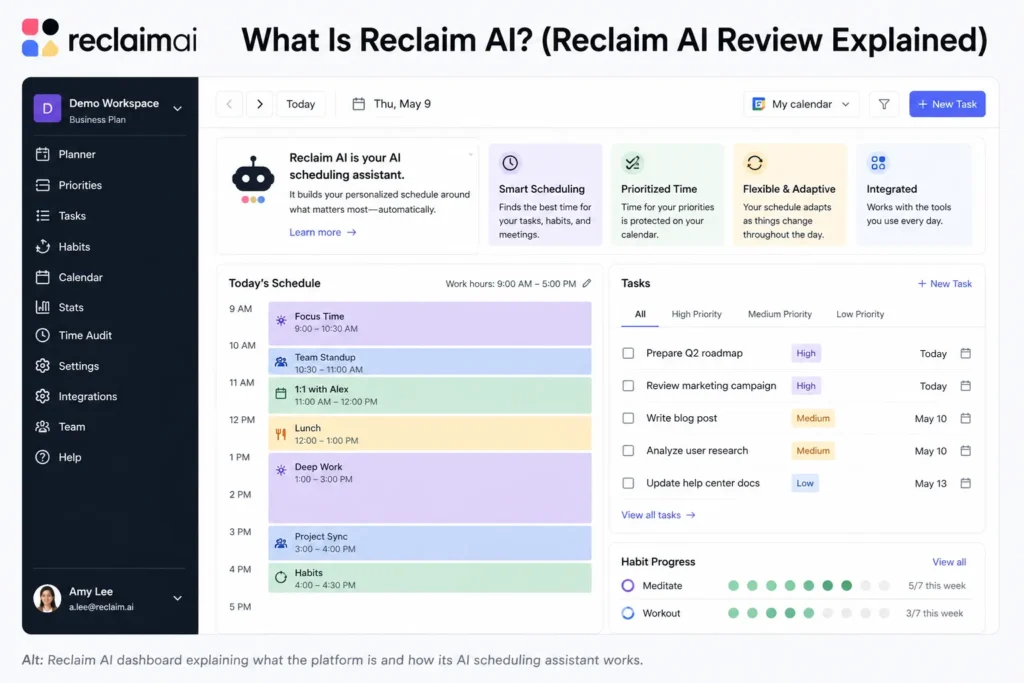
Reclaim AI is an AI-powered scheduling assistant designed to automate how you manage your time. Instead of manually planning your day, the tool intelligently organizes your calendar based on your priorities, deadlines, and availability.
At its core, Reclaim AI connects directly to your calendar (Google Calendar or Outlook) and works in the background to:
Unlike traditional productivity apps, Reclaim AI doesn’t just store your tasks—it decides when you should actually do them.
What makes it unique is its ability to continuously adjust. If your week changes, Reclaim automatically moves tasks, habits, and meetings without you having to reorganize everything manually.
This is why many users describe it as having a personal AI assistant for time management.
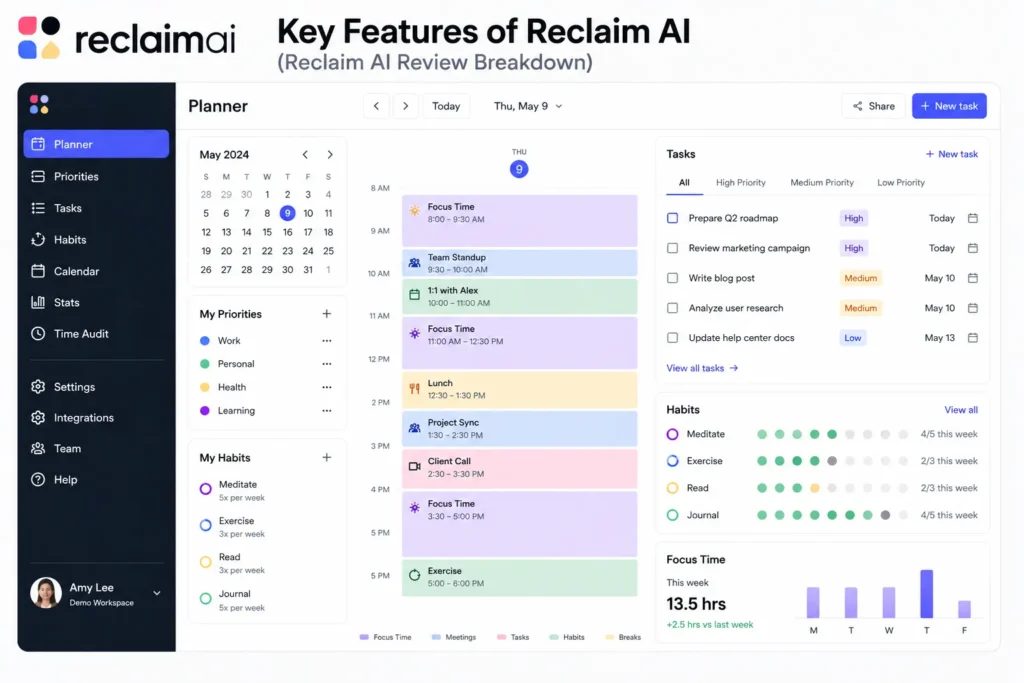
The strength of Reclaim AI lies in how all its features work together. Instead of isolated tools, everything is connected to your calendar and powered by AI.
Here are the most important features you need to know.
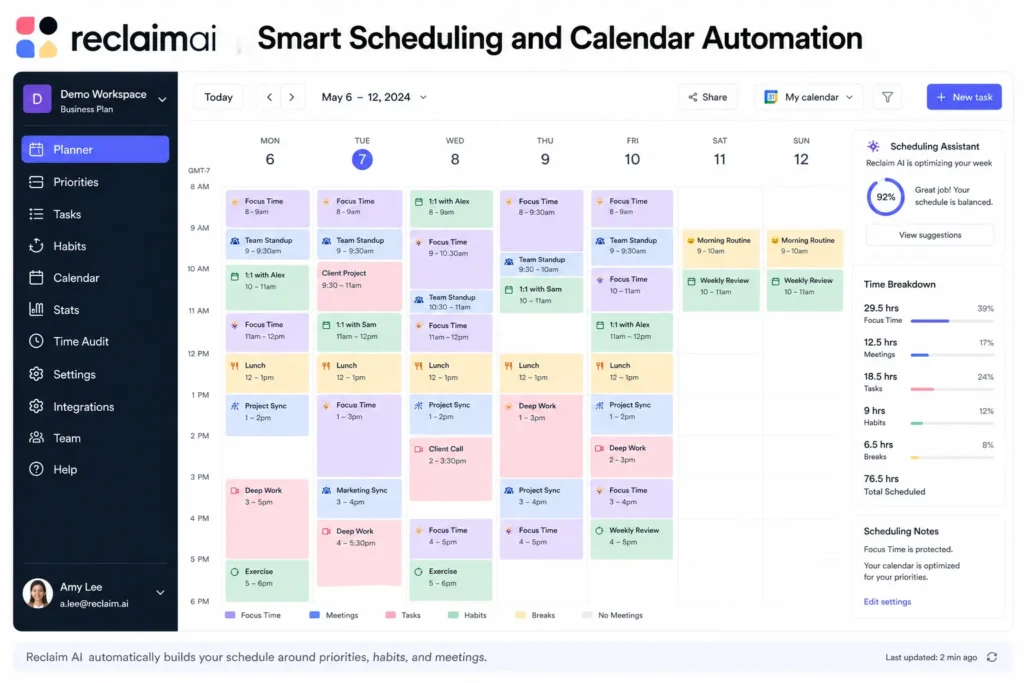
This is the core feature of Reclaim AI—and honestly, the primary reason most users choose the platform in the first place.
Many productivity systems help users create task lists, but they still leave one major problem unsolved: deciding when the work should actually get done. People often know what they need to accomplish, yet struggle to find time in an already crowded calendar.
Reclaim AI addresses this challenge by automatically scheduling tasks, meetings, and routines into the most appropriate available time slots.
Instead of manually dragging events around a calendar, users simply tell the system what needs to be completed. The AI then determines the best time to schedule the work based on availability, deadlines, priorities, and personal preferences.
The system can:
• Prioritize tasks based on importance
• Find available time slots automatically
• Schedule work around existing meetings
• Reschedule tasks when conflicts occur
• Adapt to changing priorities
• Optimize workload distribution
• Respect deadlines and preferences
One of the biggest advantages is flexibility. Traditional calendar planning often falls apart as soon as an unexpected meeting, urgent request, or schedule change occurs. Reclaim continuously adjusts schedules to keep important work moving forward without requiring constant manual updates.
For example, if you have a task that requires two hours of focused work and a deadline three days away, Reclaim analyzes your calendar and determines the most efficient way to fit that work into your schedule. Depending on availability, it may schedule a single two-hour block or split the task into multiple focused sessions across several days.
This intelligent scheduling process helps ensure that important work receives dedicated time rather than remaining on an endless to-do list.
The feature is particularly useful for:
• Busy professionals
• Entrepreneurs
• Freelancers
• Remote workers
• Project managers
• Executives
• Students managing multiple commitments
• Teams balancing meetings and deep work
Another major benefit is reducing decision fatigue. Many people spend unnecessary mental energy deciding when to work on tasks. Reclaim removes much of that burden by making scheduling decisions automatically.
This solves one of the most common productivity challenges:
👉 Not knowing when to actually do the work.
Rather than repeatedly reviewing a task list and trying to find time, users can trust the system to allocate appropriate work sessions based on current priorities and availability.
The AI also protects productivity by adapting as circumstances change. If a new meeting appears, a deadline moves, or priorities shift, Reclaim automatically updates the schedule while keeping important commitments on track.
This proactive approach helps prevent tasks from being forgotten or continuously postponed.
For many users, this is what transforms Reclaim from a simple calendar application into a complete productivity system. By handling the scheduling process automatically, it allows users to focus on execution rather than planning logistics.
Overall, this intelligent scheduling engine is the foundation of Reclaim AI’s value. Its ability to automatically organize tasks, protect focus time, adapt to schedule changes, and remove the burden of manual planning is why many professionals consider it one of the best AI productivity tool options available for managing modern workloads.
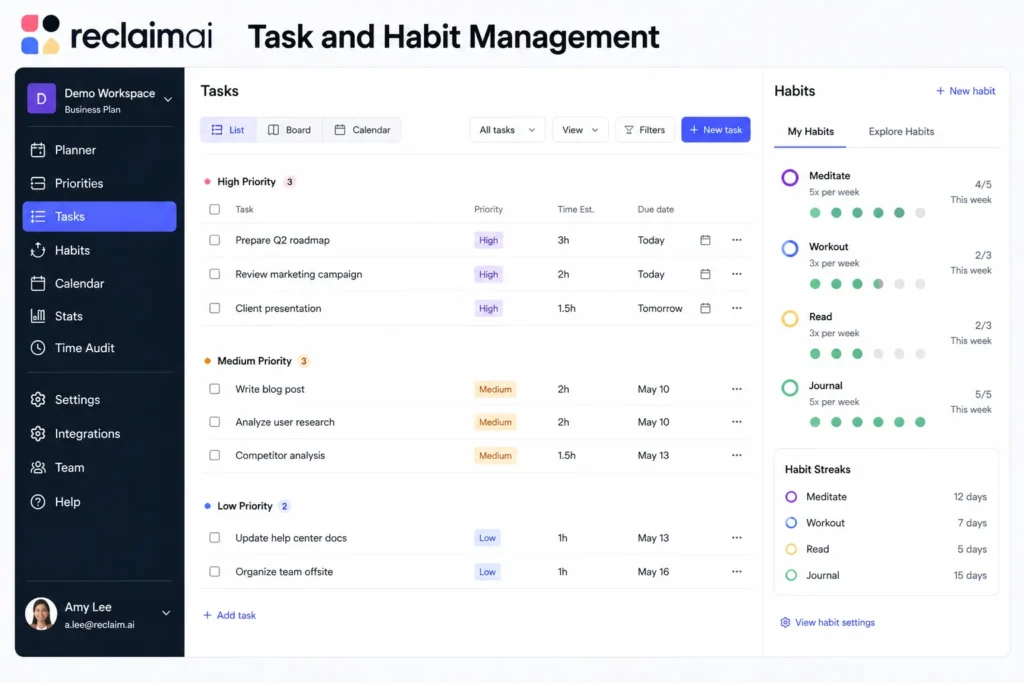
Most productivity tools treat tasks and habits as completely separate systems. You typically manage your to-do list in one place while tracking routines, personal goals, or recurring activities somewhere else.
This separation often creates problems because habits and tasks compete for the same limited resource: your time.
Reclaim takes a different approach by combining both into a single scheduling system. Instead of forcing users to manually balance work responsibilities with personal routines, the platform intelligently manages both within the same calendar.
This is where the real power of the platform becomes apparent.
With Reclaim AI Calendar, users can schedule and protect both one-time tasks and recurring habits without constantly reorganizing their day. The system understands that maintaining healthy routines is just as important as completing project deadlines.
For example, users can schedule:
• Deep work sessions
• Exercise routines
• Reading time
• Learning activities
• Team meetings
• Client work
• Personal projects
• Administrative tasks
Rather than treating habits as optional calendar events, Reclaim actively protects time for them and automatically adjusts schedules when conflicts arise.
One of the biggest advantages is consistency. Many people start positive habits but struggle to maintain them because work responsibilities continuously take priority. Reclaim helps preserve these commitments by intelligently finding space in the calendar and rescheduling them when necessary.
For instance, if a daily workout is blocked on the calendar but an urgent meeting appears, the system can automatically move the workout to another suitable time instead of simply deleting it from the schedule.
This creates a more balanced approach to productivity where both professional and personal goals receive attention.
The feature is especially useful for:
• Professionals balancing work and personal growth
• Entrepreneurs with busy schedules
• Remote workers managing flexible routines
• Students balancing study and personal development
• Anyone trying to build consistent habits
Another benefit is reduced planning effort. Users no longer need to decide whether they should prioritize tasks or routines because the AI continuously manages both categories together.
As workloads increase, this becomes increasingly valuable. The system can adapt to changing priorities while still protecting important recurring activities that contribute to long-term success and well-being.
By integrating habits directly into the scheduling process, Reclaim helps ensure that important personal commitments do not disappear whenever work becomes busy.
Overall, the ability to combine tasks and habits within a single intelligent scheduling system is one of Reclaim’s most unique advantages. It creates a more realistic and sustainable approach to productivity by helping users make progress on both their immediate responsibilities and their long-term goals at the same time.
One of the reasons Reclaim integrates so well into existing workflows is its flexible task management system.
Many professionals already use project management and task management platforms to organize their work. Switching to a completely new ecosystem can be difficult, which is why Reclaim focuses on working alongside popular productivity tools rather than replacing them entirely.
Users have multiple ways to add work into the system.
You can:
• Add tasks manually
• Import tasks from external platforms
• Set task priorities
• Define estimated durations
• Assign deadlines
• Organize work by importance and urgency
The platform supports integrations with popular productivity tools such as:
• Asana
• ClickUp
• Todoist
This means users can continue managing projects in their preferred tools while allowing Reclaim to handle the scheduling side of the workflow.
Once tasks are added, the real automation begins.
Instead of manually deciding where every task should fit in the calendar, Reclaim analyzes available time, priorities, deadlines, and existing commitments. It then automatically schedules work sessions in the most appropriate locations throughout the calendar.
For example, a user may create a task with:
• High priority
• A three-hour estimated duration
• A deadline later in the week
The system will determine the best available time blocks to complete that work and place them into the schedule automatically.
One of the biggest advantages is that the schedule remains dynamic. If meetings are added, deadlines change, or priorities shift, Reclaim can automatically move tasks to maintain an optimized calendar without requiring manual intervention.
This flexibility helps eliminate common productivity issues such as:
• Overloaded calendars
• Forgotten tasks
• Last-minute deadline pressure
• Scheduling conflicts
• Poor workload distribution
The feature is especially valuable for:
• Busy professionals
• Entrepreneurs
• Freelancers
• Project managers
• Remote workers
• Team leaders
• Consultants managing multiple clients
Another benefit is realistic planning. Many people create task lists that look manageable on paper but do not fit within the actual hours available in a day. Reclaim helps bridge the gap between planning and execution by scheduling work according to real calendar availability.
This is one of the reasons highlighted in many discussions and user experiences covered in a Reclaim AI review. The platform does not simply organize tasks—it actively ensures that those tasks have dedicated time allocated for completion.
By combining task imports, intelligent prioritization, deadline awareness, and automated scheduling, Reclaim creates a workflow that requires far less manual planning than traditional productivity systems.
Overall, the task management and scheduling engine makes it easy to capture work from multiple sources and transform it into a realistic, actionable calendar. This allows users to spend less time organizing tasks and more time actually completing them.
This is one of Reclaim AI’s most underrated features and one that many users do not fully appreciate until they start using it consistently.
Most productivity tools are excellent at managing tasks and deadlines, but they often fail to protect the recurring habits that contribute to long-term success. Activities like exercise, learning, focused work, and personal development are frequently pushed aside whenever schedules become busy.
Reclaim approaches this differently.
The platform allows users to create recurring habits and automatically reserve time for them within the calendar. Rather than treating these activities as optional, the system actively works to ensure they remain part of the schedule.
Users can create recurring habits such as:
• Gym sessions
• Deep work blocks
• Learning and study time
• Lunch breaks
• Reading sessions
• Meditation routines
• Personal projects
• Health and wellness activities
One of the biggest advantages is calendar protection. Once a habit is created, Reclaim automatically finds the best time for it and reserves space accordingly. This helps prevent important routines from being squeezed out by meetings, deadlines, and other commitments.
For example, if you schedule three gym sessions each week, Reclaim will place them into available time slots and treat them as important commitments rather than optional reminders.
The feature becomes even more powerful when schedules change.
If a meeting, urgent task, or higher-priority commitment conflicts with a scheduled habit, the platform does not simply remove it from the calendar. Instead, it intelligently finds another suitable time and reschedules the activity automatically.
This behavior is what makes Reclaim a highly effective AI scheduling tool for maintaining consistency.
Many people struggle with productivity not because they lack goals, but because they struggle to protect time for the habits that support those goals. Reclaim helps solve this problem by ensuring that recurring routines remain visible and actionable within the schedule.
This is particularly valuable for:
• Busy professionals
• Entrepreneurs
• Students
• Remote workers
• Freelancers
• Executives
• Anyone building long-term habits
Another benefit is sustainability. Productivity is not just about completing tasks; it is also about maintaining routines that support performance over weeks, months, and years. Habits such as exercise, learning, and deep work often generate the greatest long-term benefits, yet they are frequently the first things sacrificed when schedules become crowded.
By automatically protecting and rescheduling these activities, Reclaim helps users stay consistent without requiring constant manual planning.
The result is a more balanced approach to productivity where both urgent responsibilities and long-term personal development receive attention.
👉 This is huge for consistency because successful habits are built through repetition, not occasional effort.
Overall, Reclaim’s habit scheduling system is one of its most powerful yet overlooked features. By protecting recurring routines, adapting to calendar changes, and ensuring that important habits continue to happen even when schedules become busy, it helps users build sustainable productivity and make meaningful progress toward their long-term goals.
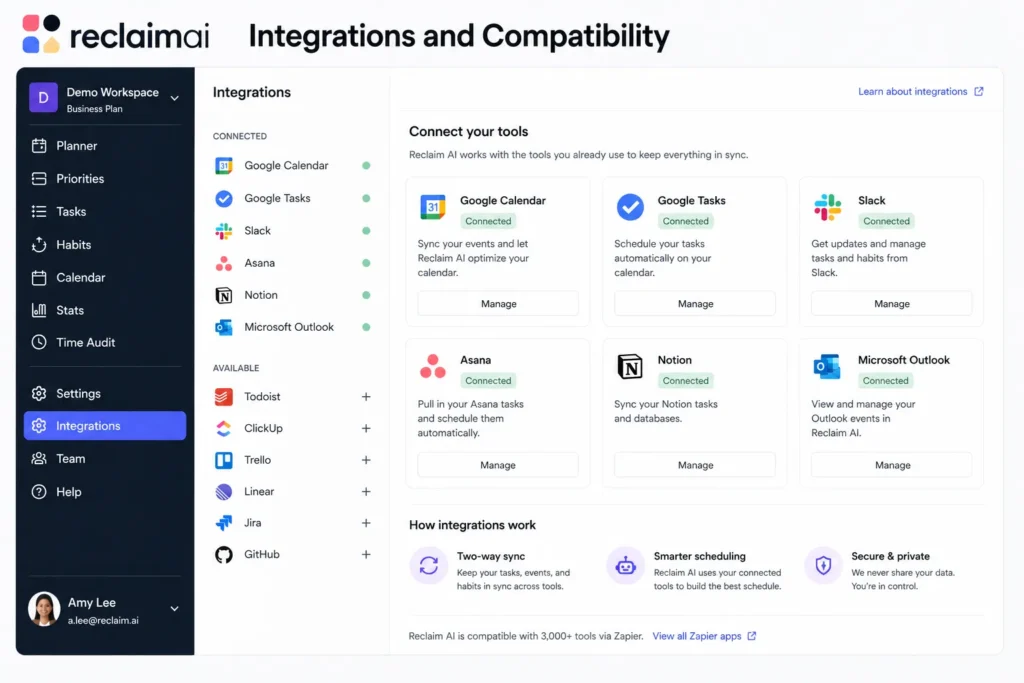
Reclaim AI integrates with several popular tools, allowing it to fit into your workflow.
These integrations allow:
However, compared to some competitors, integrations are still somewhat limited.
👉 This is one of the few weaknesses of the platform.
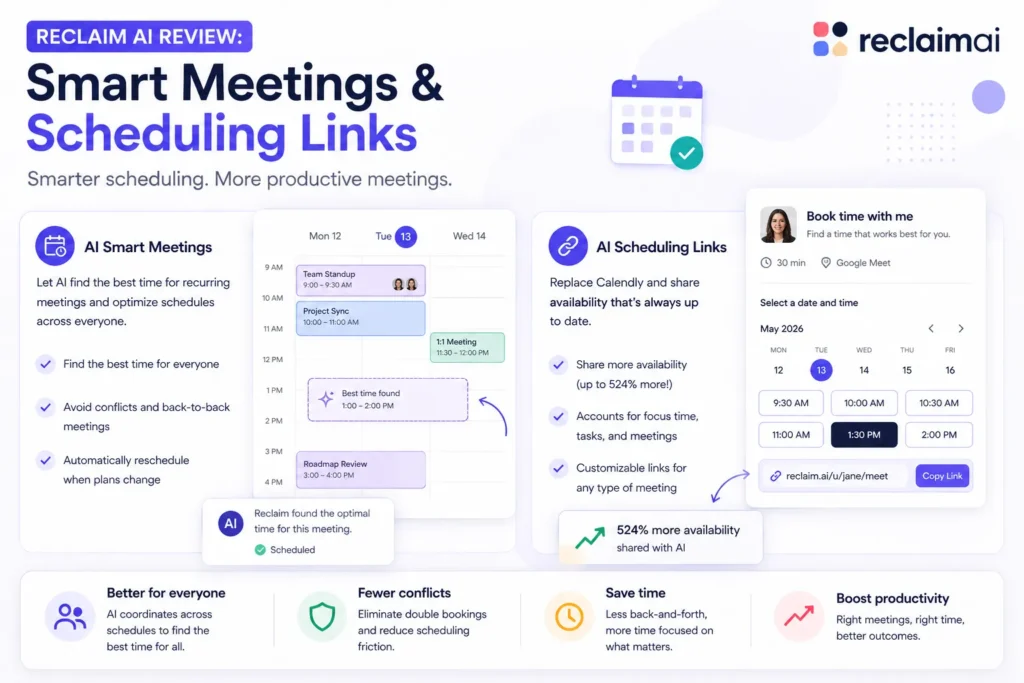
Scheduling meetings is one of the most frustrating parts of modern work.
Reclaim solves this with:
Similar to Calendly, but smarter.
You can:
What’s different is that Reclaim can show availability dynamically, even accounting for tasks and habits.
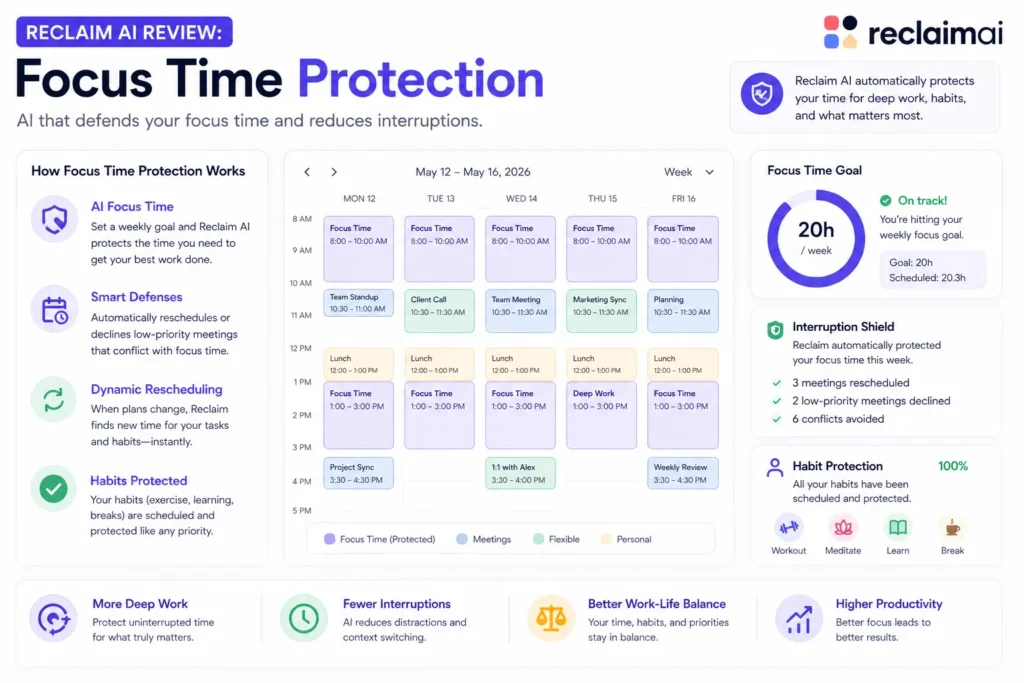
This feature alone can completely change your productivity.
Reclaim automatically blocks time for deep work using:
Most calendars get filled with meetings. Reclaim flips this by:
👉 Protecting your work time first
👉 Then fitting meetings around it
It also reduces:
Many users report saving hours of focus time every week.
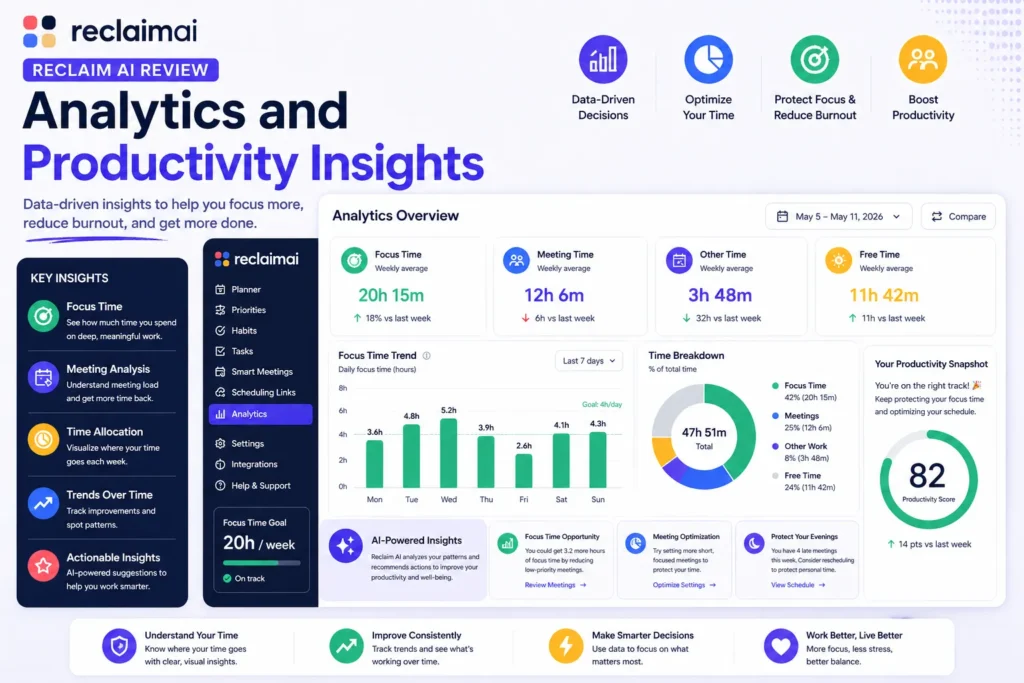
Reclaim doesn’t just schedule your time—it helps you understand it.
You get access to:
This allows you to:
For teams, this becomes even more powerful with shared insights.
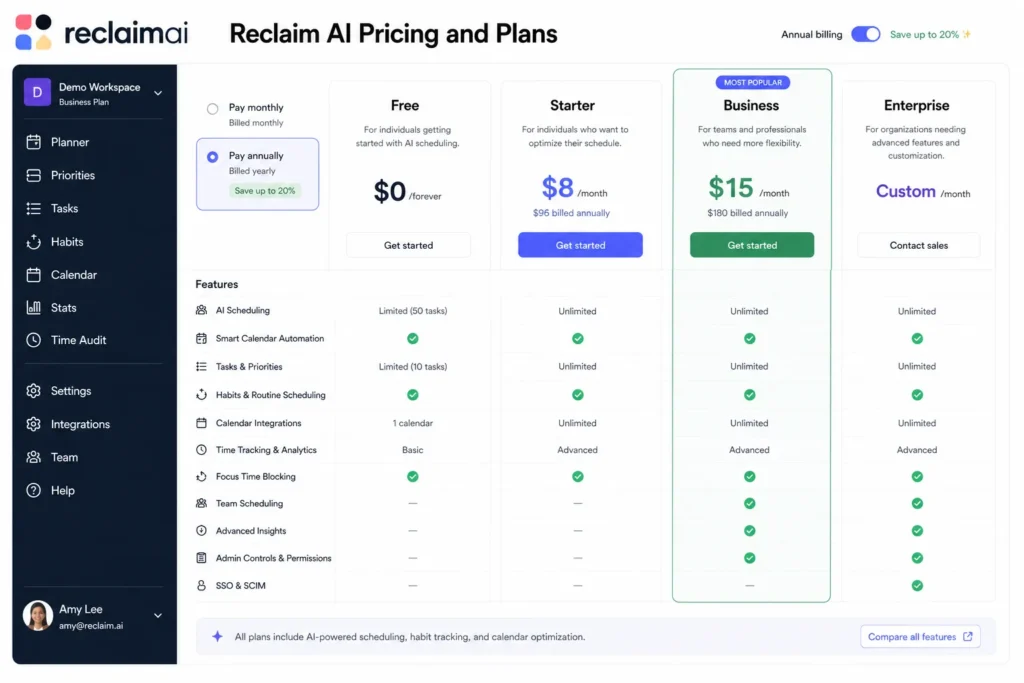
Reclaim AI offers a flexible pricing structure, making it accessible for individuals and teams.
Compared to competitors, Reclaim offers strong value for money, especially considering its automation capabilities.
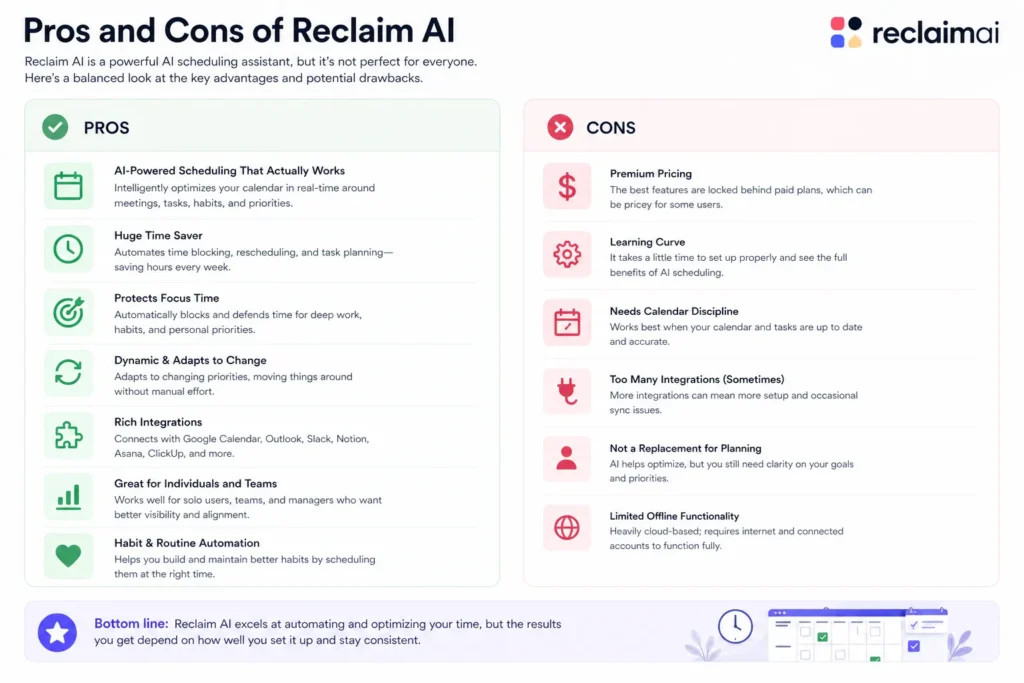
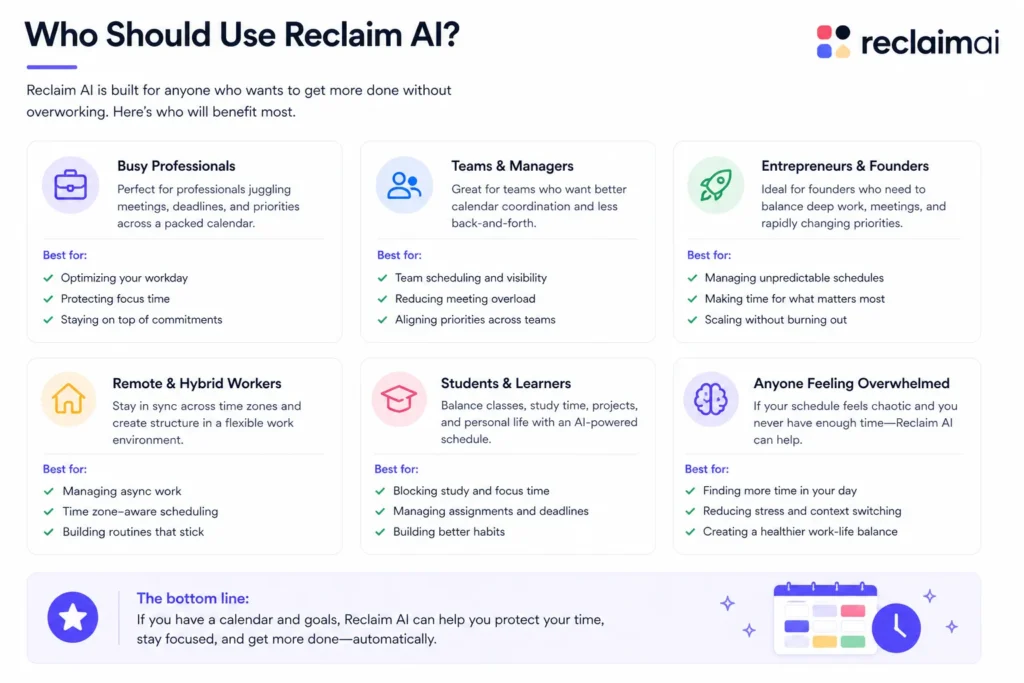
Reclaim AI is not for everyone—but for the right user, it’s incredibly powerful.
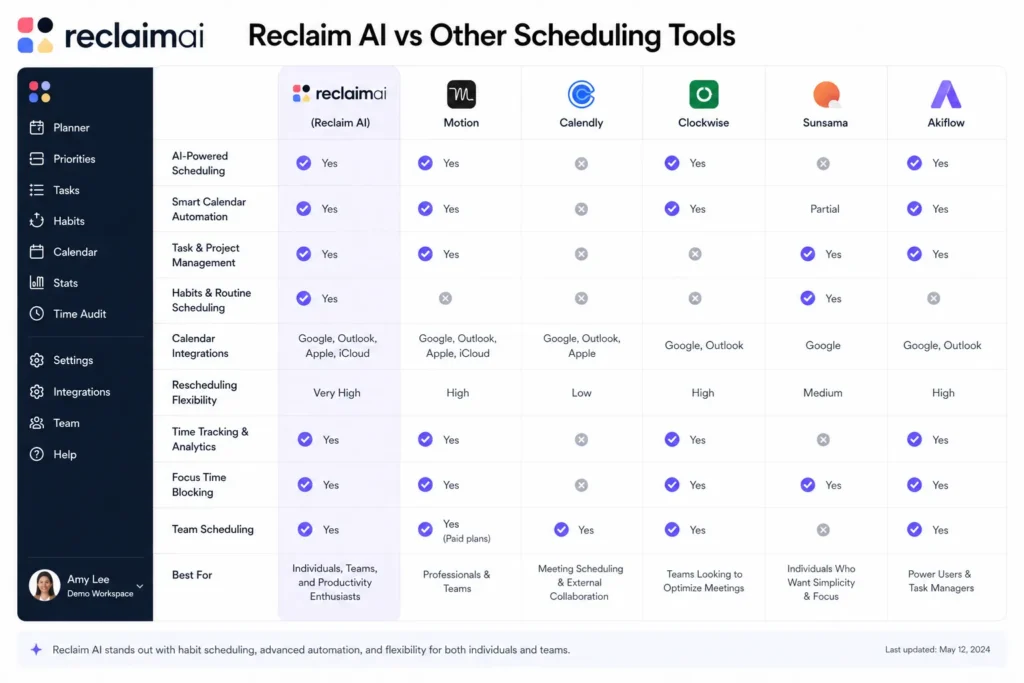
Compared to tools like Motion, Clockwise, or Calendly, Reclaim stands out in one key area:
👉 Balance between automation and flexibility
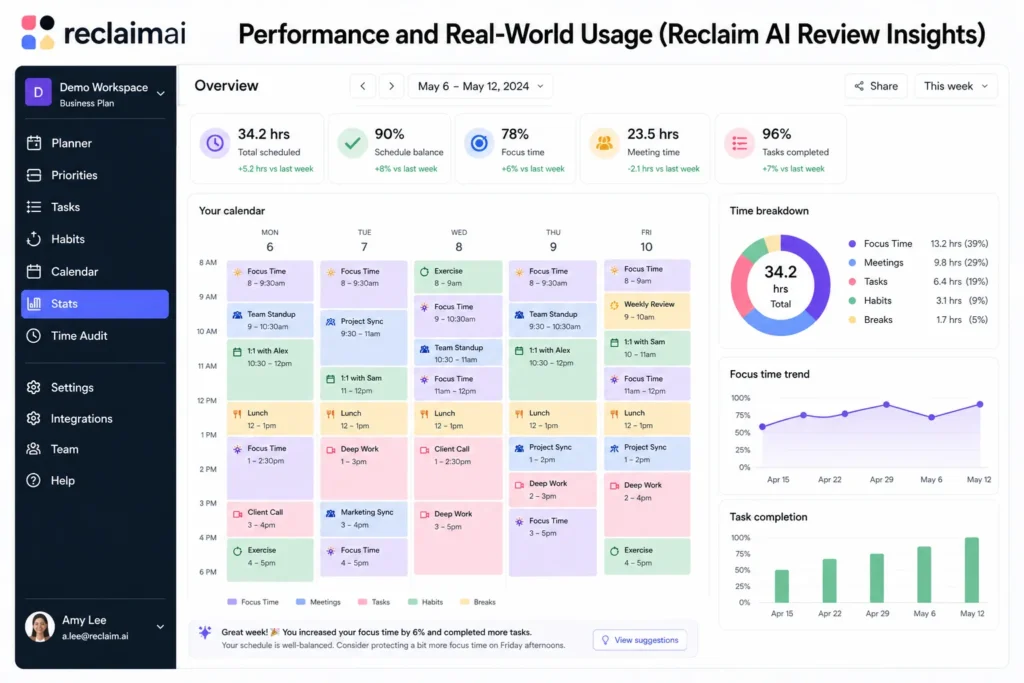
In real-world use, Reclaim AI performs exceptionally well.
Many users report:
The biggest benefit is not just time saved—but mental clarity.
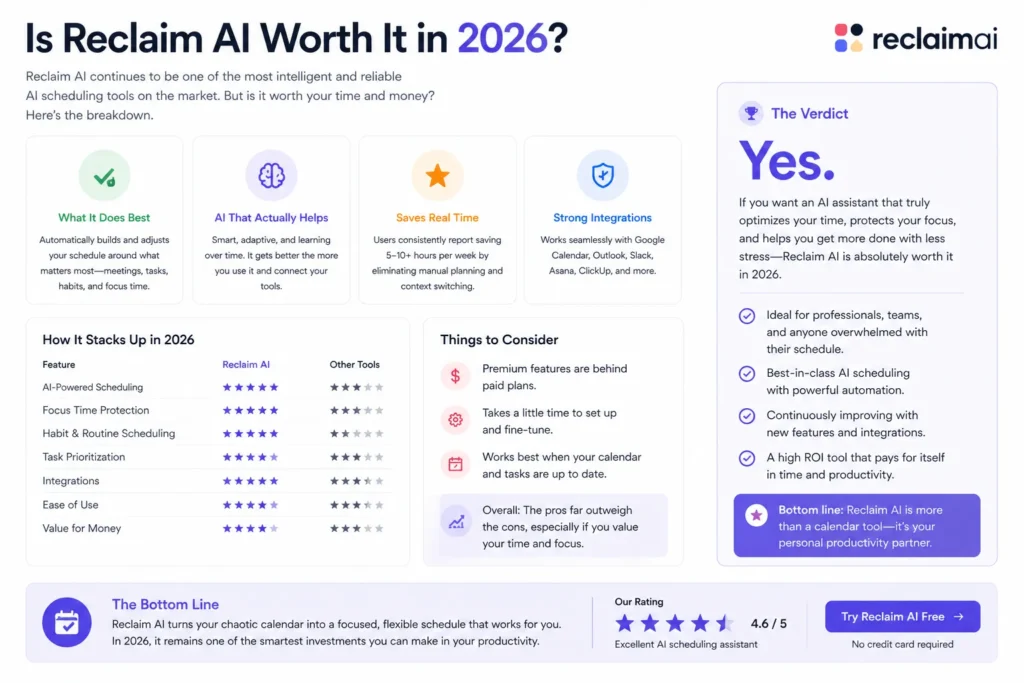
This is the most important question.
The answer depends on how you work.
If you:
👉 Then yes, Reclaim AI is absolutely worth it.
If you:
Overall, Reclaim AI remains one of the most advanced AI scheduling tools in 2026.
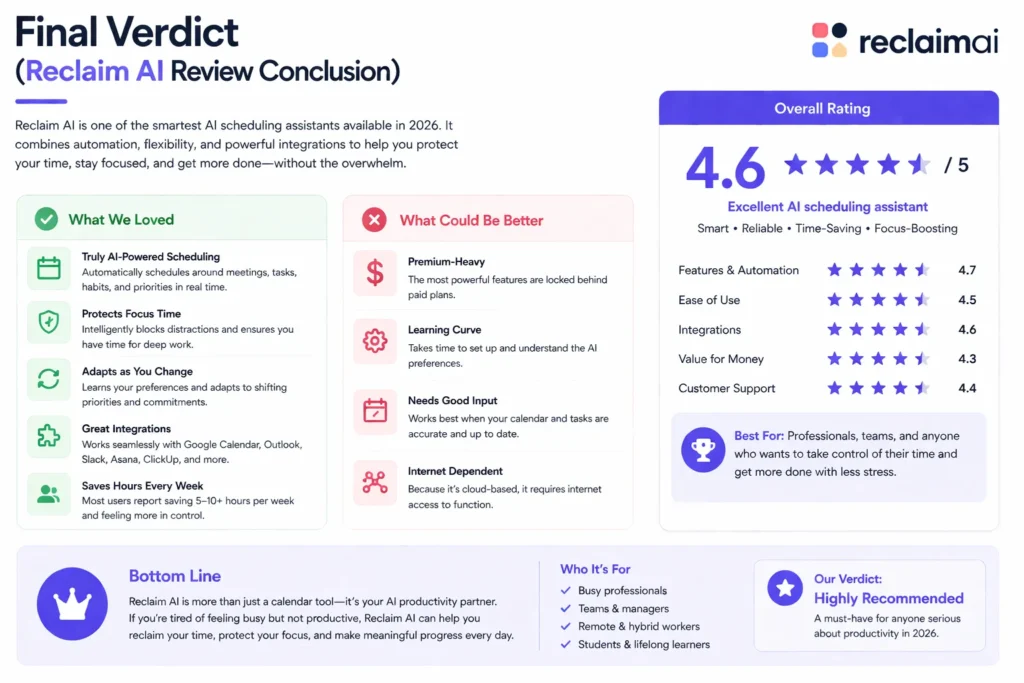
Reclaim AI is not just another productivity tool—it’s a complete time management system powered by AI.
It removes the need to constantly plan your day and replaces it with intelligent automation.
Despite a few limitations like lack of mobile apps and limited integrations, the overall value is extremely high.
👉 If you want to take control of your time without micromanaging your calendar, Reclaim AI is one of the best tools you can use.
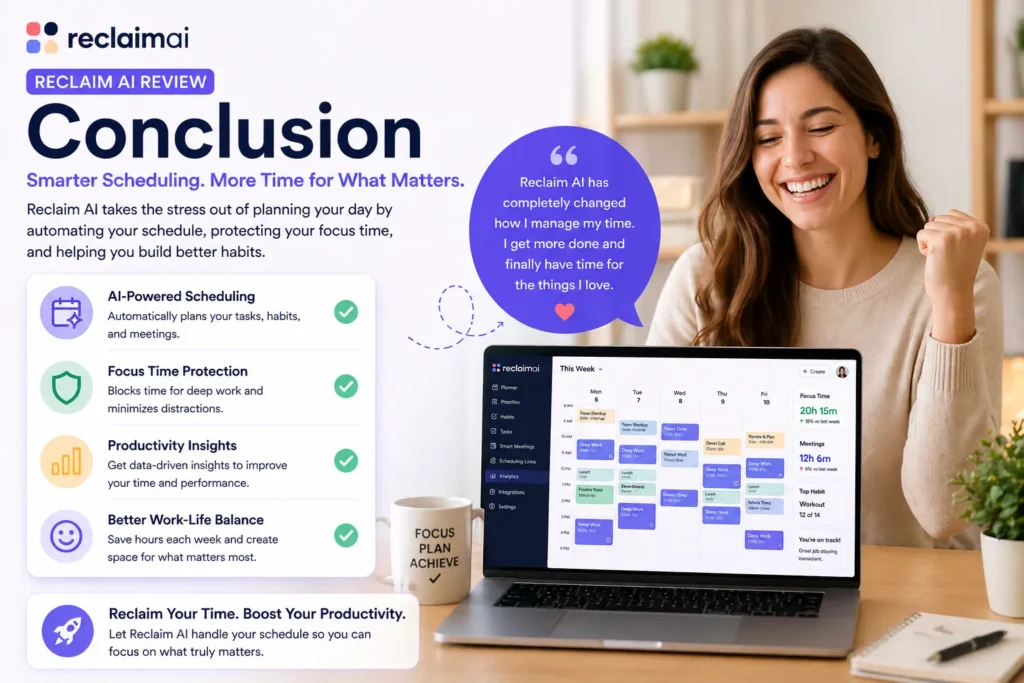
Reclaim AI proves that the future of productivity is not about doing more—it’s about letting AI handle the planning so you can focus on execution.
Instead of spending time organizing your schedule, you get a system that:
If you’re serious about improving your productivity in 2026, this tool is more than worth trying.
Bottom line:
Reclaim AI is one of the smartest investments you can make in your time, focus, and overall productivity.