Physical Address
304 North Cardinal St.
Dorchester Center, MA 02124
Physical Address
304 North Cardinal St.
Dorchester Center, MA 02124

Notion AI review (2026): Notion AI is quickly becoming one of the most powerful AI productivity tools available today—but is it actually worth paying for, or just another overhyped feature added to an already popular app?
In this in-depth Notion AI review, we’ll break down everything you need to know based on real use cases, real features, and how the tool actually performs in everyday workflows. Unlike generic overviews, this guide focuses on practical value—what Notion AI can really do, where it struggles, and whether it deserves a place in your workflow in 2026.
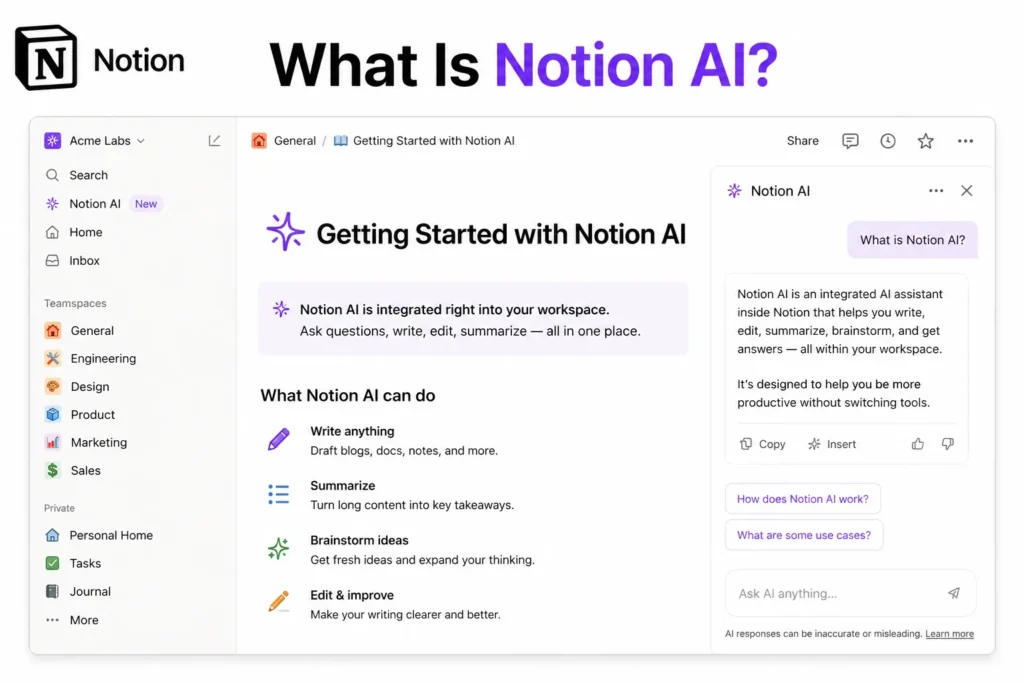
Notion AI is an AI-powered assistant built directly inside Notion, the all-in-one workspace used for notes, documents, databases, and project management. Instead of being a separate chatbot or tool, Notion AI lives inside your pages and works with your existing content.
To understand its real power, you need to understand what Notion itself is. Notion is not just a note-taking app—it’s more like a system builder. Everything is structured around:
Notion AI enhances all of this by allowing you to:
But what makes Notion AI different is not just what it does—it’s where it does it. It operates inside your workspace, meaning it understands your content, your structure, and your workflow.
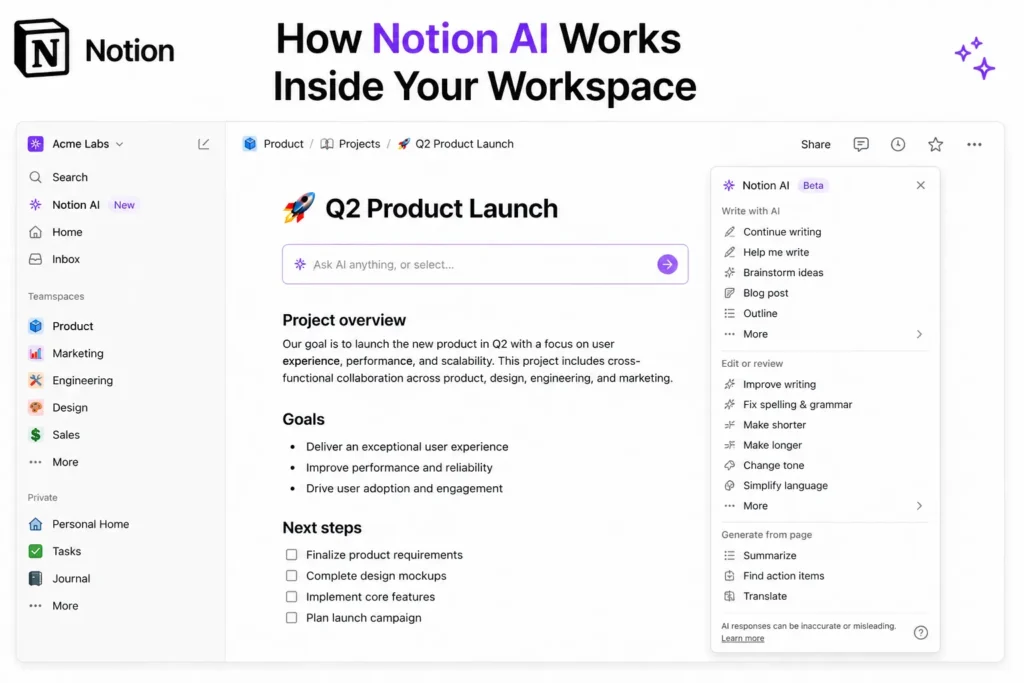
Unlike standalone AI tools, Notion AI doesn’t require you to switch tabs, copy content, or start from scratch. You simply type “/ai” or highlight text, and the assistant appears directly inside your page.
From there, you can:
This seamless integration is where Notion AI starts to show real value. Instead of being a separate tool you occasionally use, it becomes part of your daily workflow.
One of the most impressive aspects is how it understands context. For example, if you’re working inside a project page or database, Notion AI can use that context to generate more relevant outputs.
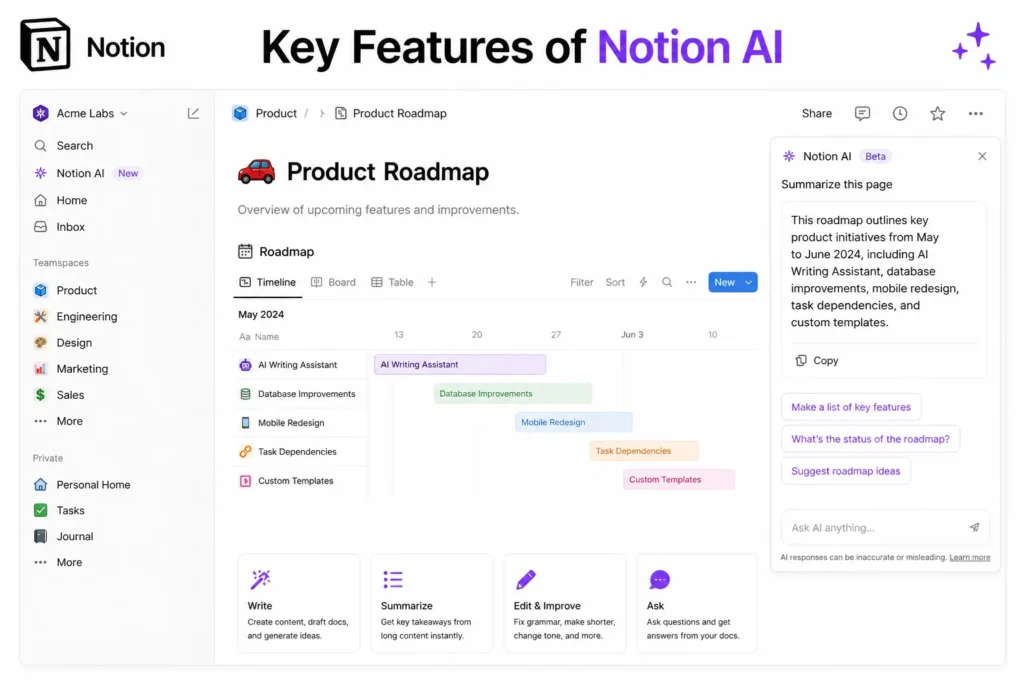
Notion AI isn’t just a writing tool—it’s a productivity engine. Here are the core features that define its value:
One of the most useful capabilities of the platform is its built-in content generation feature, which allows users to create written content without leaving their workspace.
Instead of switching between multiple applications for research, drafting, editing, and formatting, users can generate content directly where they are already working. This creates a more efficient workflow and helps reduce the interruptions that often occur when moving between different tools.
The platform can assist with creating:
• Blog posts
• Emails
• Summaries
• Outlines
• Meeting notes
• Documentation
• Reports
• Project plans
One of the biggest advantages is speed. Users can generate a first draft within seconds and then refine it as needed. This is especially valuable for professionals who regularly create written content as part of their daily responsibilities.
For teams, the feature can help streamline communication and documentation processes. Instead of spending significant time formatting reports or summarizing information manually, users can generate structured content quickly and focus on reviewing and improving the final result.
The tool performs particularly well when working with structured content. Notes, documentation, reports, and outlines typically follow predictable formats, making them ideal candidates for AI-assisted writing. The platform can organize information logically, identify key points, and present content in a clear and readable format.
This can be useful for:
• Project documentation
• Technical specifications
• Research summaries
• Meeting recaps
• Internal reports
• Knowledge base articles
• Process documentation
• Business communications
Another benefit is consistency. Organizations often need documents that follow specific formats and standards. AI-assisted content generation can help maintain a consistent style across different documents while reducing the amount of manual effort required.
For individuals, the feature can help overcome writer’s block and accelerate the drafting process. Starting with a generated outline or first draft is often easier than beginning with a blank page, allowing users to focus on refining ideas rather than creating everything from scratch.
While human review remains important for accuracy and quality, the ability to generate content directly within the workspace can save considerable time and improve overall productivity. By combining content creation, editing, and organization in a single environment, the platform becomes more than just a productivity tool—it becomes a central hub for managing information and producing written work efficiently.
Overall, the built-in content generation feature is a valuable addition for anyone who regularly creates documentation, reports, notes, or other written materials. Its ability to quickly generate structured content helps users work faster while maintaining organization and consistency across their projects.
One of the most practical features of Notion AI is its ability to summarize large amounts of information quickly and accurately.
In many organizations, employees spend significant amounts of time reading meeting notes, project updates, research documents, reports, and internal documentation. As information grows, finding the most important points can become increasingly difficult and time-consuming.
Notion AI helps solve this problem by automatically analyzing content and generating concise summaries that highlight the key information. Instead of reading through dozens of pages, users can quickly understand the main ideas, decisions, and action items within minutes.
This feature is particularly useful for:
• Meeting notes
• Project updates
• Research documents
• Internal reports
• Knowledge base articles
• Client communications
• Team documentation
• Long-form written content
One of the biggest advantages is time savings. Teams often attend multiple meetings every week, producing pages of notes and discussions. Not everyone has time to read every detail, especially in larger organizations where information is constantly being shared.
With Notion AI, lengthy meeting records can be condensed into clear summaries that focus on the most important outcomes. This allows team members to stay informed without spending excessive time reviewing raw notes.
The feature can also identify and organize:
• Key discussion points
• Decisions made during meetings
• Action items
• Project updates
• Important deadlines
• Next steps and responsibilities
This helps improve communication and reduces the risk of important information being overlooked.
For managers and team leaders, summarization can be especially valuable when reviewing updates from multiple departments or projects. Rather than manually compiling information, they can quickly understand progress and identify areas that require attention.
Another benefit is improved knowledge management. Organizations often accumulate large amounts of documentation over time. Summaries make it easier to navigate this information and find relevant insights without reading every document in full.
Remote and distributed teams can benefit significantly as well. Team members who miss meetings or join projects later can review AI-generated summaries to quickly get up to speed on discussions, decisions, and project status.
The quality of the summaries is generally strong because Notion AI focuses on extracting the most relevant information rather than simply shortening text. The result is a clearer overview that helps users understand content faster while maintaining important context.
While users should still review critical information when making important decisions, the summarization feature can dramatically reduce the amount of time spent processing information.
Overall, Notion AI’s summarization capabilities are among its most useful productivity features. By transforming long documents and detailed meeting notes into concise, easy-to-understand summaries, it helps teams stay informed, improve communication, and manage information more efficiently across their organization.
One of the most underrated strengths of Notion AI is its ability to support the thinking and planning process, not just content creation.
Many people initially view AI tools as writing assistants that generate articles, emails, or summaries. While Notion AI certainly excels at those tasks, its real value often comes from helping users organize ideas, develop strategies, and structure complex projects more effectively.
Instead of staring at a blank page trying to determine where to start, users can leverage Notion AI to generate ideas, create outlines, and build structured workflows in seconds. This helps reduce mental friction and allows projects to move forward more quickly.
The tool can assist with:
• Brainstorming ideas
• Creating content outlines
• Building project workflows
• Organizing research
• Planning marketing campaigns
• Structuring business processes
• Creating action plans
• Developing creative concepts
One of the biggest advantages is overcoming the blank-page problem. Whether you’re planning a business initiative, writing a report, creating content, or organizing a project, getting started is often the hardest part. Notion AI can provide an initial framework that users can refine and expand rather than starting from scratch.
For example, a content creator can ask for a blog outline, a business owner can generate a marketing workflow, and a project manager can create a step-by-step implementation plan. These outputs provide structure and direction that help users move forward faster.
The feature is particularly useful for:
• Content planning
• Business strategy sessions
• Team project management
• Product development planning
• Research organization
• Marketing campaigns
• Operational workflows
• Goal setting and execution
Another benefit is idea expansion. Users can start with a simple concept and ask Notion AI to generate additional perspectives, related ideas, or alternative approaches. This can lead to more creative solutions and better decision-making.
For teams, this capability can improve collaboration by helping organize discussions into actionable plans. Meeting ideas can quickly become structured tasks, workflows, and project roadmaps that are easier to execute and track.
The workflow-generation capabilities are especially valuable because they transform abstract goals into concrete steps. Instead of simply discussing objectives, teams can create clear processes with responsibilities, milestones, and action items.
This makes Notion AI useful not only for writers but also for managers, entrepreneurs, consultants, marketers, students, and anyone responsible for organizing information and executing projects.
Perhaps the most important benefit is speed. By helping users think through problems, organize ideas, and structure plans more efficiently, Notion AI reduces the amount of time spent figuring out what to do next.
In that sense, it is not just a writing assistant—it is a productivity partner that helps transform ideas into organized plans and actionable workflows. By supporting brainstorming, planning, and execution, Notion AI enables individuals and teams to think faster, stay organized, and make progress more efficiently.
Another highly useful feature of Notion AI is its ability to improve existing content through intelligent editing and rewriting tools.
Writing is often an iterative process. Even experienced writers, professionals, and teams spend time reviewing drafts, correcting grammar, improving clarity, adjusting tone, and refining structure before content is ready to share. Notion AI helps streamline this process by providing instant editing assistance directly within the workspace.
Instead of manually reviewing every sentence, users can ask the AI to improve content with a single command. This makes it easier to transform rough drafts into polished documents without leaving the platform.
The tool can help with tasks such as:
• Fixing grammar mistakes
• Improving sentence structure
• Enhancing readability
• Rewriting paragraphs
• Simplifying complex content
• Adjusting tone and style
• Improving clarity and flow
• Making content more professional
One of the biggest advantages is speed. Documents that would normally require multiple rounds of editing can often be improved in seconds. This is particularly useful for busy professionals who regularly create reports, emails, proposals, documentation, and presentations.
The grammar correction capabilities help eliminate common writing mistakes while improving overall readability. Users can quickly identify awkward phrasing, punctuation issues, and sentence construction problems without relying on separate editing software.
The rewriting feature is equally valuable. Sometimes content contains the right information but is not communicated effectively. Notion AI can rephrase paragraphs, improve flow, and present ideas more clearly while preserving the original meaning.
This functionality is especially useful for:
• Business reports
• Internal documentation
• Project updates
• Marketing content
• Emails and communication
• Knowledge base articles
• Research summaries
• Client-facing materials
Another powerful capability is tone adjustment. Different situations require different writing styles. A technical report may need a formal tone, while a team update may benefit from a more conversational approach. Notion AI can adapt content to fit specific audiences and communication goals.
Simplifying complex information is another area where the tool performs well. Technical concepts, detailed explanations, and complicated processes can often be rewritten into more accessible language. This helps improve understanding and makes information easier to share with broader audiences.
For teams, these editing tools can improve consistency across documents. Content created by different individuals can be refined into a more unified style, helping organizations maintain professional communication standards.
Students and researchers can also benefit by making academic content clearer and more concise. Long explanations can be simplified, and dense material can become easier to read without losing important information.
Perhaps the greatest advantage is that all of these capabilities are integrated directly into the workspace. Users can write, edit, revise, and improve content without switching between multiple applications, creating a smoother and more efficient workflow.
Overall, Notion AI’s editing and rewriting features make it far more than a content generator. By helping users improve grammar, refine tone, rewrite paragraphs, and simplify complex ideas, it serves as a powerful writing assistant that enhances both the quality and effectiveness of written communication.
Another valuable feature of Notion AI is its built-in translation capability, which allows users to translate content into multiple languages without leaving their workspace.
For individuals and teams working with international clients, remote employees, or global audiences, translation can often become a time-consuming process. Traditionally, users would need to copy content into a separate translation tool, review the results, and then paste everything back into their documents. Notion AI simplifies this workflow by handling translations directly within the platform.
With just a few clicks, users can convert existing content into different languages while keeping their work organized in a single location.
This feature is useful for translating:
• Blog posts
• Meeting notes
• Emails
• Reports
• Project documentation
• Marketing materials
• Knowledge base articles
• Internal communications
One of the biggest advantages is convenience. Since translation happens directly inside the workspace, users can continue working without interrupting their workflow or switching between multiple applications.
For global teams, this can significantly improve collaboration. Team members who speak different languages can access information more easily, helping reduce communication barriers and improve overall productivity.
The feature is especially valuable for businesses that operate internationally. Marketing content, product information, customer communications, and internal documentation can be adapted for different regions more efficiently, helping organizations reach broader audiences.
Some common use cases include:
• Translating team updates for international employees
• Adapting marketing campaigns for different countries
• Creating multilingual documentation
• Preparing content for global customers
• Sharing research with international partners
• Supporting multilingual knowledge bases
Another benefit is speed. Rather than manually translating content or using separate services, users can generate translated versions almost instantly. This makes it easier to manage large volumes of content and maintain consistency across different languages.
For content creators and businesses, the ability to produce multilingual materials can expand audience reach and improve accessibility. A single document can be adapted for multiple markets without requiring extensive additional effort.
While important business, legal, or highly technical content should still be reviewed by native speakers when accuracy is critical, the translation feature provides a strong starting point and can dramatically reduce the amount of manual work involved.
By integrating translation directly into the workspace, Notion AI helps users create, manage, and share information more effectively across language barriers. The result is a smoother workflow, better collaboration, and greater accessibility for teams and audiences around the world.
Overall, the built-in translation feature adds another layer of productivity to the platform, making it easier to communicate, collaborate, and work with content in multiple languages without ever leaving your page.
One of the most underrated features of Notion AI is its ability to assist with database creation, organization, and management.
While most users associate Notion AI with writing, summarization, and content generation, its database capabilities can provide just as much value—especially for teams and individuals who rely heavily on structured information.
Creating and maintaining databases manually can be time-consuming. Users often need to define properties, organize fields, create entries, and ensure that information remains consistent across hundreds or even thousands of records. Notion AI helps simplify much of this work by automating parts of the process and providing intelligent recommendations.
The AI can assist with:
• Generating database entries
• Organizing fields and properties
• Suggesting database structures
• Improving data consistency
• Creating categories and tags
• Filling missing information
• Standardizing records
• Recommending workflow improvements
One of the most useful capabilities is database population. Instead of manually creating every entry, users can generate records automatically based on existing information or project requirements. This can save significant time when building content calendars, project trackers, CRM systems, knowledge bases, or inventory databases.
For example, a marketing team creating a content calendar can quickly generate structured entries for blog posts, social media campaigns, publication dates, and content statuses. Project managers can build task databases with priorities, deadlines, owners, and progress tracking fields already organized.
The feature is particularly useful for:
• Project management databases
• Content planning systems
• Customer relationship management (CRM) databases
• Knowledge bases
• Employee directories
• Research repositories
• Product tracking systems
• Business operations dashboards
Another advantage is organization. As databases grow, maintaining a logical structure becomes increasingly important. Notion AI can help identify better ways to arrange information, recommend useful properties, and improve the overall usability of a database.
The AI can also suggest enhancements based on the type of information being stored. For instance, it may recommend adding status fields, priority levels, categories, tags, due dates, or other properties that improve filtering and reporting capabilities.
For teams, this can lead to better data quality and more efficient workflows. Consistently structured databases make information easier to search, analyze, and share across departments.
The feature is also beneficial for users who are new to database management. Instead of designing everything from scratch, they can receive guidance on how to organize information effectively and build systems that scale as projects grow.
Another often-overlooked benefit is automation support. Well-structured databases serve as the foundation for many productivity workflows within Notion. By helping users create cleaner and more organized databases, Notion AI indirectly improves project tracking, reporting, collaboration, and overall workspace efficiency.
Overall, Notion AI’s database assistance capabilities extend far beyond content generation. By helping users structure databases, generate entries, organize fields, and optimize information management, it becomes a powerful productivity tool that supports both knowledge organization and operational workflows across an entire workspace.
One of the biggest developments for Notion AI in 2026 is the introduction of AI agents, a feature that significantly expands the platform’s capabilities beyond traditional content generation and assistance.
Earlier versions of Notion AI primarily focused on helping users write, summarize, organize information, and answer questions. While those features remain valuable, AI agents represent a major shift toward automation and intelligent workspace management.
Rather than simply responding to prompts, these agents can actively perform tasks, work with information stored in your workspace, and assist with ongoing workflows.
Some of the key capabilities include:
• Answering questions using workspace knowledge
• Automating repetitive tasks
• Generating reports automatically
• Routing tasks to appropriate team members
• Organizing information across projects
• Monitoring workflows and updates
• Supporting operational processes
• Assisting with team productivity
One of the most powerful features is workspace-aware knowledge retrieval. Because the agents can access relevant information stored within Notion, users can ask questions and receive answers based on their organization’s documentation, projects, databases, and internal knowledge.
Instead of searching through dozens of pages manually, employees can quickly find the information they need through natural language interactions. This can save significant time and improve access to organizational knowledge.
Automation is another major advantage. Many teams spend countless hours performing repetitive administrative tasks such as updating records, assigning responsibilities, generating reports, and organizing information. AI agents can help automate portions of these workflows, allowing employees to focus on more valuable work.
For example, agents may assist with:
• Project status updates
• Meeting follow-up tasks
• Progress reporting
• Information categorization
• Task assignment workflows
• Database maintenance
• Team coordination activities
Report generation is particularly useful for managers and leadership teams. Instead of manually gathering information from multiple sources, AI agents can compile updates, summarize progress, and generate reports based on available workspace data.
Task routing capabilities also help improve efficiency. As organizations grow, ensuring that work reaches the right people becomes increasingly important. AI agents can help direct tasks, requests, and information to the appropriate teams or individuals, reducing delays and improving workflow management.
These features are especially valuable for:
• Growing businesses
• Remote teams
• Project management environments
• Knowledge-driven organizations
• Operations teams
• Marketing departments
• Product development teams
• Enterprise workspaces
Perhaps the most important aspect of AI agents is that they move beyond passive assistance. Traditional AI tools generally wait for user input before providing help. AI agents introduce a more proactive approach by participating in workflows, managing information, and supporting ongoing operations.
This evolution transforms Notion AI from a simple assistant into a semi-autonomous productivity system capable of helping manage work rather than merely responding to requests. While human oversight remains essential, the agents can handle many routine processes that previously required manual effort.
As AI technology continues to evolve, features like these are likely to play an increasingly important role in workplace productivity. By combining knowledge management, automation, reporting, and workflow support, Notion AI’s agents represent one of the platform’s most significant advancements and a major step toward smarter, more automated work environments.
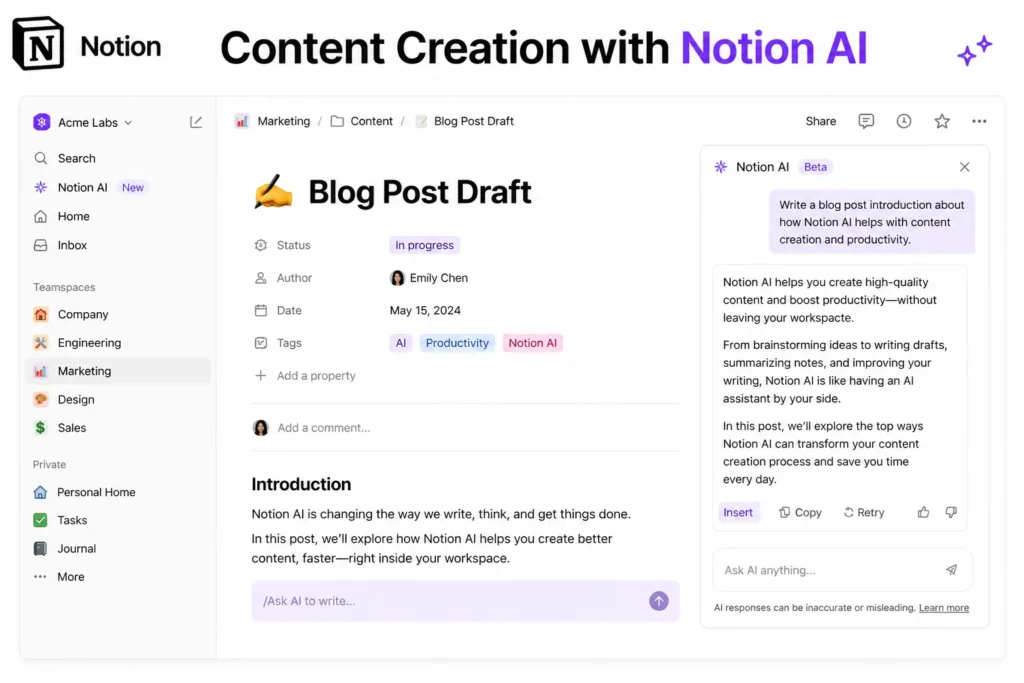
If you’re creating content regularly, Notion AI can significantly speed up your workflow.
Instead of jumping between tools, you can:
All inside one place.
However, it’s important to be realistic. Notion AI is not designed to replace advanced writing tools completely. It’s best used for:
For high-level creative writing or deep research, general AI tools may still perform better.
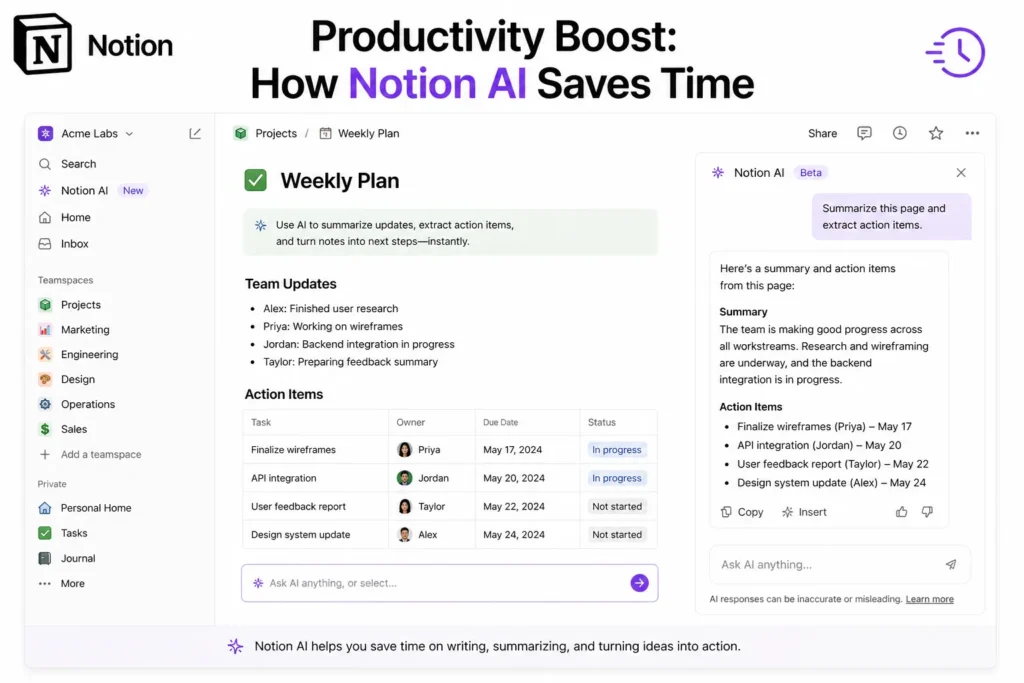
The biggest advantage of Notion AI is not creativity—it’s efficiency.
Here’s where it truly shines:
A real-world example shows how powerful this can be. A user asked Notion AI to create a tech inventory database with fields like price, receipt, and purchase date. Notion AI built the entire database instantly, including advanced features like relationships between pages.
This kind of automation is where Notion AI becomes more than just a writing assistant—it becomes a workflow accelerator.
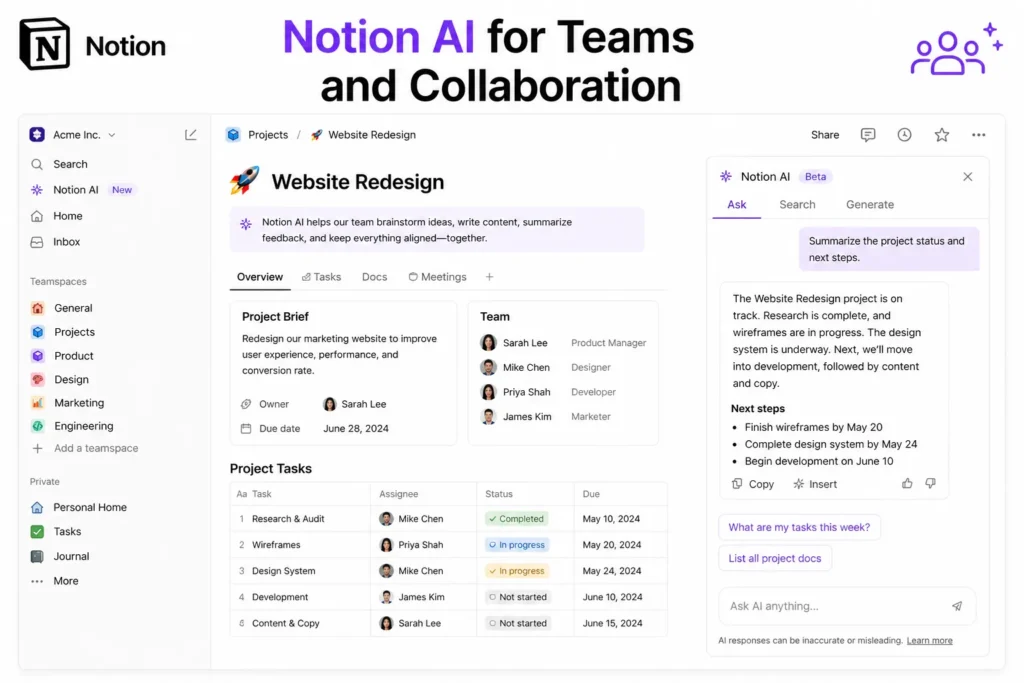
Notion has always been strong for collaboration, and AI makes it even better.
Teams can use Notion AI to:
With AI agents, teams can even automate:
However, it’s not perfect. Larger teams may find limitations in advanced analytics and reporting compared to dedicated tools.
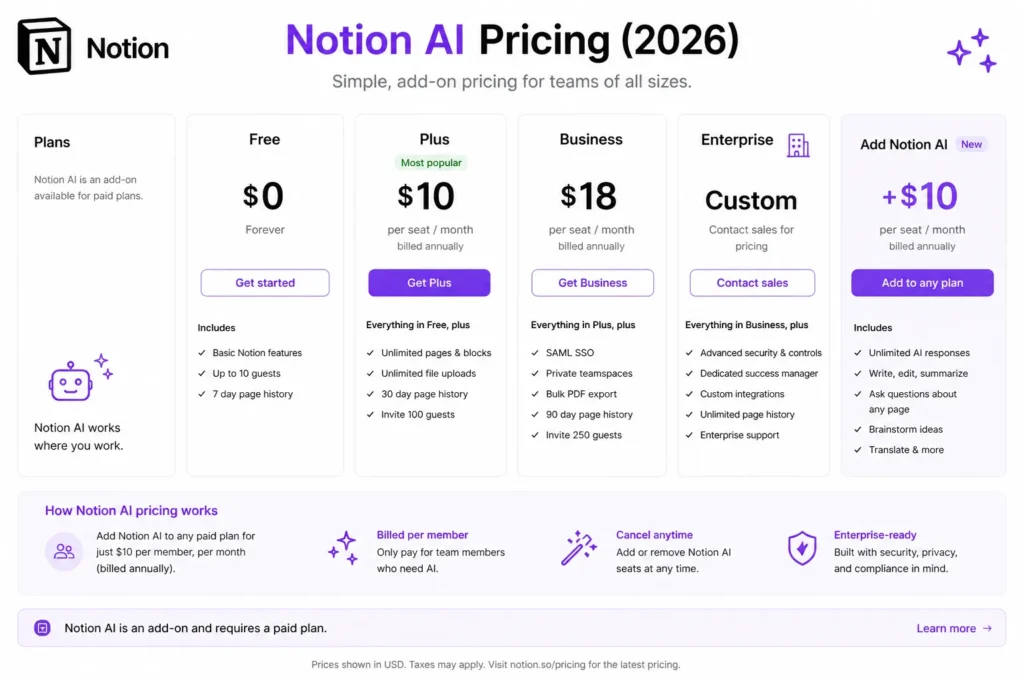
Notion AI is not included for free—it’s an add-on.
This means you’re paying extra on top of your existing Notion subscription.
It depends on your usage.
It’s worth it if:
It’s not worth it if:
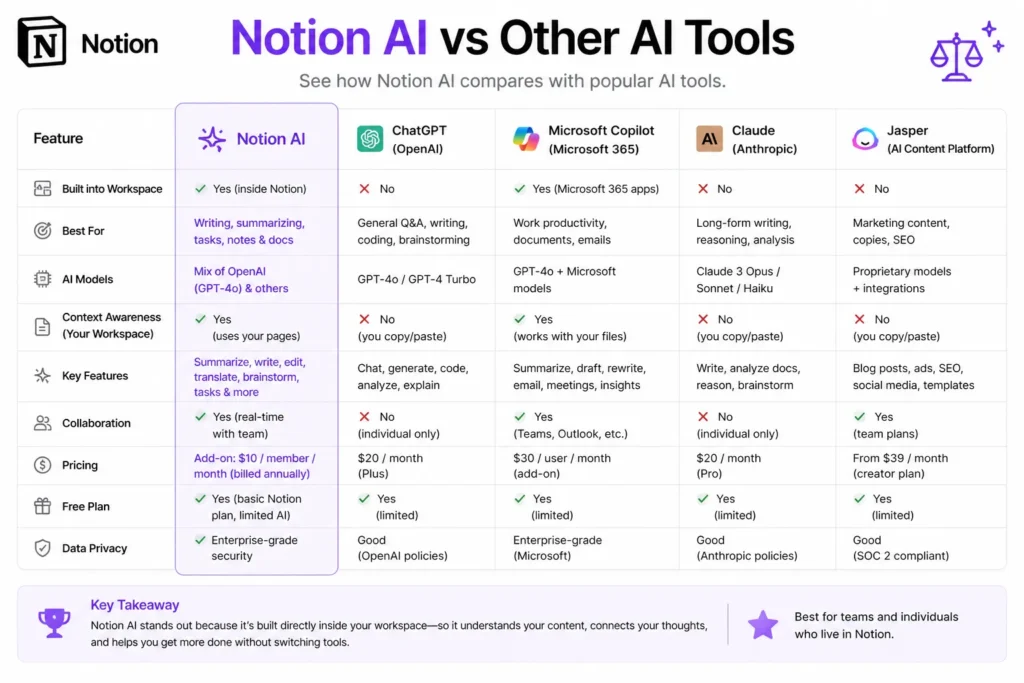
This is one of the most important comparisons.
The key takeaway:
Notion AI is not trying to replace these tools. It’s trying to eliminate friction inside your workflow.
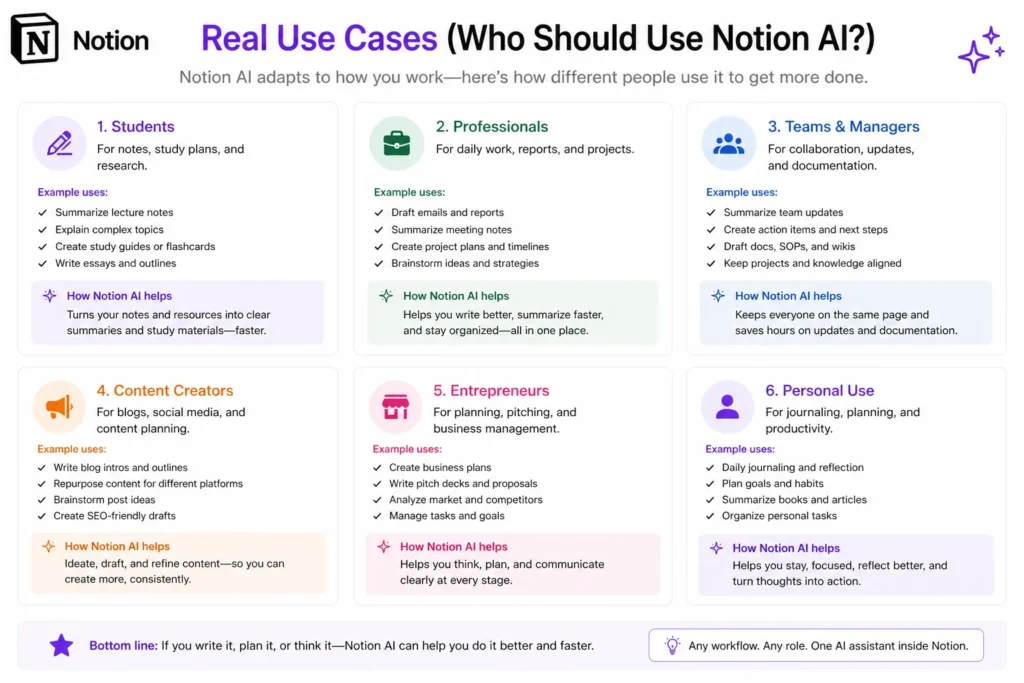
Notion AI is not for everyone. It works best for specific types of users.
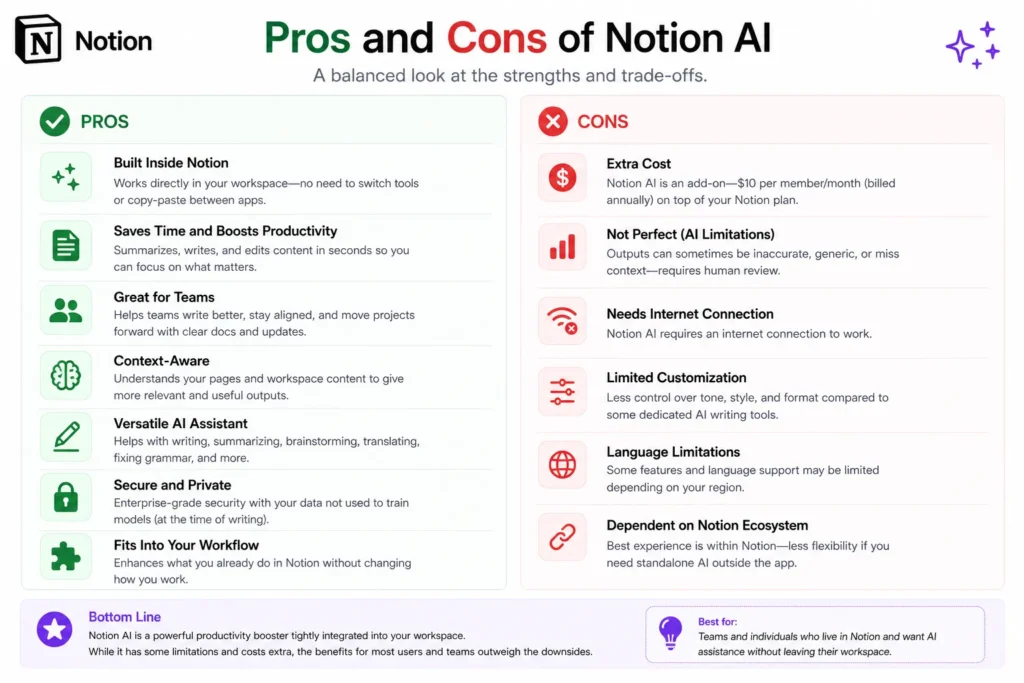
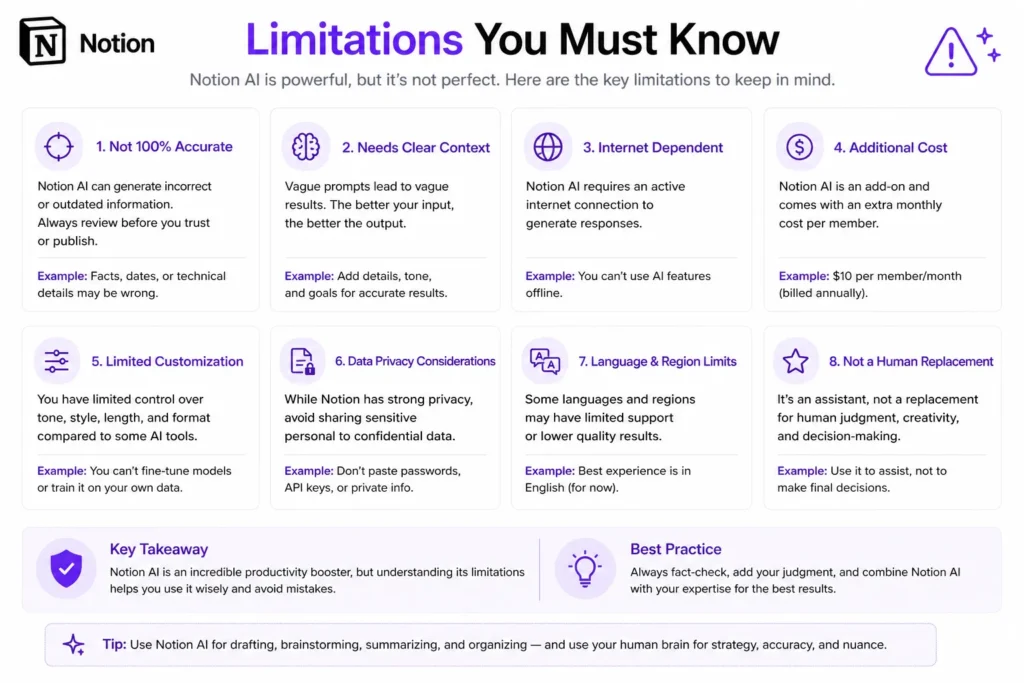
Notion AI is powerful, but it has clear limitations.
Understanding these limitations is key to using it effectively.
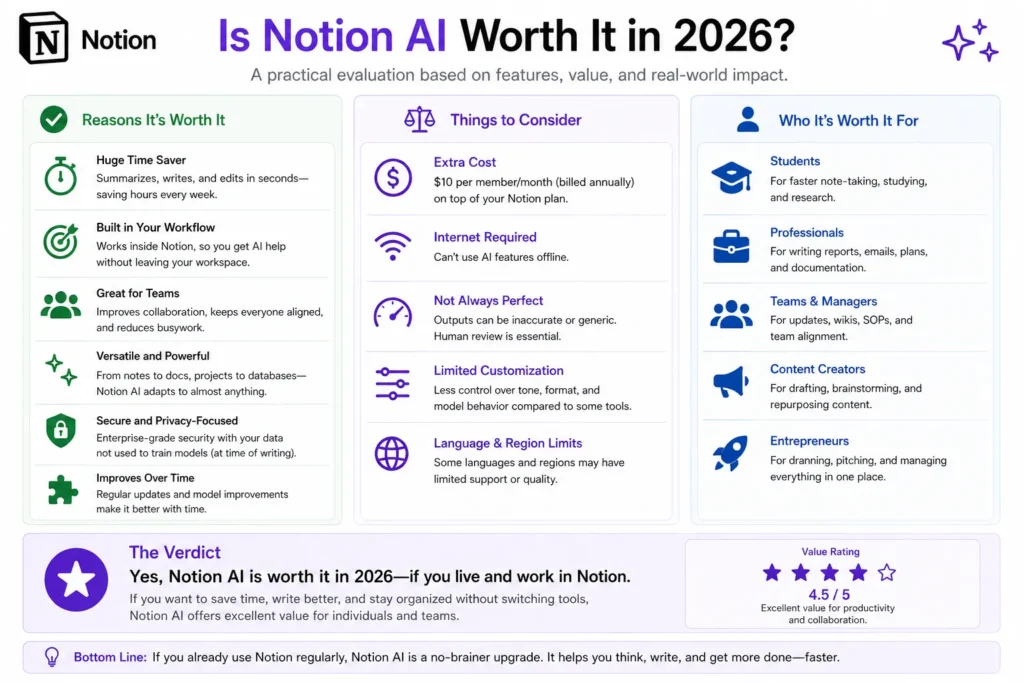
So, is Notion AI worth it in 2026?
The answer is simple:
Yes—if you already use Notion heavily.
It becomes incredibly valuable when:
But if you’re looking for a general-purpose AI tool, it’s not the best choice.
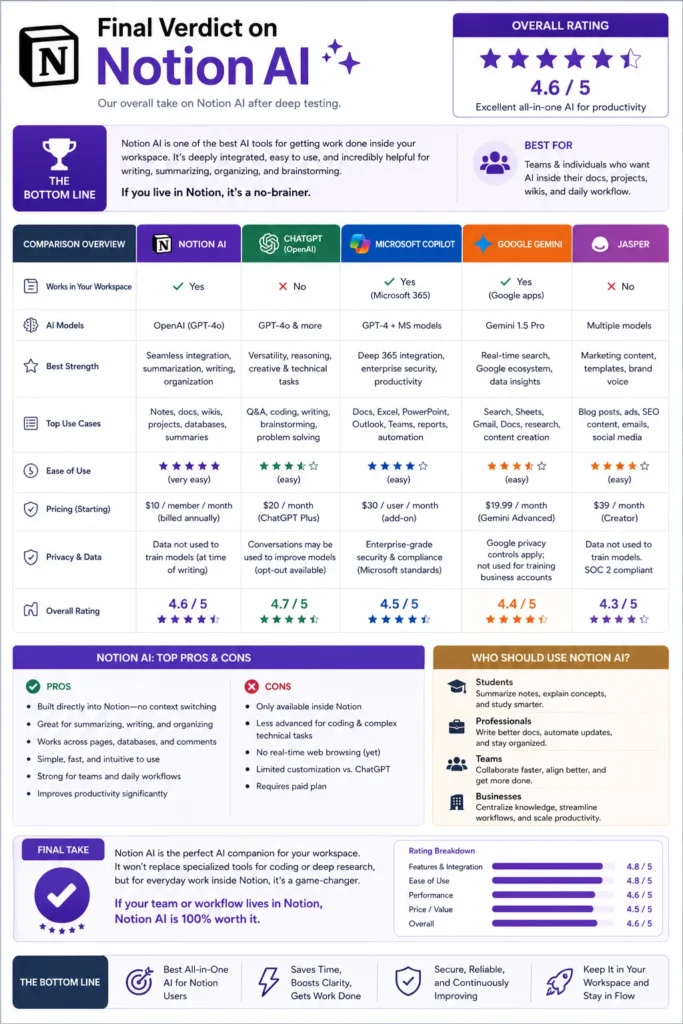
Notion AI is not trying to be the smartest AI tool. It’s trying to be the most useful one inside your workflow.
And in that role, it performs extremely well.
It turns Notion from a static workspace into a dynamic, intelligent system that helps you:
It’s not perfect, but it’s one of the most practical AI implementations available today.
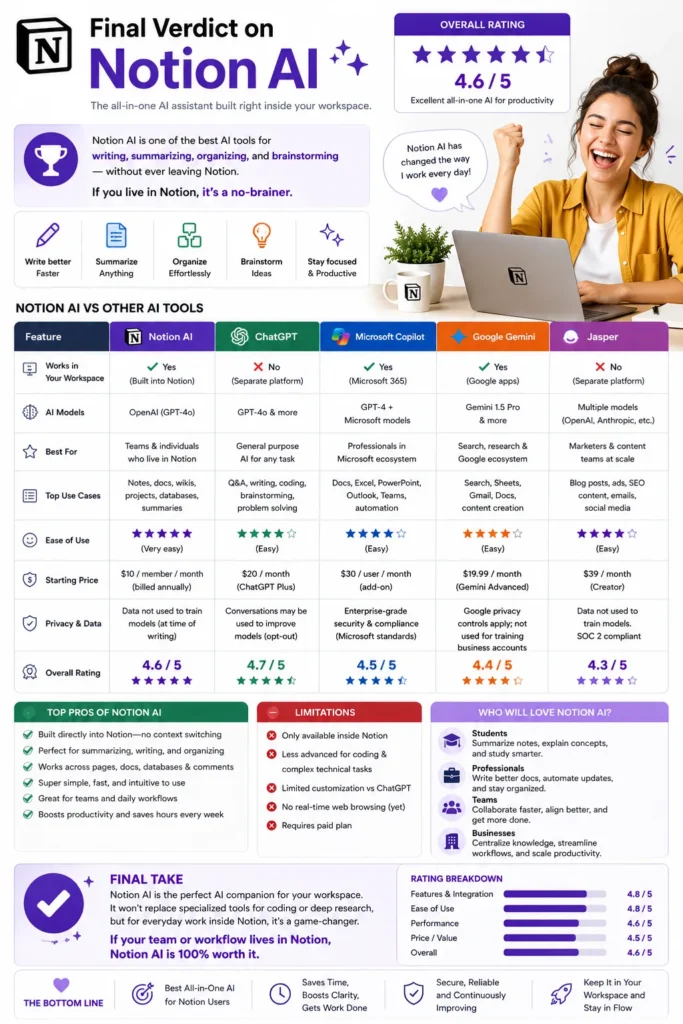
If your workflow already lives inside Notion, then Notion AI is not just helpful—it’s a no-brainer.
It removes friction, saves time, and makes your workspace smarter without requiring extra tools.
But if you’re not a Notion user, it’s not a reason to switch by itself.
The real power of Notion AI comes from its integration. It’s not about what it can do—it’s about how seamlessly it fits into what you already do.
Bottom line:
Notion AI is one of the best AI productivity tools in 2026—not because it replaces everything, but because it improves everything inside your workflow.