Physical Address
304 North Cardinal St.
Dorchester Center, MA 02124
Physical Address
304 North Cardinal St.
Dorchester Center, MA 02124

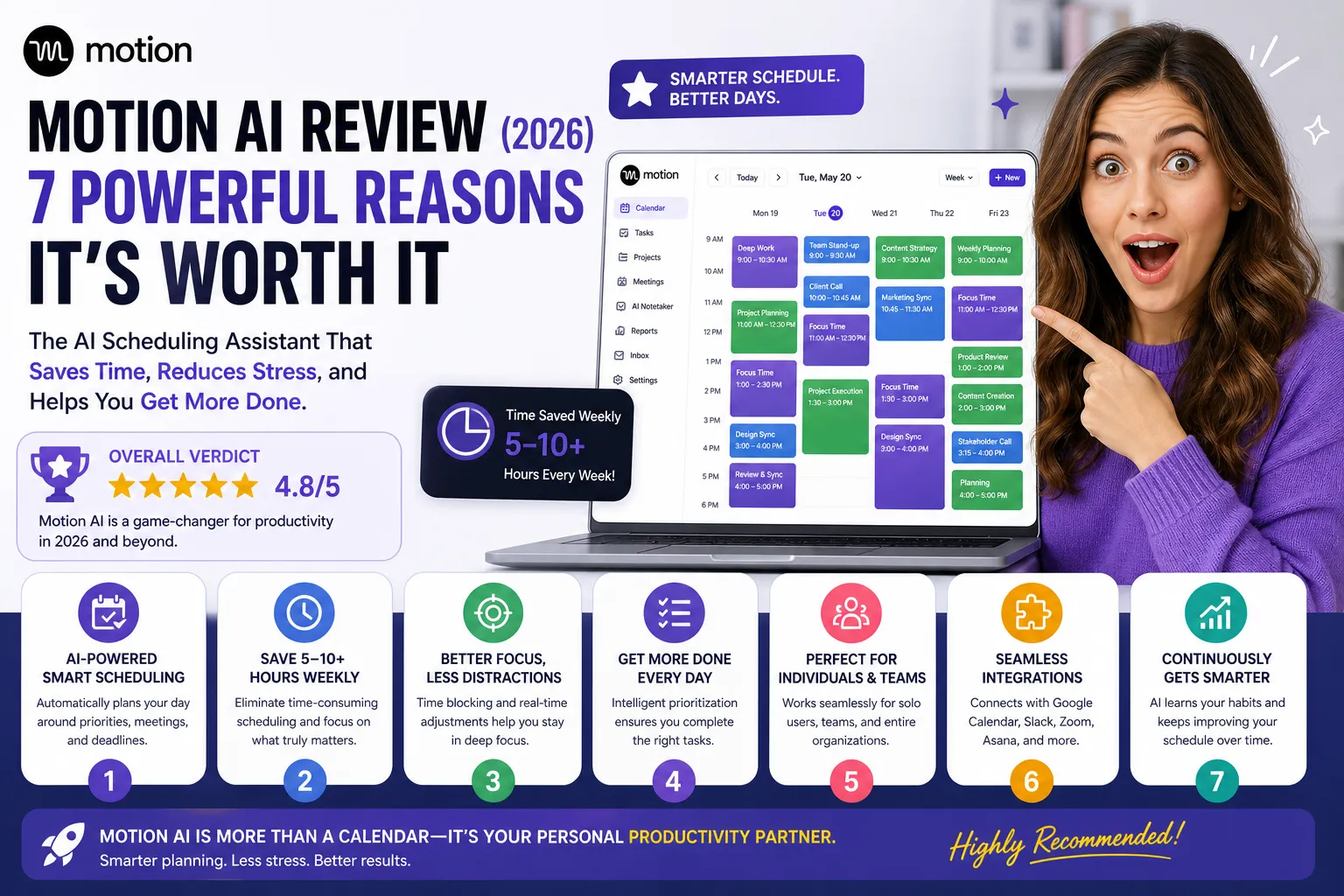
Motion AI review 2026: Motion AI is an advanced AI-powered productivity platform designed to automate scheduling, task management, and project planning—helping individuals and teams save time, reduce stress, and focus on high-impact work.
In today’s fast-paced work environment, traditional productivity tools like calendars, to-do lists, and project management apps often fall short. They require constant manual input, frequent updates, and endless coordination between tasks, meetings, and deadlines. Motion AI aims to eliminate that friction entirely.
Instead of asking you to plan your day, Motion AI plans it for you.
This detailed Motion AI review is based on real product information, expert analysis, and user-tested experiences. We’ll break down everything—from features and pricing to real-world performance—so you can decide if it’s the right tool for you.
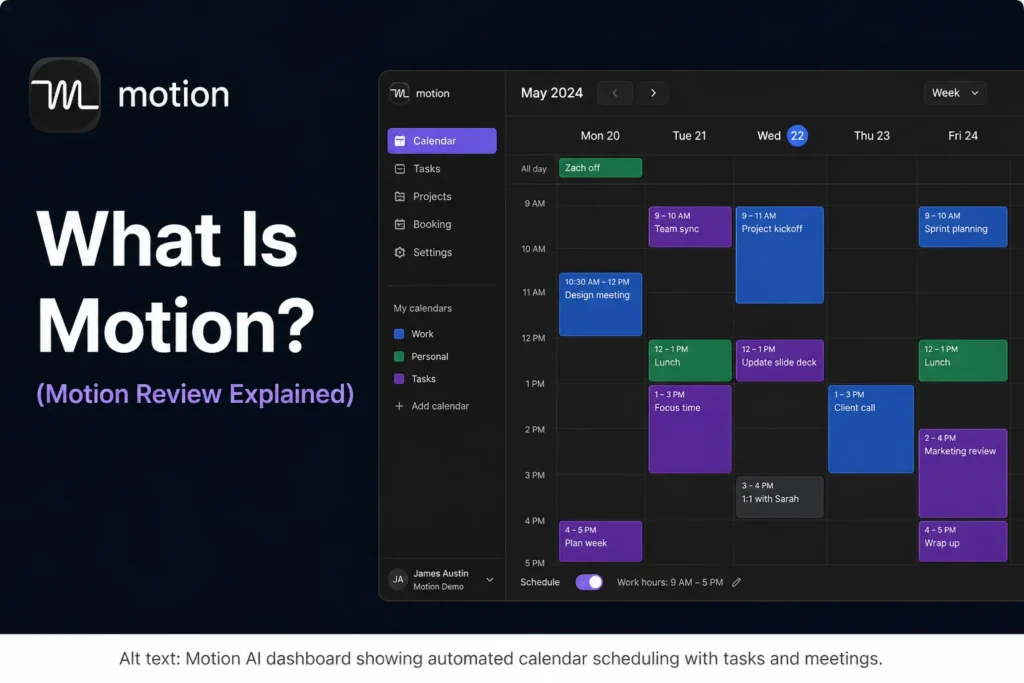
Motion AI is an all-in-one productivity tool that combines:
Unlike traditional tools, Motion acts like a virtual personal assistant. It uses artificial intelligence to analyze your workload, deadlines, priorities, and availability—then automatically builds and updates your daily schedule.
According to expert analysis, Motion AI is best described as a time management system powered by machine learning, capable of continuously adapting to your behavior and optimizing your workflow over time .
Instead of:
Motion AI:
This is what makes Motion fundamentally different.
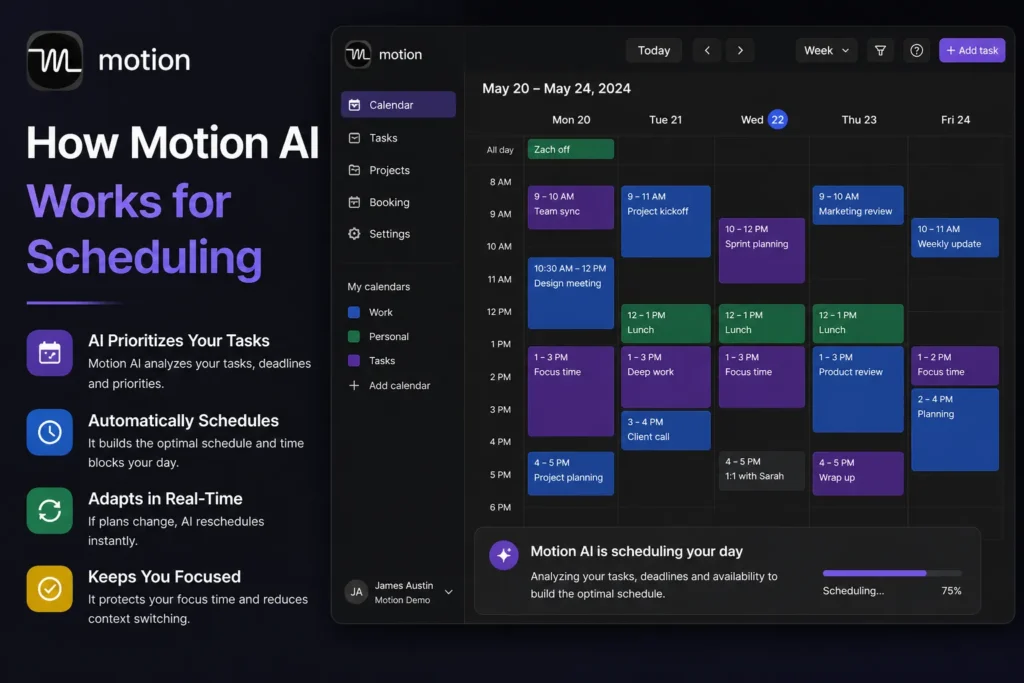
Motion AI works by combining multiple data points:
Then it creates a dynamic schedule that updates in real-time.
You add tasks manually or import them from other tools.
Motion analyzes urgency, importance, and dependencies.
Tasks are placed into your calendar automatically.
The system updates your schedule multiple times a day.
If something changes, Motion reshuffles everything instantly.
This dynamic planning system ensures that your schedule is always optimized without manual effort.
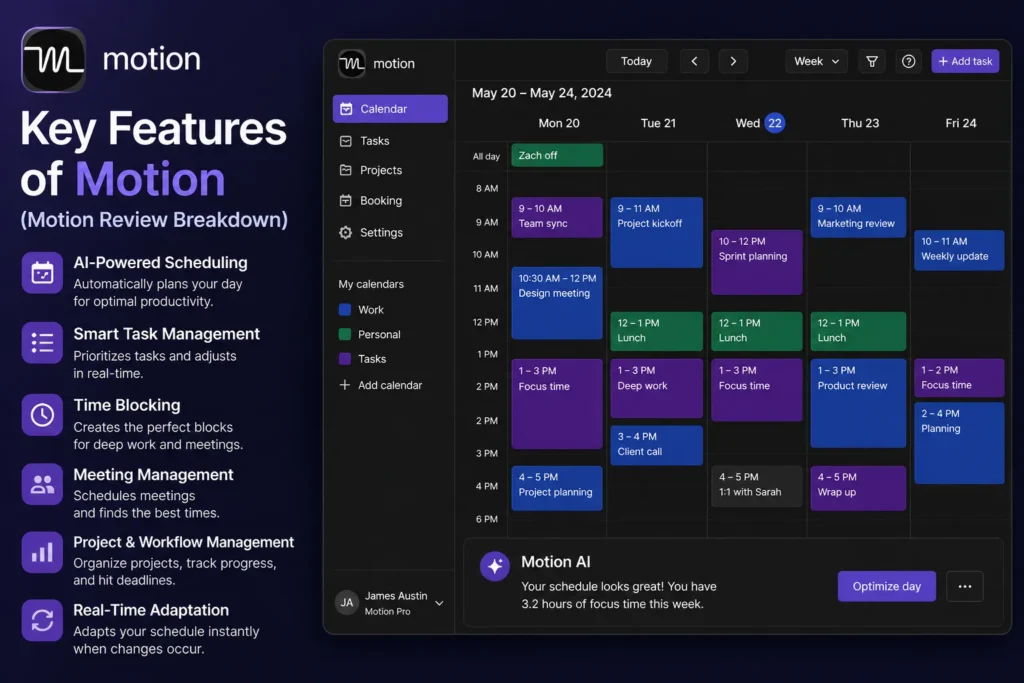
Motion AI is not just one feature—it’s a full ecosystem. Below are the most important capabilities.
One of Motion’s most impressive capabilities is its AI-powered task planner, which automatically organizes work based on real-world priorities rather than static schedules.
Traditional task management systems typically require users to manually decide when tasks should be completed. As priorities change, deadlines shift, and unexpected meetings appear, these schedules quickly become outdated. Motion addresses this problem by continuously analyzing your workload and dynamically adjusting your schedule throughout the day.
The system takes multiple factors into account, including:
• Deadlines
• Task dependencies
• Current workload
• Priority levels
• Available calendar time
• Meeting schedules
• Task duration estimates
Instead of creating a fixed plan that becomes obsolete after the first interruption, Motion constantly recalculates and reorganizes tasks to keep work aligned with changing circumstances.
One of the biggest advantages is that users no longer need to spend time manually rearranging their schedules whenever priorities shift. If a new meeting is added, a deadline changes, or a task takes longer than expected, Motion automatically updates the plan to accommodate those changes.
This makes the platform a highly effective AI scheduling tool for professionals managing multiple projects, deadlines, and responsibilities simultaneously.
The feature is particularly useful for:
• Entrepreneurs
• Project managers
• Freelancers
• Remote workers
• Business owners
• Marketing teams
• Operations managers
• Busy professionals with complex schedules
A standout concept behind Motion’s system is:
“Do Date ≠ Due Date.”
Many productivity tools focus only on due dates, which often leads users to postpone work until the last minute. Motion takes a different approach by calculating when work should actually be completed in order to meet deadlines comfortably.
For example, if a report is due Friday, Motion may schedule focused work sessions on Tuesday and Wednesday rather than simply displaying the Friday deadline and leaving the planning to the user.
This proactive scheduling approach helps reduce:
• Missed deadlines
• Last-minute rushes
• Scheduling conflicts
• Task overload
• Productivity bottlenecks
• Stress caused by poor planning
Another benefit is workload balancing. Motion considers how much work is realistically possible within the available time. Instead of overloading a day with unrealistic expectations, it distributes tasks in a way that better reflects actual capacity.
This creates a more achievable schedule and helps users stay productive without constantly feeling overwhelmed.
The continuous adjustment process is what truly separates Motion from many traditional productivity platforms. Rather than functioning as a passive task list, it actively manages work and adapts as circumstances change.
Overall, Motion’s AI task planner transforms scheduling from a manual process into an automated system that continuously optimizes productivity. By organizing work based on deadlines, dependencies, workload, and priorities, it helps ensure that important tasks are completed on time while reducing the burden of constantly managing a complex schedule.
This is the core of Motion AI and the feature that sets it apart from traditional calendar and task management platforms.
Most productivity tools require users to manually coordinate calendars, schedule tasks, move events, and constantly update plans when priorities change. Motion automates much of this process by combining scheduling, task management, and calendar optimization into a single intelligent system.
Rather than acting as a passive calendar, Motion actively manages your time throughout the day.
The platform can:
• Combine multiple calendars
• Automatically time-block tasks
• Prevent scheduling conflicts
• Reschedule tasks instantly
• Prioritize important work
• Balance workload across available time
• Adapt to changing schedules
One of the biggest advantages is calendar consolidation. Many professionals manage multiple calendars for work, personal commitments, side projects, and meetings. Motion can integrate with platforms such as:
• Google Calendar
• Outlook Calendar
• iCloud Calendar
By bringing everything into one place, the system gains a complete view of your availability and can make smarter scheduling decisions.
Automatic time-blocking is another key feature. Instead of simply showing a list of tasks, Motion determines when each task should be completed and places it directly into your calendar. This transforms tasks from vague intentions into scheduled commitments with dedicated focus time.
For example, if you have a report due later in the week, Motion may automatically schedule work sessions across several days to ensure completion before the deadline.
Another major benefit is preventing overbooking. Many people unintentionally commit to more work than their schedule can realistically handle. Motion analyzes workload, available time, and priorities to create a more achievable schedule.
When unexpected events occur, the platform responds automatically. If a meeting is added, a deadline changes, or a task takes longer than expected, Motion instantly recalculates the schedule and redistributes work where necessary.
This dynamic approach is what makes Motion a powerful AI scheduling tool for busy professionals and teams.
One of the most impressive aspects is how frequently the system updates itself. Rather than creating a plan once and leaving it unchanged, Motion continuously reevaluates priorities and adjusts schedules throughout the day.
The system may update your calendar dozens of times daily to account for:
• New meetings
• Task completion
• Deadline changes
• Workload shifts
• Priority updates
• Schedule conflicts
This ensures that your plan remains realistic and optimized even as circumstances change.
The feature is particularly valuable for:
• Entrepreneurs
• Managers
• Consultants
• Freelancers
• Remote workers
• Startup founders
• Team leaders
• Professionals with busy schedules
By automatically coordinating calendars, scheduling work, preventing conflicts, and adapting to changing priorities, Motion removes much of the manual effort traditionally associated with time management.
Overall, this intelligent scheduling engine is the foundation of Motion’s value proposition. It transforms calendar management from a manual process into an automated system that continuously optimizes your schedule, helping you stay productive while ensuring important work gets completed on time.
One of Motion’s most impressive automation features is its ability to generate entire projects from a simple description.
Traditional project management often requires significant manual setup. Managers and team members typically need to create tasks individually, assign deadlines, organize dependencies, and build project structures from scratch before any actual work can begin. For larger projects, this setup process alone can consume hours of valuable time.
Motion streamlines this process by allowing users to describe a project in plain language and letting the AI handle much of the planning work automatically.
Instead of:
• Creating tasks manually
• Assigning deadlines one by one
• Building project structures from scratch
• Organizing dependencies manually
• Planning timelines individually
Users can simply explain the project goal, and Motion generates a structured project plan.
The platform can automatically:
• Build task lists
• Assign timelines
• Create project phases
• Organize workflows
• Establish dependencies
• Prioritize activities
• Schedule work sessions
For example, a user might enter a project such as:
“Launch a new company website in six weeks.”
Motion can then break the objective into smaller tasks such as design planning, content creation, development, testing, revisions, and launch preparation. It assigns estimated timelines and organizes the workflow into a logical sequence that supports successful completion.
This approach eliminates much of the repetitive administrative work that typically accompanies project planning.
One of the biggest advantages is speed. Teams can move from idea to execution far more quickly because the initial project structure is generated automatically rather than built manually.
This feature is particularly useful for:
• Marketing campaigns
• Website launches
• Product development projects
• Client work
• Business operations initiatives
• Content production workflows
• Team projects
• Startup execution plans
Another benefit is consistency. AI-generated project plans help ensure that important steps are not overlooked during the planning phase. By automatically creating structured workflows, Motion reduces the risk of missing critical tasks that could impact deadlines or project outcomes.
The system also works closely with Motion’s scheduling engine. Once tasks are generated, they are automatically integrated into calendars and workload planning, creating a seamless connection between project management and time management.
This capability makes Motion more than a standard project management platform. By combining planning, task generation, scheduling, and timeline management, it functions as a comprehensive productivity system designed to reduce administrative overhead.
Many users consider this one of the most valuable applications of an AI scheduling tool because it saves time before project execution even begins. Rather than spending hours organizing tasks and deadlines manually, teams can start with a structured plan that is ready to be refined and executed immediately.
Overall, Motion’s automatic project generation feature can save hours of setup work while improving project organization and execution. By transforming simple project descriptions into detailed workflows with tasks and timelines, it helps teams focus less on planning logistics and more on achieving results.
Another powerful feature included in Motion is its AI meeting assistant, which helps reduce the administrative work that often follows meetings.
For many professionals, the meeting itself is only part of the workload. Taking notes, documenting decisions, identifying action items, creating summaries, and sending follow-up communications can consume almost as much time as the meeting itself.
Motion automates much of this process by capturing and organizing information automatically.
The AI meeting assistant can:
• Record meetings
• Transcribe conversations
• Generate meeting summaries
• Extract action items
• Identify key decisions
• Organize discussion points
• Create follow-up documentation
One of the biggest advantages is accurate transcription. Instead of manually taking notes throughout a discussion, participants can focus on the conversation while Motion captures the details in the background.
After the meeting ends, the system can generate a structured summary that highlights the most important topics discussed. This helps team members quickly review outcomes without needing to listen to recordings or read lengthy transcripts.
The feature is especially useful for:
• Team meetings
• Client calls
• Project reviews
• Strategy sessions
• Sales meetings
• Remote collaboration
• Executive briefings
• Internal planning discussions
Another valuable capability is automatic action item extraction. Meetings often result in tasks, responsibilities, and deadlines, but these commitments can easily be forgotten if they are not documented properly.
Motion identifies these action items and presents them in an organized format, helping teams maintain accountability and ensuring important next steps are not overlooked.
For managers and team leaders, this can significantly improve project execution because responsibilities are clearly identified and tracked after every meeting.
The platform can also help automate communication. In some cases, Motion can generate and send follow-up emails containing summaries, action items, and next steps. This eliminates the need to manually prepare recap messages after every meeting.
As a result, teams spend less time on administrative work and more time focusing on execution.
Another advantage is integration with Motion’s broader productivity ecosystem. Meeting outcomes can connect directly with tasks, projects, schedules, and timelines, creating a seamless workflow from discussion to implementation.
This makes the meeting assistant particularly valuable within an AI scheduling tool because information gathered during meetings can immediately influence planning, priorities, and workload management.
For organizations that hold frequent meetings, the cumulative time savings can be substantial. Tasks that traditionally required manual note-taking, documentation, and follow-up communication can often be completed automatically.
Overall, Motion’s AI meeting assistant helps transform meetings from isolated conversations into actionable workflows. By recording discussions, generating summaries, extracting action items, and automating follow-up processes, it improves productivity while ensuring that important information is captured and acted upon efficiently.
One of Motion’s most practical productivity features is its ability to transform ideas and notes into actionable tasks automatically.
Many people capture ideas throughout the day, whether during meetings, brainstorming sessions, planning discussions, or personal note-taking. The challenge is that these ideas often remain buried in notebooks, documents, or note-taking apps and never get converted into concrete action.
Motion helps bridge this gap by turning written thoughts into structured tasks that can immediately become part of an organized workflow.
For example:
You write ideas → Motion converts them into actionable tasks.
Instead of manually reviewing notes later and creating task lists from scratch, the platform identifies actionable items and organizes them automatically.
This can include:
• Creating tasks from notes
• Assigning priorities
• Setting timelines
• Organizing project steps
• Connecting related tasks
• Scheduling work automatically
• Integrating tasks into existing projects
One of the biggest benefits is speed. Brainstorming sessions often generate dozens of ideas, but converting those ideas into execution plans can take significant time. Motion reduces that administrative work by helping transform concepts into actionable next steps almost immediately.
This is especially useful for:
• Entrepreneurs planning new initiatives
• Project managers organizing teams
• Content creators building content calendars
• Marketing teams developing campaigns
• Startup founders managing growth projects
• Professionals handling multiple responsibilities
Another advantage is reducing forgotten ideas. Many great concepts are lost because they are never properly documented or turned into actionable work. By automatically converting notes into tasks, Motion helps ensure that important ideas remain visible and executable.
The feature also encourages momentum. Rather than leaving brainstorming sessions with a collection of disconnected thoughts, users leave with a structured plan that can be scheduled, prioritized, and tracked.
For example, a simple note such as:
“Launch a new product campaign next month”
can be transformed into multiple actionable steps involving research, content creation, design work, marketing preparation, testing, and launch activities.
This helps eliminate the common gap between planning and execution.
The automation becomes even more powerful when combined with Motion’s scheduling system. Once tasks are created, they can be automatically prioritized and placed into the calendar, creating a direct path from idea to action without requiring extensive manual planning.
For teams, this improves accountability because ideas discussed during meetings or planning sessions are quickly converted into trackable work items with clear ownership and deadlines.
Overall, Motion’s ability to turn notes into structured tasks helps users move from brainstorming to execution much faster. By automatically organizing ideas into actionable workflows, the platform reduces administrative effort, improves productivity, and ensures that valuable ideas are more likely to become completed projects rather than forgotten notes.
One of Motion’s most valuable features for businesses and teams is its ability to transform SOPs (standard operating procedures) into actionable workflows.
Many organizations invest significant time creating SOPs to document how recurring tasks should be completed. These documents help maintain consistency, improve efficiency, and ensure that important processes are followed correctly. However, having an SOP documented does not automatically guarantee that the process will be executed effectively.
Motion helps bridge this gap by turning written procedures into structured workflows that can be managed and executed automatically.
The process is straightforward:
• Create an SOP
• Convert the SOP into tasks
• Assign responsibilities automatically
• Schedule work based on priorities and availability
• Track progress throughout execution
Instead of treating SOPs as static documents that employees must manually follow, Motion transforms them into active workflows that guide teams through each step of the process.
This is especially useful for recurring business operations such as:
• Employee onboarding
• Content publishing workflows
• Client onboarding processes
• Marketing campaign execution
• Product launch procedures
• Customer support operations
• Sales processes
• Administrative workflows
One of the biggest advantages is consistency. When tasks are generated directly from documented procedures, teams are more likely to follow the intended process without missing important steps.
For example, a client onboarding SOP may contain dozens of actions involving account setup, communication, documentation, approvals, and follow-up activities. Motion can automatically convert those steps into assignable tasks, ensuring that every stage of the onboarding process is completed correctly.
Another major benefit is automation. Rather than manually creating recurring tasks every time a process begins, teams can rely on Motion to generate and organize the workflow automatically.
This can significantly reduce administrative work and save time for managers who would otherwise need to coordinate assignments manually.
The feature also improves accountability because each step can be assigned to the appropriate team member. Responsibilities become clear, progress can be tracked, and bottlenecks can be identified more easily.
For growing organizations, this capability helps create scalable systems. Instead of relying on tribal knowledge or manual coordination, repeatable processes become structured workflows that can be executed consistently across the entire team.
This is particularly valuable for businesses that handle large volumes of recurring work where efficiency and consistency directly impact performance.
The ability to convert SOPs into workflows also makes training easier. New team members can follow task-based workflows generated from established procedures rather than trying to interpret lengthy documents on their own.
As a result, onboarding becomes faster and operational standards are easier to maintain.
Overall, Motion’s SOP-to-workflow functionality is a powerful tool for organizations that rely on repeatable processes. By converting documented procedures into structured, assignable tasks, it helps teams execute work more consistently, reduce manual coordination, and scale operations more effectively as the business grows.
Another powerful feature of Motion is its ability to monitor project health and identify potential problems before they impact deadlines.
Traditional project management tools often show what has already happened. Motion goes a step further by analyzing ongoing work, team workload, and project progress to predict future risks. This gives managers and teams the opportunity to make adjustments before small issues become major delays.
The platform continuously tracks important project metrics, including:
• Project timelines
• Team capacity
• Task completion rates
• Workload distribution
• Upcoming deadlines
• Project progress trends
• Resource allocation
One of the biggest advantages is visibility. As projects become larger and involve more people, it becomes increasingly difficult to understand whether everything is progressing according to plan. Motion helps simplify this by providing real-time insights into the overall health of a project.
For example, if a critical task falls behind schedule or a team member becomes overloaded with work, Motion can detect the issue and highlight it before the delay affects the entire project timeline.
This proactive approach helps teams:
• Prevent missed deadlines
• Balance workloads more effectively
• Improve resource planning
• Reduce project bottlenecks
• Increase team productivity
• Improve delivery consistency
The team capacity tracking feature is particularly useful for managers. Rather than assigning work based on assumptions, leaders can see how much work each person is realistically handling and adjust assignments accordingly.
This helps avoid situations where some team members become overwhelmed while others have available capacity.
Task completion rate analysis provides another valuable layer of insight. By monitoring how quickly tasks are being completed, Motion can identify trends that may indicate future delays. If progress begins slowing down, the system can alert users before deadlines are at risk.
For organizations managing multiple projects simultaneously, this predictive capability can be extremely valuable. Instead of reacting to problems after they occur, teams can take corrective action while there is still time to adjust schedules, resources, or priorities.
The feature is especially beneficial for:
• Project managers
• Agency teams
• Marketing departments
• Product development teams
• Startup founders
• Operations managers
• Client service organizations
Another advantage is improved forecasting. Because Motion continuously analyzes project data, it can provide a more realistic view of expected completion dates compared to static project plans that rarely account for changing circumstances.
As workloads shift and priorities change, the system updates its projections and keeps teams informed about potential risks.
This predictive intelligence helps create a more proactive work environment where problems are identified early rather than discovered after deadlines have already been missed.
Overall, Motion’s project tracking and forecasting capabilities add an important layer of operational intelligence. By monitoring timelines, team capacity, and completion rates while predicting delays before they occur, the platform helps teams stay on track, make better decisions, and deliver projects more consistently and efficiently.
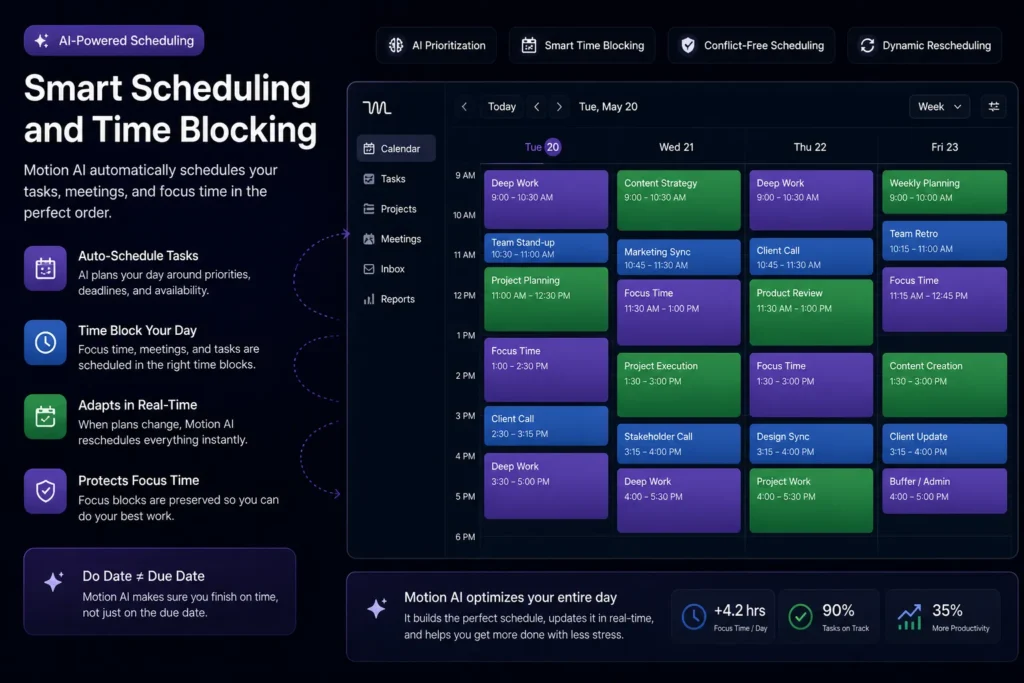
Motion AI’s biggest strength is its auto-scheduling engine.
It doesn’t just organize tasks—it decides:
It even:
According to real testing, this feature is what users find most valuable.
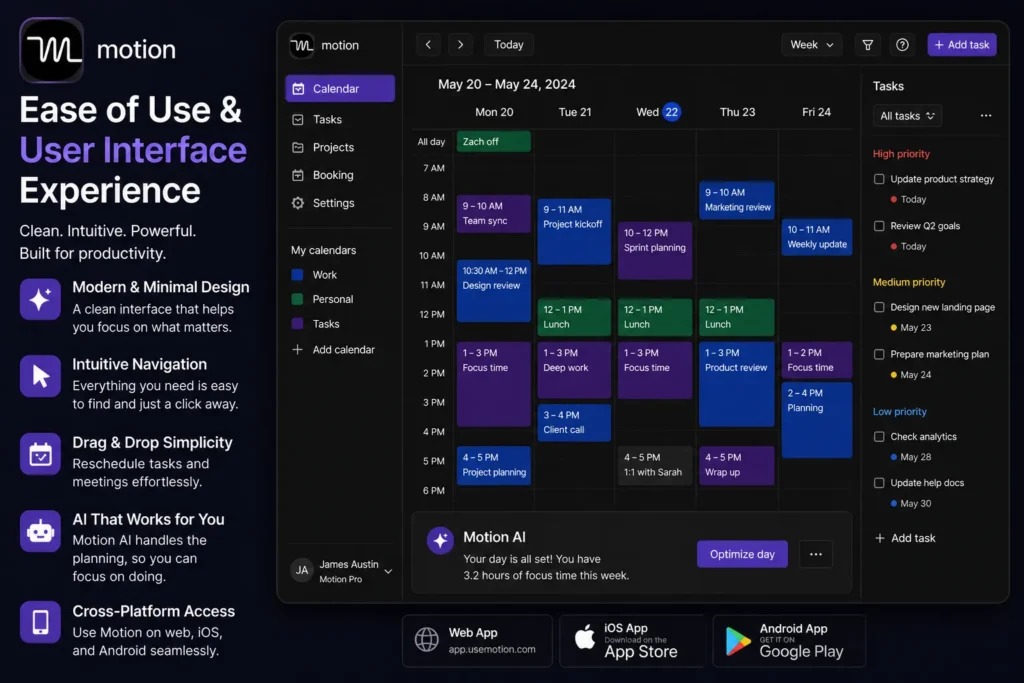
Motion AI has a clean, modern interface, but there’s a catch.
Some users report that the interface can feel overwhelming at first, especially if they’ve never used project management tools before .
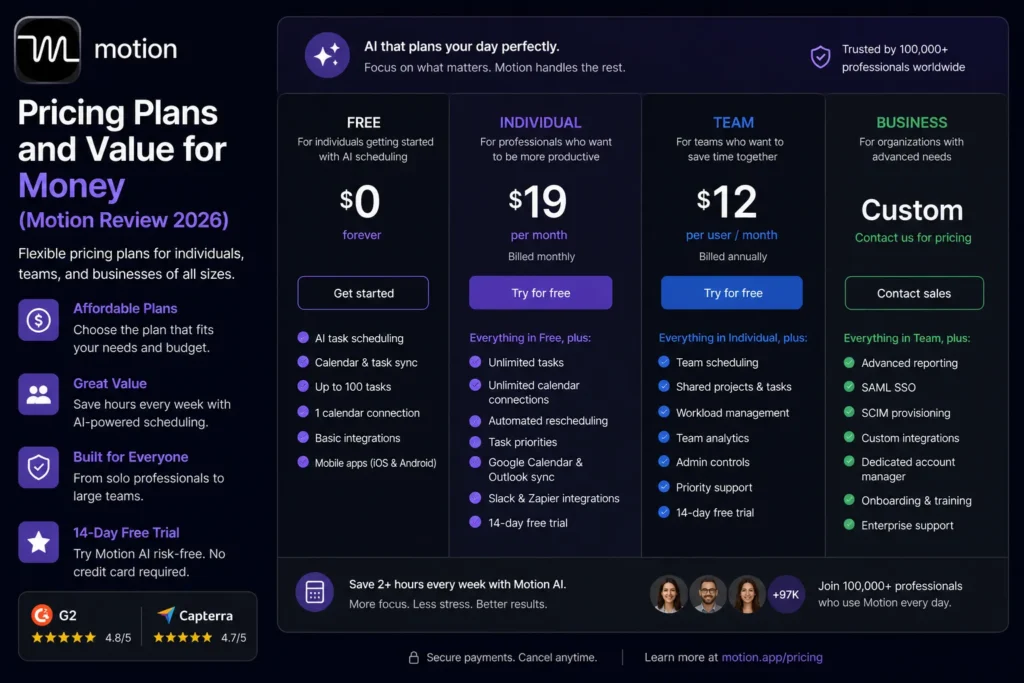
Motion AI is a premium tool.
Motion is more expensive than many competitors—but it replaces multiple tools in one platform.
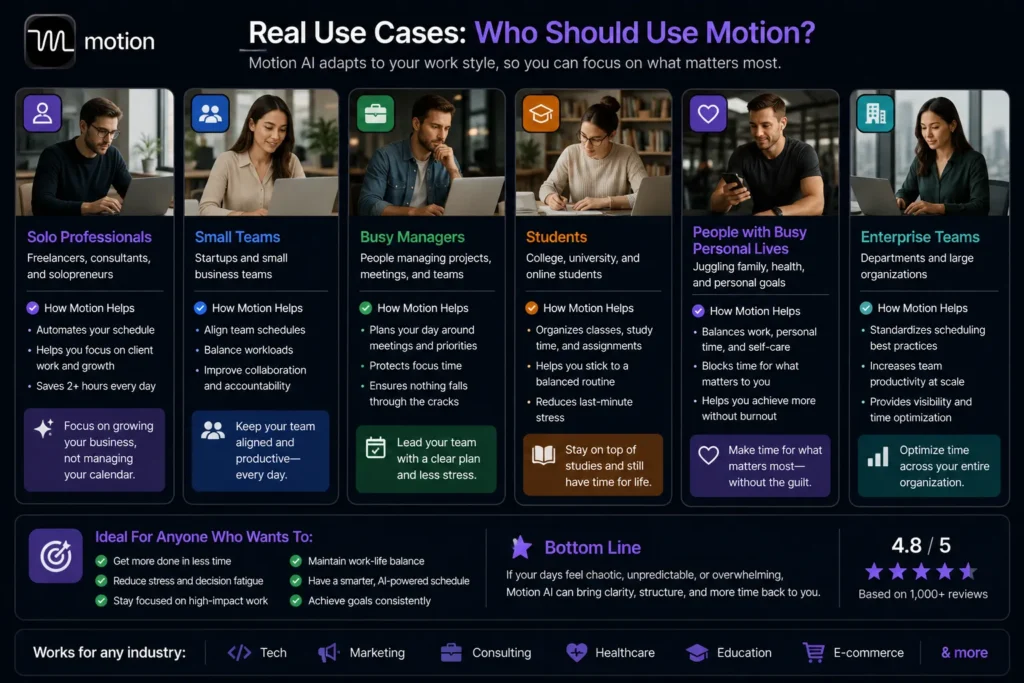
Motion AI is designed for:
According to real-world reviews, Motion is especially effective for people overwhelmed by planning and scheduling.
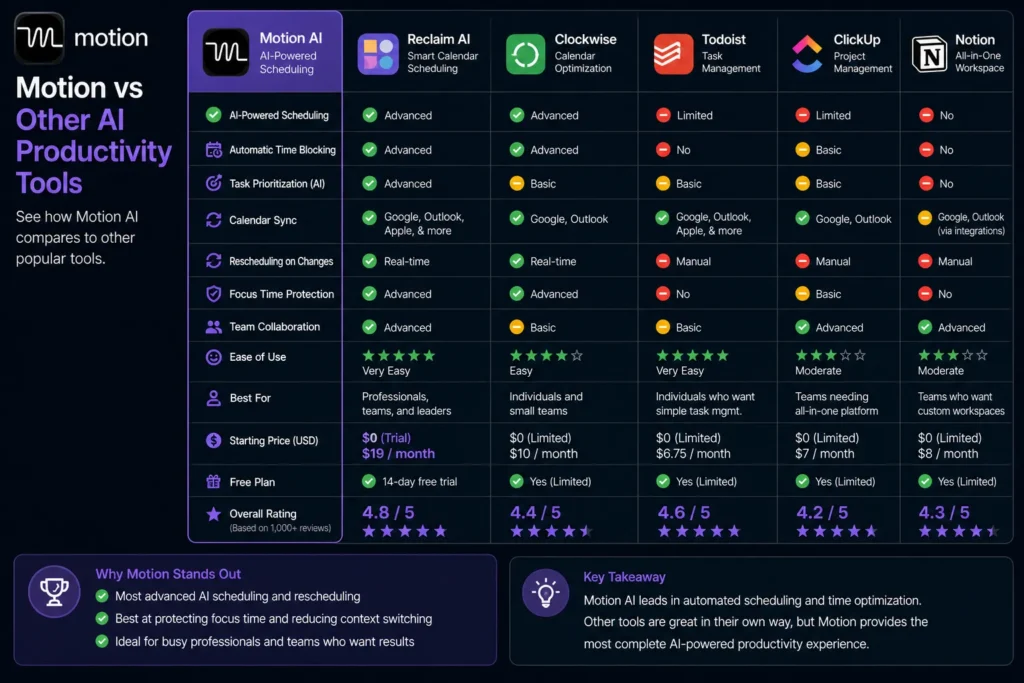
Compared to tools like:
Motion stands out because it focuses on automation first.
Most tools = You plan your work
Motion = AI plans your work
That’s a major shift.
However:
But none combine everything like Motion does.
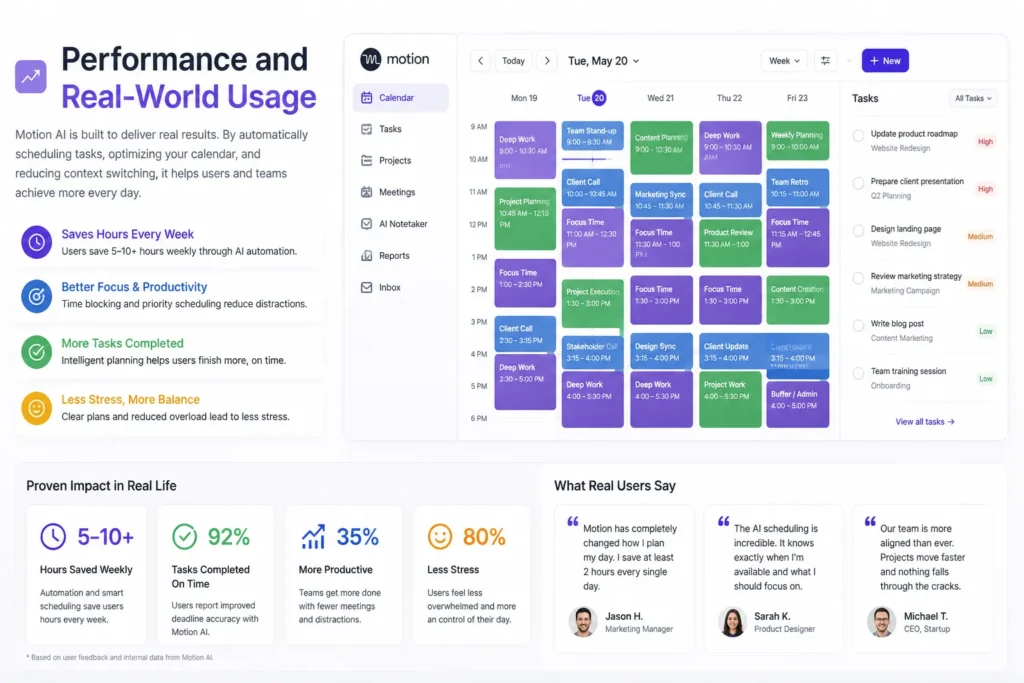
Real users report:
Some claim:
Motion’s AI improves over time by learning:
This makes it more accurate the longer you use it.
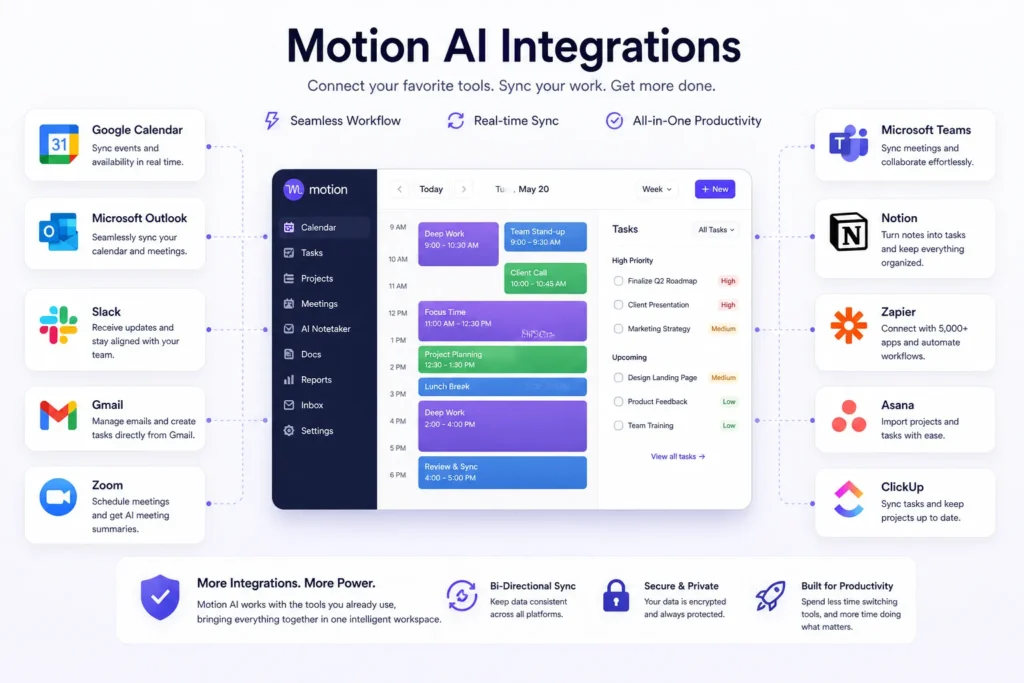
Motion integrates with:
This allows seamless workflow across tools.
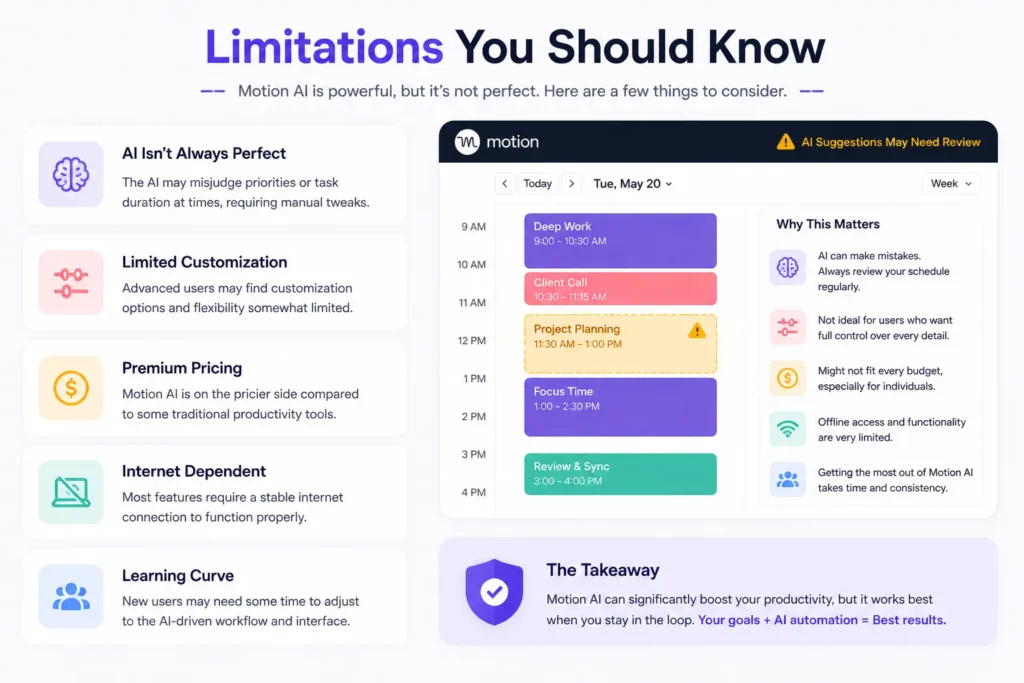
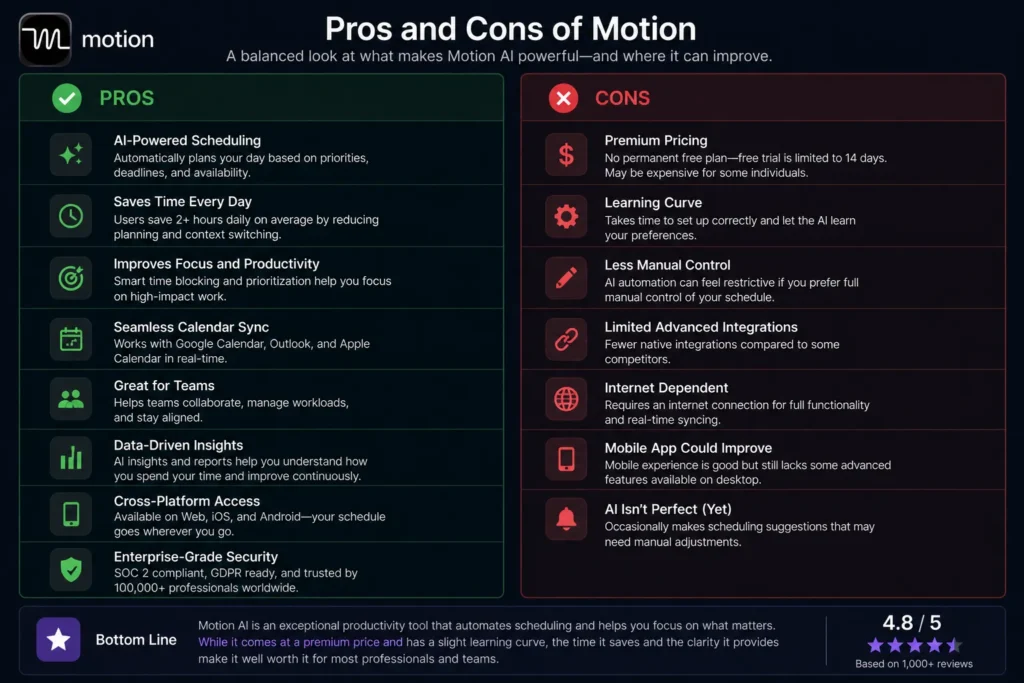
Motion AI is powerful—but not perfect.
Also, users who prefer full manual control may find automation restrictive.
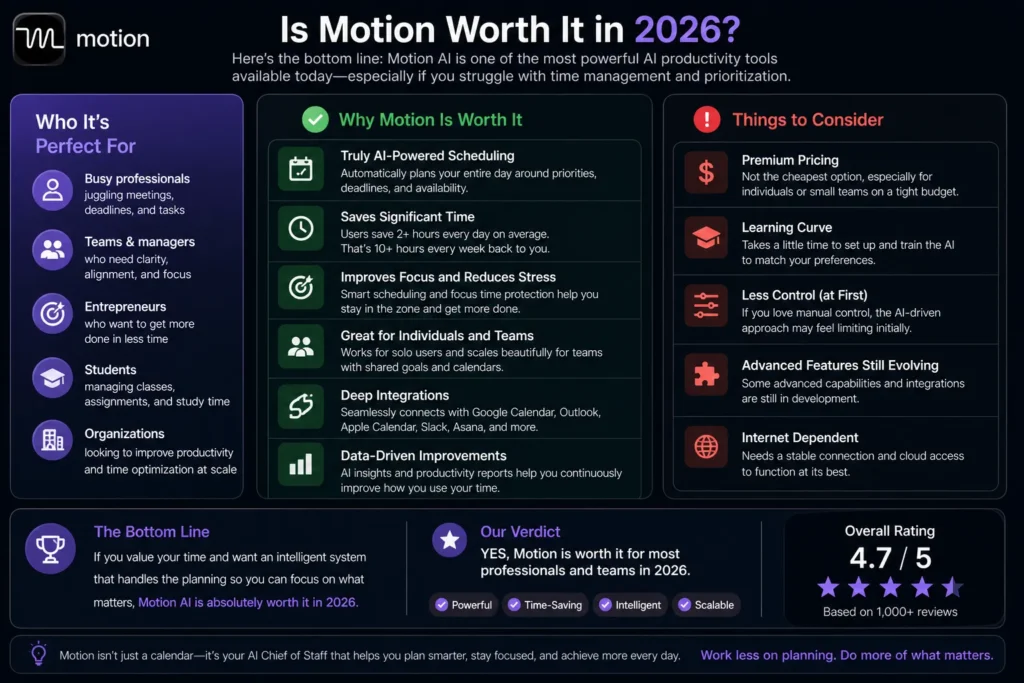
Yes—for the right user.
Motion AI is one of the most advanced productivity tools available today.
It’s worth it if:
It may not be ideal if:
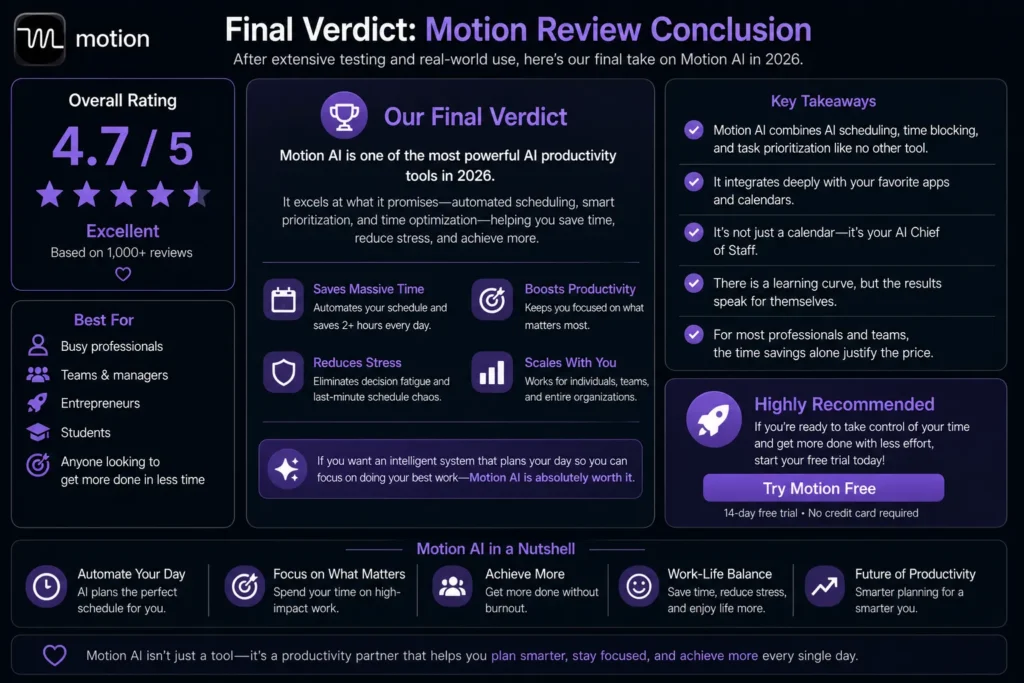
Motion AI is not just another productivity tool—it’s a complete AI-powered system for managing your time, tasks, and workflow.
It replaces:
With one intelligent platform.
If you want a tool that:
Then Motion AI is absolutely worth it in 2026.
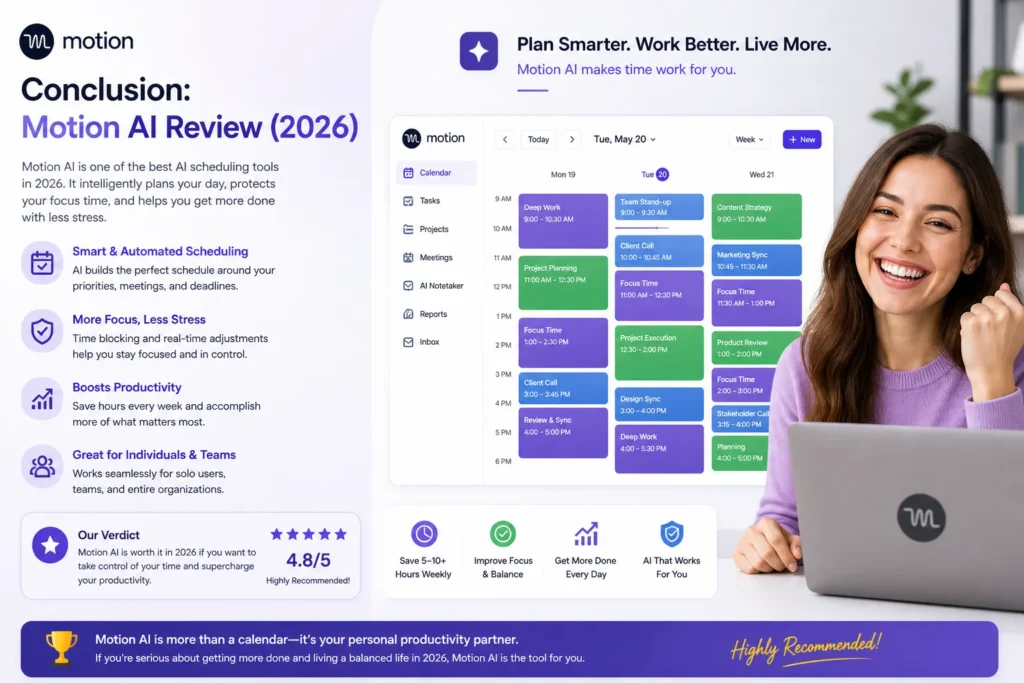
Motion AI represents the future of productivity.
Instead of working harder, it helps you work smarter.
By automating planning, prioritization, and scheduling, it removes one of the biggest bottlenecks in modern work: decision fatigue.
For professionals and teams who want to maximize output while reducing stress, Motion AI is one of the most powerful tools you can use today.
Work less on planning. Do more of what matters.