Physical Address
304 North Cardinal St.
Dorchester Center, MA 02124
Physical Address
304 North Cardinal St.
Dorchester Center, MA 02124


If you’re searching for a serious AI tool that actually fits into real creative workflows—not just a flashy generator—you’ve probably come across Adobe Firefly. Unlike many standalone AI tools that feel experimental or disconnected, Firefly is built directly into the ecosystem of professional design tools used by millions worldwide.
This Adobe Firefly review goes deep into what really matters: performance, real-world usability, pricing, limitations, and whether it’s actually worth using in 2026. No hype—just real insights based on how the tool works today.
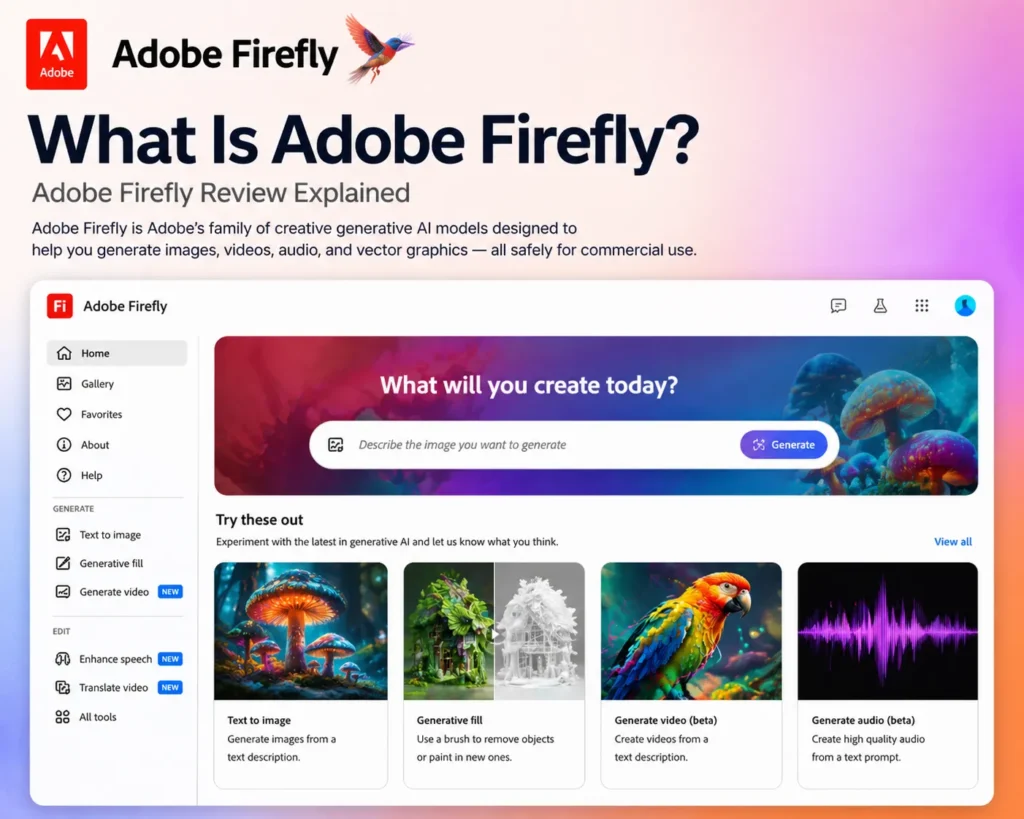
Adobe Firefly is a generative AI platform designed for creating and editing visual content including images, video, audio, and design assets. It’s not just another AI image generator—it’s part of the broader Adobe ecosystem, integrating tightly with tools like Adobe Photoshop, Adobe Illustrator, and Adobe Express.
At its core, Firefly allows you to:
What makes it different is its focus on professional workflows and commercial safety. Adobe trains Firefly on licensed and public-domain content, which reduces copyright risks—a major concern with AI tools today .

Firefly operates through a simple prompt-based system. You type what you want—like “modern product ad with soft lighting”—and the AI generates multiple variations within seconds.
But it goes beyond that.
Inside the interface, you can:
Once generated, you can refine results using editing tools or send them directly into Adobe apps for further work.
This workflow integration is a major advantage. Instead of jumping between tools, everything happens in one connected system.
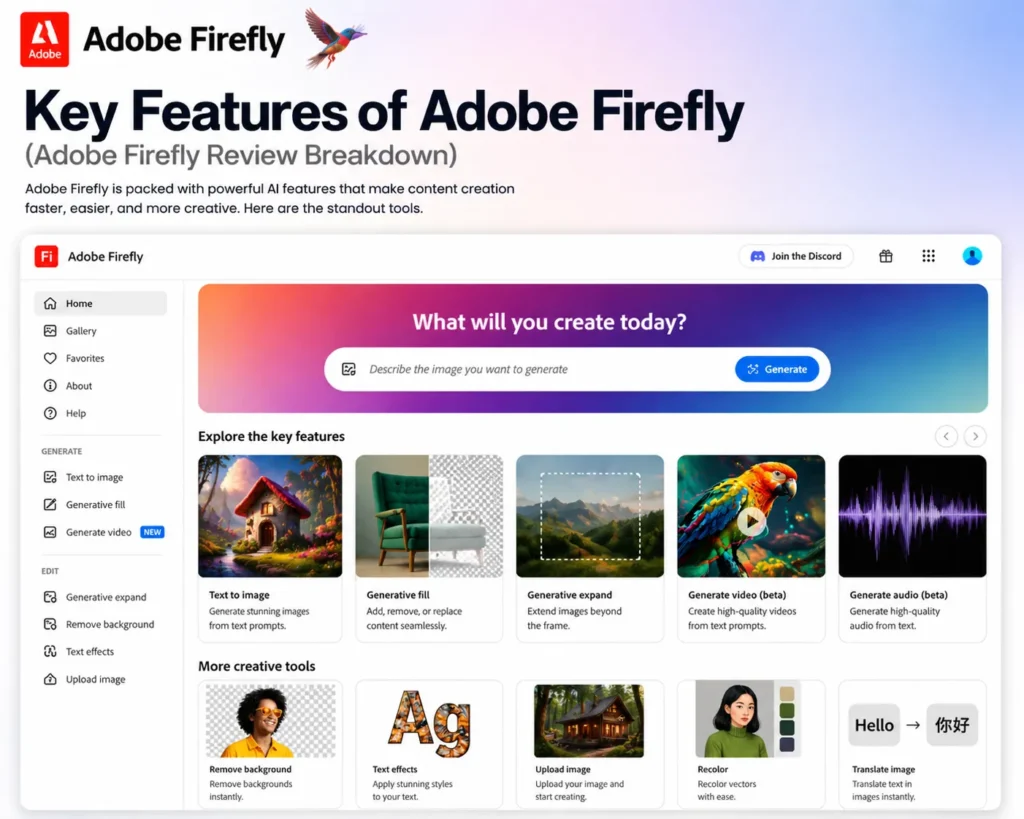
This is where most users begin their journey with Adobe Firefly AI, and it remains one of the platform’s most popular capabilities.
Adobe Firefly AI allows users to generate images from simple text prompts in just a few seconds. Unlike many AI image generators that focus heavily on artistic experimentation, Firefly is designed with creative professionals, marketers, and business users in mind.
The platform prioritizes clean, usable visuals that fit naturally into real-world design workflows.
Adobe Firefly AI performs particularly well for:
• Marketing visuals
• Product mockups
• Social media graphics
• Advertising assets
• Website imagery
• Promotional materials
• Brand content
One of its biggest strengths is speed.
Users can describe what they want, generate multiple image options almost instantly, and begin editing or incorporating those visuals into their projects without a lengthy creative process.
This is especially valuable for:
• Marketing teams
• Designers
• Content creators
• Small business owners
• Agencies
• Brand managers
A major differentiator is Firefly’s focus on structure and usability.
Many AI image generators are optimized for artistic creativity and dramatic visual experimentation. While that can be useful, businesses often need images that are practical, professional, and easy to integrate into commercial projects.
Adobe Firefly AI tends to generate visuals that feature:
• Cleaner compositions
• Better visual hierarchy
• More balanced layouts
• Professional presentation styles
• Commercial-friendly aesthetics
This makes the outputs particularly suitable for marketing and branding applications.
For example, a marketer creating an advertising campaign often needs visuals that clearly communicate a message rather than highly abstract artistic concepts. Firefly’s design-oriented approach aligns well with these requirements.
Product mockup generation is another area where the platform performs strongly.
Businesses can quickly create visual concepts for:
• Product promotions
• Packaging ideas
• Marketing campaigns
• E-commerce listings
• Sales presentations
without requiring extensive graphic design work.
The same applies to social media graphics, where clarity and communication are often more important than extreme artistic expression.
Another advantage is consistency.
Because Adobe Firefly AI is built with creative workflows in mind, generated content generally feels easier to refine, edit, and integrate into larger design projects than many purely art-focused AI generators.
This practical approach is one of the reasons many professional users appreciate the platform.
While some competing tools may generate more dramatic or imaginative artwork, Firefly often excels when the goal is creating content that supports business, marketing, and design objectives.
Rather than prioritizing artistic chaos, it focuses on producing visuals that are organized, polished, and ready for professional use.
Overall, image generation is one of the strongest capabilities of Adobe Firefly AI. By delivering fast, clean, and commercially useful visuals for marketing, product mockups, social media content, and branding projects, it provides a highly practical solution for creators who value structure, clarity, and workflow efficiency over purely artistic experimentation.
Generative Fill is widely considered one of the most impressive Adobe Firefly features and a major reason why Adobe’s AI ecosystem has gained so much attention among designers, marketers, photographers, and content creators.
Unlike traditional image editing, which often requires advanced skills and time-consuming manual work, Generative Fill allows users to modify images using simple text instructions.
The process is remarkably straightforward:
• Select an area of an image
• Type what you want to change
• Let the AI generate the result
With just a few clicks, users can:
• Remove unwanted objects
• Replace elements with AI-generated content
• Expand image backgrounds
• Add new objects to scenes
• Modify compositions
• Repair missing image areas
One of the biggest strengths of this feature is its integration with Adobe’s professional workflow.
Because it works directly inside tools such as Adobe Photoshop, users can apply AI-powered edits without leaving their existing design environment.
This makes the feature extremely practical for real-world projects.
For example, a designer can quickly:
• Remove distracting objects from a photo
• Extend a landscape background
• Replace a product with a different version
• Create additional space for marketing text
• Adjust image composition for different formats
Traditionally, many of these tasks would require advanced photo manipulation techniques and significant editing time.
Generative Fill dramatically simplifies the process.
One of the most impressive capabilities is object removal.
Instead of manually cloning, masking, and retouching areas of an image, users can simply highlight an unwanted object and allow the AI to remove it while reconstructing the surrounding environment.
In many cases, the results appear surprisingly natural.
Background expansion is another highly valuable use case.
Designers frequently need to adapt images for:
• Social media posts
• Website banners
• Presentations
• Advertisements
• Print materials
Rather than cropping images awkwardly, Firefly can generate additional content around the edges and extend scenes seamlessly.
This provides significantly greater design flexibility.
The feature is particularly useful for:
• Graphic designers
• Marketing teams
• Photographers
• Content creators
• Advertising agencies
• Brand managers
Another reason Generative Fill stands out among Adobe Firefly features is image blending quality.
The AI generally does an excellent job matching:
• Lighting conditions
• Colors
• Textures
• Perspective
• Environmental details
This helps generated content blend naturally into existing images rather than appearing artificially inserted.
Of course, like any AI system, it is not perfect.
Complex scenes, unusual perspectives, or highly detailed subjects can occasionally produce inconsistent results that require additional adjustments.
However, compared to traditional editing methods, the time savings are often substantial.
For many creative professionals, Generative Fill has become one of the most useful AI-assisted editing tools available because it accelerates common design tasks without sacrificing creative control.
Overall, Generative Fill is one of the strongest Adobe Firefly features available today. By allowing users to remove objects, replace elements, expand backgrounds, and modify images through simple text instructions directly inside Photoshop, it transforms complex editing workflows into fast, intuitive processes while delivering results that are often remarkably realistic and professionally usable.
Another emerging capability among Adobe Firefly features is AI-powered video generation from text prompts.
This technology allows users to describe a scene, concept, or animation using natural language and have the AI generate a short video clip automatically. While the feature is still evolving, it provides an exciting glimpse into the future of AI-assisted video production.
The process is simple:
• Enter a text prompt
• Describe the desired scene
• Generate a short video clip
• Refine and experiment with variations
This makes it easy to visualize ideas without needing traditional video production skills.
Potential use cases include:
• Marketing concepts
• Storyboarding
• Product demonstrations
• Creative brainstorming
• Advertising mockups
• Social media ideas
• Motion design experiments
One of the biggest advantages is speed.
Instead of spending hours creating rough animations or editing sample footage, users can quickly generate visual concepts and explore different creative directions.
This is especially useful for:
• Designers
• Marketers
• Creative agencies
• Content creators
• Video editors
• Brand teams
However, it is important to be realistic about the current state of the technology.
At the moment, the feature is still developing and should be viewed as an early-stage creative tool rather than a complete video production solution.
Current limitations include:
• Short video durations (typically around 5 seconds)
• Limited scene complexity
• Occasional motion inconsistencies
• Imperfect realism
• Reduced control compared to traditional video editing
While the generated clips can be visually impressive, they are generally not yet suitable for producing complete commercial videos without additional editing and post-production work.
Realism has improved significantly compared to earlier AI video systems, but the results can still occasionally appear artificial, especially in scenes involving complex movement, detailed human interactions, or highly dynamic environments.
Because of these limitations, the feature currently performs best in concept development workflows.
For example, teams can use it to:
• Visualize campaign ideas
• Test creative concepts
• Explore scene compositions
• Pitch marketing concepts
• Create mood boards
• Develop story ideas
This allows creators to validate ideas before investing significant time and resources into full-scale production.
Another advantage is rapid experimentation.
Since video clips can be generated quickly, users can test multiple concepts and creative directions in a fraction of the time required by traditional workflows.
This makes the feature particularly valuable during brainstorming and pre-production stages.
As AI video technology continues to improve, capabilities such as longer clips, better realism, and greater creative control are expected to become increasingly sophisticated.
For now, though, most professionals view the tool as a complement to existing video production workflows rather than a replacement for them.
Overall, AI video generation is one of the most exciting Adobe Firefly features currently under development. While the technology is still maturing and works best for concept creation, storyboarding, and creative exploration, it provides a fast and accessible way to transform ideas into motion and offers a compelling preview of the future of AI-assisted video production.
Another valuable addition to the growing list of Adobe Firefly features is its AI-powered audio generation capabilities.
As content creation becomes increasingly multimedia-focused, creators often need more than just images and videos. Audio plays a critical role in marketing campaigns, social media content, presentations, product demonstrations, and video production.
Adobe Firefly helps simplify this process by providing tools that can generate audio assets without requiring professional recording equipment or extensive editing experience.
The platform includes tools for:
• AI voiceovers
• Audio generation
• Sound effects
• Voice-based narration
• Background audio elements
• Creative audio assets
One of the biggest advantages is speed.
Traditionally, creating audio content often requires:
• Recording equipment
• Voice talent
• Audio editing software
• Post-production work
Firefly helps reduce much of this complexity by generating usable audio assets directly through AI-powered workflows.
This is particularly valuable for:
• Content creators
• Marketers
• Social media managers
• Educators
• Small businesses
• Video producers
AI voiceovers are one of the most practical use cases.
Instead of recording narration manually, users can generate spoken audio for:
• Product videos
• Explainer content
• Presentations
• Training materials
• Marketing campaigns
• Social media videos
This can significantly reduce production time while making content creation more accessible to individuals and small teams.
Another useful capability is sound effect generation.
Many projects require simple audio enhancements such as:
• Environmental sounds
• Transition effects
• Action sounds
• Ambient audio
• Creative sound design elements
Rather than searching through large audio libraries, creators can generate suitable sounds directly within the workflow.
Audio generation can also help during the early stages of content development.
For example, creators may use AI-generated voiceovers and sound effects to build prototypes, test concepts, or create draft versions before investing in full professional production.
This makes the feature especially useful for:
• Storyboarding
• Content planning
• Rapid prototyping
• Marketing concept development
• Social media production
One of the strongest benefits is accessibility.
Not every creator has access to professional voice talent, recording studios, or audio editing expertise. AI-generated audio helps bridge this gap and allows users to create complete multimedia projects more efficiently.
However, as with many AI-powered creative tools, quality expectations should remain realistic.
For high-end commercial productions, professional recording and audio engineering may still provide superior results.
That said, for everyday content creation, educational materials, social media videos, and marketing assets, the generated audio is often more than sufficient.
The real value lies in reducing production barriers and enabling creators to move from idea to finished content much faster.
Overall, Adobe’s AI audio capabilities expand the usefulness of Adobe Firefly features beyond visual content alone. By offering AI voiceovers, audio generation, and sound effects, the platform helps creators build richer multimedia experiences while reducing the need for manual recording, complex editing workflows, and external audio resources.
This is where Adobe Firefly AI truly separates itself from many competing AI creative platforms.
While image generation and AI editing features are impressive, Firefly’s greatest advantage is its deep integration with Adobe’s professional creative ecosystem. Rather than functioning as a standalone tool, Firefly becomes part of the applications that designers, marketers, photographers, and content creators already use every day.
Adobe Firefly AI integrates directly with:
• Adobe Photoshop (image editing)
• Adobe Illustrator (vector generation)
• Adobe Express (fast content creation)
This integration creates a significant productivity advantage because users can generate, edit, and refine content without constantly moving between separate platforms.
One of the biggest challenges with many AI tools is workflow disruption.
A typical process often involves:
• Generating content in one platform
• Downloading files
• Uploading them elsewhere
• Editing in another application
• Repeating the process multiple times
Firefly eliminates much of this friction by embedding AI capabilities directly inside Adobe’s creative tools.
For example, within Photoshop, users can:
• Generate new content
• Remove objects
• Expand images
• Replace elements
• Refine compositions
all without leaving their editing environment.
This creates a much smoother workflow and significantly reduces production time.
Illustrator integration provides similar benefits.
Designers can use AI-assisted tools to generate and modify vector graphics, accelerating concept development while maintaining access to professional editing capabilities.
This is especially valuable for:
• Logo concepts
• Illustrations
• Brand assets
• Marketing graphics
• Vector-based design projects
Adobe Express brings another layer of convenience by making Firefly features accessible to users who need fast content creation rather than advanced professional editing.
This is particularly useful for:
• Social media content
• Marketing materials
• Presentations
• Promotional graphics
• Quick business designs
One of the strongest advantages of Adobe Firefly AI is that generated content remains editable.
Rather than receiving a fixed AI output, users can continue refining their work using the full capabilities of Adobe’s creative applications.
This combination of AI generation and professional editing flexibility is something many standalone AI tools struggle to match.
The integration is particularly valuable for:
• Professional designers
• Marketing teams
• Creative agencies
• Photographers
• Content creators
• Brand managers
Another major benefit is efficiency.
Because users remain inside familiar applications, there is less time spent learning new workflows, managing file transfers, or switching between multiple platforms.
For professionals already invested in Adobe Creative Cloud, this can result in substantial productivity gains.
Ultimately, Firefly is not just an AI image generator—it is an AI layer built directly into one of the world’s most widely used creative ecosystems.
That integration is what makes the platform especially powerful.
Overall, Adobe Firefly AI stands out because it combines AI generation with professional creative software. By integrating directly into Photoshop, Illustrator, and Express, it allows users to generate, edit, refine, and publish content without leaving their existing workflow. For Adobe users, this seamless integration is often the feature that delivers the greatest real-world value and productivity improvement.
One of the more overlooked strengths of Adobe Firefly AI is its support for multiple AI models and its growing ability to leverage technologies from different providers.
Rather than limiting users to a single image generation approach, Adobe has focused on creating a flexible ecosystem that can accommodate different AI capabilities and creative requirements. This gives users access to a broader range of visual styles, generation methods, and creative possibilities.
The result is greater flexibility when working on different types of projects.
Benefits include:
• More creative control
• Greater output variety
• Better adaptability across projects
• Expanded visual possibilities
• More styling options
• Improved workflow flexibility
One of the biggest advantages is output diversity.
Different AI models often excel at different tasks. Some are stronger at realistic imagery, while others may perform better with illustrations, concept art, design elements, or creative experimentation.
By supporting multiple AI technologies, Adobe Firefly AI can provide users with more options when generating content.
This is particularly valuable for creators who work across multiple formats such as:
• Marketing campaigns
• Brand design projects
• Social media content
• Product mockups
• Website graphics
• Advertising materials
• Creative concepts
Another major benefit is creative control.
Not every project requires the same visual style. A business presentation may require clean and professional imagery, while a social media campaign might benefit from a more creative and attention-grabbing approach.
Access to different generation methods allows users to select outputs that align more closely with the goals of a specific project.
This flexibility helps reduce one of the common limitations of AI-generated content: visual repetition.
When users are restricted to a single generation model, outputs can sometimes begin to feel similar over time. Multiple model support helps introduce more variation and keeps creative work fresh.
For professional creators, this can be especially important because clients often require different visual styles across different campaigns and industries.
The feature is particularly useful for:
• Designers
• Marketing teams
• Agencies
• Content creators
• Brand strategists
• Creative professionals
Another advantage is future adaptability.
As AI technology continues to evolve rapidly, Adobe’s approach positions Firefly to benefit from advancements across the broader AI ecosystem rather than relying exclusively on a single generation engine.
This means users may gain access to new capabilities, styles, and quality improvements without dramatically changing their workflow.
Because these capabilities remain integrated within the Adobe Creative Cloud environment, users can still take advantage of familiar editing tools while benefiting from increasingly powerful AI generation technologies.
Ultimately, the goal is not simply to provide more models—it is to provide more creative possibilities.
By giving users access to a wider range of generation approaches, Adobe Firefly AI becomes more adaptable to different creative challenges and professional workflows.
Overall, support for multiple AI models is a significant advantage for Adobe Firefly AI. It provides greater creative control, increased variation in generated content, and improved flexibility across a wide range of projects, making the platform more versatile and capable of supporting diverse creative needs.
One of the most powerful enterprise-focused capabilities of Adobe Firefly AI is the ability to create and train custom AI models using your own content and visual assets.
While standard AI image generators are designed to create generic content, many businesses require visuals that consistently match their brand identity, design standards, and creative guidelines. Custom model training helps solve this challenge by allowing organizations to teach the AI how their brand should look and feel.
Instead of generating completely generic content, the AI can learn from approved assets and produce outputs that align more closely with a company’s established visual style.
This capability is particularly useful for:
• Brand consistency
• Agency workflows
• Large-scale content production
• Marketing campaigns
• Enterprise creative operations
• Multi-brand organizations
One of the biggest advantages is maintaining a consistent visual identity.
As businesses produce more content, maintaining consistency becomes increasingly difficult. Marketing teams, designers, freelancers, and agencies may all create assets differently, leading to variations in style, colors, imagery, and branding.
Custom AI models help reduce this inconsistency by generating content that follows predefined visual patterns.
For example, businesses can train models using:
• Brand imagery
• Product photography
• Marketing assets
• Approved visual styles
• Design systems
• Creative guidelines
This allows generated content to better reflect the organization’s established identity.
The feature is especially valuable for agencies.
Agencies often manage multiple clients, each with unique branding requirements. Custom models make it possible to create AI-assisted workflows tailored to specific client styles, helping teams generate content faster while maintaining quality and consistency.
This can significantly improve efficiency when producing:
• Social media graphics
• Advertising creatives
• Marketing materials
• Product promotions
• Campaign assets
• Brand content
Large-scale content production is another major use case.
Organizations that create hundreds or thousands of assets each month often struggle to balance speed with brand consistency. Custom AI models help automate portions of the creative process while preserving visual standards.
This can improve:
• Production speed
• Brand alignment
• Creative consistency
• Workflow efficiency
• Content scalability
Another advantage is reducing repetitive creative work.
Rather than manually recreating the same style across numerous projects, teams can use AI-generated content that already reflects their preferred visual direction.
For businesses operating across multiple regions, campaigns, or product lines, this can provide substantial productivity gains.
The feature is particularly attractive to:
• Enterprise organizations
• Marketing departments
• Creative agencies
• E-commerce brands
• Large content teams
• Global businesses
Because these custom capabilities remain integrated into the broader Adobe ecosystem, users can continue refining generated assets inside familiar creative tools such as Photoshop and Illustrator.
This combination of custom AI generation and professional editing creates a highly flexible workflow that balances automation with creative control.
Overall, custom model training is one of the most valuable advanced capabilities of Adobe Firefly AI. By allowing organizations to train AI models using their own visual assets, the platform helps businesses maintain brand consistency, streamline agency workflows, and scale content production while ensuring that generated content remains aligned with their unique creative identity.
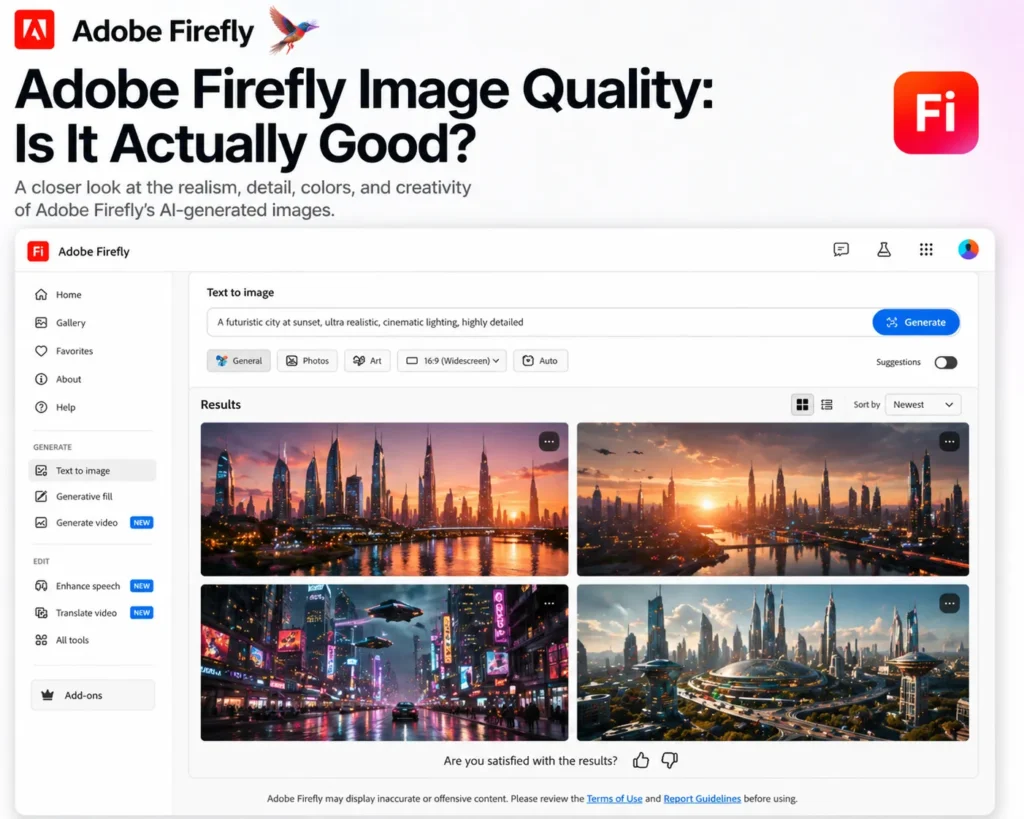
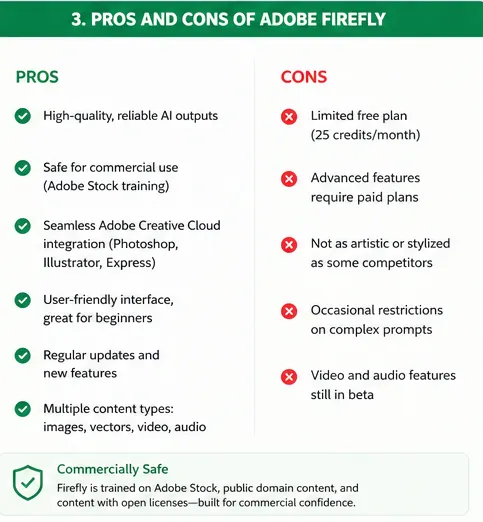
Firefly produces clean and polished results, especially for design-focused tasks.
Strengths:
Weaknesses:
In real-world tests, Firefly performs best for:
It’s less impressive for highly detailed artistic or cinematic imagery.
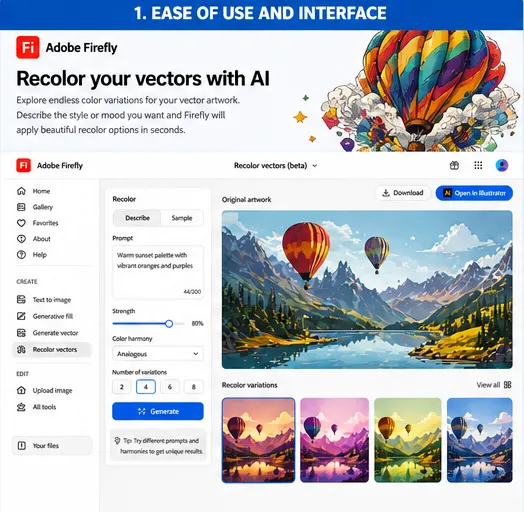
Firefly is extremely beginner-friendly.
Even if you’ve never used AI tools before, you can:
The interface feels familiar, especially if you’ve used Adobe products before.
There’s almost no learning curve, which is rare for powerful creative tools.
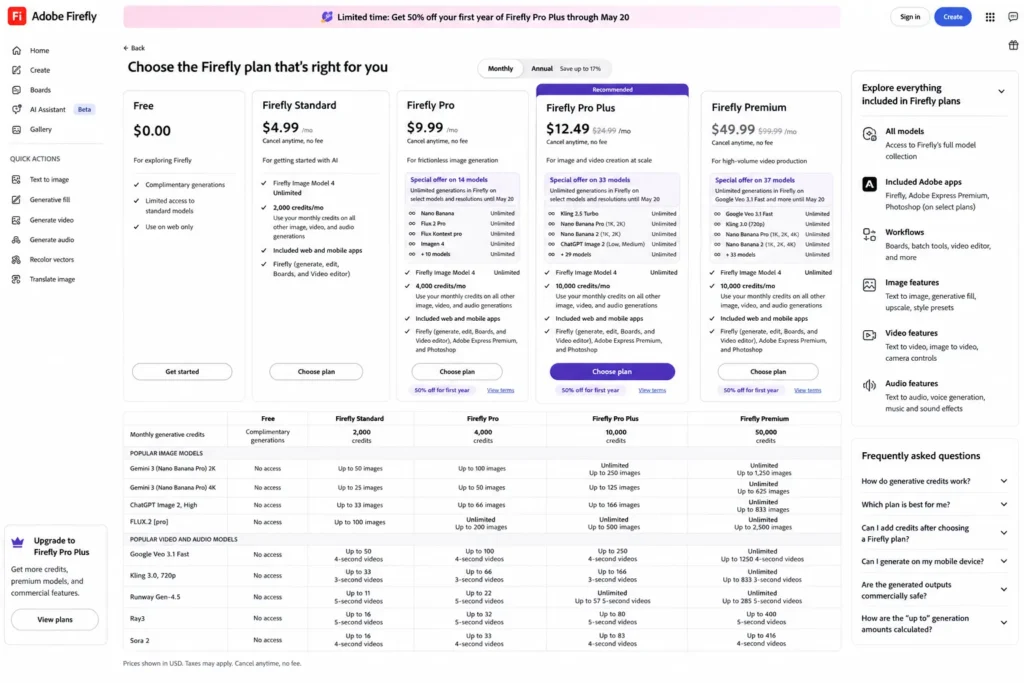
Firefly uses a credit-based system.
Typical plans include:
Credits are used for:
One important thing: heavy usage can burn through credits quickly.
However, if you already use Adobe Creative Cloud, Firefly often comes included, making it much more cost-effective.
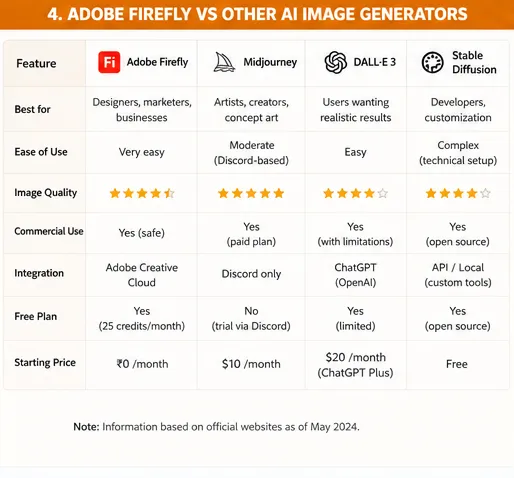
Compared to tools like Midjourney or Stable Diffusion:
Firefly is not trying to be the most creative—it’s trying to be the most usable.
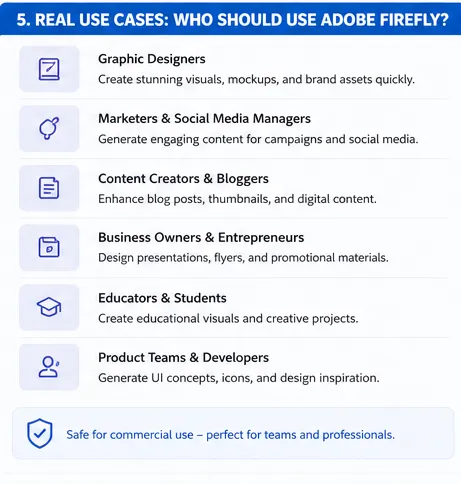
Firefly is ideal for:
Quickly create visuals, mockups, and assets.
Generate ad creatives, social posts, and campaign visuals.
Produce thumbnails, graphics, and media assets.
Speed up production workflows and maintain brand consistency.
Create marketing materials at scale with AI.
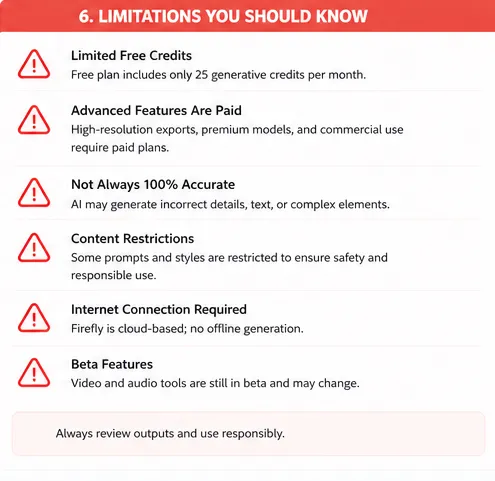
Firefly is powerful—but not perfect.
Key limitations include:
It’s reliable—but not revolutionary in every aspect.
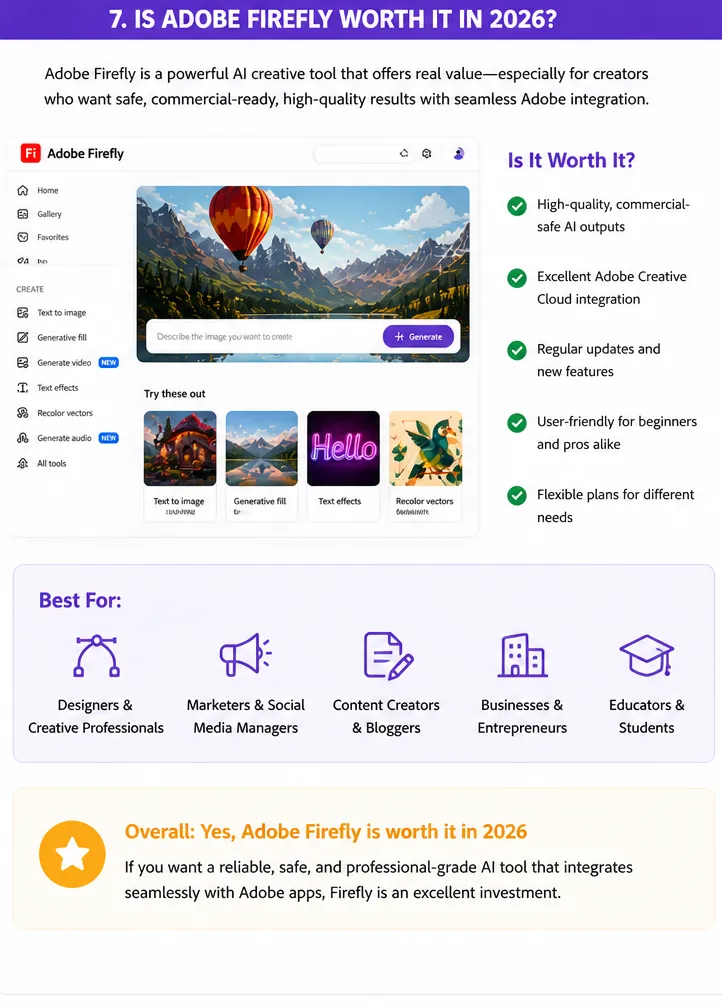
Yes—but only for the right users.
Firefly is worth it if:
It’s not ideal if:
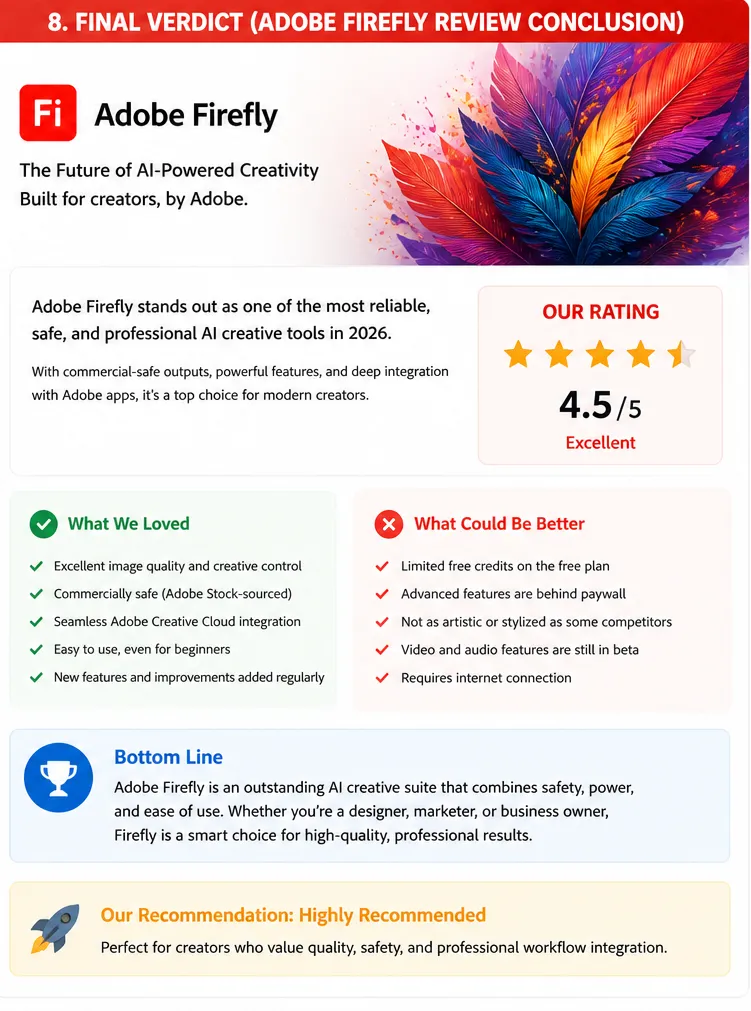
Adobe Firefly is not trying to replace creativity—it’s trying to enhance productivity.
It works best as:
It doesn’t beat every competitor in quality—but it wins where it matters most: usability, integration, and reliability.
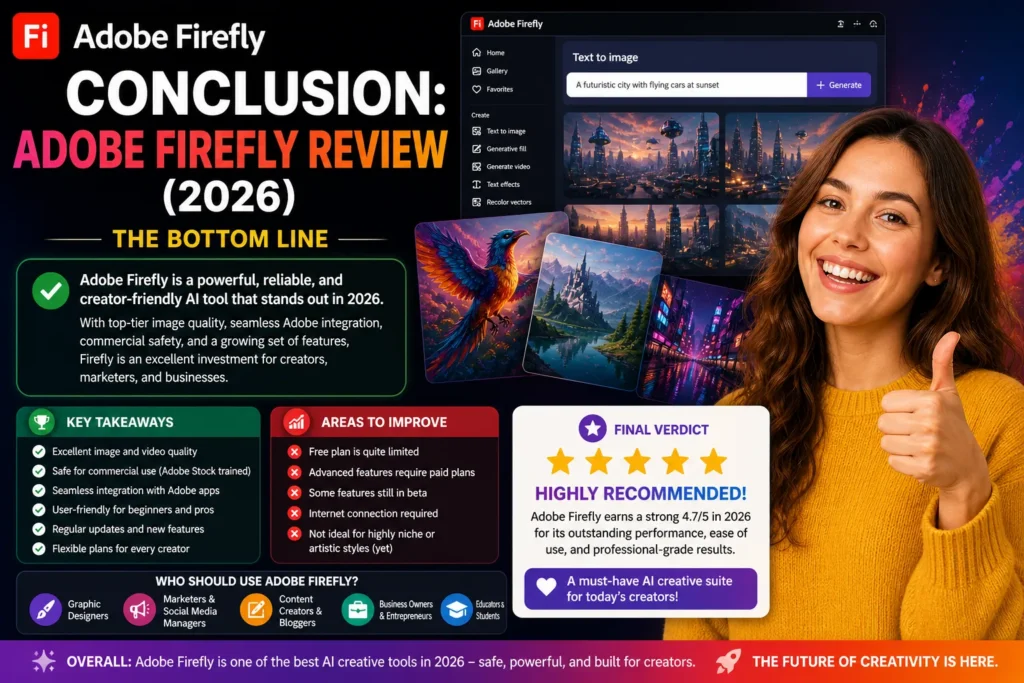
In 2026, Adobe Firefly stands as one of the most practical AI tools for real-world creative work.
It’s not the flashiest.
It’s not the most artistic.
But it’s one of the most useful.
If you’re serious about design, marketing, or content creation—and especially if you’re already inside the Adobe ecosystem—Firefly is absolutely worth using.
It won’t replace your creativity.
But it will make you faster, more efficient, and more productive than ever.